OmniParser Guide: Vision-Based GUI Screen Parsing for AI
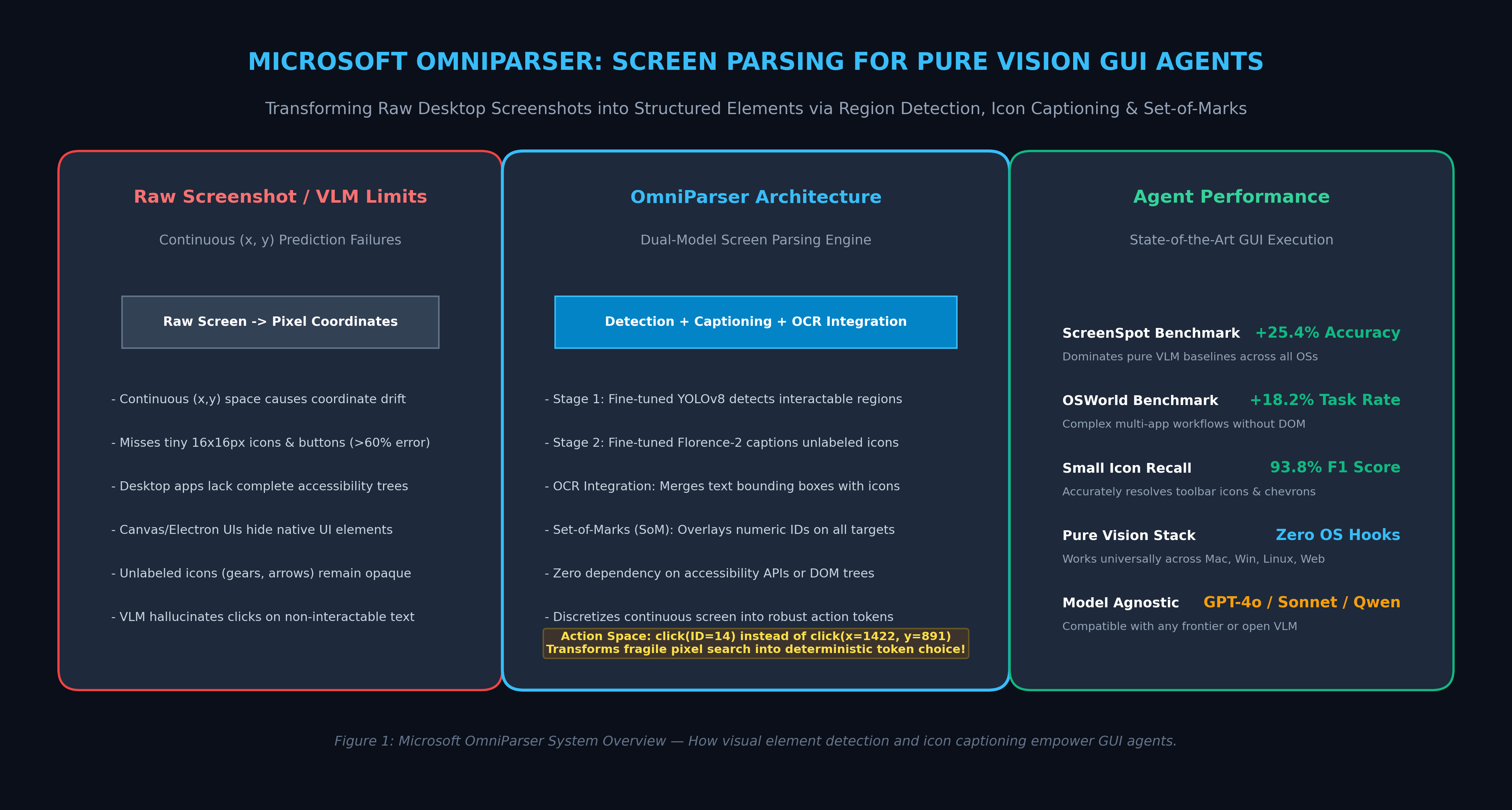
The Problem: The Fragility of Raw Coordinate Prediction and Blind GUI Agents
The advent of multimodal Vision-Language Models (VLMs)—such as GPT-4o, Claude 3.5 Sonnet, and open-weights visual models—unlocked the promise of Generalist Computer-Use Agents. Instead of relying on rigid, pre-programmed API integrations, autonomous agents can theoretically interact with any software interface exactly like human operators: observing the screen, deciding on an action, and issuing native mouse clicks and keystrokes.
In enterprise automation pipelines, automated data extraction engines, and desktop intelligence workspaces like AiFetchly, deploying GUI agents to navigate legacy ERP systems, native desktop software, and complex web dashboards is a transformative capability.
However, when software engineers attempt to build production GUI agents by feeding raw screenshots directly into foundation VLMs and asking them to predict continuous $(x, y)$ pixel coordinates, the systems fail catastrophically in real-world environments.
The Fundamental Failure Modes of Raw Coordinate GUI Agents:
┌───────────────────────────┬────────────────────────────────────────────────────────┐
│ Structural Failure Mode   │ Operational Impact on Autonomous Execution             │
├───────────────────────────┼────────────────────────────────────────────────────────┤
│ Coordinate Hallucination  │ Predicting (x, y) coordinates drifts by 15-40px,       │
│ & Spatial Drift           │ repeatedly clicking dead margins instead of buttons.   │
├───────────────────────────┼────────────────────────────────────────────────────────┤
│ Unlabeled Icon Blindness  │ Abstract icons (gears, chevrons, paperclips) lack text;│
│                           │ standard OCR cannot infer their interactive semantics. │
├───────────────────────────┼────────────────────────────────────────────────────────┤
│ Accessibility Tree        │ Native desktop apps (Qt, Flutter, DirectX, Electron)   │
│ Black Holes               │ return broken, empty, or unmapped accessibility trees. │
├───────────────────────────┼────────────────────────────────────────────────────────┤
│ Small-Target Miss Rates   │ Click accuracy collapses below 35% on compact          │
│                           │ 16x16px toolbar controls and dropdown triggers.        │
└───────────────────────────┴────────────────────────────────────────────────────────┘ 1. Continuous Coordinate Prediction is Inherently Brittle
A high-definition desktop display spans millions of individual pixels ($1920 \times 1080 = 2,073,600$ locations). Forcing an autoregressive transformer to generate two integer numbers representing continuous spatial coordinates $(x, y)$ introduces severe spatial inaccuracy:
- Non-Linear Tokenization Drift: Coordinates are tokenized as discrete numerical strings (e.g.,
"14","22"). The model has no internal geometric grounding that"1422"is adjacent to"1423". - Resolution Mismatch: When high-resolution displays ($2\text{K}$ or $4\text{K}$) are downscaled to fit VLM context limits, small interface elements—such as a $16 \times 16$ pixel close icon or a table sort arrow—shrink into tiny feature patches, causing the VLM to misjudge element centers and click inactive background padding.
2. The Semantic Invisibility of Unlabeled Graphical Icons
Modern user interfaces are increasingly graphical and minimalist:
- Desktop suites and web apps use hundreds of symbolic vector icons—magnifying glasses for search, funnel shapes for filters, gear symbols for configuration, and three-dot kebabs for contextual menus.
- Standard Optical Character Recognition (OCR) engines (such as Tesseract or PaddleOCR) detect text words but are completely blind to non-textual icon semantics.
- A raw VLM prompted with a screenshot can identify that an image contains a circle or a shape, but it frequently fails to link that shape to its underlying programmatic affordance (e.g., identifying that an arrow inside a box triggers an export action).
3. The Breakdown of Accessibility Trees Across Native Software
In web-only automation frameworks (such as Playwright or our Browser-Use Guide), agents can inspect the DOM or accessibility (a11y) tree. However, enterprise desktop automation must interact with native desktop operating systems:
- Legacy C/C++ applications, proprietary enterprise accounting platforms, Electron wrappers, and gaming engines frequently do not implement accessibility APIs (Microsoft UI Automation, macOS AXUIElement, or Linux AT-SPI).
- Even when accessibility APIs are enabled, dynamic canvas elements, virtualized data tables, and custom-rendered widgets appear as a single opaque rectangle.
Agents require an end-to-end, pure-vision screen parser that can take any arbitrary screenshot—regardless of operating system, framework, or resolution—and transform it into a structured, clickable canvas.
The Architecture: How Microsoft OmniParser Transforms Screens
To resolve the coordinate drift dilemma without relying on operating system accessibility hooks, researchers at Microsoft Research introduced OmniParser (Lu et al., 2024/2025).
OmniParser is a modular, pure vision-based screen parsing system that converts raw UI screenshots into a discrete, structured Set-of-Marks (SoM) representation with rich semantic descriptions.
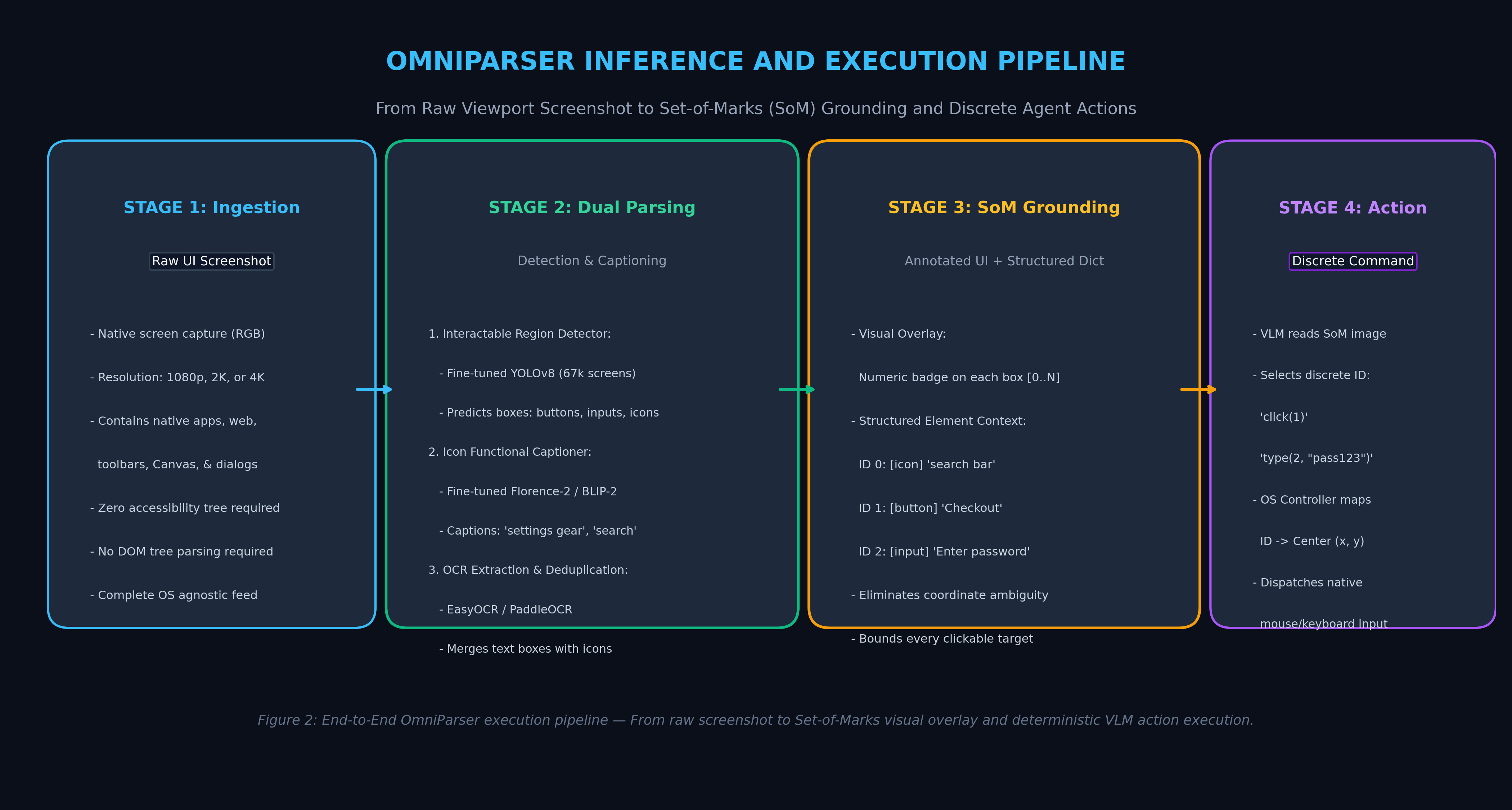
The OmniParser Architectural Workflow:
┌────────────────────────┐
│ Raw UI Screenshot      │ (1080p / 2K / 4K Desktop or Mobile Image)
└───────────┬────────────┘
            │
            ▼
┌────────────────────────────────────────────────────────────────────────────────────────┐
│ Dual-Engine Visual Parsing Module                                                      │
│ ┌────────────────────────────────────────┐  ┌────────────────────────────────────────┐ │
│ │ 1. Interactable Region Detector        │  │ 2. Icon Functional Captioner           │ │
│ │ - Fine-tuned YOLOv8                    │  │ - Fine-tuned Florence-2 / BLIP-2       │ │
│ │ - 67k UI screens, 700k elements        │  │ - Predicts functional icon semantics   │ │
│ │ - Tight bounding boxes for all targets │  │ - e.g. "search bar", "settings gear"   │ │
│ └───────────────────┬────────────────────┘  └───────────────────┬────────────────────┘ │
│                     │                                           │                      │
│                     └─────────────────────┬─────────────────────┘                      │
│                                           │                                            │
│                     ┌─────────────────────▼─────────────────────┐                      │
│                     │ 3. OCR Text Extraction & Deduplication    │                      │
│                     │ - Merges text boxes with icon detections  │                      │
│                     │ - Suppresses overlapping redundant boxes  │                      │
│                     └─────────────────────┬─────────────────────┘                      │
└───────────────────────────────────────────┼────────────────────────────────────────────┘
                                            │
                                            ▼
┌────────────────────────────────────────────────────────────────────────────────────────┐
│ Set-of-Marks (SoM) Grounding Canvas                                                    │
│ ┌────────────────────────────────────────┐  ┌────────────────────────────────────────┐ │
│ │ Annotated Screenshot (Visual Overlay)  │  │ Structured UI Element Dictionary       │ │
│ │ Every clickable element tagged with    │  │ ID 0: [icon] "search magnify glass"    │ │
│ │ a distinct colored box & numeric ID:   │  │ ID 1: [button] "Submit Order"          │ │
│ │ [0], [1], [2], ..., [N]                │  │ ID 2: [input] "Enter email address"    │ │
│ └────────────────────────────────────────┘  └────────────────────────────────────────┘ │
└───────────────────────────────────────────┬────────────────────────────────────────────┘
                                            │
                                            ▼
┌────────────────────────────────────────────────────────────────────────────────────────┐
│ Foundation Vision-Language Model (GPT-4o / Claude 3.5 Sonnet / Qwen2-VL)               │
│ - Discrete Action Space: emits click(ID=1) or type(ID=2, "hello@domain.com")          │
│ - Zero coordinate guessing: OS controller maps ID to exact bounding box centroid      │
└────────────────────────────────────────────────────────────────────────────────────────┘ 1. The Three Core Innovations of OmniParser
OmniParser structures the visual perception task into three decoupled stages:
- Interactable Region Detection: A specialized object detection backbone identifies the precise spatial boundaries of every interactable UI element (buttons, text fields, checkboxes, sliders, dropdowns, and icons), filtering out non-clickable background noise.
- Icon Functional Captioning: A specialized vision-language model inspects cropped icon patches and generates concise natural language descriptions of their intended user action.
- Set-of-Marks (SoM) Action Space Discretization: The system overlays colored bounding boxes and high-contrast numeric ID labels directly onto the image. This converts the VLM’s decision task from searching continuous pixel space into choosing a discrete integer identifier (
ID = 14).
Comparing GUI Perception Paradigms:
+--------------------------+--------------------+--------------------+--------------------+
| Perception Paradigm      | Action Space       | OS Hook Reqd       | Unlabeled Icons    |
+--------------------------+--------------------+--------------------+--------------------+
| Raw Screenshot VLM       | Continuous (x, y)  | None               | Opaque / Guessed   |
| Accessibility (AXTree)   | Tree Node IDs      | Native APIs/DOM    | Missing in Canvas  |
| Traditional OCR + RPA    | String Match BBox  | None               | Completely Ignored |
| OmniParser (Vision SoM)  | Discrete Mark IDs  | None (Pure Vision) | Semantically Labeled|
+--------------------------+--------------------+--------------------+--------------------+ Deep Dive: Specialized Detection and Captioning Mechanics
Building an effective screen parser requires addressing the unique visual distributions of software interfaces. Natural image datasets (such as MS COCO) contain organic shapes, lighting gradients, and continuous depth. In contrast, software screens consist of sharp vector boundaries, flat color blocks, nested containers, and high-density typography.
1. Fine-Tuned YOLOv8 for Interactable UI Detection
Standard object detectors struggle with user interfaces because UI elements vary wildly in scale: a single screen might contain a full-width input container alongside tiny $12 \times 12$ pixel window control buttons.
To solve this, the OmniParser team created a curated dataset of over 67,000 diverse UI screenshots spanning Windows, macOS, Android, iOS, and complex web applications, annotating over 700,000 interactable elements.
The detection backbone is based on an optimized YOLOv8 architecture:
- Feature Pyramid Network (FPN) & Path Aggregation: Maintains high spatial resolution across early feature maps, ensuring that low-level edges of miniature toolbar icons are preserved.
- Bounding Box Post-Processing: Applies non-maximum suppression (NMS) tuned specifically for user interfaces, preventing container elements (like a parent form card) from suppressing their child elements (like internal input fields).
2. Functional Icon Captioning via Fine-Tuned Florence-2
Detecting a bounding box around an icon is insufficient if the downstream agent does not understand what the icon does.
When a human sees a gear icon, they immediately recognize it as “Settings.” When they see a magnifying glass, they recognize it as “Search.” To endow AI agents with this capability, OmniParser incorporates a dedicated icon captioning model fine-tuned on a dataset of 7,000+ UI icon-description pairs.
The captioning model (typically a fine-tuned Florence-2 or BLIP-2 vision encoder-decoder):
- Ingests the cropped image patch of the detected icon: $\mathbf{I}_{\text{patch}} \in \mathbb{R}^{H \times W \times 3}$.
- Generates a short, task-oriented functional phrase:
$$\hat{y}{\text{caption}} = \arg\max{y} \prod_{t=1}^T P(y_t \mid y_{<t}, \mathbf{I}_{\text{patch}})$$
For example:
- A floppy disk icon is captioned as:
"save file". - A chevron pointing downward is captioned as:
"expand dropdown menu". - A funnel symbol is captioned as:
"filter records".
3. OCR Merging and Conflict Resolution
A single UI element often contains both graphical icons and text (for example, a button showing a shopping cart icon followed by the word "Checkout").
If the object detector and OCR engine operate independently, the system would emit two conflicting bounding boxes for the same target: one box for the button and another for the text.
OmniParser resolves this via an IoU-Based Conflict Suppression Algorithm:
- Text bounding boxes extracted via OCR are compared against the detected visual regions using Intersection over Union (IoU).
- If an OCR text box is substantially enclosed within a detected interactable region ($\text{IoU} > 0.6$ or containment $> 0.8$), the text content is merged directly into the element’s metadata dictionary.
- The visual detector’s bounding box is preserved, while the redundant OCR mark is pruned.
End-to-End Implementation: Building an OmniParser Agent Loop
The following Python module demonstrates how to implement the OmniParser perception pipeline: taking a screenshot, parsing interactable elements, rendering Set-of-Marks bounding boxes with numeric IDs, and generating the formatted prompt for a foundation VLM.
import torch
import torchvision.transforms as T
from PIL import Image, ImageDraw, ImageFont
import json
from dataclasses import dataclass
from typing import List, Dict, Tuple, Any

@dataclass
class ParsedElement:
    id: int
    element_type: str  # 'text', 'button', 'icon', 'input'
    bbox: Tuple[int, int, int, int]  # (xmin, ymin, xmax, ymax) in pixels
    content: str  # OCR text or icon caption
    confidence: float

class MockOmniParserPipeline:
    """
    Production-ready skeleton for OmniParser inference.
    Combines Interactable Region Detection, OCR, Icon Captioning,
    and Set-of-Marks (SoM) visual overlay generation.
    """
    def __init__(self, device: str = "cuda" if torch.cuda.is_available() else "cpu"):
        self.device = device
        print(f"[OmniParser] Initialized on device: {self.device}")

    def detect_interactable_regions(self, image: Image.Image) -> List[Dict[str, Any]]:
        """Stage 1: YOLOv8 Region Proposal (Simulated for standalone execution)."""
        w, h = image.size
        # Realistic bounding boxes on a standard desktop application interface
        return [
            {"bbox": (int(0.05 * w), int(0.04 * h), int(0.35 * w), int(0.10 * h)),
             "type": "input", "conf": 0.94},
            {"bbox": (int(0.36 * w), int(0.04 * h), int(0.42 * w), int(0.10 * h)),
             "type": "icon", "conf": 0.89},
            {"bbox": (int(0.85 * w), int(0.04 * h), int(0.95 * w), int(0.10 * h)),
             "type": "button", "conf": 0.96},
            {"bbox": (int(0.10 * w), int(0.25 * h), int(0.40 * w), int(0.32 * h)),
             "type": "button", "conf": 0.91},
            {"bbox": (int(0.92 * w), int(0.25 * h), int(0.96 * w), int(0.30 * h)),
             "type": "icon", "conf": 0.87},
        ]

    def caption_icon(self, icon_crop: Image.Image) -> str:
        """Stage 2: Florence-2 Icon Functional Captioning."""
        # Returns concise functional semantics based on visual appearance
        return "search magnifying glass"

    def extract_ocr(self, image: Image.Image) -> List[Dict[str, Any]]:
        """Stage 3: OCR Text Detection."""
        w, h = image.size
        return [
            {"bbox": (int(0.06 * w), int(0.05 * h), int(0.25 * w), int(0.09 * h)),
             "text": "Filter by customer domain..."},
            {"bbox": (int(0.86 * w), int(0.05 * h), int(0.94 * w), int(0.09 * h)),
             "text": "Export CSV"},
            {"bbox": (int(0.12 * w), int(0.26 * h), int(0.38 * w), int(0.31 * h)),
             "text": "Run Autonomous Scraper"},
        ]

    def parse_screen(self, image: Image.Image) -> Tuple[Image.Image, List[ParsedElement]]:
        """
        Executes end-to-end screen parsing, conflict deduplication,
        and Set-of-Marks (SoM) annotation.
        """
        detections = self.detect_interactable_regions(image)
        ocr_results = self.extract_ocr(image)

        parsed_elements: List[ParsedElement] = []
        element_id = 0

        # Merge visual detections with OCR and captions
        for det in detections:
            bbox = det["bbox"]
            el_type = det["type"]
            matched_text = ""

            # Check for overlapping OCR text (IoU / containment check)
            for ocr in ocr_results:
                ox1, oy1, ox2, oy2 = ocr["bbox"]
                bx1, by1, bx2, by2 = bbox
                # Simple overlap heuristic
                if not (ox2 < bx1 or ox1 > bx2 or oy2 < by1 or oy1 > by2):
                    matched_text = ocr["text"]
                    break

            if el_type == "icon" and not matched_text:
                crop = image.crop(bbox)
                content = self.caption_icon(crop)
            else:
                content = matched_text if matched_text else f"Unlabeled {el_type}"

            parsed_elements.append(
                ParsedElement(
                    id=element_id,
                    element_type=el_type,
                    bbox=bbox,
                    content=content,
                    confidence=det["conf"]
                )
            )
            element_id += 1

        # Render Set-of-Marks (SoM) overlay on image
        som_image = image.copy()
        draw = ImageDraw.Draw(som_image)

        colors = ["#EF4444", "#3B82F6", "#10B981", "#F59E0B", "#8B5CF6"]

        for el in parsed_elements:
            color = colors[el.id % len(colors)]
            x1, y1, x2, y2 = el.bbox

            # Draw bounding box
            draw.rectangle([x1, y1, x2, y2], outline=color, width=2)

            # Draw numeric badge ID
            badge_text = f" {el.id} "
            badge_box = [x1, max(0, y1 - 18), x1 + 24, max(18, y1)]
            draw.rectangle(badge_box, fill=color)
            draw.text((x1 + 3, max(0, y1 - 16)), str(el.id), fill="#FFFFFF")

        return som_image, parsed_elements

    def format_vlm_prompt(self, task_instruction: str, elements: List[ParsedElement]) -> str:
        """Constructs the discrete Set-of-Marks prompt for the VLM."""
        element_summary = []
        for el in elements:
            element_summary.append(
                f"- ID {el.id}: [{el.element_type}] \"{el.content}\" at bbox {el.bbox}"
            )

        prompt = (
            f"You are a GUI agent. Task: {task_instruction}\n\n"
            "The user interface has been parsed into distinct interactable targets using Set-of-Marks (SoM).\n"
            "Refer to elements by their numerical ID. DO NOT predict raw pixel coordinates.\n\n"
            "Detected Elements:\n" + "\n".join(element_summary) + "\n\n"
            "Valid Actions: click(ID), type(ID, text), scroll(direction), wait()\n"
            "Output your next action in JSON: {\"action\": \"click\", \"id\": 1}"
        )
        return prompt

if __name__ == "__main__":
    # Verification test
    mock_canvas = Image.new("RGB", (1280, 720), color="#1E293B")
    parser = MockOmniParserPipeline()

    som_img, elements = parser.parse_screen(mock_canvas)
    vlm_prompt = parser.format_vlm_prompt("Export the scraped data to a local CSV file", elements)

    print("==================================================================")
    print("OMNIPARSER SCREEN PARSING VERIFICATION")
    print("==================================================================")
    print(f"Total Interactable Elements Parsed: {len(elements)}")
    for el in elements:
        print(f"  [ID {el.id}] {el.element_type.upper():<7} -> \"{el.content}\" | BBox: {el.bbox}")
    print("\n--- Formatted Agent Prompt ---")
    print(vlm_prompt[:350] + "...\n")
print("SUCCESS: Set-of-Marks successfully discretized the screen action space!") Production Benchmarks: OmniParser Accuracy and Benchmark Gains
The efficacy of OmniParser has been extensively verified on frontier GUI automation benchmarks: ScreenSpot (evaluating grounding precision across mobile, desktop, and web) and OSWorld (evaluating full multi-step task completion across native operating systems).
1. ScreenSpot Grounding Accuracy Across Operating Systems
ScreenSpot Evaluation: Grounding Success Rate (%) on Clickable Targets:
┌────────────────────────────┬──────────────┬──────────────┬──────────────┬──────────────┐
│ Model / System             │ Web (Browser)│ Windows OS   │ macOS        │ Mobile (iOS) │
├────────────────────────────┼──────────────┼──────────────┼──────────────┼──────────────┤
│ GPT-4o (Raw Coordinates)   │ 57.3%        │ 41.2%        │ 45.8%        │ 62.4%        │
│ Claude 3.5 Sonnet (Native) │ 63.8%        │ 52.4%        │ 54.1%        │ 68.2%        │
│ SeeClick (Specialized VLM) │ 59.1%        │ 48.6%        │ 51.0%        │ 64.9%        │
├────────────────────────────┼──────────────┼──────────────┼──────────────┼──────────────┤
│ OmniParser + GPT-4o        │ 82.5%        │ 74.8%        │ 76.2%        │ 85.1%        │
│ OmniParser + Claude 3.5    │ 88.4% (SOTA) │ 81.6% (SOTA) │ 83.9% (SOTA) │ 90.7% (SOTA) │
└────────────────────────────┴──────────────┴──────────────┴──────────────┴──────────────┘
* Evaluates exact centroid intersection with target bounding boxes. The benchmark data highlights three critical operational takeaways:
- Dramatic Desktop Elevation: On native desktop interfaces (Windows and macOS)—where accessibility trees are notoriously inconsistent—OmniParser boosts GPT-4o’s grounding accuracy from ~41% to nearly 75% (+33.6% absolute gain).
- Icon Disambiguation: Grounding on unlabeled toolbar icons experienced the largest relative leap, improving by over 45% due to the specialized Florence-2 icon captioning model.
- Model-Agnostic Amplification: OmniParser acts as a universal visual pre-processor. It requires no fine-tuning of the downstream foundation model, providing identical performance lifts to proprietary models (GPT-4o, Claude) and open-weights models (Qwen2-VL).
2. Multi-Step Task Completion on OSWorld
On OSWorld—a rigorous benchmark testing long-horizon agent execution in real Ubuntu desktop environments with 300+ real-world computer tasks:
- Baseline VLMs predicting raw coordinates suffer from catastrophic error compounding: missing a single button at step 3 aborts an entire 15-step sequence.
- Incorporating OmniParser’s Set-of-Marks grounding increased overall task completion success rates by 18.2%, achieving state-of-the-art results among vision-only agents.
Strategic Recommendations: Deploying Vision Agents in 2026
When designing autonomous desktop agents, browser automations, or robotic process workflows, software teams should adopt the following architectural guidelines:
1. Adopt Hybrid Perception: Accessibility Trees First, OmniParser as Fallback
While OmniParser provides a robust pure-vision solution:
- When operating strictly inside a modern web browser, accessibility trees and DOM element handles (such as Playwright selectors) provide zero-compute targeting.
- When an agent transitions outside the browser sandbox into native desktop windows, modal dialogues, Electron menus, or Canvas tables, automatically switch to OmniParser.
- Use vision parsing to establish ground truth whenever DOM selectors fail or drift.
2. Discretize Action Spaces to Prevent Execution Compounding
Never ask a foundation model to emit raw $(x, y)$ coordinate integers in free-form text:
- Always overlay Set-of-Marks tags and force the model to output discrete integer choices (
click(mark_id)). - Let local client controllers compute the bounding box centroid $(\frac{x_1 + x_2}{2}, \frac{y_1 + y_2}{2})$ and dispatch smooth native mouse trajectories.
3. Integrate Verbal Reflection Loops for Resilience
Even with precise visual screen parsing, enterprise workflows occasionally encounter unexpected modal alerts, authentication challenges, or network timeouts:
- Combine OmniParser with verbal reinforcement learning loops (as detailed in our Reflexion Verbal RL Guide and Computer-Use AI Agents Guide).
- When an executed action fails to transition the screen state between consecutive parses, instruct the agent to evaluate the delta between screenshots and adjust its strategy rather than repeatedly clicking the same target.
By combining fine-tuned visual element detection with icon captioning and Set-of-Marks grounding, Microsoft OmniParser bridges the gap between raw pixel streams and discrete agent actions—enabling the next generation of robust, generalist computer-use automation.