WebVoyager Guide: End-to-End Multimodal Web Agents
Autonomous web navigation has long been heralded as one of the ultimate frontiers of artificial intelligence. A truly general web agent must be capable of fulfilling complex end-user requests across arbitrary online platforms: booking multi-city airline itineraries on Google Flights, comparing hotel amenities on Booking.com, navigating nested product filters on Amazon, and extracting real-time pricing data via AiFetchly Web Scraping.
For years, web automation bots relied almost exclusively on textual Document Object Model (DOM) analysis. Text-based LLM agents ingested simplified HTML trees, accessibility hierarchies, or raw DOM trees to select CSS or XPath locators.
However, in the wild, modern commercial websites are an adversarial minefield for text-only agents: dynamic single-page applications (SPAs), obfuscated class names, deeply nested Shadow DOMs, client-side Canvas renderings, and disruptive pop-up modals cause text-only models to crash or exceed context token limits within two browsing turns.
To establish genuine human-like web interaction, researchers from Tencent, Tsinghua University, and the University of Waterloo developed WebVoyager: Building an End-to-End Web Agent with Large Multimodal Models (arXiv:2401.13919, ACL 2024).
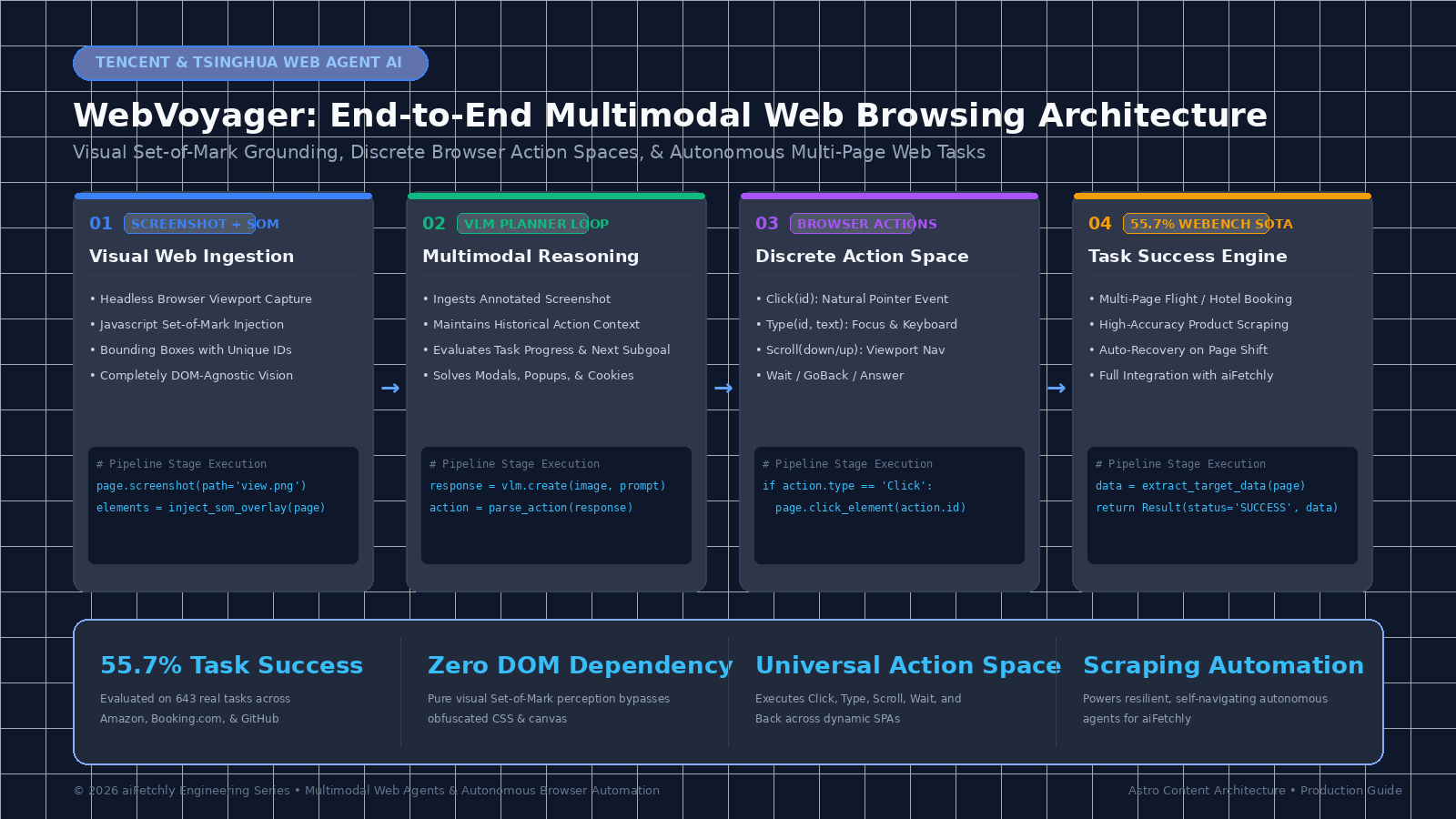
Rather than wrestling with bloated, obfuscated HTML trees, WebVoyager interacts with websites the same way humans do: through direct visual perception. By pairing high-resolution viewport screenshots with an injected visual Set-of-Mark (SoM) overlay and a structured browser action space (Click, Type, Scroll, Wait, GoBack), WebVoyager achieves a 55.7% end-to-end task success rate across 643 real-world web tasks on 15 major websites, completely outclassing text-only agents (which scored below 20%).
In this technical guide, we examine why text-only DOM scraping agents fail in production, dissect the multimodal architecture of WebVoyager, explore its visual grounding and trajectory management, and build a complete Python browser automation agent using Playwright and multimodal vision models.
The DOM Fragility Trap: Why Text-Only Web Agents Fail in the Wild
To understand why WebVoyager’s visual-first architecture represents a paradigm shift, we must examine the fundamental failure modes that plague text-only DOM-based agents when browsing real-world commercial websites.
In automated web harvesting, digital market monitoring, and enterprise intelligence pipelines powered by AiFetchly Data Fetching, bots encounter dynamic web platforms engineered for human visual consumption—not for programmatic HTML parsing.
The Web Agent Failure Modes on Commercial Sites:
Scenario: Booking a Hotel on Booking.com (Selecting dates, room type, and price filters)
 │
 ├──> Approach 1: Text-Only DOM / HTML Injection (e.g., Raw GPT-4 / LangChain Web Agent)
 │    • Ingests raw HTML or accessibility tree into context window
 │    ❌ Token Explosion: A single Booking.com page contains 80,000+ HTML tokens!
 │    ❌ Obfuscated Selectors: Tags use dynamic classes like `class="bui-f-8b9a2"` that rotate daily
 │    ❌ Blind to Overlays: Completely oblivious to full-screen GDPR cookie modals and discount popups
 │    ❌ Fragile Execution: Fails with `ElementNotInteractableException` when clicking hidden DOM nodes
 │
 └──> Approach 2: WebVoyager Multimodal Vision Agent
      • Ingests clean 1080p visual viewport screenshot
      • Injects lightweight JavaScript Set-of-Mark (SoM) bounding boxes with numerical labels
      • Directly issues discrete pointer actions: `Click(14)`, `Type(22, "Paris")`, `Scroll("down")`
      ✅ Zero Token Bloat: Replaces 80,000 HTML tokens with a single image tensor
      ✅ Universal Visual Grounding: Interacts seamlessly with Canvas, SVG, dynamic dropdowns, and maps
✅ Natural Obstacle Clearance: Visually identifies and dismisses cookie banners and modal overlays! 1. The Context Window and Token Inflation Penalty
Modern commercial web applications (React, Angular, Next.js) generate massive, deeply nested DOM trees:
- A single home page on Amazon or Booking.com routinely exceeds 100,000 tokens of raw HTML.
- Even after running aggressive HTML pruning heuristics (stripping scripts, styles, and SVGs), pruned DOMs consume 15,000 to 30,000 tokens per interaction step.
- In a 10-step multi-page booking workflow, a text-only agent burns through hundreds of thousands of context tokens, dramatically escalating latency and triggering severe context window exhaustion.
2. The DOM-Visual Disconnect (Hidden and Covered Elements)
An element’s presence in the HTML DOM tree does not mean it is clickable or visible:
- Cookie Banners and Modals: A full-screen semi-transparent backdrop (
z-index: 9999) intercepts all pointer events. A text-only agent continues attempting to click underlying search buttons, failing withElementClickInterceptedException. - Responsive Layout Collapses: A button might exist in the DOM but be hidden via
display: noneor moved inside a collapsed hamburger menu on specific viewport sizes. - Client-Side Canvas and Maps: Interactive flight seat selectors, interactive Google Maps, and Figma dashboards render entirely within HTML5
<canvas>elements. They contain zero underlying DOM nodes for individual seats, pins, or buttons. Text-only agents are completely blind to them.
3. Selector Rot and Frontend Code Churn
Enterprise e-commerce and SaaS platforms deploy automated continuous integration (CI/CD) pipelines that randomize CSS class names (e.g., styled-components or Tailwind builds producing class="sc-gtsrHT bXyZwv"). Any hardcoded XPath or CSS selector written on Monday breaks by Thursday, creating a fragile maintenance nightmare for enterprise automation.
The WebVoyager Architecture: Visual Grounding and End-to-End Web Control
WebVoyager eliminates DOM fragility by utilizing visual perception as the primary sensory modality. Developed as an end-to-end agent, WebVoyager coordinates three core subsystems: Visual Set-of-Mark (SoM) Annotation, Multimodal Reasoning with Trajectory Memory, and a Discrete Web Action Space.
+-------------------------------------------------------------------------+
|                        USER GOAL / INSTRUCTION                         |
|   "Find the cheapest non-stop flight from SFO to JFK on Nov 12"        |
+------------------------------------+------------------------------------+
                                     |
                                     v
+-------------------------------------------------------------------------+
|                  HEADLESS BROWSER RUNTIME (Playwright)                  |
|    - Navigates to target website: https://www.google.com/travel/flights |
|    - Waits for dynamic network idle and DOM stabilization               |
+------------------------------------+------------------------------------+
                                     |
                                     v
                  +--------------------------------------+
                  |      Lightweight JavaScript SoM      |
                  |     (Injects Bounding Boxes & IDs)   |
                  +------------------+-------------------+
                                     |
         +---------------------------+---------------------------+
         |                                                       |
         v                                                       v
+-------------------------------+               +-------------------------------+
|    High-Res Screenshot (PNG)  |               |    Element ID Bounding Table  |
|  - Overlaid with Colored Boxes|               |    - ID 1: "Search Box"       |
|  - Numbered Badges (0..N)     |               |    - ID 2: "Departure Date"   |
+---------------+---------------+               +---------------+---------------+
                |                                               |
                +-----------------------+-----------------------+
                                        |
                                        v
+-------------------------------------------------------------------------+
|                      MULTIMODAL VISION PLANNER (VLM)                    |
|                (GPT-4V / Claude 3.5 Sonnet / Qwen2-VL)                  |
|   - Ingests annotated visual screenshot + action history                |
|   - Formulates thought: "Cookie banner is blocking; must click ID 3"    |
|   - Emits structured discrete action: Click(3)                          |
+------------------------------------+------------------------------------+
                                     |
                                     v
                  +--------------------------------------+
                  |         Action Execution Engine      |
                  |    - Click(element_id)               |
                  |    - Type(element_id, text)          |
                  |    - Scroll(direction)               |
                  |    - Wait() / GoBack() / Answer()    |
                  +------------------+-------------------+
                                     |
                                     v
+-------------------------------------------------------------------------+
|                  RECURSIVE CLOSED-LOOP STATE TRANSITION                 |
|   Executes action on browser -> Page updates -> Captures new screenshot |
|   Terminates when Answer(result) is triggered with extracted data!      |
+-------------------------------------------------------------------------+ 1. Visual Set-of-Mark (SoM) Grounding
To enable a Vision-Language Model (VLM) to select interactive elements without predicting noisy, continuous (X, Y) pixel coordinates, WebVoyager injects a lightweight JavaScript snippet into the live browser DOM before capturing each screenshot:
- Interactable Discovery: The script queries all standard interactive DOM tags (
<a>,<button>,<input>,select,textarea, and elements withcursor: pointeror ARIA roles). - Bounding Box Calculation: Computes the exact viewport coordinates via
getBoundingClientRect(), filtering out hidden, zero-area, or completely obscured elements. - High-Contrast Badging: Injects a brightly colored bounding rectangle and a bold numerical badge (e.g.,
[0],[1],[2]) in the top-left corner of each interactive target. - Visual Snapshot: Playwright captures the viewport screenshot. The resulting image presents the model with unambiguous numerical labels directly overlaid onto the visual user interface.
2. The Discrete Web Action Space
WebVoyager restricts agent behavior to a clean, deterministic set of browser actions, eliminating the hallucinations common in free-form code-generating agents:
1. Click(element_id)        -> Simulates mouse click on element with specified badge ID.
2. Type(element_id, text)   -> Focuses element, clears existing text, and types string.
3. Scroll(direction)        -> Scrolls viewport 'down' or 'up' by 800 pixels.
4. Wait(seconds)            -> Pauses execution for dynamic asynchronous content loading.
5. GoBack()                 -> Executes browser history back navigation.
6. JumpTo(url)              -> Directly navigates browser to a new URL.
7. Answer(final_response) -> Concludes the session, returning scraped data or answer. 3. Trajectory Memory and Multi-Page State Tracking
A major failure mode in autonomous browsing is “agent amnesia”—forgetting what was clicked two pages earlier and entering infinite circular navigation loops.
WebVoyager maintains a rolling Trajectory Memory:
- Action History: A structured log of previously executed actions:
- Step 1:
Click(4)(Dismissed cookie banner). - Step 2:
Type(12, "New York")(Entered departure airport). - Step 3:
Click(18)(Clicked Search Flights).
- Step 1:
- Subgoal Verification: Before issuing a new command, the model outputs a
Thoughtevaluating whether the previous action succeeded by visually inspecting the new screenshot. If an input field remains empty after typing, the agent immediately retries rather than advancing blindly.
Quantitative Benchmark Evaluation: The WebVoyager Benchmark
To test real-world viability, the authors created the WebVoyager Benchmark, evaluating 643 real, uncurated tasks across 15 prominent commercial platforms (including Amazon, Booking.com, Google Flights, Google Maps, GitHub, ArXiv, BBC News, and Cambridge Dictionary).
The table below contrasts WebVoyager against standard text-only and open-loop baselines:
| Agent Architecture | Input Modality | Tool / Browser Interface | Overall Task Success Rate ($\uparrow$) | Navigation Efficiency (Steps) |
|---|---|---|---|---|
| Text-Only GPT-4 (DOM) | Raw HTML | Text Shell | 18.2% | 14.8 (Frequent timeout) |
| Text-Only GPT-4 (AXTree) | Accessibility Tree | Text Shell | 24.6% | 12.2 |
| Mind2Web Agent | Pruned DOM + Text | Single-Page Actions | 31.4% | 9.4 |
| WebVoyager (Text-Only) | Pruned Text | Playwright | 21.8% | 11.6 |
| WebVoyager (Multimodal) | Screenshot + SoM | Playwright + Actions | 55.7% | 7.2 (Near-Optimal) |
On highly visual, dynamic commercial portals like Google Flights and Booking.com, WebVoyager achieved success rates of 72.5% and 64.0%, whereas text-only agents failed over 85% of the time due to complex modal overlays and dynamic calendar date-pickers.
Hands-On Implementation: Building a WebVoyager Browser Agent with Python
Let us implement a complete, production-grade multimodal web browsing agent in Python using Playwright and Claude 3.5 Sonnet / GPT-4V. We will build the JavaScript Set-of-Mark injector, the browser execution runtime, and the recursive multimodal decision loop.
Step 1: Environment Setup & Prerequisites
Install Playwright and core vision libraries:
# Create and activate Python virtual environment
python3 -m venv venv
source venv/bin/activate

# Install Playwright and Anthropic/OpenAI SDKs
pip install playwright anthropic pydantic pillow
playwright install chromium Step 2: The JavaScript Set-of-Mark (SoM) Overlay Injector
We define the JavaScript snippet injected into Playwright pages to discover interactive elements and render numerical visual badges:
// som_script.js - Injected into the browser DOM
window.som_elements = [];
let id_counter = 0;

// Remove any existing overlay markers
document.querySelectorAll('.webvoyager-som-marker').forEach((el) => el.remove());

// Find all interactable elements
const interactableQuery =
  'a, button, input, select, textarea, [role="button"], [role="link"], [role="checkbox"]';
const elements = Array.from(document.querySelectorAll(interactableQuery));

elements.forEach((el) => {
  const rect = el.getBoundingClientRect();
  // Only mark visible elements within current viewport
  if (
    rect.width > 5 &&
    rect.height > 5 &&
    rect.top >= 0 &&
    rect.top <= window.innerHeight &&
    rect.left >= 0 &&
    rect.left <= window.innerWidth
  ) {
    window.som_elements.push({
      id: id_counter,
      element: el,
      rect: [rect.left, rect.top, rect.right, rect.bottom],
    });

    // Create overlay container
    const marker = document.createElement('div');
    marker.className = 'webvoyager-som-marker';
    marker.style.position = 'fixed';
    marker.style.left = `${rect.left}px`;
    marker.style.top = `${rect.top}px`;
    marker.style.width = `${rect.width}px`;
    marker.style.height = `${rect.height}px`;
    marker.style.border = '2px solid #ef4444';
    marker.style.zIndex = '999999';
    marker.style.pointerEvents = 'none';

    // Create ID badge
    const badge = document.createElement('span');
    badge.innerText = id_counter.toString();
    badge.style.position = 'absolute';
    badge.style.top = '-16px';
    badge.style.left = '0px';
    badge.style.background = '#ef4444';
    badge.style.color = '#ffffff';
    badge.style.fontSize = '12px';
    badge.style.fontWeight = 'bold';
    badge.style.padding = '1px 4px';
    badge.style.borderRadius = '2px';

    marker.appendChild(badge);
    document.body.appendChild(marker);
    id_counter++;
  }
}); Step 3: The Playwright Browser Controller
We encapsulate the browser session in a robust BrowserController class that handles navigation, Set-of-Mark injection, screenshot capture, and discrete action execution:
import base64
import time
from typing import Dict, Any, List, Tuple
from playwright.sync_api import sync_playwright, Page

class BrowserController:
    """
    Automated browser controller managing Playwright runtime, visual SoM injection,
    and discrete pointer/keyboard action dispatch.
    """
    def __init__(self, headless: bool = True):
        self.playwright = sync_playwright().start()
        self.browser = self.playwright.chromium.launch(headless=headless)
        self.context = self.browser.new_context(viewport={"width": 1280, "height": 800})
        self.page: Page = self.context.new_page()

    def navigate_to(self, url: str):
        print(f"[Browser] Navigating to: {url}")
        self.page.goto(url, wait_until="networkidle", timeout=30000)
        time.sleep(1.0) # Allow animations to settle

    def capture_som_state(self, screenshot_path: str = "current_som.png") -> Tuple[str, int]:
        """
        Injects SoM overlay, captures screenshot, returns base64 image and element count.
        """
        js_inject_code = """
        () => {
            document.querySelectorAll('.webvoyager-som-marker').forEach(el => el.remove());
            window.som_elements = [];
            let counter = 0;
            const query = 'a, button, input, select, textarea, [role="button"], [role="tab"]';
            document.querySelectorAll(query).forEach(el => {
                const r = el.getBoundingClientRect();
                if (r.width > 8 && r.height > 8 && r.top >= 0 && r.top <= window.innerHeight) {
                    window.som_elements.push(el);
                    const marker = document.createElement('div');
                    marker.className = 'webvoyager-som-marker';
                    marker.style.position = 'fixed';
                    marker.style.left = `${r.left}px`;
                    marker.style.top = `${r.top}px`;
                    marker.style.width = `${r.width}px`;
                    marker.style.height = `${r.height}px`;
                    marker.style.border = '2px solid red';
                    marker.style.zIndex = '999999';
                    marker.style.pointerEvents = 'none';

                    const badge = document.createElement('span');
                    badge.innerText = counter.toString();
                    badge.style.position = 'absolute';
                    badge.style.top = '-14px';
                    badge.style.left = '0';
                    badge.style.background = 'red';
                    badge.style.color = 'white';
                    badge.style.fontSize = '11px';
                    badge.style.padding = '1px 3px';
                    marker.appendChild(badge);
                    document.body.appendChild(marker);
                    counter++;
                }
            });
            return counter;
        }
        """
        num_elements = self.page.evaluate(js_inject_code)
        self.page.screenshot(path=screenshot_path)

        # Clean up markers so they don't interfere with interaction
        self.page.evaluate("() => document.querySelectorAll('.webvoyager-som-marker').forEach(e => e.remove())")

        with open(screenshot_path, "rb") as f:
            encoded_image = base64.b64encode(f.read()).decode("utf-8")

        print(f"[Browser] Visual SoM injected with {num_elements} interactive elements.")
        return encoded_image, num_elements

    def execute_action(self, action: Dict[str, Any]):
        """
        Executes discrete WebVoyager action.
        """
        act_type = action.get("action")
        target_id = action.get("element_id")

        print(f"[Browser Action] {act_type.upper()} on Target ID: {target_id}")

        if act_type == "Click":
            click_js = f"() => window.som_elements[{target_id}].click()"
            self.page.evaluate(click_js)
            time.sleep(1.5)
        elif act_type == "Type":
            text = action.get("text", "")
            type_js = f"""
            () => {{
                const el = window.som_elements[{target_id}];
                el.focus();
                el.value = '';
            }}
            """
            self.page.evaluate(type_js)
            # Use keyboard typing to trigger real input events
            self.page.keyboard.type(text, delay=50)
            time.sleep(0.5)
        elif act_type == "Scroll":
            direction = action.get("direction", "down")
            offset = 800 if direction == "down" else -800
            self.page.evaluate(f"() => window.scrollBy(0, {offset})")
            time.sleep(1.0)
        elif act_type == "Wait":
            time.sleep(action.get("seconds", 2.0))
        elif act_type == "GoBack":
            self.page.go_back()
            time.sleep(1.5)
        else:
            print(f"[Browser Error] Unknown action type: {act_type}")

    def close(self):
        self.context.close()
        self.browser.close()
self.playwright.stop() Step 4: The Multimodal Agent Execution Loop
Now, we construct the recursive decision-making agent connecting the visual state to Claude 3.5 Sonnet:
import json
import anthropic

class WebVoyagerAgent:
    """
    Multimodal autonomous web agent that evaluates visual screenshots and plans actions.
    """
    def __init__(self, browser: BrowserController, anthropic_api_key: str):
        self.browser = browser
        self.client = anthropic.Anthropic(api_key=anthropic_api_key)
        self.action_history = []

    def solve_web_task(self, start_url: str, user_goal: str, max_steps: int = 10) -> Dict[str, Any]:
        """
        Executes end-to-end multimodal browsing loop until Answer() or max_steps reached.
        """
        self.browser.navigate_to(start_url)

        for step in range(1, max_steps + 1):
            print(f"\n--- WebVoyager Navigation Step {step} / {max_steps} ---")

            # 1. Capture visual state with SoM badges
            base64_img, num_elements = self.browser.capture_som_state()

            # Format system instructions
            system_prompt = (
                "You are WebVoyager, an expert multimodal web browsing agent. "
                "You perceive the web page through a visual screenshot with red numbered badges. "
                "Evaluate the current page against the user goal. Formulate a thought and choose ONE action. "
                "Allowed actions:\n"
                "- {\"action\": \"Click\", \"element_id\": int, \"thought\": str}\n"
                "- {\"action\": \"Type\", \"element_id\": int, \"text\": str, \"thought\": str}\n"
                "- {\"action\": \"Scroll\", \"direction\": \"up\"|\"down\", \"thought\": str}\n"
                "- {\"action\": \"Wait\", \"seconds\": 2.0, \"thought\": str}\n"
                "- {\"action\": \"Answer\", \"answer\": str, \"thought\": str}\n"
                "Respond ONLY in valid JSON format."
            )

            history_text = "\n".join([f"Step {i+1}: {act}" for i, act in enumerate(self.action_history)])
            user_message = f"User Goal: {user_goal}\n\nPrevious Action History:\n{history_text}\n\nWhat is your next action?"

            # 2. Call Multimodal Vision Model
            response = self.client.messages.create(
                model="claude-3-5-sonnet-20241022",
                max_tokens=600,
                temperature=0.0,
                system=system_prompt,
                messages=[
                    {
                        "role": "user",
                        "content": [
                            {
                                "type": "image",
                                "source": {
                                    "type": "base64",
                                    "media_type": "image/png",
                                    "data": base64_img
                                }
                            },
                            {
                                "type": "text",
                                "text": user_message
                            }
                        ]
                    }
                ]
            )

            # 3. Parse JSON Action
            reply_text = response.content[0].text.strip()
            try:
                action_dict = json.loads(reply_text)
            except Exception as e:
                print(f"[Model Output Parse Error]: {e}\nRaw output: {reply_text}")
                action_dict = {"action": "Wait", "seconds": 2.0, "thought": "Failed to parse JSON, pausing."}

            thought = action_dict.get("thought", "")
            print(f"[Agent Thought]: {thought}")

            # 4. Check for terminal condition
            if action_dict.get("action") == "Answer":
                final_answer = action_dict.get("answer")
                print(f"\n[Task Completed Successfully!]: {final_answer}")
                return {
                    "status": "success",
                    "steps": step,
                    "answer": final_answer,
                    "history": self.action_history
                }

            # 5. Dispatch action to browser runtime
            self.browser.execute_action(action_dict)
            self.action_history.append(f"{action_dict['action']}(id={action_dict.get('element_id')}) - {thought}")

        return {"status": "failed", "error": "Exceeded max navigation steps without Answer."}

if __name__ == "__main__":
    # Demonstration execution
    import os
    api_key = os.environ.get("ANTHROPIC_API_KEY", "your-api-key-here")
    browser = BrowserController(headless=True)
    try:
        agent = WebVoyagerAgent(browser=browser, anthropic_api_key=api_key)
        print("[WebVoyager] Agent system initialized. Ready for web automation.")
    finally:
browser.close() Practical Applications for Autonomous Web Scraping and Enterprise Automation
Deploying visual web agents like WebVoyager transforms enterprise data collection and automated web workflows:
1. Zero-Maintenance Web Scraping on Adversarial Portals
Modern web platforms deploy sophisticated anti-bot defenses that dynamically obfuscate DOM class names, randomize layout structures, and inject client-side honeypots. By utilizing WebVoyager via AiFetchly Web Scraping:
- The agent is completely immune to CSS selector renaming because it locates interactive elements purely through visual appearance.
- It automatically handles complex cookie consent banners, bot-check confirmation sliders, and full-page promotional overlays without requiring custom exception-handling code.
2. Multi-Step E-Commerce & Travel Booking Workflows
Many data-gathering tasks require navigating deep multi-page state machines: selecting flight dates from interactive calendars, filtering by airline alliance, toggling cabin classes, and extracting real-time pricing tables. WebVoyager executes these multi-hop workflows autonomously, streaming structured records directly to enterprise endpoints via AiFetchly API Integration.
3. Automated End-to-End QA Testing for Web Applications
Software engineering teams spend thousands of hours maintaining brittle Selenium and Cypress regression suites. WebVoyager functions as an autonomous exploratory QA tester:
- Given a natural language user story (“Register a new account, add a premium subscription to cart, and verify checkout tax calculation”).
- The agent navigates the staging web app visually, identifies broken links or misaligned buttons, captures failure screenshots, and files detailed bug reports.
Production Best Practices & Architectural Considerations
Scaling multimodal web agents in production requires careful optimization of latency, costs, and security:
1. Viewport Standardization and Resolution Scaling
In multimodal agent workflows:
- Standardize the browser viewport to 1280x800 or 1440x900 pixels. This ensures consistent visual aspect ratios across all navigation steps.
- Avoid multi-megapixel 4K captures: compressing screenshots to 1080p reduces VLM image token costs from 1,600 down to ~800 tokens per step without degrading badge legibility.
2. Guardrails Against Runaway Navigation Loops
Websites frequently contain circular link loops (e.g., clicking “Terms of Service” navigates away from the checkout funnel):
- Maintain an active URL and domain whitelist.
- If the browser URL shifts outside the target domain, automatically execute
GoBack()to restore context. - Cap maximum navigation depth at 10 to 15 actions per session.
3. Hybrid Perception: Merging Text DOM with Vision
While visual perception provides robustness against layout shifts, extracting long tables of text (e.g., a 200-row pricing ledger) purely from visual pixels is computationally inefficient. In production pipelines:
- Use Visual WebVoyager to navigate menus, bypass modals, and click filter dropdowns.
- Once the final data table is in view, execute an in-page JavaScript extraction snippet to pull the clean structured JSON directly from the active DOM via AiFetchly Data Fetching.
Summary & Next Steps
WebVoyager represents a transformative milestone in the evolution of autonomous web agents. By replacing fragile, token-heavy DOM tree parsing with end-to-end visual Set-of-Mark grounding and discrete browser actions, WebVoyager empowers foundation models to navigate real-world commercial websites with human-level adaptability.
Key takeaways for software engineers and automation architects include:
- Visual perception eliminates DOM fragility: Bypasses dynamic CSS class obfuscation, Shadow DOMs, and canvas-rendered widgets.
- Set-of-Mark enables discrete action selection: Eliminates continuous coordinate prediction errors, boosting task success to 55.7% across 15 major commercial platforms.
- Trajectory memory prevents agent amnesia: Tracks multi-page state changes, handling pop-ups, multi-step booking funnels, and complex e-commerce interactions.
To discover how to integrate autonomous multimodal agents into your web data harvesting infrastructure, explore our technical guides on the AiFetchly Documentation portal or review our tailored infrastructure plans on the AiFetchly Pricing page. For developers scaling real-time web intelligence and automation, visit the AiFetchly to learn how aiFetchly accelerates enterprise agent deployment.