Unstructured.io Guide: Document Partitioning & RAG ETL
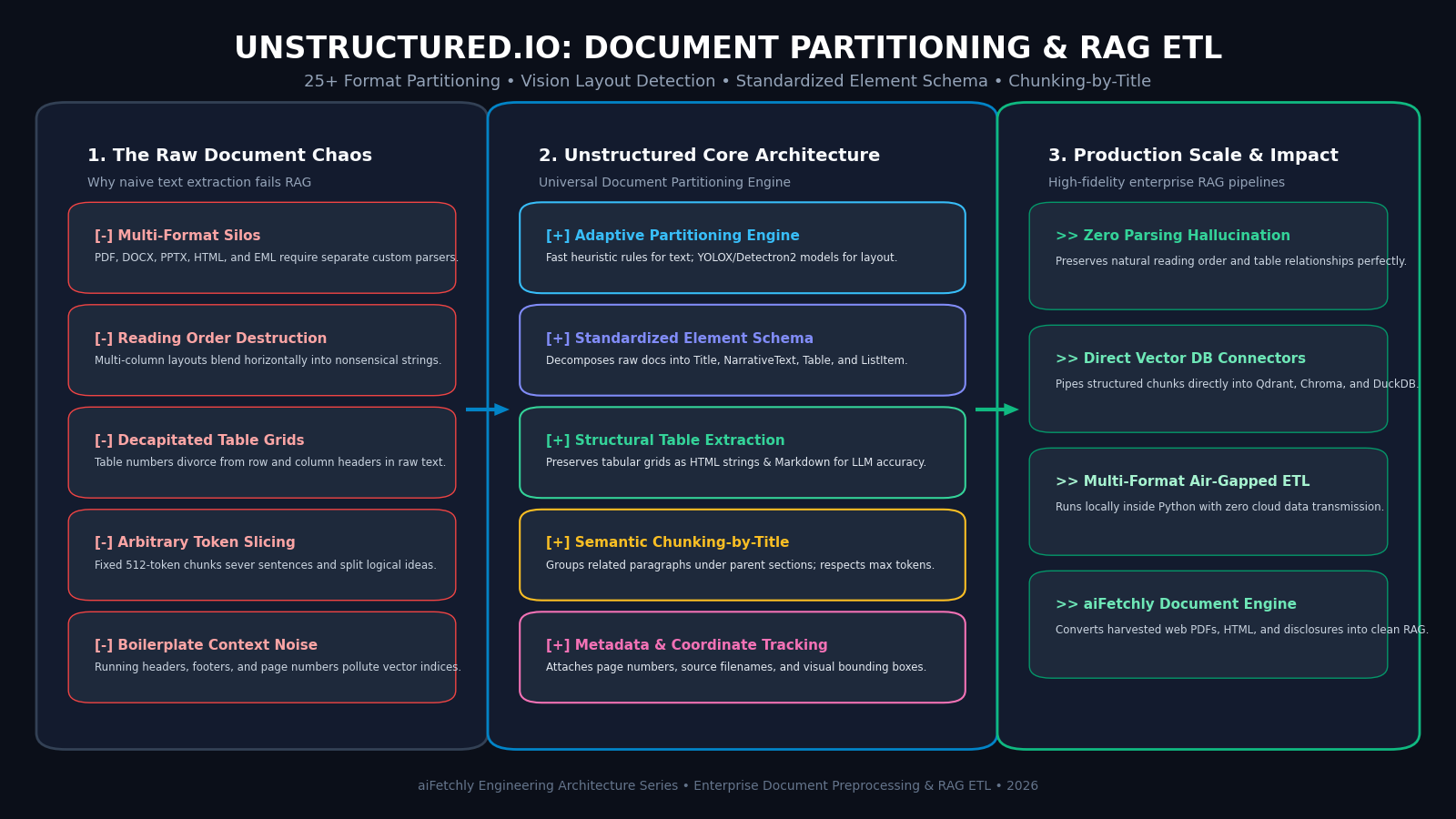
The Problem: The Unstructured Document Ingestion Crisis in Production RAG
In modern enterprise automation, automated market research, and high-frequency data extraction platforms powered by AiFetchly, foundation models depend fundamentally on the quality of their ingested knowledge base. When Large Language Models (LLMs) answer complex compliance inquiries, analyze competitive financial earnings, or summarize technical engineering specifications, their accuracy is bounded by the fidelity of retrieved document chunks.
However, enterprise knowledge does not reside in clean, pre-tokenized Markdown files. It is trapped inside millions of messy, legacy formats: multi-column PDF whitepapers, corporate Word documents (.docx), scanned slide presentations (.pptx), HTML web archives, and customer email threads (.eml).
Attempting to process these real-world files with naive text extractors creates catastrophic failures in downstream Retrieval-Augmented Generation (RAG):
The Naive Document Ingestion Failure:
Original Two-Column Document:
┌───────────────────────────────┬───────────────────────────────┐
│ Section 1: Operating Income   │ Section 2: Key Risks          │
│ Total operating revenue grew  │ Supply chain headwinds        │
│ by 18% in European markets.   │ increased freight expenses by │
│ Table 1: Q3 Margin Breakdown  │ 12% across North America.     │
│ Segment | Revenue | Growth    │ Currency fluctuations shaved  │
│ Cloud   | $1.2B   | +34%      │ $45M from gross operating cash│
└───────────────────────────────┴───────────────────────────────┘
                                │
                                ▼ [Naive Byte-Stream Text Extraction]
┌───────────────────────────────────────────────────────────────┐
│ Extracted Raw Text Stream:                                    │
│ "Section 1: Operating Income Section 2: Key Risks Total       │
│ operating revenue grew Supply chain headwinds by 18% in       │
│ European markets. increased freight expenses by Table 1: Q3   │
│ Margin Breakdown 12% across North America. Segment | Revenue  │
│ Currency fluctuations shaved Cloud | $1.2B $45M from gross"   │
└───────────────────────────────────────────────────────────────┘
                                │
 ├── ❌ Reading Order Destroyed: Columns blend horizontally across lines
 ├── ❌ Decapitated Tables: Headers and values scrambled into word soup
 ├── ❌ Split Sentences: Naive 512-token chunks cut thoughts in half
└── ❌ Irreversible Hallucinations: LLM retrieves nonsensical facts 1. Format Fragmentation Across 25+ Heterogeneous File Types
Corporate data ecosystems are notoriously heterogeneous:
- Engineering documentation lives in Markdown and HTML.
- Legal contracts and regulatory filings are published in multi-page PDFs.
- Corporate presentations are saved in PowerPoint (
.pptx), while executive memorandums circulate in Microsoft Word (.docx). - Without a unified ingestion layer, engineering teams must maintain dozens of independent, brittle parsing libraries (
pypdf,python-docx,python-pptx,beautifulsoup4,openpyxl), each exposing completely incompatible data structures and object models.
2. Reading Order Destruction in Multi-Column Layouts
Standard PDF libraries extract characters based on the physical order of font drawing instructions embedded in the raw PDF byte stream rather than human visual reading order:
- In two-column research papers or financial disclosures, the drawing instructions often jump back and forth between columns.
- Naive extractors read across physical lines horizontally, interleaving sentences from completely different sections into a single incoherent paragraph.
- When this mangled text is embedded into a vector database, semantic proximity is destroyed, making accurate retrieval impossible.
3. Decapitated Tables and Severed Structural Data
Tabular data is the primary vehicle for high-value enterprise facts (pricing matrices, balance sheets, product comparison grids):
- Basic text extractors strip spatial bounding boxes, flattening multi-dimensional tables into a continuous string of floating numbers.
- Column headers are severed from their corresponding row values. An LLM querying “What was cloud revenue growth in Q3?” cannot determine whether
+34%belongs to “Cloud” or “Hardware”, triggering confident hallucinations.
4. Fixed-Window Token Slicing and Context Fragmentation
The legacy standard for RAG chunking is the fixed-character or fixed-token sliding window (e.g., splitting text every 512 tokens with a 50-token overlap):
- Fixed-window splitters are completely blind to document structure: slicing through the middle of sentences, decapitating list items, and orphaning section titles from their explanatory paragraphs.
- Downstream embeddings become noisy and ambiguous because chunks lack contextual anchoring to their parent topic.
To overcome these structural roadblocks, the open-source community created Unstructured.io: a modular, multi-modal document preprocessing and ETL framework that transforms complex documents into clean, structured, RAG-ready elements.
The Solution: Unstructured.io Architecture, Partitioning Strategies & Chunking-by-Title
Unstructured.io acts as a universal document ingestion compiler for foundation models. It digests over 25 unstructured document types, identifies structural document layouts using computer vision and heuristic rules, standardizes content into a typed element taxonomy, and performs context-aware semantic chunking.
Unstructured.io End-to-End Processing Architecture:
┌─────────────────────────────────────────────────────────────────┐
│ Input Documents: PDF, DOCX, PPTX, HTML, EML, EPUB, XLSX, TXT   │
└────────────────────────────────┬────────────────────────────────┘
                                 │
                                 ▼
┌─────────────────────────────────────────────────────────────────┐
│ 1. Partitioning Strategy Selector (Fast / Hi-Res / OCR)        │
│ • Heuristic text extraction for clean digital files             │
│ • Computer Vision Layout (YOLOX/Detectron2) for complex PDFs    │
│ • Optical Character Recognition (Tesseract) for scanned images  │
└────────────────────────────────┬────────────────────────────────┘
                                 │
                                 ▼
┌─────────────────────────────────────────────────────────────────┐
│ 2. Standardized Document Element Taxonomy                      │
│ • Title • NarrativeText • Table (HTML/Markdown) • ListItem      │
│ • Header • Footer • FigureCaption • PageBreak                   │
└────────────────────────────────┬────────────────────────────────┘
                                 │
                                 ▼
┌─────────────────────────────────────────────────────────────────┐
│ 3. Element Cleaning & Metadata Normalization                   │
│ • Boilerplate Stripping: Drops repeated headers/footers         │
│ • Metadata Enrichment: Filename, Page Number, Bounding Boxes    │
└────────────────────────────────┬────────────────────────────────┘
                                 │
                                 ▼
┌─────────────────────────────────────────────────────────────────┐
│ 4. Semantic Chunking-by-Title & Vector DB Export               │
│ • Groups NarrativeText and ListItems under parent Titles        │
│ • Enforces max_characters while respecting sentence boundaries  │
│ • Direct pipeline export to Chroma, Qdrant, DuckDB, or Milvus   │
└─────────────────────────────────────────────────────────────────┘ 1. The Multi-Strategy Partitioning Pipeline (fast, hi_res, ocr_only)
Unstructured provides specialized partitioning strategies tailored to document complexity and latency budgets:
strategy="fast"(Heuristic Rule-Based): Uses native text extraction libraries (such aspdfminer.sixandpypdf) with deterministic spatial heuristics. It extracts text in sub-second speeds, making it ideal for digital-native documents without complex multi-column layouts.strategy="hi_res"(Computer Vision & Layout Detection): Employs deep learning computer vision models (such as YOLOX or Detectron2 layout parsers) to analyze high-resolution document page images. It segments pages into visual bounding boxes, categorizes text blocks, and computes the true visual reading order across arbitrary multi-column layouts.strategy="ocr_only": Leverages Tesseract OCR to extract text from scanned paper documents, low-resolution faxes, and flattened image files where no underlying digital font layer exists.
2. Standardized Document Element Taxonomy
Rather than returning an undifferentiated blob of text, Unstructured decomposes documents into strongly-typed Elements:
Title: Primary headings, subheadings, and section headers that define document hierarchy.NarrativeText: Continuous prose paragraphs and analytical descriptions.ListItem: Bullet points, numbered steps, and outline elements.Table: Tabular grids parsed with full row-column awareness.Header/Footer: Running page headers, footers, and page numbers, which can be selectively purged to prevent RAG index contamination.
3. High-Fidelity Table Extraction with HTML and Markdown Serialization
When processing complex tables, Unstructured preserves both the spatial structure and semantic content:
- The
Tableelement extracts rows, columns, and merged cells, serializing the output into a clean HTML table representation (<table><tr><th>...) or structured Markdown. - Foundation models process HTML tables far more reliably than flattened text strings, allowing agents to perform accurate numeric reasoning, cross-tabulation, and financial analysis.
4. Context-Aware Semantic Chunking-by-Title
Unstructured eliminates the pitfalls of fixed-window token slicing with its Chunking-by-Title algorithm:
- Structural Boundaries: Chunks are constructed around document sections rather than arbitrary token counts.
- Hierarchical Anchoring: When a new
Titleelement is detected, Unstructured closes the preceding chunk and begins a new chunk, ensuring that narrative text is always grouped under its relevant heading. - Soft Maximums: If a section exceeds the target character limit (e.g., 500 characters), it splits gracefully at natural sentence boundaries without severing words or punctuation.
5. Metadata Enrichment and Source Lineage Tracking
Every partitioned element carries rich, verifiable metadata:
metadata.page_number: Exact physical page number where the text appeared.metadata.filename: Original source file identifier.metadata.coordinates: Bounding box pixel coordinates on the page canvas, enabling frontends to render visual highlights over original PDF documents during RAG citation verification.
Architectural Comparison: Unstructured.io vs. PyPDF/pdfplumber vs. Docling vs. LlamaParse
The table below contrasts Unstructured.io with alternative document parsing and ETL frameworks:
| Feature / Metric | PyPDF / pdfplumber | LlamaParse (LlamaIndex) | Docling (IBM) | Unstructured.io |
|---|---|---|---|---|
| Format Support | PDF Only | PDF, DOCX, PPTX | PDF, DOCX, PPTX | 25+ Formats (PDF, DOCX, PPTX, HTML, EML, XLSX) |
| Open Source | 100% Open Source | Closed Commercial API | 100% Open Source (MIT) | 100% Open Source (Apache 2.0) |
| Vision Layout Parsing | None (Raw Coordinates) | Proprietary Multimodal | DocLayNet / Vision Model | YOLOX / Detectron2 (hi_res) |
| Table Preservation | Flattens to Text / Brittle | Markdown / HTML Tables | Clean Markdown Tables | Native HTML / Markdown Table Elements |
| Chunking Intelligence | Manual Token Splitting | Markdown Headers Split | Hierarchical Chunking | Semantic Chunking-by-Title Engine |
| Element Taxonomy | Raw Strings | Markdown Nodes | Structured JSON Doc | Standardized Element Classes |
| Air-Gapped Deployment | Yes (Local) | No (Requires Cloud API) | Yes (Local) | Yes (100% In-Process & Air-Gapped) |
Hands-On Implementation: Building an End-to-End Multi-Format Ingestion Pipeline
Below is a complete, production-grade guide demonstrating how to install Unstructured, partition a complex multi-column document with tables, apply semantic chunking-by-title, and export clean, structured payloads ready for vector embedding.
Step 1: Install Dependencies and System Libraries
Install the Unstructured core library along with PDF and document support:
# Install Unstructured with PDF, DOCX, and vision dependencies
pip install "unstructured[all-docs]" sentence-transformers

# Install underlying system libraries (Ubuntu/Debian)
# sudo apt-get update && sudo apt-get install -y tesseract-ocr poppler-utils Step 2: Partition Complex Multi-Column PDFs with Table Extraction
Use the high-level partition_pdf API to parse documents with vision layout detection and HTML table extraction:
from unstructured.partition.pdf import partition_pdf
from unstructured.cleaners.core import clean_extra_whitespace, group_broken_paragraphs

# High-resolution partitioning on a complex multi-column PDF
elements = partition_pdf(
    filename="sample_financial_report.pdf",
    strategy="hi_res",                   # Uses vision layout model
    infer_table_structure=True,          # Extracts tables as structured HTML
    extract_images_in_pdf=False,
    languages=["eng"]
)

print(f"Total elements partitioned: {len(elements)}")

# Inspect identified element types
for i, el in enumerate(elements[:8]):
    el_type = el.category  # e.g., Title, NarrativeText, Table, ListItem
    text_snippet = el.text[:80].replace("\n", " ")
print(f"[{i:02d}] {el_type:15s} | Page {el.metadata.page_number} | {text_snippet}...") Step 3: Apply Semantic Chunking-by-Title and Output Clean RAG Payloads
Apply Unstructured’s context-aware chunking algorithm to group narrative paragraphs under their parent titles, filter out boilerplate headers, and generate RAG-ready payloads:
from unstructured.chunking.title import chunk_by_title
from unstructured.documents.elements import Header, Footer

# 1. Purge repetitive running headers and footers to keep RAG clean
filtered_elements = [
    el for el in elements
    if not isinstance(el, (Header, Footer))
]

# 2. Apply context-aware Chunking-by-Title
chunks = chunk_by_title(
    elements=filtered_elements,
    max_characters=1000,             # Target chunk length
    combine_text_under_n_chars=200,  # Merges short adjacent paragraphs
    new_after_n_chars=800            # Soft ceiling to respect boundaries
)

print(f"\nCreated {len(chunks)} semantic chunks from {len(filtered_elements)} raw elements.")

# 3. Format chunks for Vector Database Ingestion (e.g., ChromaDB, DuckDB VSS, Qdrant)
vector_payloads = []
for idx, chunk in enumerate(chunks):
    # Check if chunk contains a structured table
    table_html = getattr(chunk.metadata, "text_as_html", None)

    payload = {
        "chunk_id": f"chunk_{idx:04d}",
        "text": chunk.text,
        "metadata": {
            "source_file": chunk.metadata.filename,
            "page_number": chunk.metadata.page_number,
            "element_types": [type(el).__name__ for el in getattr(chunk, "orig_elements", [])],
            "has_table": table_html is not None,
            "table_html": table_html
        }
    }
    vector_payloads.append(payload)

# Preview first structured payload
print("\n--- SAMPLE RAG VECTOR PAYLOAD ---")
import json
print(json.dumps(vector_payloads[0], indent=2)) Running this pipeline produces semantically cohesive text segments where narrative context is firmly rooted in section headers, table structures remain intact, and page numbers enable instant source verification.
Production Deployment with aiFetchly
In automated web harvesting, desktop document assistants, and continuous market intelligence pipelines engineered by AiFetchly, Unstructured.io serves as the foundational data normalization layer.
aiFetchly Enterprise Intelligence Integration with Unstructured.io:
┌─────────────────────────────────────────────────────────────────┐
│ 1. Autonomous Web & Document Acquisition                        │
│ • aiFetchly crawls portals, downloads PDF reports, and HTML doc │
│ • Harvests multi-format corporate whitepapers and disclosures    │
├─────────────────────────────────────────────────────────────────┤
│ 2. Unstructured.io Partitioning & Extraction                    │
│ • Adaptive strategies (Fast vs. Hi-Res) parse complex layouts   │
│ • Tables extracted with full row-column HTML preservation       │
├─────────────────────────────────────────────────────────────────┤
│ 3. Semantic Chunking-by-Title & Lineage Tracking                │
│ • Groups text under parent section headers with page numbers    │
│ • Strips boilerplate headers, footers, and tracking pixels      │
├─────────────────────────────────────────────────────────────────┤
│ 4. High-Precision Vector Ingestion                              │
│ • Exports clean payloads directly to local DuckDB / Chroma lakes│
│ • 100% air-gapped data sovereignty; zero cloud transmission     │
└─────────────────────────────────────────────────────────────────┘ - Elimination of Multi-Format Parsing Overhead: Rather than writing custom scrapers for every downloaded PDF, PowerPoint presentation, or HTML table, aiFetchly pipelines ingest multi-format enterprise assets through a single, unified Unstructured schema.
- Grounded Source Citations: Because Unstructured tags every chunk with its exact physical page number and bounding box coordinates, aiFetchly users verify extracted insights directly against original source documents with a single click.
- Complete Privacy for Sensitive Corpora: Operating entirely in-process on local workstations or private virtual private clouds, Unstructured ensures that confidential financial spreadsheets, legal disclosures, and strategic research remain 100% secure within the enterprise firewall.
To discover how aiFetchly combines automated web extraction with enterprise document preprocessing architectures, explore our AiFetchly Documentation or review our AiFetchly Pricing.