UI-TARS Guide: Native End-to-End Vision GUI Agent
The Problem: The Fragility of Modular GUI Agent Frameworks
In modern enterprise automation, automated desktop workflows, and autonomous research platforms powered by AI Fetchly, autonomous agents are increasingly expected to operate software interfaces directly like human knowledge workers. Rather than relying on custom-built REST API integrations or brittle web scrapers, an autonomous computer-use agent observes the visual monitor, plans a multi-step procedure, moves the cursor, executes clicks, and types keystrokes to achieve arbitrary end-to-end objectives.
However, the prevailing architecture for computer-use agents—the modular agent framework—has reached a fundamental engineering ceiling. When engineering teams build GUI agents by wrapping proprietary commercial Vision-Language Models (such as GPT-4o or Claude 3.5 Sonnet) with external scrapers, OCR engines, and coordinate mappers, the resulting pipelines suffer from severe structural brittleness in production environments.
1. The Disjoint Perception and Grounding Tax
In modular agent frameworks, perception and action execution are artificially bifurcated into separate, loosely coupled subsystems:
- Textual DOM and Accessibility Tree Dependencies: Early web agents depended on Document Object Model (DOM) trees, HTML dumps, or operating system accessibility APIs (like UIAutomation on Windows or AXUIElement on macOS). However, modern software—spanning Electron desktop applications, Canvas-rendered web dashboards (such as Figma or Google Sheets), Flutter apps, and legacy ERP terminals—either hides accessibility trees completely or returns deeply nested, multi-megabyte DOM dumps that immediately overwhelm foundation model context windows.
- External Grounding Latency and Cascading Errors: To interact visually without DOM trees, frameworks glue an external vision-language model to a specialized visual grounding tool (such as Microsoft OmniParser or SeeClick). The framework first calls the parser to extract bounding boxes, generates numbered overlays via Set-of-Marks (SoM), feeds the annotated screenshot to the foundation LLM to select an element ID, and finally invokes an OS-level script to translate the ID back into continuous $(x, y)$ coordinates. If the upstream parser fails to detect a 14x14 pixel dropdown trigger or misidentifies an icon glyph, the downstream planner fails catastrophically, with zero ability to diagnose or recover from the spatial error.
- Severe Latency Overhead: Stacking multiple neural inference passes per interaction step—visual bounding box detection, OCR text extraction, LLM plan formulation, and coordinate translation—inflates step latency to 4–10 seconds per click. In multi-step enterprise workflows requiring 30 to 50 interactions, cumulative execution duration quickly exceeds operational thresholds.
The Modular Agent Framework Dilemma:
┌────────────────────────────────────────────────────────────────────────┐
│ Modular Agent Framework (Design-Driven, Brittle Pipeline)              │
├────────────────────────────────────────────────────────────────────────┤
│ [Raw Screenshot]                                                       │
│        │                                                               │
│        ├──► [Module 1: OCR / YOLO Icon Detector] (e.g., OmniParser)    │
│        │        │                                                      │
│        │        ▼                                                      │
│        ├──► [Module 2: Set-of-Marks Overlay Generator]                 │
│        │        │                                                      │
│        │        ▼                                                      │
│        ├──► [Module 3: Commercial VLM Planner] (e.g., GPT-4o / Claude) │
│        │        │                                                      │
│        │        ▼                                                      │
│        └──► [Module 4: Coordinate Translation & PyAutoGUI Script]      │
│                                                                        │
│ ❌ Cascading Failure: Detection error in Module 1 derails Module 3    │
│ ❌ Multi-Pass Latency: 4 to 8 seconds per interaction step             │
│ ❌ Zero Parameter Evolution: System cannot learn from failure traces    │
└────────────────────────────────────────────────────────────────────────┘ 2. Lack of Deliberate System-2 Reasoning and Error Recovery
Beyond spatial grounding failures, modular agents struggle on complex, dynamic interfaces due to myopic decision-making:
- System-1 Reactive Clicks: Standard foundation models prompted for computer interaction operate as reactive “System-1” generators. When presented with a complex UI state, the model immediately attempts to emit an executable coordinate without first formulating an explicit hypothesis, breaking down sub-goals, or checking prerequisites.
- Catastrophic Failure Loops: If an unexpected modal pop-up appears, a page takes longer to load, or an invalid form field highlights in red, reactive models repeat identical failing actions in an infinite retry loop until step timeouts terminate the session.
- Absence of Action Consistency: In long-horizon tasks spanning dozens of steps (such as auditing spreadsheets, configuring cloud infrastructure, or multi-site booking), commercial VLMs lose track of past intermediate states, suffering from context drift and goal amnesia.
3. The Data Scarcity Bottleneck in Native Training
Why didn’t the industry simply train end-to-end models earlier? Developing a single, unified neural network that perceives raw screen pixels and directly emits executable actions requires vast corpora of multi-step, grounded GUI interaction trajectories:
- Isolated datasets exist for single-element detection (e.g., bounding boxes for icons) and static question answering, but end-to-end multi-step trajectories pairing raw visual state changes with expert thought processes and low-level mouse/keyboard tokens were historically non-existent.
- Human annotation of 50-step operating system trajectories is prohibitively expensive, slow, and non-standardized across diverse operating platforms (Windows, macOS, Linux, Android, and Web).
To resolve these compounding challenges, ByteDance Seed and Tsinghua University introduced UI-TARS (arXiv:2501.12326).
The Solution: Native End-to-End GUI Agent Modeling
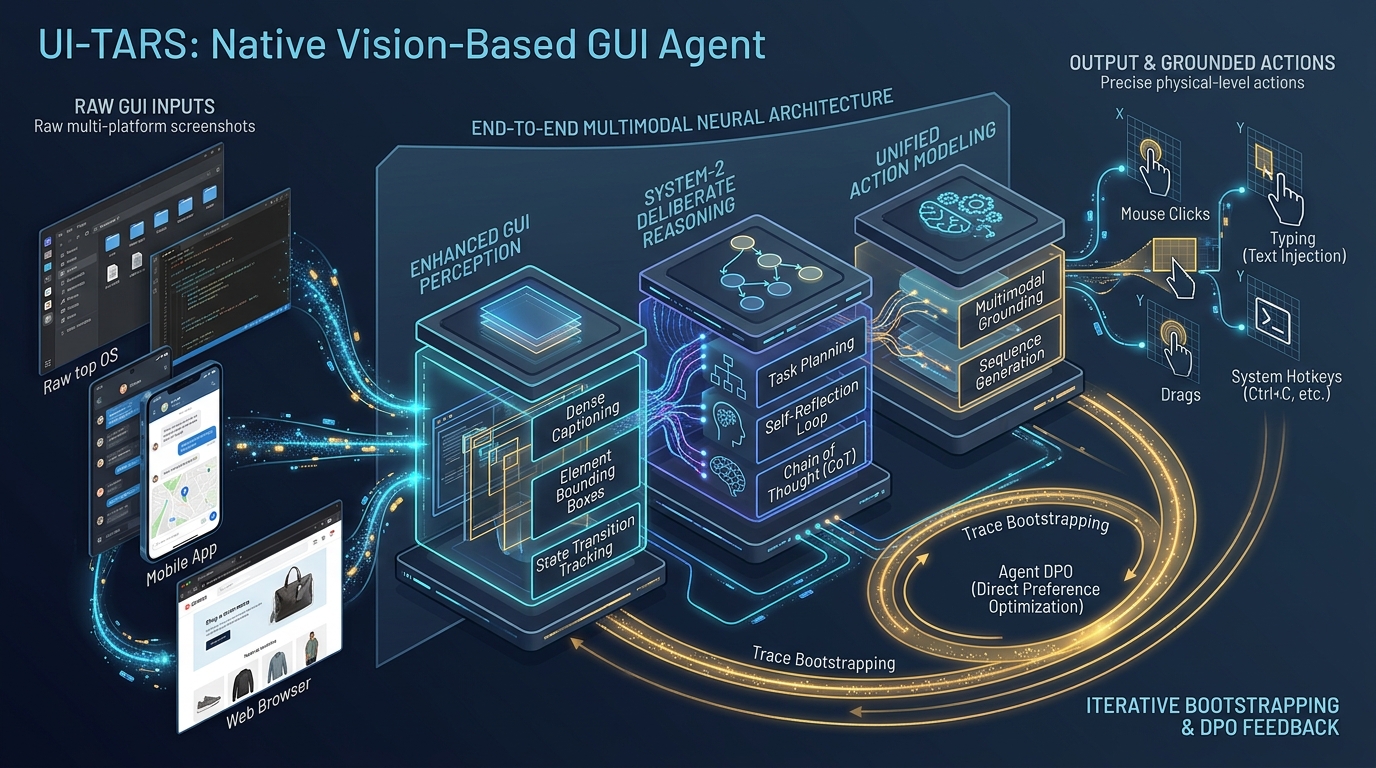
UI-TARS (Pioneering Automated GUI Interaction with Native Agents) represents a paradigm shift in autonomous digital interaction: transitioning from design-driven agent frameworks to a data-driven native agent model.
Instead of piping images through disparate OCR libraries, heuristic parsers, and prompt wrappers, UI-TARS is an end-to-end multimodal foundation model (fine-tuned on Qwen2-VL 7B and 72B backbones across 50 billion tokens) that ingests raw screen pixels and directly generates both structured reasoning thoughts and grounded physical actions.
The UI-TARS Native Agent Paradigm:
┌────────────────────────────────────────────────────────────────────────┐
│ UI-TARS: Single Unified Multimodal Model (Data-Driven, End-to-End)     │
├────────────────────────────────────────────────────────────────────────┤
│ [Raw Screenshot Input] (Desktop OS, Web Browser, or Mobile App)        │
│        │                                                               │
│        ▼                                                               │
│ ┌────────────────────────────────────────────────────────────────────┐ │
│ │ UI-TARS Multimodal Transformer (Qwen2-VL Backbone)                 │ │
│ │                                                                    │ │
│ │ 1. Enhanced GUI Perception: Native element & transition awareness  │ │
│ │ 2. System-2 Deliberate Reasoning: Explicit thought generation      │ │
│ │    • Task decomposition, milestone tracking, & reflection          │ │
│ │ 3. Unified Action Modeling: Cross-platform standardized syntax     │ │
│ └────────────────────────────────────────────────────────────────────┘ │
│        │                                                               │
│        ▼                                                               │
│ [Direct Structured Output]:                                            │
│ Thought: "The modal requires an email confirmation before proceeding..."│
│ Action: Click(x=482, y=615)                                            │
│                                                                        │
│ ✔ Sub-second latency: Single forward pass per interaction step         │
│ ✔ Self-Correction: Native reflection tuning and Agent DPO recovery     │
│ ✔ Cross-Platform Generalization: Windows, Linux, macOS, Android, & Web │
└────────────────────────────────────────────────────────────────────────┘ By unifying perception, reasoning, and execution within a single set of neural weights, UI-TARS establishes four core architectural capabilities:
- Enhanced Screenshot Perception: Mastered through large-scale pre-training across structured element descriptions, dense UI layout captions, fine-grained state transition tracking, and visual question answering.
- Cross-Platform Unified Action Space: Standardizes keyboard and mouse interactions into a unified coordinate vocabulary across desktop, mobile, and web environments.
- Infused System-2 Deliberate Reasoning: Forces the model to generate explicit internal thoughts—encompassing goal decomposition, milestone recognition, and counterfactual reflection—prior to emitting physical actions.
- Iterative Trace Bootstrapping & Agent DPO: Solves the data bottleneck through automated multi-VM interaction collection and Direct Preference Optimization (DPO) on paired error-recovery trajectories.
Architecture: The Four Pillars of UI-TARS
The internal architecture and training methodology of UI-TARS are engineered to mirror human cognitive interaction with computing devices.
UI-TARS End-to-End Architectural Pipeline:
┌──────────────────────────────────────────────────────────────────────────────┐
│ PILLAR 1: ENHANCED GUI PERCEPTION PRE-TRAINING                               │
│ • Element Description: (x, y, w, h) + semantic role + interactable state     │
│ • Dense Layout Captioning: Spatial hierarchies and functional clusters       │
│ • State Transition Captioning: Visual delta analysis between (t-1) and (t)   │
│ • Screen Question Answering & Native Set-of-Marks (SoM) Grounding            │
└──────────────────────────────────────┬───────────────────────────────────────┘
                                       │
                                       ▼
┌──────────────────────────────────────────────────────────────────────────────┐
│ PILLAR 2: UNIFIED ACTION SPACE MODELING                                      │
│ • Shared Primitives: Click(x, y), Drag(x1, y1, x2, y2), Scroll(x, y, dir),   │
│   Type(text), Wait(), Finished(), CallUser()                                 │
│ • Desktop Extensions: Hotkey(key), LeftDouble(x, y), RightSingle(x, y)       │
│ • Mobile Extensions: LongPress(x, y), PressBack(), PressHome(), PressEnter() │
└──────────────────────────────────────┬───────────────────────────────────────┘
                                       │
                                       ▼
┌──────────────────────────────────────────────────────────────────────────────┐
│ PILLAR 3: SYSTEM-2 DELIBERATE REASONING (THOUGHT AUGMENTATION)               │
│ • Knowledge Pre-training: 6 Million scraped & cleaned GUI technical tutorials │
│ • Explicit Thought Format:                                                   │
│   Thought: <Sub-goal decomposition> -> <Milestone check> -> <Reflection>    │
│   Action: <Standardized Physical Function Call>                              │
└──────────────────────────────────────┬───────────────────────────────────────┘
                                       │
                                       ▼
┌──────────────────────────────────────────────────────────────────────────────┐
│ PILLAR 4: ITERATIVE BOOTSTRAPPING & AGENT DPO                                │
│ • Fleet Execution: Hundreds of virtual machines exploring real-world tasks   │
│ • Multi-Stage Filter: Rule-based heuristics + VLM critic verification        │
│ • Reflection Tuning: Annotating paired error-correction & recovery paths     │
│ • Direct Preference Optimization: Maximizing margin of successful recovery   │
└──────────────────────────────────────────────────────────────────────────────┘ Pillar 1: Enhanced GUI Perception for Complex Screenshots
Standard computer vision backbones are optimized for natural images (e.g., ImageNet or COCO datasets), where visual features consist of continuous textures, lighting gradients, and organic boundaries. In contrast, Graphical User Interfaces feature high information density, razor-sharp vector lines, pixel-aligned typographic fonts, nested rectangular frames, and subtle state indicators (e.g., a 1-pixel border highlight on an active text input or a 5% opacity change on a hovered button).
To bridge this domain gap, UI-TARS curates an extensive multi-task perception dataset:
- Element Description: Pairs millions of cropped UI bounding boxes with structured metadata, including element type (button, input field, toggle switch, dropdown menu, tab), bounding box coordinates $(x_{min}, y_{min}, x_{max}, y_{max})$, text content, and interactive status (enabled, disabled, selected, hovered).
- Dense Layout Captioning: Trains the model to generate holistic spatial descriptions of entire application windows. The model learns to describe parent-child hierarchies (e.g., “The left sidebar contains navigation icons; the center pane renders a three-column data table with sortable headers; the top right header houses user profile settings”).
- State Transition Captioning: Crucial for understanding temporal dynamics. The model is presented with image pairs $(S_{t-1}, S_t)$ taken immediately before and after an action $A_{t-1}$. The model must predict the visual delta (e.g., “Clicking at (340, 112) caused the modal dialog to dismiss and updated the notification badge count from 3 to 2”). This capability allows UI-TARS to verify action success autonomously.
- Set-of-Marks (SoM) and Visual QA: Integrates synthetic visual prompt markers during pre-training, ensuring the network can ground linguistic references directly onto coordinate spaces.
Pillar 2: Unified Action Space Modeling
Different operating platforms historically enforce fragmented action primitives. Android uses touch gestures and hardware buttons (Back, Home, App Switcher); desktop operating systems require multi-button mice, double-clicks, and keyboard modifier combinations (Ctrl, Alt, Shift, Super); web browsers rely on scrolling, hover tooltips, and tab navigation.
UI-TARS standardizes all digital interactions into a unified, extensible action space:
| Environment | Action Signature | Execution Semantics |
|---|---|---|
| Shared | Click(x, y) | Moves cursor to $(x, y)$ and fires primary left click / single tap |
| Shared | Drag(x1, y1, x2, y2) | Depresses pointer at $(x_1, y_1)$, moves to $(x_2, y_2)$, and releases |
| Shared | Scroll(x, y, direction) | Positions cursor at $(x, y)$ and issues scroll event (up, down, left, right) |
| Shared | Type(content) | Injects text string into the currently focused input element |
| Shared | Wait() | Pauses execution for a brief interval to allow network/UI rendering |
| Shared | Finished() | Signals task completion and emits final answer payload |
| Shared | CallUser() | Requests human intervention when encountering 2FA or CAPTCHA |
| Desktop | Hotkey(key) | Dispatches system hotkey combination (e.g., Ctrl+C, Enter, Alt+Tab) |
| Desktop | LeftDouble(x, y) | Executes rapid double-click to open folders, launch apps, or select words |
| Desktop | RightSingle(x, y) | Triggers context menu at target coordinates $(x, y)$ |
| Mobile | LongPress(x, y) | Holds pointer at $(x, y)$ for extended duration (context menus on mobile) |
| Mobile | PressBack() | Triggers Android OS hardware back event |
| Mobile | PressHome() | Navigates to operating system primary home launcher |
| Mobile | PressEnter() | Sends IME soft-keyboard enter / submission action |
To ensure robust grounding across arbitrary display scalings (ranging from 720p mobile screens to 4K desktop monitors), all coordinates are normalized to an integer grid $[0, 1000] \times [0, 1000]$:
$$x_{norm} = \left\lfloor \frac{x_{raw}}{W_{screen}} \times 1000 \right\rfloor, \quad y_{norm} = \left\lfloor \frac{y_{raw}}{H_{screen}} \times 1000 \right\rfloor$$
When executing on host hardware, the client runtime performs the inverse scaling, guaranteeing platform-independent precision.
Pillar 3: Infusing System-2 Deliberate Reasoning
A defining breakthrough of UI-TARS is the integration of System-2 deliberate reasoning directly into the autoregressive action loop.
Rather than predicting actions directly from perception tokens ($S_t \to A_t$), UI-TARS enforces a two-stage generative step ($S_t \to T_t \to A_t$), where $T_t$ represents an explicit chain of thought:
Format of UI-TARS Generation:
Thought: <Detailed Deliberate Reasoning String>
Action: <Target Unified Action Call> To equip the model with domain knowledge for System-2 reasoning, the authors crawled and filtered 6 million technical GUI tutorials from developer documentation, operating system help forums, and software user guides. This knowledge was augmented across training trajectories by instilling five deliberate reasoning patterns:
- Task Decomposition: Breaking complex instructions (“Export Q3 expenses to CSV and email the finance team”) into an ordered DAG of atomic milestones.
- Milestone Recognition: Evaluating whether the previous action successfully transitioned the system into the next anticipated milestone.
- Long-Term Goal Consistency: Maintaining the overarching user intent across extended action trajectories, preventing the agent from getting sidetracked by secondary links or tangential UI elements.
- Trial-and-Error Exploration: Formulating speculative actions when encountering ambiguous or unfamiliar interfaces, testing hypotheses with non-destructive interactions.
- Post-Action Reflection: Analyzing state changes immediately after execution. If an action fails (e.g., an error banner appears), the model explicitly reflects on the failure reason and alters its strategy rather than blindly repeating the failed command.
Pillar 4: Iterative Refinement via Online Bootstrapping and Agent DPO
The most formidable barrier in training native agent models is the data bottleneck: collecting hundreds of thousands of diverse, multi-step interaction traces.
UI-TARS solves this through an autonomous virtual machine bootstrapping factory:
Autonomous Virtual Machine Bootstrapping Loop:
┌────────────────────────────────────────────────────────────────────────┐
│ 1. Virtual Machine Swarm                                               │
│    Hundreds of headless VMs (Ubuntu, Windows, Android emulators)       │
│    instantiated with realistic application environments.               │
└───────────────────────────────────┬────────────────────────────────────┘
                                    │
                                    ▼
┌────────────────────────────────────────────────────────────────────────┐
│ 2. Autonomous Task Exploration                                         │
│    Agent generates trajectories across thousands of synthesized tasks. │
└───────────────────────────────────┬────────────────────────────────────┘
                                    │
                                    ▼
┌────────────────────────────────────────────────────────────────────────┐
│ 3. Multi-Stage Quality Filtering                                       │
│    • Rule-based heuristics: Detect infinite loops, crashes, timeouts   │
│    • VLM Judge: Evaluates task success criteria against final state    │
│    • Human-in-the-Loop Validation: Curates edge cases                  │
└───────────────────────────────────┬────────────────────────────────────┘
                                    │
                                    ▼
┌────────────────────────────────────────────────────────────────────────┐
│ 4. Reflection Tuning & Paired Dataset Construction                     │
│    • Path Y_w (Winning Trajectory): Successful recovery trajectory     │
│    • Path Y_l (Losing Trajectory): Failed, unreflective loop           │
└───────────────────────────────────┬────────────────────────────────────┘
                                    │
                                    ▼
┌────────────────────────────────────────────────────────────────────────┐
│ 5. Agent Direct Preference Optimization (Agent DPO)                    │
│    Maximizes preference margin for deliberate self-correcting agents:  │
│    L_DPO = -E [ log σ( β log(π_θ(Y_w|x)/π_ref(Y_w|x))                  │
│                        - β log(π_θ(Y_l|x)/π_ref(Y_l|x)) ) ]            │
└────────────────────────────────────────────────────────────────────────┘ Through this continuous cycle of trace exploration, failure filtering, reflection annotation, and preference optimization, UI-TARS learns to navigate and self-correct across completely unseen software interfaces without human supervision. Similar to how DeepSeek-R1 reasoning models incentivize verifiable problem solving, Agent DPO aligns the policy directly against human operational success.
End-to-End Implementation: Building an Autonomous UI-TARS Client
To demonstrate how UI-TARS executes in real-world environments, we construct an end-to-end Python client that connects to a deployed UI-TARS model (hosted via an OpenAI-compatible vLLM or SGLang RadixAttention serving engine), captures the active screen, parses the System-2 thought chain, and dispatches native hardware input events.
Step 1: Installing Dependencies and Configuring Hardware Control
To run the local interaction loop, install PyAutoGUI for mouse/keyboard dispatch, Pillow for screenshot handling, and the OpenAI SDK for model inference:
pip install pyautogui pillow openai pydantic Step 2: Developing the UI-TARS Execution Engine
Below is a complete, production-ready Python client implementation:
#!/usr/bin/env python3
"""
UI-TARS Autonomous GUI Agent Client
Implements screen capture, coordinate de-normalization,
System-2 thought parsing, and native OS action dispatch.
"""

import re
import time
import base64
from io import BytesIO
from typing import Dict, Any, Tuple, Optional
from pydantic import BaseModel
import pyautogui
from PIL import Image
from openai import OpenAI

# Safety configuration for PyAutoGUI
pyautogui.FAILSAFE = True
pyautogui.PAUSE = 0.2

class AgentStepResult(BaseModel):
    thought: str
    action_type: str
    action_args: Dict[str, Any]
    raw_action: str

class UITARSClient:
    def __init__(
        self,
        base_url: str = "http://localhost:8000/v1",
        api_key: str = "EMPTY",
        model_name: str = "ui-tars-72b-dpo"
    ):
        self.client = OpenAI(base_url=base_url, api_key=api_key)
        self.model_name = model_name
        self.screen_width, self.screen_height = pyautogui.size()

        # Regex patterns for parsing UI-TARS structured outputs
        self.thought_pattern = re.compile(r"Thought:\s*(.*?)(?=Action:|$)", re.DOTALL)
        self.action_pattern = re.compile(r"Action:\s*([A-Za-z]+)\((.*?)\)", re.DOTALL)

    def capture_screen_base64(self) -> Tuple[str, Image.Image]:
        """Captures the primary display and encodes it into a JPEG Base64 payload."""
        screenshot = pyautogui.screenshot()
        buffered = BytesIO()
        screenshot.save(buffered, format="JPEG", quality=85)
        encoded_image = base64.b64encode(buffered.getvalue()).decode("utf-8")
        return encoded_image, screenshot

    def denormalize_coordinates(self, x_norm: float, y_norm: float) -> Tuple[int, int]:
        """Translates normalized [0, 1000] coordinates into actual hardware pixels."""
        x_real = int((x_norm / 1000.0) * self.screen_width)
        y_real = int((y_norm / 1000.0) * self.screen_height)
        return x_real, y_real

    def parse_model_response(self, response_text: str) -> AgentStepResult:
        """Extracts System-2 thought chain and action signature from raw model output."""
        thought_match = self.thought_pattern.search(response_text)
        thought = thought_match.group(1).strip() if thought_match else "Direct execution without thought."

        action_match = self.action_pattern.search(response_text)
        if not action_match:
            raise ValueError(f"Failed to parse executable action from response: {response_text}")

        action_type = action_match.group(1).strip()
        args_str = action_match.group(2).strip()
        raw_action = f"{action_type}({args_str})"

        # Parse key-value or positional arguments
        args: Dict[str, Any] = {}
        if args_str:
            tokens = [t.strip() for t in args_str.split(",")]
            for token in tokens:
                if "=" in token:
                    k, v = token.split("=", 1)
                    k = k.strip()
                    v = v.strip().strip("'\"")
                    try:
                        args[k] = float(v) if "." in v else int(v)
                    except ValueError:
                        args[k] = v
                else:
                    # Positional fallback
                    try:
                        args[f"arg_{len(args)}"] = float(token) if "." in token else int(token)
                    except ValueError:
                        args[f"arg_{len(args)}"] = token.strip("'\"")

        return AgentStepResult(
            thought=thought,
            action_type=action_type,
            action_args=args,
            raw_action=raw_action
        )

    def execute_physical_action(self, step: AgentStepResult) -> bool:
        """Executes the parsed action on the host OS via native mouse/keyboard drivers."""
        action = step.action_type
        args = step.action_args

        print(f"\n[THOUGHT] {step.thought}")
        print(f"[ACTION]  {step.raw_action}")

        if action == "Click":
            x_norm = args.get("x", args.get("arg_0"))
            y_norm = args.get("y", args.get("arg_1"))
            x, y = self.denormalize_coordinates(x_norm, y_norm)
            pyautogui.moveTo(x, y, duration=0.25)
            pyautogui.click()

        elif action == "LeftDouble":
            x_norm = args.get("x", args.get("arg_0"))
            y_norm = args.get("y", args.get("arg_1"))
            x, y = self.denormalize_coordinates(x_norm, y_norm)
            pyautogui.moveTo(x, y, duration=0.25)
            pyautogui.doubleClick()

        elif action == "RightSingle":
            x_norm = args.get("x", args.get("arg_0"))
            y_norm = args.get("y", args.get("arg_1"))
            x, y = self.denormalize_coordinates(x_norm, y_norm)
            pyautogui.moveTo(x, y, duration=0.25)
            pyautogui.rightClick()

        elif action == "Drag":
            x1_norm = args.get("x1", args.get("arg_0"))
            y1_norm = args.get("y1", args.get("arg_1"))
            x2_norm = args.get("x2", args.get("arg_2"))
            y2_norm = args.get("y2", args.get("arg_3"))
            x1, y1 = self.denormalize_coordinates(x1_norm, y1_norm)
            x2, y2 = self.denormalize_coordinates(x2_norm, y2_norm)
            pyautogui.moveTo(x1, y1, duration=0.2)
            pyautogui.dragTo(x2, y2, duration=0.5, button='left')

        elif action == "Scroll":
            direction = args.get("direction", args.get("arg_2", "down"))
            amount = -5 if direction == "down" else 5
            pyautogui.scroll(amount)

        elif action == "Type":
            text_to_type = args.get("content", args.get("arg_0", ""))
            pyautogui.write(text_to_type, interval=0.03)

        elif action == "Hotkey":
            key_combo = args.get("key", args.get("arg_0", ""))
            keys = [k.strip().lower() for k in key_combo.split("+")]
            pyautogui.hotkey(*keys)

        elif action == "Wait":
            time.sleep(2.0)

        elif action == "Finished":
            print("[STATUS] Task successfully completed by agent.")
            return True

        elif action == "CallUser":
            print("[ALERT] Agent requested human assistance (e.g., CAPTCHA/2FA).")
            return True

        else:
            print(f"[WARNING] Unrecognized action '{action}', skipping.")

        return False

    def run_task(self, instruction: str, max_steps: int = 25) -> None:
        """Executes a multi-step autonomous agent loop."""
        print(f"=== Starting UI-TARS Task: '{instruction}' ===")
        history = [
            {
                "role": "system",
                "content": (
                    "You are UI-TARS, an expert autonomous GUI agent. "
                    "Analyze the user request and screenshot. You MUST formulate your response in two parts:\n"
                    "Thought: <System-2 deliberate reasoning, milestone tracking, and reflection>\n"
                    "Action: <Standardized unified action primitive>"
                )
            }
        ]

        for step_idx in range(1, max_steps + 1):
            print(f"\n--- Step {step_idx}/{max_steps} ---")
            img_b64, _ = self.capture_screen_base64()

            user_message = {
                "role": "user",
                "content": [
                    {"type": "text", "text": f"Goal: {instruction}"},
                    {"type": "image_url", "image_url": {"url": f"data:image/jpeg;base64,{img_b64}"}}
                ]
            }
            history.append(user_message)

            response = self.client.chat.completions.create(
                model=self.model_name,
                messages=history,
                temperature=0.1,
                max_tokens=512
            )

            raw_text = response.choices[0].message.content
            step_result = self.parse_model_response(raw_text)

            history.append({"role": "assistant", "content": raw_text})

            is_terminal = self.execute_physical_action(step_result)
            if is_terminal:
                break

time.sleep(1.0) Benchmark Comparison: UI-TARS vs. SOTA GUI Agents
UI-TARS has been evaluated across more than 10 standardized GUI agent benchmarks spanning computer operating systems (OSWorld), mobile environments (AndroidWorld, AndroidControl), web navigation (VisualWebBench, WebSRC), and fine-grained visual grounding (ScreenSpot Pro).
Below is the comparative performance breakdown contrasting UI-TARS against proprietary commercial agent frameworks and frontier vision models:
1. Holistic Operating System Task Execution (OSWorld & AndroidWorld)
| Model / Framework | Architecture Type | OSWorld (15 Steps) | OSWorld (50 Steps) | AndroidWorld Success Rate |
|---|---|---|---|---|
| GPT-4o (Direct VLM) | Modular Framework | 5.0% | 5.0% | 34.5% |
| Gemini 1.5 Pro | Modular Framework | 5.4% | 5.4% | 22.8% |
| CogAgent-9B | Native Agent Model | 8.1% | 8.1% | N/A |
| Aguvis-72B | Native Agent Model | 10.3% | 10.3% | 26.1% |
| Claude 3.5 Sonnet Computer Use | Proprietary Agent | 14.9% | 22.0% | 27.9% |
| UI-TARS-7B-SFT | Open-Weights Native Model | 17.7% | 18.2% | 33.0% |
| UI-TARS-7B-DPO | Open-Weights Native Model | 18.7% | 19.4% | 36.8% |
| UI-TARS-72B-SFT | Frontier Native Model | 18.8% | 21.5% | 42.1% |
| UI-TARS-72B-DPO | Frontier Native Model | 22.7% | 24.6% | 46.6% |
UI-TARS-72B-DPO establishes a new state of the art on OSWorld (24.6% at 50 steps), outperforming Anthropic’s Claude 3.5 Sonnet Computer Use (22.0%), while doubling the success rate of standard open-weights baselines. On AndroidWorld, UI-TARS achieves 46.6%, substantially outperforming GPT-4o’s 34.5%.
2. Fine-Grained Visual Grounding Accuracy (ScreenSpot Pro)
Grounding accuracy evaluates whether the model can predict a coordinate inside the ground-truth target bounding box across challenging technical software interfaces (e.g., CAD software, developer IDEs, and graphic design tools):
| Model / System | Development Tools Grounding | Creative Software Grounding | CAD Interface Grounding | Overall Grounding Average |
|---|---|---|---|---|
| GPT-4o (Zero-Shot) | 0.7% | 0.6% | 1.5% | 0.9% |
| SeeClick | 0.3% | 0.6% | 1.9% | 0.9% |
| ShowUI-2B | 9.4% | 5.3% | 1.9% | 5.5% |
| Claude 3.5 Sonnet Computer Use | 12.6% | 16.8% | 11.9% | 13.8% |
| OS-Atlas-7B | 17.7% | 17.9% | 10.3% | 15.3% |
| UGround-7B | 14.7% | 17.0% | 11.1% | 14.3% |
| UI-TARS-7B | 36.1% | 32.8% | 18.0% | 29.0% |
| UI-TARS-72B | 40.8% | 39.6% | 17.2% | 32.5% |
On professional desktop software where buttons are small and icon-dense, zero-shot commercial models completely collapse (scoring under 1%). UI-TARS achieves 40.8% on development software and 39.6% on creative tools, demonstrating the efficacy of its element description pre-training.
Production Deployment: Infrastructure, Sandboxing, and Safety
Deploying autonomous computer-use agents in production enterprise environments requires addressing severe reliability and security risks. In automated workflows managing web scraping pipelines or real-time data fetching, an agent equipped with native operating system access can potentially overwrite local files, leak confidential tokens, or get trapped in unintended UI state machines.
Production Hardened Agent Architecture:
┌────────────────────────────────────────────────────────────────────────┐
│ Virtual Desktop Infrastructure (VDI) Isolation                        │
│ ┌────────────────────────────────────────────────────────────────────┐ │
│ │ Ephemeral Docker / QEMU MicroVM Container                          │ │
│ │ • Read-Only Base Image with OverlayFS Scratch Space                │ │
│ │ • Network Firewall: Egress allowed ONLY to approved domain proxies │ │
│ │ • Screen Streaming: X11 / Wayland VNC capture at 1080p resolution  │ │
│ └─────────────────────────────────┬──────────────────────────────────┘ │
│                                   │                                    │
│                                   ▼                                    │
│ ┌────────────────────────────────────────────────────────────────────┐ │
│ │ Semantic Guardrail Interceptor                                     │ │
│ │ • Regex & AST analysis on Action strings before execution          │ │
│ │ • Blacklisted hotkeys: Intercepts `Ctrl+Alt+Del`, `Win+R`, `rm -rf` │ │
│ │ • Human Confirmation Escalation on high-consequence dialogs        │ │
│ └─────────────────────────────────┬──────────────────────────────────┘ │
│                                   │                                    │
│                                   ▼                                    │
│ ┌────────────────────────────────────────────────────────────────────┐ │
│ │ Host Execution Driver (PyAutoGUI / Selenium / Appium)              │ │
│ └────────────────────────────────────────────────────────────────────┘ │
└────────────────────────────────────────────────────────────────────────┘ 1. Ephemeral Sandbox Isolation and Network Firewalls
Never execute an autonomous GUI agent directly on a developer workstation or production host machine:
- Disposable MicroVMs: Deploy each agent execution within a clean, containerized virtual machine (such as Docker with an X11 virtual frame buffer or lightweight QEMU/Firecracker microVMs).
- OverlayFS Rollback: Mount the operating system root as a read-only base layer with an ephemeral copy-on-write overlay. If an agent corrupts system settings or deletes files during an execution session, tearing down the session instantly restores the image to a pristine state.
- Strict Egress Filtering: Restrict virtual machine network interfaces using iptables or cloud security groups. Block internal VPC access and metadata endpoints (e.g.,
169.254.169.254), routing outbound HTTP traffic strictly through inspected logging proxies.
2. Guardrailing Physical Action Execution
Before an action emitted by UI-TARS is passed to OS drivers, it must pass through an automated safety validator:
class ActionSafetyGuardrail:
    FORBIDDEN_HOTKEYS = {
        "ctrl+alt+del", "ctrl+w", "alt+f4", "win+r", "cmd+q", "ctrl+shift+w"
    }

    CRITICAL_KEYWORDS = {
        "format disk", "delete account", "drop table", "purge", "transfer funds"
    }

    @classmethod
    def validate_action(cls, step: AgentStepResult) -> bool:
        # 1. Hotkey Inspection
        if step.action_type == "Hotkey":
            key_combo = step.action_args.get("key", "").lower().replace(" ", "")
            if key_combo in cls.FORBIDDEN_HOTKEYS:
                print(f"[BLOCKED] Dangerous hotkey combination '{key_combo}' detected!")
                return False

        # 2. Typing Content Filter
        if step.action_type == "Type":
            content = step.action_args.get("content", "").lower()
            for kw in cls.CRITICAL_KEYWORDS:
                if kw in content:
                    print(f"[BLOCKED] Critical keyword '{kw}' found in Type content!")
                    return False

return True 3. Latency Optimization via Speculative Caching and Fast Indexing
Serving a 72B parameter vision model on every interaction step can introduce noticeable turnaround times. To achieve real-time responsiveness:
- Disaggregated Prefill and Fast Decoding: Deploy UI-TARS on serving engines like vLLM or SGLang with chunked-prefills and FP8 quantization. This cuts time-to-first-token (TTFT) by over 60%, allowing screen ingestion to complete in under 400ms.
- Action Caching for Static Workflows: For repetitive automation pipelines (such as logging into an internal portal or downloading a recurring invoice), store high-confidence sub-goal action sequences. When screen perception matches an established fingerprint, the client dispatches cached actions instantly, bypassing model inference.
Summary and Key Takeaways
The transition from modular frameworks to native agent models marks a pivotal milestone in autonomous software interaction. By eliminating the disconnect between perception, planning, and execution, UI-TARS transforms how artificial intelligence navigates the graphical computing landscape:
- End-to-End Visual Mastery: Ingests raw screen pixels and directly emits coordinate actions, eliminating fragile DOM parsers, external OCR pipelines, and multi-second modular latency.
- Deliberate Cognitive Reasoning: Infuses System-2 thought generation before every action, allowing agents to decompose goals, verify intermediate milestones, and recover from unexpected UI states.
- Superior Benchmark Performance: SOTA on OSWorld (24.6%) and AndroidWorld (46.6%), outperforming commercial frontier models including Claude 3.5 Sonnet Computer Use and GPT-4o.
- Continuous Self-Improvement: Leverages automated virtual machine bootstrapping and Agent DPO to learn autonomously from interaction mistakes.
As multimodal foundation models continue to evolve, native GUI agents like UI-TARS will serve as the core engine powering the next generation of autonomous enterprise automation, intelligent operating systems, and computer-use copilots.