Turn Any Website into a RAG Knowledge Base: aiFetchly
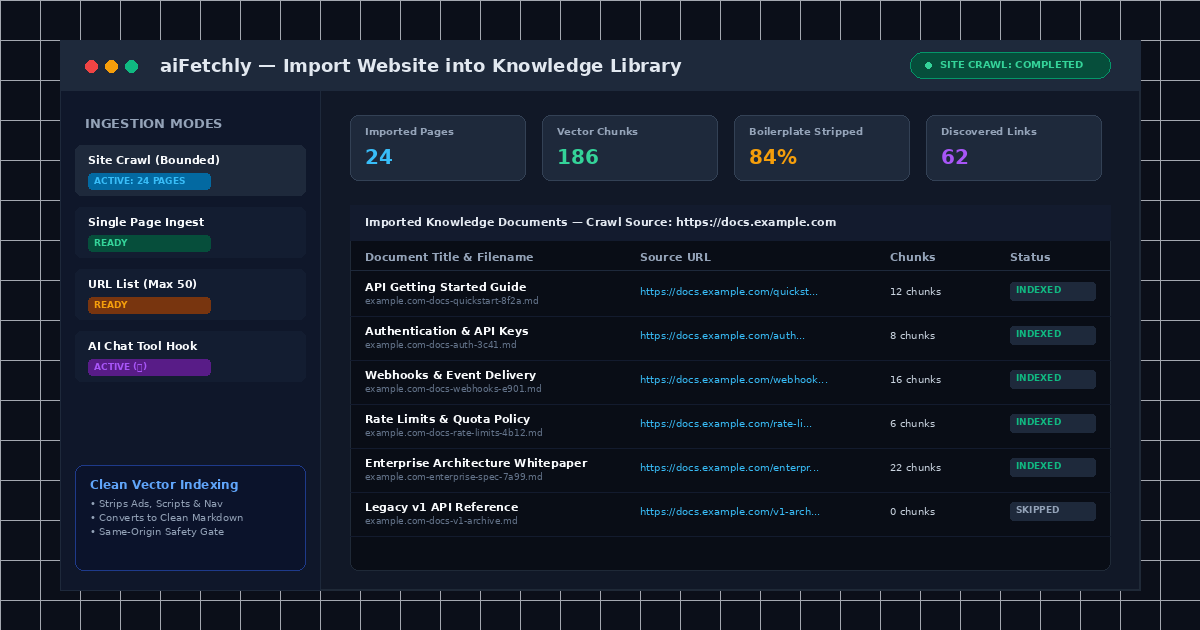
The Boilerplate Noise Problem in Web-Based RAG
Building a reliable retrieval-augmented generation (RAG) system typically requires writing custom scrapers, stripping messy HTML boilerplate, managing vector database infrastructure, and paying recurring cloud embedding subscriptions. For researchers, analysts, and marketers, turning competitor websites, API documentation, or customer support knowledge bases into usable AI context is an engineering headache.
Raw web pages contain navigation bars, cookie banners, tracking scripts, and footer links. When fed directly into vector databases, this extraneous noise dilutes embedding precision, pollutes retrieval ranking, and causes models to hallucinate during generation.
AI Fetchly eliminates this friction with its Import Website into Knowledge Library engine. Built directly into the desktop client, this feature ingests public web pages, converts them into clean semantic markdown, and stores vector embeddings in your local SQLite database without manual data wrangling.
Three Ways to Ingest Web Content: Single Page, URL List, and Site Crawl
aiFetchly provides three ingestion modes to balance speed and coverage:
| Ingestion Mode | Input Parameters | Maximum Scope | Ideal Use Case |
|---|---|---|---|
| Single Page | 1 target URL + optional Title override | 1 page | Product pricing, terms, or landing pages |
| URL List | 1 to 50 URLs (one per line) | 50 distinct URLs | Curated competitor blogs or selected guides |
| Site Crawl | 1 root Start URL + Max Depth / Pages | Up to 100 pages (Depth 0–4) | Complete documentation sites and FAQs |
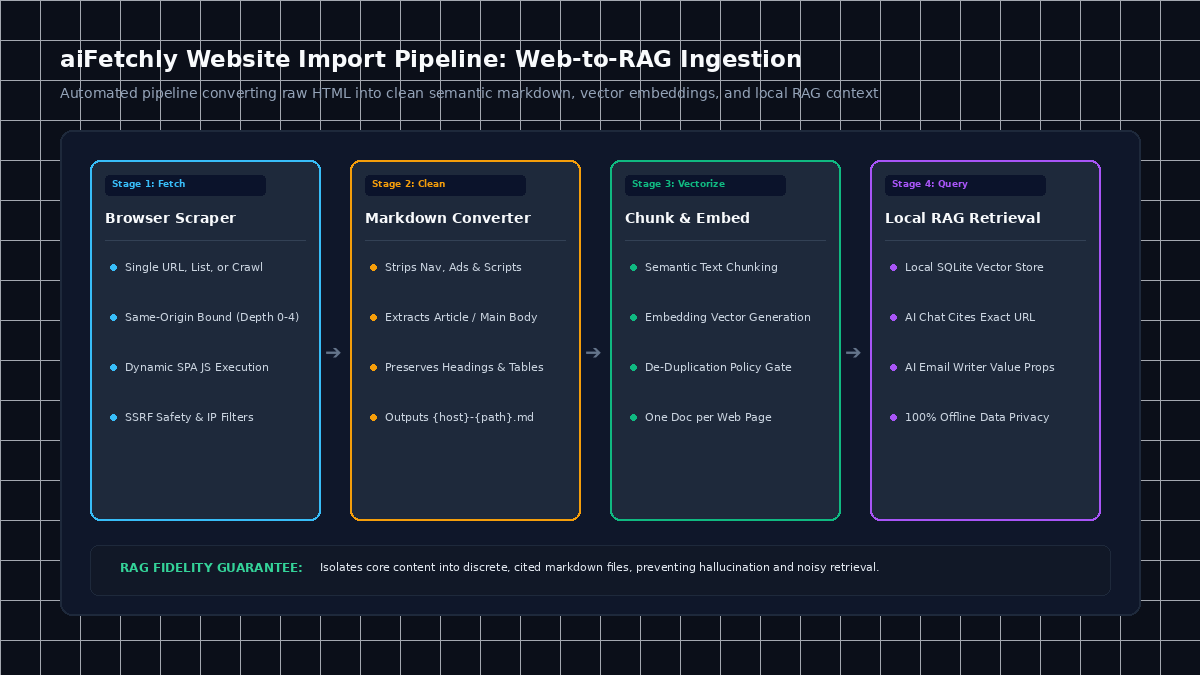
Step-by-Step Tutorial: Ingesting Web Documentation into RAG
Follow this walkthrough to crawl an online documentation site and index it for grounded AI reasoning.
Step 1: Open the Import Website Dialog
- Launch aiFetchly on your Windows desktop.
- Navigate to Knowledge in the left sidebar menu.
- Click the Import Website button in the page header.
Step 2: Choose Your Ingestion Mode and Enter Target URLs
Select between single-page extraction, curated lists, or automated crawling:
- Select Site Crawl at the top of the dialog.
- In the Start URL field, enter your public documentation root (e.g.,
https://docs.example.com/api). - Set your crawling boundaries: configure Max Pages (default: 20; range: 1–100) and Max Depth (default: 2 hops; range: 0–4). The crawler strictly adheres to same-origin boundaries to prevent external domain drift.
Step 3: Apply Metadata and De-Duplication Policies
Organize your incoming knowledge assets before indexing:
- Add comma-separated Tags (e.g.,
api-docs, competitor-q3). - Set the Author metadata (defaults to
Website). - Set your Duplicate Policy: keep the default
Skip duplicatesto keep your database clean, or selectAllow duplicatesto store historical snapshots of updated pages.
Step 4: Execute Ingestion and Verify RAG Citations
Click Import. aiFetchly’s browser scraper loads each page, strips boilerplate HTML, converts the content to clean markdown ({hostname}-{path}-{hash}.md), chunks the text, and writes vector embeddings to local SQLite.
Once complete, open AI Chat or the AI Marketing Assistant (Cmd/Ctrl + K) and toggle the RAG icon (📖). The assistant will cite exact source URLs, paragraph quotes, and verified facts directly from your newly indexed site.
Instant, Private Knowledge Bases on Your Desktop
By converting web pages into discrete, cited markdown records locally, aiFetchly ensures your AI agents reason over grounded truth without leaking data to cloud embedding vendors.
To explore conversational chat imports and custom chunking settings, visit the AI Fetchly Docs.
Visual Generation Prompts
Hero Image Prompt:Modern SaaS application window in dark mode, showing the aiFetchly Import Website dialog with Site Crawl parameters, discovered link counters, real-time page ingestion status tags, and local SQLite vector database indicator, isometric 3D perspective, cyan and emerald glowing accents.Body Image Prompt:Clean technical architecture diagram illustrating the four-stage Website Import pipeline in aiFetchly: browser-based scraper fetching URLs, semantic HTML-to-markdown conversion, local vector embedding, and AI Chat grounded RAG retrieval, dark slate vector styling.