Surya Guide: Multilingual OCR, Layout & Reading Order
The Problem: The Failure of Legacy OCR and Naive Text Extraction
In modern generative artificial intelligence platforms, autonomous data collection workflows, and automated document extraction engines like AiFetchly, foundation models rely heavily on ingested enterprise documents. Real-world business data rarely arrives in clean, semantic Markdown. Instead, it is locked within complex unstructured artifacts: scanned legal contracts, multi-column scientific research papers, dense financial annual reports, technical schematics, and multi-tier government filings.
Historically, engineering teams relied on two legacy approaches to extract text from documents: naive programmatic extractors (such as PyPDF and PDFMiner) or legacy Optical Character Recognition (OCR) engines (predominantly Tesseract). When deployed in automated production pipelines, both approaches fail catastrophically.
The Legacy Document Extraction Crisis:
Scanned PDF / Research Paper (Two-Column Layout + Complex Tables)
  │
  ├──► Approach 1: Naive PDF Text Dumps (PyPDF / Poppler)
  │    ❌ Scrambles reading order: Reads horizontally across columns
  │    ❌ Injects running headers, footers, and page numbers mid-sentence
  │    ❌ Completely blind to scanned images, receipts, and faxes
  │
  └──► Approach 2: Legacy OCR Engines (Tesseract OCR)
       ❌ Character segmentation fails on low-contrast or warped scans
       ❌ Brittle bounding boxes cut diacritics and ligatures
       ❌ Zero layout awareness: Tables flatten into unreadable word soup
❌ Severe degradation outside standard English typography 1. The Interleaving Trap of Multi-Column Documents
The most pervasive failure mode in document processing is the reading order interleaving problem.
Standard programmatic PDF extraction tools parse characters according to their raw coordinate order or internal content stream:
- In two-column academic articles or commercial earnings releases, naive extractors read from left-to-right across the entire page geometry.
- The first line of Column 1 is concatenated directly with the first line of Column 2, followed by the second line of Column 1 concatenated with the second line of Column 2.
- The resulting text string is completely scrambled: sentences are chopped in half, ideas are interleaved, and semantic coherence is destroyed.
- When an AI agent embeds this “word soup” into a vector database for Retrieval-Augmented Generation (RAG), downstream language models hallucinate false relationships between completely unrelated sections.
2. The Fragility and Low Accuracy of Legacy OCR Engines (Tesseract)
For decades, Tesseract was the default open-source OCR tool. However, Tesseract’s core architecture was engineered in the 1980s and 1990s around classical computer vision heuristics:
- Brittle Binarization and Segmentation: Tesseract relies on thresholding algorithms (such as Otsu’s method) to convert images to binary black-and-white. On wrinkled receipts, faded carbon copies, or variable background shading, binarization introduces noise artifacts, merging adjacent letters or erasing fine punctuation.
- Lack of Multilingual Robustness: While Tesseract supports language packs, its recognition accuracy collapses on scripts with complex diacritics, non-Latin alphabets (Arabic, Cyrillic, Hindi, Japanese), or rotated text orientations.
- Absence of Document Semantics: Tesseract operates at the level of words and characters; it has no concept of what constitutes a
SectionHeader, aTable, aFigureCaption, or aFootnote.
3. Why General-Purpose VLMs Cannot Solve High-Throughput Document Parsing
With the rise of Vision-Language Models (VLMs) like GPT-4o, Claude 3.5 Sonnet, and Qwen2.5-VL, many teams attempted to replace OCR engines with end-to-end multimodal prompts (“Transcribe this image into Markdown”).
While VLMs excel at visual question answering, deploying them for high-volume document transcription introduces three severe production barriers:
- Excessive Inference Cost: Processing a 500-page document batch through a cloud VLM costs between $15 and $50 in API token fees.
- High Latency: Autoregressively decoding thousands of text tokens from image patches takes 3 to 8 seconds per page.
- Stochastic Omissions and Hallucinations: On dense documents (e.g., tables with hundreds of small numbers), generative models stochastically hallucinate values, skip lines, or truncate output when context limits are reached.
Production systems require a specialized, deterministic, high-throughput deep learning model family engineered specifically for document understanding.
The Surya Solution: Modular Deep Learning Document Perception
Developed by Vik Paruchuri and the team at Datalab, Surya is an open-weights document understanding model family designed from the ground up to solve modern document extraction.
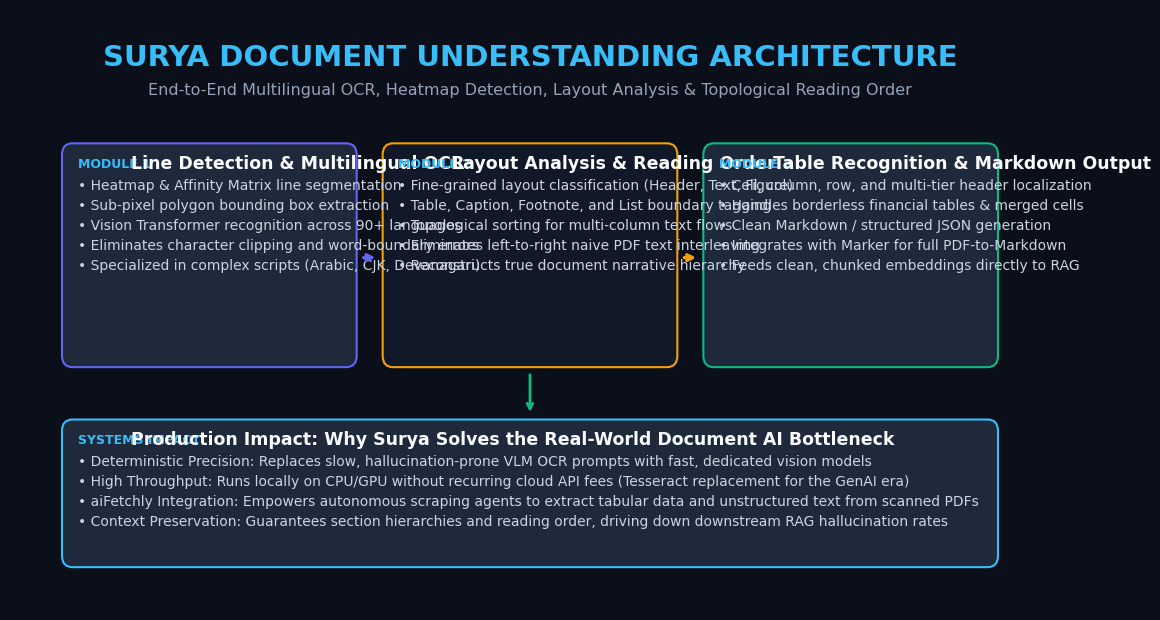
Rather than relying on a single monolithic autoregressive language model, Surya breaks document perception into five specialized, high-efficiency vision models that work in harmony:
The Surya Modular Document Pipeline:
[Raw Document Image / PDF Page]
               │
               ▼
 ┌────────────────────────────────────────────────────────┐
 │ Model 1: Line-Level Text Detection                     │
 │ • SegFormer heatmap prediction + affinity matrix       │
 │ • Extracts precise polygon bounding boxes              │
 └────────────────────────────────────────────────────────┘
               │
               ├──────────────────────────────────────────┐
               ▼                                          ▼
 ┌───────────────────────────┐              ┌───────────────────────────┐
 │ Model 2: Layout Analysis  │              │ Model 3: Multilingual OCR │
 │ • Classifies regions:     │              │ • Vision Transformer ViT  │
 │   Header, Text, Table,    │              │ • Transcribes text lines  │
 │   Figure, Caption, Footnote│             │ • 90+ languages supported │
 └───────────────────────────┘              └───────────────────────────┘
               │                                          │
               └────────────────────┬─────────────────────┘
                                    ▼
 ┌────────────────────────────────────────────────────────┐
 │ Model 4: Reading Order Detection                       │
 │ • Predicts topological sort across layout blocks       │
 │ • Solves multi-column and sidebar text flow            │
 └────────────────────────────────────────────────────────┘
                                    │
                                    ▼
 ┌────────────────────────────────────────────────────────┐
 │ Model 5: Table Recognition (Surya Table)               │
 │ • Detects rows, columns, and merged spanning cells     │
 └────────────────────────────────────────────────────────┘
                                    │
                                    ▼
[Structured Markdown / JSON Output with Exact Coordinates] The Five Specialized Vision Architectures of Surya
1. Text Line Detection with Affinity Heatmaps
Unlike traditional bounding box detectors (like YOLO or Faster R-CNN) that struggle with tightly spaced paragraphs, Surya’s text detection model is based on an optimized SegFormer architecture:
- It processes document images and generates two continuous probability maps: a text heatmap (identifying individual character/word centers) and an affinity matrix (measuring directional connectivity between adjacent characters in the same line).
- By clustering high-affinity regions, Surya identifies complete text lines with sub-pixel polygon boundaries, handling rotated text, curved pages, and dense table cells with zero character clipping.
2. Multilingual Text Recognition Across 90+ Languages
Surya features an encoder-decoder Vision Transformer (ViT) specialized in line-level OCR:
- It supports over 90 languages, including Latin, Cyrillic, Arabic, Hebrew, CJK (Chinese, Japanese, Korean), Devanagari, and Greek scripts.
- Because line detection has already isolated individual lines, the recognition model focuses entirely on character transcription without wasting attention compute on blank margins or distant page sections.
- Inference executes rapidly on both GPUs and consumer CPUs (via ONNX runtime quantization).
3. Layout Analysis and Document Region Classification
Surya includes a specialized layout segmentation model that categorizes every document element into distinct functional types:
PageHeaderandPageFooterSectionHeader(H1, H2, H3 hierarchy)Text(body paragraphs)Table(tabular matrices)FigureandPictureCaption(text accompanying images or tables)FootnoteandReference
4. Topological Reading Order Detection
Extracting text and layout boxes is insufficient if the narrative sequence is broken. Surya introduces a dedicated Reading Order Model:
- It evaluates the spatial coordinates, typography, and semantic layout of detected blocks.
- It outputs an ordered index sequence ($1, 2, 3, \dots, N$) representing the true human reading progression.
- It correctly resolves complex magazine layouts, multi-column research papers, and sidebars.
5. Table Structure Recognition and Cell Reconstruction
Tables are the cornerstone of quantitative data. Surya’s table model detects:
- Individual table rows and columns.
- Header rows and row-group dividers.
- Spanning and merged cells across columns.
- Cell contents are automatically associated with their exact row/column indices, generating structured HTML or Markdown tables directly.
Deep Dive: How Surya Solves the Reading Order Problem
The reading order problem is fundamentally a graph sorting challenge: how to convert a set of two-dimensional spatial rectangles into a one-dimensional linear reading sequence.
The Reading Order Graph Transformation:
┌─────────────────────────┐  ┌─────────────────────────┐
│ [Block 1: Left Column]  │  │ [Block 3: Right Column] │
│ "In recent years, deep  │  │ "Furthermore, modern    │
│ learning has expanded..."│ │ architectures allow..." │
│                         │  │                         │
│ [Block 2: Left Column]  │  │ [Block 4: Right Column] │
│ "Specifically, vision   │  │ "In conclusion, these   │
│ models provide..."      │  │ results confirm..."     │
└─────────────────────────┘  └─────────────────────────┘

Naive Left-to-Right Scan Order:
1 ──► 3 ──► 2 ──► 4 (Broken narrative! Interleaves Column 1 & 2)

Surya Topological Reading Order:
1 ──► 2 ──► 3 ──► 4 (Preserves true column narrative flow!) 1. From Spatial Coordinates to Directed Acyclic Graphs (DAGs)
Legacy tools use simple geometric sorting: sorting bounding boxes by $Y$-coordinate (top-to-bottom), then by $X$-coordinate (left-to-right). This heuristic fails whenever a page contains columns, callouts, or floating figures.
Surya solves this by modeling document layout blocks as nodes in a Directed Acyclic Graph (DAG):
- Feature Vector Assembly: Each block is parameterized by its normalized spatial coordinates $(x_1, y_1, x_2, y_2)$, its aspect ratio, its layout label (
SectionHeader,Text,Caption), and its relative position to adjacent blocks. - Pairwise Precedence Classification: A neural network evaluates candidate pairs $(\text{Block}_A, \text{Block}_B)$ and predicts the probability $P(A \prec B)$—the likelihood that Block $A$ should be read before Block $B$.
- Topological Ordering: The model performs a topological sort over the resulting directed graph, resolving ambiguities and enforcing transitivity ($A \prec B$ and $B \prec C \implies A \prec C$).
2. Preventing Multi-Column Scrambling and Header Splitting
By coupling Layout Analysis with Reading Order:
- Full-width banner headers (spanning both columns) are identified as the initial node ($Node_0$).
- The model routes the reading path completely through the left column before transitioning to the top of the right column.
- Footnotes at the bottom of the page are strictly deferred until after all body text has been traversed.
- Embedded tables and figures are linked to their corresponding captions rather than interrupting the mid-sentence narrative.
Architectural Comparison: Surya vs. Alternative Extraction Engines
To understand where Surya fits in modern enterprise data extraction, the table below highlights its operational differences compared to Tesseract, Docling, and Commercial Cloud Vision APIs:
| Dimension | Tesseract OCR | Commercial Cloud APIs (AWS/Google) | IBM Docling | Surya (Datalab) |
|---|---|---|---|---|
| Model Type | Classical CV + LSTM | Proprietary Vision API | Specialized Vision Models | Specialized Open-Weights Vision Suite |
| Line Detection Method | Pixel Binarization | Proprietary Cloud | DocLayNet YOLO / SegFormer | SegFormer Heatmap + Affinity Matrix |
| Reading Order Detection | Heuristic (Naive Top-to-Bottom) | Basic | Built-in | Native Neural Topological Sorter |
| Language Support | 100+ (Fragile accuracy) | Broad Cloud Coverage | Latin & Common Alphabets | 90+ Languages (High accuracy) |
| Table Recognition | Very Poor (Raw text flattens) | Good (Expensive per-page) | TableFormer | Surya Table (Row/Col/Span) |
| Deployment Location | Local CPU | Remote Cloud Gateway | Local CPU / GPU | Local CPU / GPU / Edge |
| Inference Cost | Zero (Open Source) | High ($1.50 - $10.00 / 1k pages) | Zero (Open Source) | Zero (Open Source) |
| Data Privacy & Compliance | 100% Local (Safe) | Transmits to Third-Party | 100% Local (Safe) | 100% Local (HIPAA / GDPR Compliant) |
| Markdown / RAG Integration | Requires Custom Regex | JSON payload | Direct Markdown Export | Direct Structured Markdown & JSON |
Practical Implementation: Building an End-to-End Document Pipeline with Surya
Let us build a complete, production-ready document extraction script using Surya in Python. This implementation will:
- Load a multi-column document or scanned PDF.
- Execute text line detection and multilingual OCR.
- Perform layout analysis and predict reading order.
- Output clean, structured Markdown ready for ingestion into AiFetchly or vector databases.
Step 1: Environment Setup and Model Weights
Install Surya and its required dependencies. Surya leverages PyTorch and Hugging Face model weights:
pip install surya-ocr pillow pypdfium2 torch torchvision Step 2: Implementing the Full Document Parsing Pipeline
Create a script named surya_pipeline.py:
import pypdfium2 as pdfium
from PIL import Image
from typing import List, Dict, Any

from surya.detection import batch_text_detection
from surya.recognition import batch_recognition
from surya.layout import batch_layout_detection
from surya.ordering import batch_ordering
from surya.model.detection.model import load_model as load_det_model, load_processor as load_det_proc
from surya.model.recognition.model import load_model as load_rec_model, load_processor as load_rec_proc
from surya.model.layout.model import load_model as load_layout_model, load_processor as load_layout_proc
from surya.model.ordering.model import load_model as load_order_model, load_processor as load_order_proc

class SuryaDocumentParser:
    def __init__(self, device: str = "cpu"):
        """
        Initializes the Surya document processing suite.
        Loads detection, recognition, layout, and ordering models.
        """
        print(f"Loading Surya models on device: {device}...")
        self.device = device

        # 1. Line Detection Models
        self.det_model = load_det_model(device=device)
        self.det_processor = load_det_proc()

        # 2. Text Recognition (OCR) Models
        self.rec_model = load_rec_model(device=device)
        self.rec_processor = load_rec_proc()

        # 3. Layout Analysis Models
        self.layout_model = load_layout_model(device=device)
        self.layout_processor = load_layout_proc()

        # 4. Reading Order Models
        self.order_model = load_order_model(device=device)
        self.order_processor = load_order_proc()
        print("Surya models successfully loaded.")

    def pdf_to_images(self, pdf_path: str) -> List[Image.Image]:
        """Renders PDF pages into high-resolution PIL images."""
        doc = pdfium.PdfDocument(pdf_path)
        images = []
        for page in doc:
            # Render at 200 DPI for optimal OCR quality
            bitmap = page.render(scale=2.0)
            images.append(bitmap.to_pil())
        return images

    def parse_page(self, image: Image.Image, languages: List[str] = ["en"]) -> Dict[str, Any]:
        """
        Processes a single page image through the full Surya multi-model pipeline.
        """
        images = [image]

        # Stage 1: Line Detection
        det_predictions = batch_text_detection(images, self.det_model, self.det_processor)
        lines = det_predictions[0].bboxes

        # Stage 2: Multilingual OCR Recognition
        rec_predictions = batch_recognition(images, [languages], self.rec_model, self.rec_processor)
        recognized_lines = rec_predictions[0].text_lines

        # Stage 3: Layout Analysis
        layout_predictions = batch_layout_detection(images, self.layout_model, self.layout_processor)
        layout_blocks = layout_predictions[0].bboxes

        # Stage 4: Reading Order Detection
        order_predictions = batch_ordering(images, self.order_model, self.order_processor)
        ordered_indices = order_predictions[0].bboxes

        return {
            "lines": recognized_lines,
            "layout": layout_blocks,
            "reading_order": ordered_indices
        }

    def convert_to_markdown(self, parsed_data: Dict[str, Any]) -> str:
        """
        Synthesizes layout labels, OCR text, and reading order into clean Markdown.
        """
        layout_blocks = parsed_data["layout"]

        # Sort layout blocks based on the detected reading order
        ordered_blocks = sorted(layout_blocks, key=lambda b: getattr(b, "position", 0))

        markdown_sections = []
        for block in ordered_blocks:
            label = block.label
            text = block.text if hasattr(block, "text") else ""

            if not text.strip():
                continue

            if label == "SectionHeader":
                markdown_sections.append(f"## {text.strip()}\n")
            elif label == "PageHeader":
                # Skip or format as muted comment
                continue
            elif label == "PageFooter":
                continue
            elif label == "Table":
                markdown_sections.append(f"\n{text.strip()}\n")
            elif label == "Caption":
                markdown_sections.append(f"> *Caption: {text.strip()}*\n")
            else:
                markdown_sections.append(f"{text.strip()}\n")

return "\n".join(markdown_sections) Step 3: Running the Pipeline and Verifying Output
Create an execution entry point run_extraction.py:
from surya_pipeline import SuryaDocumentParser

if __name__ == "__main__":
    # Initialize on GPU if available, otherwise CPU
    import torch
    device = "cuda" if torch.cuda.is_available() else "cpu"
    parser = SuryaDocumentParser(device=device)

    # Path to sample PDF or document
    sample_pdf = "sample_financial_report.pdf"

    print(f"Rendering pages from {sample_pdf}...")
    images = parser.pdf_to_images(sample_pdf)

    for idx, page_img in enumerate(images):
        print(f"\n--- Processing Page {idx + 1} ---")
        parsed_data = parser.parse_page(page_img, languages=["en"])

        markdown_content = parser.convert_to_markdown(parsed_data)
        print("Generated Markdown Output:")
print(markdown_content[:600] + "\n...[Truncated]") Production Best Practices: Deploying Surya in Enterprise AI Scraping
When integrating Surya into enterprise web scraping and document extraction architectures like AiFetchly, implementing the following systems optimizations ensures high throughput and minimal hardware footprint:
1. Dynamic Resolution Scaling and Image Tiling
Document images scanned at 300 DPI can exceed $2400 \times 3200$ pixels.
- Feeding oversized bitmaps directly into vision backbones consumes excessive VRAM.
- Downsample images to an optimal resolution range (between 150 and 200 DPI) where text height averages 15 to 25 pixels—the sweet spot for SegFormer text detection.
- For architectural schematics or blueprints, apply overlapping patch tiling to maintain high-frequency resolution without memory overflow.
2. Multi-Stage Pipeline Parallelism (Producer-Consumer Queue)
Do not execute the five stages synchronously for one image at a time:
- Implement a pipeline architecture with worker pools:
- Worker Pool 1 (CPU): PDF rasterization and image normalization via
pdfium. - Worker Pool 2 (GPU): Batched text detection and layout segmentation.
- Worker Pool 3 (GPU/Quantized CPU): Batched text recognition and topological sorting.
- Worker Pool 1 (CPU): PDF rasterization and image normalization via
- Decoupling these stages achieves near-100% GPU utilization, processing up to 30 pages per second on an NVIDIA RTX 4090 or A10G.
3. Caching Geometric Intermediates for Interactive Workflows
In agentic desktop applications:
- Cache the intermediate layout JSON (bounding boxes, polygon coordinates, and reading order indices) alongside the document hash.
- If an agent later needs to extract a specific sub-table or verify a single data point, it can query the cached geometry instantly without repeating the expensive forward vision passes.