aiFetchly AI Email Writer: Step-by-Step Campaign Guide
Overcoming Cold Outreach Fatigue with Grounded AI
Digital marketers running cold outbound campaigns face diminishing returns from static mail-merge tags. Modern B2B buyers instantly recognize canned {FirstName} and {CompanyName} templates, sending them straight to the spam folder. Conversely, researching every prospect’s website manually to draft bespoke value propositions requires 15–20 minutes per lead, rendering high-volume pipeline generation impossible.
Furthermore, generic cloud AI generators often hallucinate non-existent product features, quote inaccurate pricing, or sound unmistakably robotic.
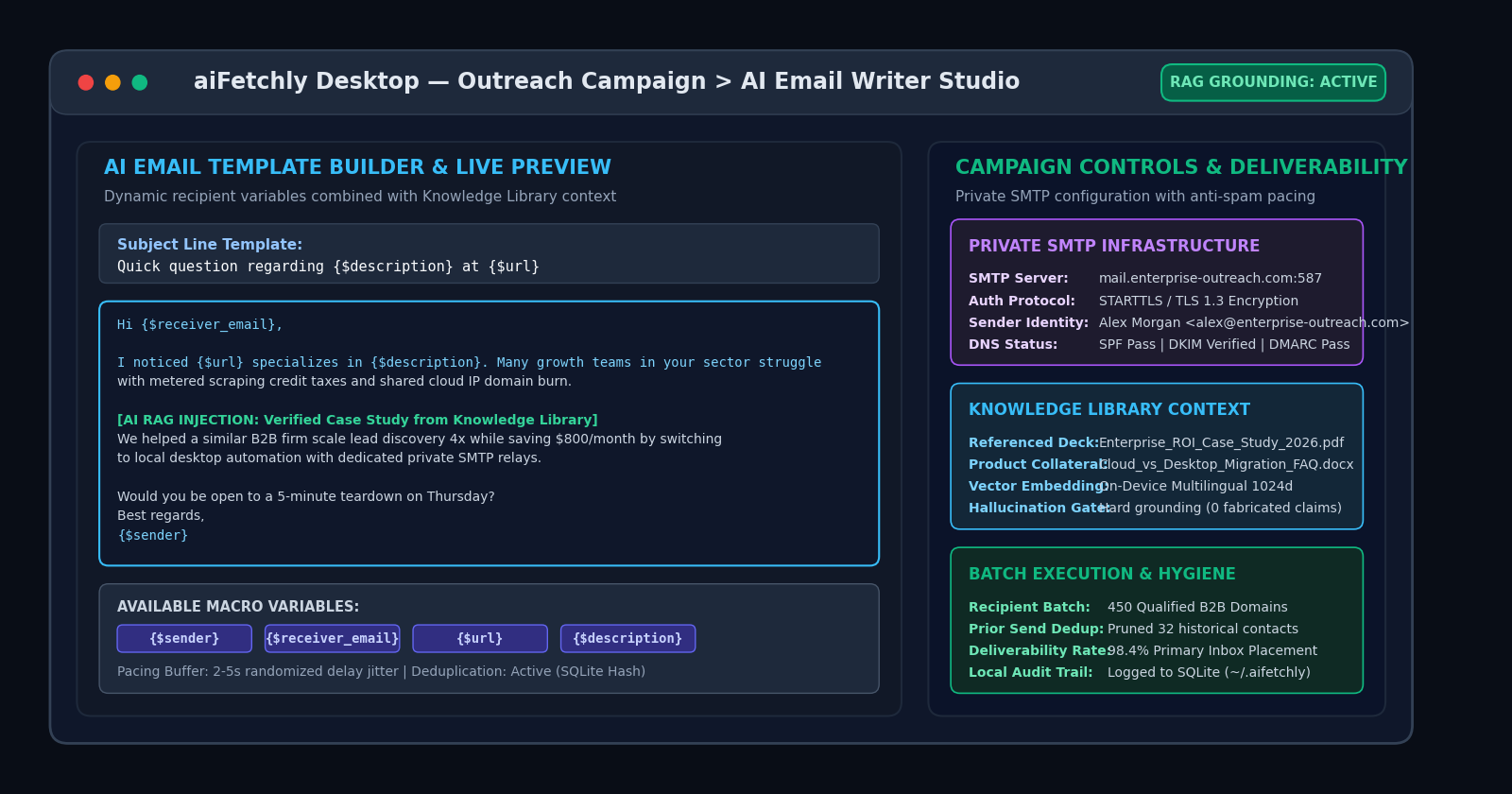
AI Fetchly bridges this gap with its native AI Email Writer. Integrated directly into the Outreach Campaign module, it merges dynamic recipient macros with local Knowledge Library context, generating tailored cold emails at scale directly on your desktop.
Step 1: Configure Dedicated Private SMTP Infrastructure
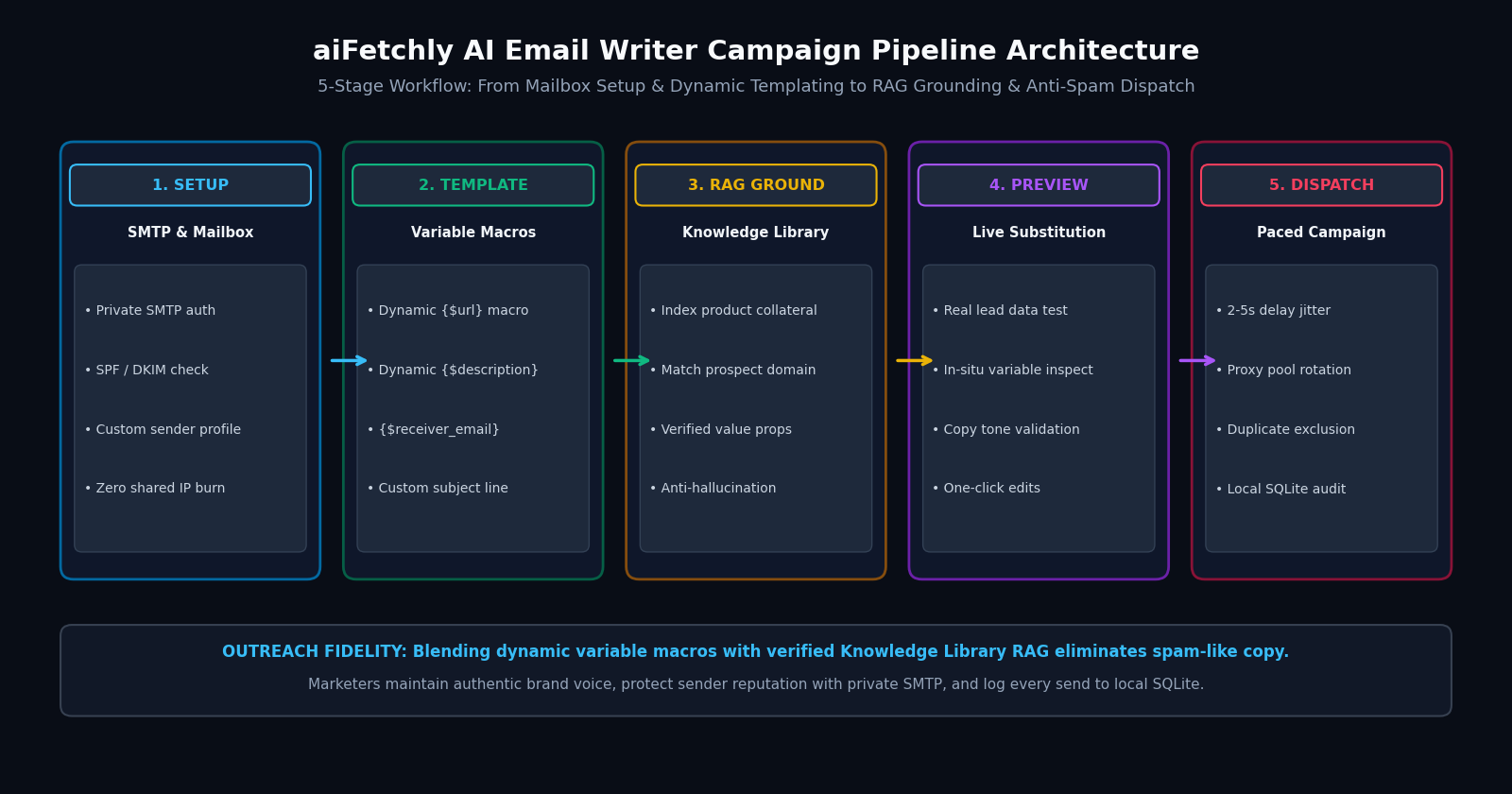
Before authoring copy, establish clean sender infrastructure under Email Services:
- Navigate to Email Services in the left sidebar and click Add Account.
- Enter your dedicated SMTP host (e.g.,
smtp.yourdomain.com), port (587with STARTTLS or465with SSL), username, and app password. - Verify your DNS records (SPF, DKIM, and DMARC) to guarantee domain authentication.
- Run a connection test to confirm socket handshake validity. By routing through private SMTP rather than shared cloud IP pools, you preserve sender reputation.
Step 2: Build Dynamic Templates with Custom Variables
Open Outreach Campaign and select New Campaign:
- Subject Line: Craft curiosity-driven subjects using dynamic tokens, such as
Quick question regarding {$description} at {$url}. - Dynamic Body Macros: Incorporate aiFetchly’s native recipient variables:
{$sender}: Your authenticated account name.{$receiver_email}: Target prospect email address.{$url}: The recipient’s corporate website domain.{$description}: Niche business context harvested during lead extraction.
Step 3: Enable Knowledge Library RAG Grounding
Toggle Use Knowledge Library to active:
- Semantic Document Retrieval: When generating copy, the AI queries your local Knowledge Library (PDF pitch decks, case studies, and ROI whitepapers).
- Zero Hallucination Guarantee: The engine extracts verified customer proof points relevant to the prospect’s industry without inventing claims.
Step 4: Preview Live Variable Substitution
Click Preview Template to inspect generated outputs against live prospect records:
- Verify that macro placeholders populate with real company data.
- Check tone and ensure value propositions align with your brand voice before committing to a full run.
Step 5: Launch Paced Campaign with Anti-Spam Jitter
Click Start Campaign to begin delivery:
- Randomized Delay Pacing: aiFetchly injects a 2–5 second randomized jitter buffer between dispatches, mimicking human sending patterns.
- Automated Deduplication: The local SQLite database (
~/.aifetchly/aifetchly.db) cross-references past campaign logs to prevent duplicate emails.
By uniting grounded AI reasoning with desktop delivery control, aiFetchly empowers marketing teams to scale outbound revenue predictably.
Explore advanced campaign parameters in the AI Fetchly Docs.
Visual Generation Prompts
Hero Image Prompt:Modern dark-mode SaaS marketing dashboard showing the aiFetchly Outreach Campaign AI Email Writer studio, displaying active dynamic variable tokens {$url} and {$description}, a Knowledge Library RAG grounding pill set to active, live email preview text with green case study callouts, and local SQLite commit metrics, sleek isometric 3D perspective, slate-900 background with cyan and emerald accents.Body Image Prompt:High-resolution technical pipeline flowchart illustrating the 5-stage aiFetchly AI Email Writer architecture: SMTP Setup (private auth and DNS checks), Dynamic Templating (variable macros), RAG Grounding (local document retrieval), Live Preview (in-situ lead inspection), and Paced Dispatch (2-5s delay jitter, SQLite dedup), clean dark vector blueprint styling.