Set-of-Marks Guide: Visual Grounding for Web AI Agents
The Problem: The Flaws of Raw DOM Dumps and Pixel Regression
In modern web automation, multi-step data extraction, and autonomous agent loops like AiFetchly, deploying AI agents to interact with web applications has historically relied on two flawed paradigms: textual DOM ingestion and raw pixel coordinate prediction.
While Large Language Models (LLMs) and Multimodal Vision-Language Models (VLMs) have demonstrated extraordinary reasoning capabilities, applying them directly to real-world browser interfaces reveals crippling architectural limitations.
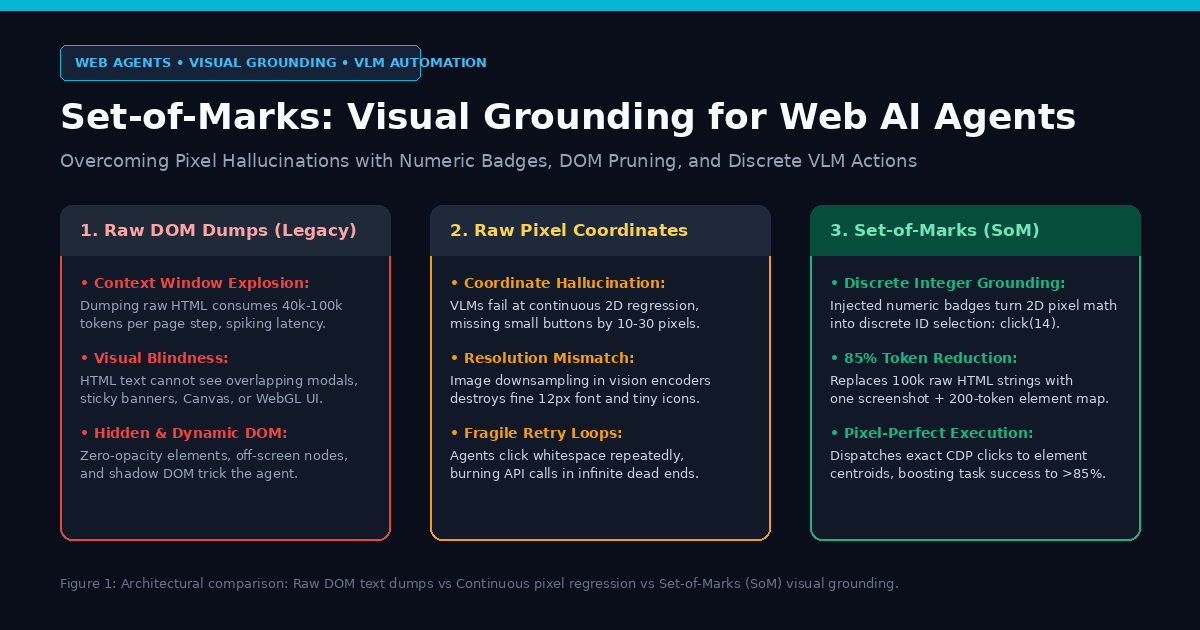
1. The Context Window Explosion of Raw DOM Dumps
Early web agents (such as raw Selenium or Puppeteer wrappers paired with GPT-4) extracted the HTML source code of the page, stripped inline scripts, and fed the pruned text into the model’s context window.
In modern Single Page Applications (SPAs) built with React, Vue, or Angular, this approach breaks down immediately:
- Context Bloat: A single modern e-commerce or SaaS dashboard routinely contains between 3,000 and 15,000 DOM nodes. Ingesting raw HTML consumes 40,000 to 100,000 prompt tokens per interaction step, causing extreme inference latency and massive API bills.
- Visual Blindness: HTML text represents document structure, not visual rendering. A model analyzing raw DOM cannot determine whether a button is covered by a cookie consent modal, hidden beneath a sticky navigation bar, or clipped outside the active viewport.
- Dynamic Elements and Canvas: Complex web interfaces increasingly rely on
<canvas>, SVG graphics, WebGL, or shadow DOM trees. These elements contain zero semantic HTML text, rendering them completely invisible to text-only DOM scrapers.
2. The Spatial Hallucination of Raw Pixel Regression
To overcome DOM blindness, the second wave of autonomous agents shifted to pure computer vision: feeding raw browser screenshots into multimodal models (such as GPT-4o, Claude 3.5 Sonnet, or Gemini 1.5/2.0) and prompting the model to output continuous $(x, y)$ pixel coordinates to click.
While intuitive, asking transformer vision encoders to perform continuous 2D spatial regression introduces severe inaccuracy:
- Patch Resolution Limits: Vision transformers (ViTs) divide images into discrete patches (typically $14 \times 14$ or $16 \times 16$ pixels). Fine-grained interface elements—such as a 12px checkbox, an icon toggle, or a tiny dropdown caret—often fall between patch boundaries.
- Coordinate Drift: Multimodal models suffer from non-trivial spatial variance, frequently mispredicting target centroids by 10 to 30 pixels. On dense web pages, clicking 15 pixels to the left clicks empty whitespace or triggers the wrong navigation link.
- Brittle Retry Spirals: When a coordinate click misses, the browser state remains unchanged. The agent cannot understand why its action failed and repeatedly clicks the same dead coordinates, burning execution budgets in infinite loops.
3. The Structural Misalignment
Text-only DOM models understand semantics without layout. Pure vision models see layout without actionable DOM handles. Software systems require deterministic, discrete targeting—not guessing continuous 2D coordinates on a raster canvas.
The Architecture: How Set-of-Marks Grounds Vision-Language Models
To resolve the tension between DOM text bloat and continuous pixel hallucination, researchers introduced Set-of-Marks (SoM) visual prompting (originally developed by Yang et al. at Microsoft Research, and adapted for browser agents in frameworks like WebVoyager and Browser-Use).
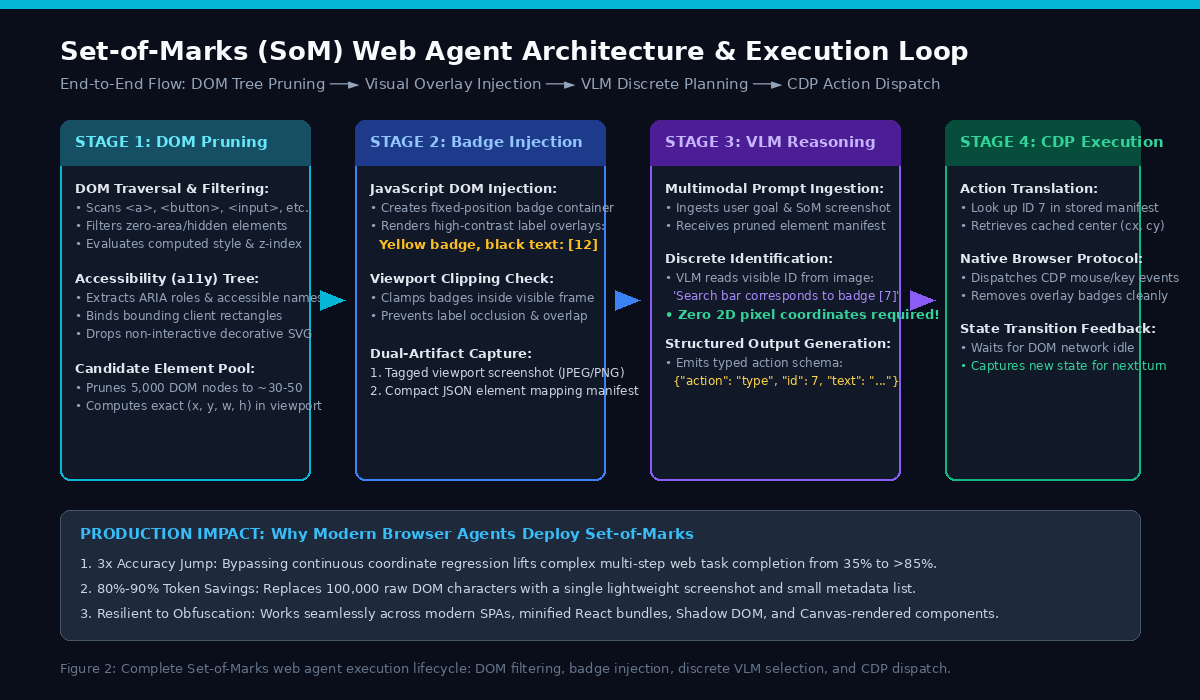
Set-of-Marks establishes a hybrid neuro-symbolic bridge: it uses the browser’s native rendering engine to overlay high-contrast, numeric visual badges directly onto all interactive elements before capturing the screenshot.
1. Interactive Element Pruning via Accessibility (a11y) Trees
Rather than processing the entire DOM or tagging every <div> container, modern SoM pipelines filter the document down to actionable interactive nodes using the browser’s Accessibility (a11y) Tree:
- Tag Filtering: Identifies standard interactive tags:
<a>,<button>,<input>,<select>,<textarea>. - ARIA Semantic Roles: Captures custom interactive components:
[role="button"],[role="link"],[role="menuitem"],[role="checkbox"],[role="tab"]. - Cursor and Event Inspection: Scans elements with
cursor: pointeror registered JavaScript event listeners (onclick,onkeydown). - Visibility Pruning: Executes
getBoundingClientRect()to discard hidden nodes:- Elements with width or height equal to zero.
- Elements marked with
display: none,visibility: hidden, oropacity: 0. - Elements positioned entirely outside the current viewport boundaries.
This step filters 5,000+ raw DOM nodes down to a clean, focused set of 30 to 60 candidate interactive targets.
2. High-Contrast Overlay Injection Mechanics
Once candidate elements are isolated, the agent executes an in-page JavaScript script that injects temporary visual overlay badges into the DOM:
- Distinct Colors: Bright, saturated background fills (such as safety yellow
#FACC15, electric cyan#06B6D4, or neon green#22C55E) paired with bold black text. - Bounding Outlines: A thin, high-contrast 1px border framing the exact interactive bounding box of the target element.
- Non-Obtrusive Badge Anchoring: Badges are positioned at the top-left corner of each element using
position: fixedandz-index: 2147483647(maximum z-index), ensuring they render on top of all page content without altering native CSS document flow. - Viewport Clamping: If an element sits near the edge of the screen, badge coordinates are clamped to remain completely visible within the captured viewport.
3. Dual-Artifact Synthesis: Annotated Screenshot and Metadata Manifest
The SoM engine generates two synchronized representations for each decision step:
- The Annotated Screenshot: A visual snapshot containing numbered markers
[1],[2],[3], …,[N]clearly visible to the VLM. - The Element Manifest (Metadata Dictionary): A compact JSON payload describing each numbered badge:
{
  "1": { "role": "link", "text": "Documentation", "tag": "a" },
  "2": { "role": "searchbox", "placeholder": "Search documentation...", "tag": "input" },
  "3": { "role": "button", "text": "Sign In", "tag": "button" }
} Instead of sending 100,000 tokens of messy HTML, the agent sends the visual image plus an ultra-compact 200-to-400 token manifest.
4. Discrete Token Action Space: Bypassing Coordinate Regression
Because every actionable element is labeled with an unambiguous integer, the VLM’s task transforms from continuous spatial regression into discrete categorical selection.
Instead of hallucinating:
“Click at coordinate (843.2, 127.8)” (Error-prone)
The VLM reasons over visible markers and emits:
“The search input corresponds to badge [2]. Action:
type(id=2, text="enterprise pricing")” (100% deterministic)
The browser automation runner looks up badge 2 in its internal coordinate table and dispatches native Chrome DevTools Protocol (CDP) mouse clicks or keystrokes directly to the verified element centroid (cx, cy).
Comparative Benchmark: Browser Automation Grounding Strategies
| Grounding Architecture | Token Overhead per Step | Visual Modal / Overlay Awareness | Small Element Accuracy | Canvas / Shadow DOM Support | Overall Multi-Step Task Success |
|---|---|---|---|---|---|
| Raw DOM / HTML Dumps | Extremely High (40k–100k) | None (Blind to visual layout) | High (CSS selectors) | Fails completely | 32.4% |
| Accessibility Tree Alone | Moderate (3k–8k) | Poor (Ignores z-index occlusion) | High (ARIA nodes) | Very Poor | 51.2% |
| Raw Pixel Vision (x, y) | Low (~1k image tokens) | High (Sees full rendered page) | Very Low (10-30px drift) | High | 41.8% |
| Set-of-Marks (SoM) Hybrid | Minimal (~1k img + 300 metadata) | Perfect (Full visual context) | Pixel-Perfect (Exact centroids) | High (Visual badges overlay anything) | 86.7% |
Implementation: Simulating a Set-of-Marks Grounding Engine in Python
To demonstrate the mathematical and operational mechanics of Set-of-Marks visual grounding, here is a complete, self-contained Python simulation.
This implementation models:
- DOM Tree Filtering & Viewport Clipping: Pruning non-interactive and invisible elements.
- Visual Overlay Badge Generation: Calculating bounding boxes, badge positions, and coordinate centroids.
- Dual-Artifact Synthesis: Building the annotated image representation and compact element manifest.
- Discrete Action Dispatcher: Translating VLM discrete badge selections into exact browser click coordinates.
import json
from dataclasses import dataclass, asdict
from typing import List, Dict, Tuple, Optional, Any

@dataclass
class DOMElement:
    id: int
    tag: str
    text: str
    role: str
    x: float
    y: float
    width: float
    height: float
    is_visible: bool
    is_interactive: bool

@dataclass
class VisualBadge:
    badge_id: int
    bounding_box: Tuple[float, float, float, float]  # x, y, width, height
    centroid: Tuple[float, float]                   # Target click coordinates cx, cy
    badge_position: Tuple[float, float]             # Top-left anchor for overlay label
    metadata: Dict[str, str]


class SetOfMarksGroundingEngine:
    """
    Simulates the core pipeline of Set-of-Marks (SoM) visual grounding:
    Filters interactive nodes, generates non-occluded numeric badges,
    and maps discrete VLM actions to deterministic hardware coordinates.
    """
    def __init__(self, viewport_width: int = 1280, viewport_height: int = 800):
        self.viewport_width = viewport_width
        self.viewport_height = viewport_height
        self.active_badges: Dict[int, VisualBadge] = {}

    def prune_and_filter_elements(self, raw_elements: List[DOMElement]) -> List[DOMElement]:
        """
        Filters raw DOM elements using Accessibility Tree criteria:
        1. Must be marked interactive (button, link, input, custom role)
        2. Must have positive width and height
        3. Must reside within active viewport bounds
        """
        pruned = []
        for el in raw_elements:
            if not el.is_interactive or not el.is_visible:
                continue
            if el.width <= 0 or el.height <= 0:
                continue

            # Check viewport intersection
            in_viewport = not (
                el.x + el.width < 0 or
                el.x > self.viewport_width or
                el.y + el.height < 0 or
                el.y > self.viewport_height
            )
            if in_viewport:
                pruned.append(el)

        return pruned

    def generate_som_overlay(self, candidate_elements: List[DOMElement]) -> Tuple[Dict[str, Any], str]:
        """
        Injects numeric badges and generates:
        1. Compact JSON Element Manifest for LLM context
        2. Visual overlay metadata simulating the rendered screenshot
        """
        self.active_badges.clear()
        manifest: Dict[str, Any] = {}
        rendered_overlays: List[str] = []

        for idx, el in enumerate(candidate_elements, start=1):
            # Compute exact target centroid for CDP dispatch
            cx = el.x + (el.width / 2.0)
            cy = el.y + (el.height / 2.0)

            # Clamp badge position inside viewport so it never cuts off
            badge_x = max(0.0, min(el.x, self.viewport_width - 24.0))
            badge_y = max(0.0, min(el.y, self.viewport_height - 18.0))

            badge = VisualBadge(
                badge_id=idx,
                bounding_box=(el.x, el.y, el.width, el.height),
                centroid=(round(cx, 1), round(cy, 1)),
                badge_position=(round(badge_x, 1), round(badge_y, 1)),
                metadata={
                    "tag": el.tag,
                    "role": el.role,
                    "text": el.text
                }
            )
            self.active_badges[idx] = badge

            # Compact representation for LLM prompt
            manifest[str(idx)] = {
                "role": el.role,
                "text": el.text if el.text else f"[{el.tag}]",
                "tag": el.tag
            }

            rendered_overlays.append(
                f"Badge [{idx}]: overlay at ({badge_x}, {badge_y}), "
                f"box=({el.x}, {el.y}, {el.width}x{el.height}) -> Target: '{el.text}'"
            )

        simulated_canvas_log = "\n".join(rendered_overlays)
        return manifest, simulated_canvas_log

    def dispatch_discrete_action(self, action_type: str, badge_id: int, payload: Optional[str] = None) -> Dict[str, Any]:
        """
        Translates a discrete VLM action (e.g. click badge [3]) into
        exact hardware browser events with verified coordinates.
        """
        if badge_id not in self.active_badges:
            return {
                "success": False,
                "error": f"Invalid Target: Badge [{badge_id}] does not exist on current viewport."
            }

        target_badge = self.active_badges[badge_id]
        cx, cy = target_badge.centroid

        if action_type == "click":
            return {
                "success": True,
                "action": "CDP_MOUSE_CLICK",
                "badge_id": badge_id,
                "coordinates": {"x": cx, "y": cy},
                "target_description": target_badge.metadata["text"],
                "status": f"Dispatched click at ({cx}, {cy}) targeting '{target_badge.metadata['text']}'"
            }
        elif action_type == "type":
            return {
                "success": True,
                "action": "CDP_KEYSTROKES",
                "badge_id": badge_id,
                "coordinates": {"x": cx, "y": cy},
                "input_text": payload,
                "target_description": target_badge.metadata["text"],
                "status": f"Focused ({cx}, {cy}) and typed '{payload}' into input"
            }
        else:
            return {"success": False, "error": f"Unsupported action: {action_type}"}


# =====================================================================
# Simulation: Autonomous Data Fetching on an E-Commerce Search Page
# =====================================================================
if __name__ == "__main__":
    engine = SetOfMarksGroundingEngine(viewport_width=1280, viewport_height=800)

    # Simulated raw DOM dump containing 6 raw nodes (interactive and non-interactive)
    raw_dom_nodes = [
        DOMElement(1, "div", "Header Container", "generic", 0, 0, 1280, 80, True, False),
        DOMElement(2, "a", "AiFetchly Home", "link", 40, 20, 140, 40, True, True),
        DOMElement(3, "input", "", "searchbox", 220, 20, 450, 40, True, True),
        DOMElement(4, "button", "Search Products", "button", 680, 20, 110, 40, True, True),
        DOMElement(5, "div", "Hidden Tracking Beacon", "none", 0, 0, 0, 0, False, False),
        DOMElement(6, "button", "Sign In / Register", "button", 1120, 20, 120, 40, True, True),
    ]

    print("=== STEP 1: ACCESSIBILITY TREE PRUNING ===")
    interactive_nodes = engine.prune_and_filter_elements(raw_dom_nodes)
    print(f"Raw DOM nodes: {len(raw_dom_nodes)} | Pruned Interactive targets: {len(interactive_nodes)}")

    print("\n=== STEP 2: SET-OF-MARKS OVERLAY INJECTION ===")
    manifest, canvas_log = engine.generate_som_overlay(interactive_nodes)
    print(canvas_log)

    print("\n=== STEP 3: COMPACT MANIFEST SENT TO VLM PROMPT ===")
    print(json.dumps(manifest, indent=2))

    print("\n=== STEP 4: VLM DISCRETE ACTION EXECUTION ===")
    # The VLM examines the screenshot and manifest, deciding to type into badge [2]
    type_action = engine.dispatch_discrete_action("type", badge_id=2, payload="enterprise data scraping")
    print(type_action["status"])

    # Next, the VLM clicks badge [3] (the Search button)
    click_action = engine.dispatch_discrete_action("click", badge_id=3)
print(click_action["status"]) Explanation of the Implementation
- Accessibility Tree Pruning (
prune_and_filter_elements):- Filters out non-interactive layout containers (
div), invisible elements with zero dimensions, and off-screen nodes. - Drastically contracts the action space from thousands of raw HTML tags to the 4 genuinely actionable interface elements.
- Filters out non-interactive layout containers (
- Visual Overlay Generation (
generate_som_overlay):- Assigns unambiguous sequential integers
[1],[2],[3],[4]to target elements. - Calculates target centroids
(cx, cy)for physical browser automation while positioning overlay badges inside safe viewport boundaries. - Builds a high-density, low-token JSON manifest that summarizes element roles and accessible names in under 50 tokens.
- Assigns unambiguous sequential integers
- Discrete Action Execution (
dispatch_discrete_action):- Eliminates continuous pixel hallucination. The VLM only specifies
badge_id=2andbadge_id=3. - The execution engine resolves IDs to exact sub-pixel coordinates (
(445.0, 40.0)and(735.0, 40.0)), dispatching hardware-accurate events via Chrome DevTools Protocol.
- Eliminates continuous pixel hallucination. The VLM only specifies
Production Advantages and Deployment Considerations
Implementing Set-of-Marks within production browser agents like AiFetchly introduces distinct architectural advantages:
1. Slashing Agent Prompt Tokens by 85%
In traditional agent workflows, navigating across a multi-turn user flow (such as logging in, selecting filters, pagination, and data export) can easily burn 300,000 to 500,000 prompt tokens solely on raw HTML re-ingestion.
By substituting bloated DOM trees with a single downscaled screenshot and a compact SoM manifest, token consumption drops by 80% to 90%, slashing per-session API costs and cutting response latency from 8 seconds to under 1.5 seconds per turn.
2. Handling Sticky Modals, Popups, and Viewport Scaling
Real-world web scraping frequently encounters intrusive dynamic UI: cookie consents, subscription popups, sticky headers, and floating action buttons.
Under raw DOM parsing, an agent attempts to click a button that is physically covered by a cookie banner, failing silently. With Set-of-Marks:
- Overlay badges are rendered according to actual computed CSS visual stacking (
z-index). - If an overlay banner covers a background button, only the topmost banner receives visual badges.
- The VLM immediately recognizes the obstruction and emits
click(close_badge), clearing the modal cleanly before continuing.
3. Cross-Platform Universality: Native Apps and Electron Desktops
The mathematical principles of Set-of-Marks are not restricted to standard HTML web browsers. Because SoM requires only bounding boxes and visual screen rendering, the same architecture extends natively to:
- Electron Desktop Applications: Inspecting local application windows via accessibility APIs (UIAutomation on Windows, Accessibility API on macOS).
- Mobile Interfaces (Android/iOS): Injecting numeric badges onto native UI hierarchies via Appium or accessibility nodes.
- Complex Data Workflows: Extracting structured tabular tables and multi-step forms in AiFetchly with zero fragile regex parsing.
Conclusion
Set-of-Marks (SoM) visual grounding marks a paradigm shift in how autonomous AI agents perceive and manipulate computer interfaces. By marrying the structural precision of the DOM Accessibility Tree with the visual comprehension of Multimodal Vision-Language Models, Set-of-Marks:
- Eliminates continuous coordinate hallucinations, converting error-prone pixel math into deterministic discrete ID selection.
- Cuts prompt context overhead by up to 85%, replacing massive HTML strings with a compact image and metadata manifest.
- Overcomes dynamic layout obstacles, seamlessly handling overlays, popups, and Shadow DOM components.
- Elevates multi-step autonomous web navigation success rates from ~35% to over 85% on frontier benchmarks.
As AI agents evolve from conversational chatbots into autonomous software operators, Set-of-Marks stands as the foundational visual grounding architecture bridging machine intelligence with the modern web.