Inside aiFetchly Hooks: Securing Agent Tool Calls
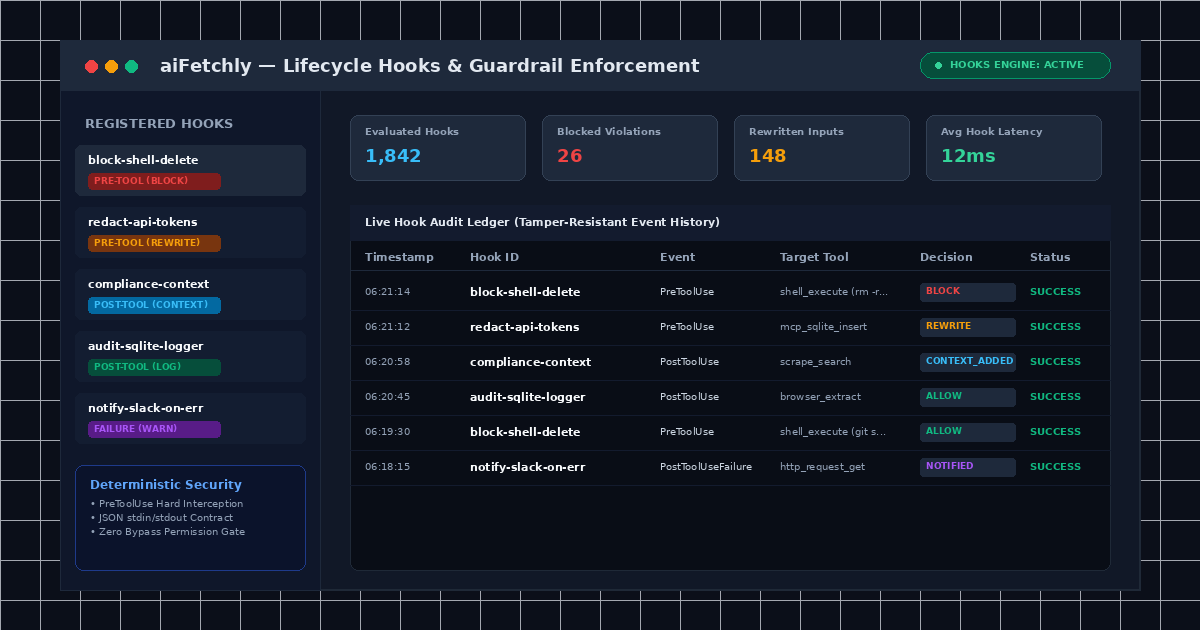
Why Prompt-Based Guardrails Fall Short in Production
As autonomous AI agents gain access to shell execution, web scrapers, and database connectors, engineering leads face an urgent challenge: how do you prevent agents from making dangerous tool calls, leaking sensitive credentials, or violating regulatory compliance during unattended runs?
Traditional agent frameworks rely on soft system prompts (e.g., “please do not delete production data”), but prompt-based guardrails frequently suffer from prompt injection, model drift, and jailbreaks. Enterprise environments require hard, deterministic middleware that intercepts agent actions before they reach the operating system.
AI Fetchly introduces a native Lifecycle Hooks Engine. Functioning as programmable gatekeepers between AI reasoning and tool execution, hooks observe, block, rewrite, or annotate every tool call across built-in skills, Model Context Protocol (MCP) servers, and shell commands.
The Anatomy of aiFetchly Lifecycle Events
Hooks are bound to precise moments in an agent’s execution lifecycle:
| Lifecycle Event | Execution Timing | Blocking Capability | Primary Application |
|---|---|---|---|
| PreToolUse | Immediately before tool dispatch | Yes (Stops execution) | Policy enforcement, parameter sanitization & redaction |
| PostToolUse | After successful tool execution | No (Already completed) | Context injection, compliance annotation, output reshaping |
| PostToolUseFailure | Immediately after tool errors | No (Cannot flip failure) | Diagnostic reporting, automatic remediation advice |
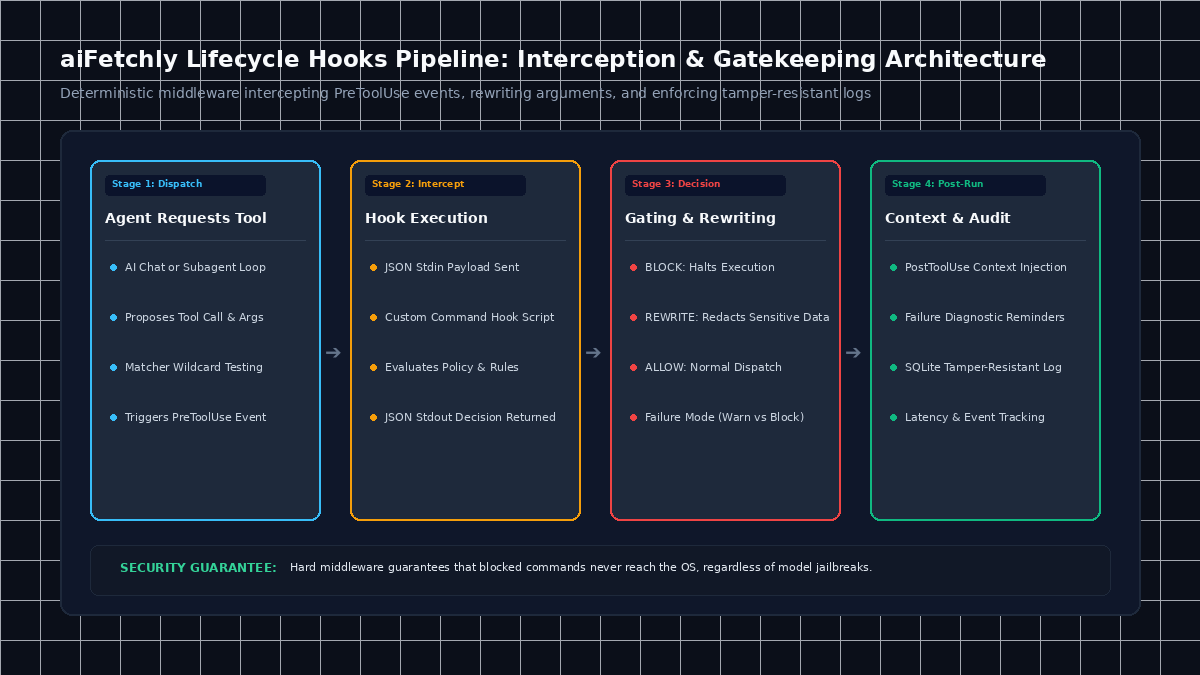
How the Hooks Engine Enforces Deterministic Guardrails
1. Intercepting and Gating via PreToolUse
When an agent requests a tool call, aiFetchly pauses execution and triggers registered PreToolUse hooks. A hook evaluates the tool name via wildcards (e.g., shell_*, scrape_*) and tests arguments against conditional patterns (e.g., rm -rf *). If a command violates policy, the hook emits { "continue": false, "reason": "Blocked by enterprise safety policy" }, terminating execution before the command ever reaches the system shell.
2. Transparent JSON-Over-StdIO Communication
Developers can write custom Command Hooks in Python, Node.js, or Go. Communication uses a clean JSON contract:
- aiFetchly passes event details (tool name, input arguments, workspace metadata) as a JSON object on standard input (
stdin). - Your script executes evaluation logic and outputs a JSON decision on standard output (
stdout). - aiFetchly parses the decision to either proceed, halt, or rewrite the inputs (such as redacting PII or API tokens).
3. Configurable Failure Modes: Warn vs. Block
Hooks themselves must handle runtime errors gracefully. aiFetchly lets developers designate an explicit failure mode for each hook:
- Warn Mode: If the hook script crashes or exceeds its timeout, the error logs to the audit ledger while the tool call proceeds normally (ideal for non-critical logging).
- Block Mode: If the hook script fails, aiFetchly defaults to a closed state, blocking the tool call to prevent unvetted execution in high-security environments.
4. Built-in Safety Hooks and Tamper-Resistant Auditing
aiFetchly ships with active out-of-the-box security hooks, including builtin-block-dangerous-shell-delete to halt destructive file system commands. Every hook invocation—including execution duration, parameters, and decision status—is permanently logged in the local SQLite audit ledger.
Deterministic Governance for Autonomous Desktop Agents
By positioning programmable hooks directly between language models and local tools, aiFetchly ensures unattended agents adhere strictly to corporate policies and safety boundaries.
To configure custom command hooks or inspect sample JSON manifests, visit the AI Fetchly Docs.
Visual Generation Prompts
Hero Image Prompt:Modern SaaS application window in dark mode, showing the aiFetchly Lifecycle Hooks console with active PreToolUse blockers, input sanitization rules, and a tamper-resistant real-time audit ledger, isometric 3D perspective, cyan and amber glowing accents.Body Image Prompt:Clean technical architecture diagram illustrating the four-stage lifecycle hook pipeline: tool dispatch, JSON stdin/stdout script evaluation, deterministic policy gating (block/allow/rewrite), and local SQLite audit logging, dark slate vector styling.