OpenAI Swarm Guide: Lightweight Multi-Agent Orchestration
The Problem: The Abstraction Bloat and Fragility of Heavyweight Agent Frameworks
In modern autonomous software engineering, intelligent data aggregation pipelines, and developer environments like AiFetchly, foundation models are increasingly tasked with complex, multi-stage workflows: customer support triage, multi-document research, automated debugging, and cross-system data retrieval.
To solve multi-step problems, the industry developed multi-agent orchestration frameworks (such as LangGraph, CrewAI, AutoGen, and early agent DAGs). However, when software engineering teams deploy these frameworks in production, they consistently collide with severe architectural trade-offs:
The Multi-Agent Orchestration Dilemma:
┌─────────────────────────────────────────────────────────────────┐
│ Approach 1: Monolithic Single-Agent Prompts with 50 Tools       │
│ ❌ Tool Selection Hallucination: Model confuses similar tools   │
│ ❌ Context Window Pollution: 10,000+ tokens of schemas burned   │
│ ❌ Brittle Instruction Following: Diluted system prompt focus   │
├─────────────────────────────────────────────────────────────────┤
│ Approach 2: Rigid Directed Acyclic Graphs (DAGs)                │
│ ❌ Hardcoded Edges: Every routing decision requires predefined  │
│    conditional router code and complex graph compilation        │
│ ❌ Non-Linear Frustration: Circular handoffs and loops require  │
│    complex state reconciliation and map-reduce nodes            │
├─────────────────────────────────────────────────────────────────┤
│ Approach 3: Heavyweight Agent Runtimes (Hidden State & Daemons) │
│ ❌ Database Lock-In: Unwanted SQLite / Postgres state saves     │
│ ❌ Steep Learning Curve: Hundreds of bespoke classes & schemas  │
│ ❌ Uncontrolled Recursion: Runaway background chat ping-pong    │
└─────────────────────────────────────────────────────────────────┘
Result: Engineering teams spend more time debugging the framework than building agent logic! 1. The Monolithic Tool Saturation Trap
When developers attempt to solve diverse business workflows using a single, monolithic agent:
- Schema Dilution: Feeding an agent 30 to 50 distinct function calling schemas burns thousands of prompt tokens on every turn before the user’s input is even evaluated.
- Tool Hallucinations: As the number of available tools grows, foundation models struggle with tool disambiguation. The agent frequently passes invalid arguments, hallucinates non-existent parameters, or triggers the wrong API entirely.
- Instruction Contradiction: Combining diverse operational guidelines (e.g., strict refund authorization rules alongside marketing sales pitches) within a single system prompt leads to contradictory persona behaviors and instruction drift.
2. The Over-Engineering of Graph-Based State Machines
To modularize agents, frameworks introduced graph-based abstractions (DAGs):
- Boilerplate Explosion: Creating a simple triage-to-specialist handoff requires defining typed state dictionaries, reducer functions, node classes, edge routers, and compiling a graph runner.
- Inflexible Dynamic Transitions: In conversational systems, user intent shifts dynamically. Forcing dialogue into rigid graph nodes requires developers to anticipate and hardcode every conceivable edge transition in advance.
- Opaque Control Flow: When an error occurs deep inside an asynchronous graph execution runtime, stack traces span thousands of lines of framework internals, obscuring the underlying LLM failure.
3. State Management and Memory Coupling
Many multi-agent frameworks bundle mandatory persistence layers:
- Hidden Database Writes: Workflows automatically persist session checkpoints to external relational or key-value databases, introducing network round-trip latencies and cloud infrastructure costs.
- State Synchronization Overhead: In high-concurrency environments or client-side desktop applications, synchronizing distributed agent state machines across threads creates race conditions, deadlocks, and memory leaks.
The Architecture: How OpenAI Swarm Redefines Multi-Agent Ergonomics
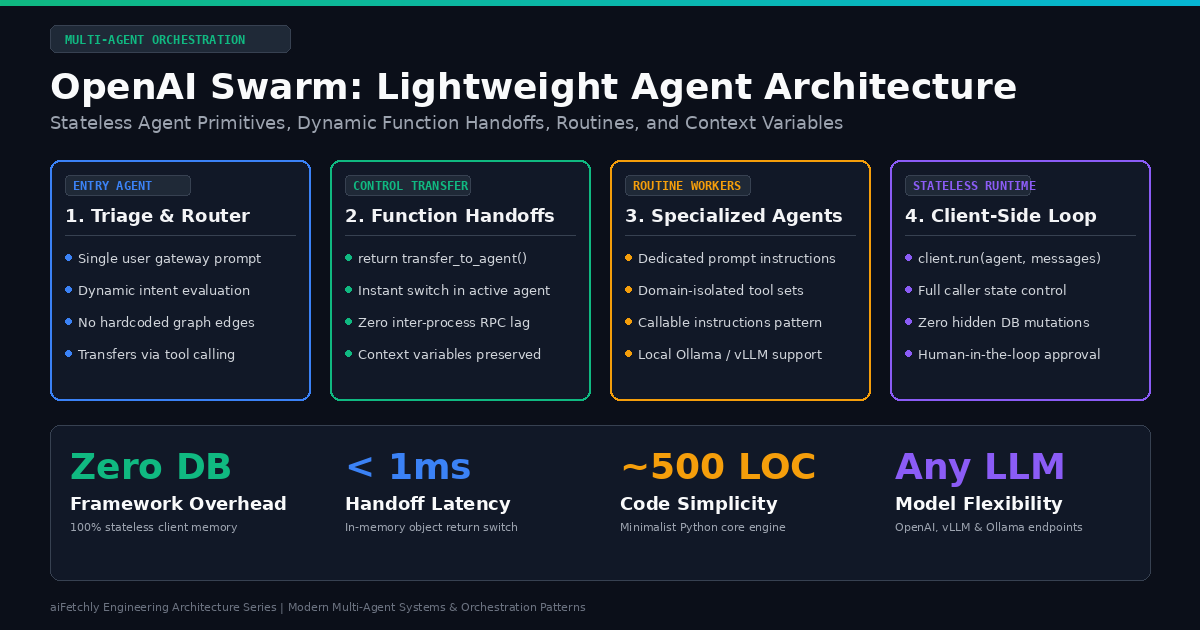
To demonstrate that multi-agent orchestration does not require hundreds of framework abstractions or complex graph compilers, OpenAI’s Solutions team released Swarm. Swarm is an experimental, educational framework exploring an ergonomic, lightweight, and completely stateless approach to coordinating multiple specialized AI agents.
Swarm reduces multi-agent architecture to two fundamental primitives: Agents and Handoffs, governed by the concept of Routines.
OpenAI Swarm Execution Topology & Handoff Mechanics:
┌────────────────────────────────────────────────────────────────────────────────────────┐
│                                   Client Application                                   │
│  Maintains conversation state: messages = [...], context_variables = {...}             │
└───────────────────────────────────────────┬────────────────────────────────────────────┘
                                            │
                                            ▼ client.run(agent=triage_agent, messages)
┌────────────────────────────────────────────────────────────────────────────────────────┐
│                              Step 1: Triage Agent Evaluation                           │
│  - System Prompt: "Inspect user request and route to appropriate department."          │
│  - Available Tools: [transfer_to_sales(), transfer_to_support()]                      │
└───────────────────────────────────────────┬────────────────────────────────────────────┘
                                            │
                                            ▼ LLM decides to call transfer_to_support()
┌────────────────────────────────────────────────────────────────────────────────────────┐
│                              Step 2: Dynamic Python Handoff                            │
│  def transfer_to_support():                                                            │
│      return support_agent  ◄── Returns actual Python Agent instance!                   │
└───────────────────────────────────────────┬────────────────────────────────────────────┘
                                            │
                                            ▼ Swarm runtime switches active agent
┌────────────────────────────────────────────────────────────────────────────────────────┐
│                              Step 3: Specialist Agent Execution                        │
│  - Active Agent: support_agent                                                         │
│  - New System Prompt: "You are technical support. Query knowledge base or refund API." │
│  - Dedicated Tools: [fetch_ticket_status(), execute_refund()]                          │
└───────────────────────────────────────────┬────────────────────────────────────────────┘
                                            │
                                            ▼ Generates final response without tool calls
┌────────────────────────────────────────────────────────────────────────────────────────┐
│                                  Step 4: Return to Caller                              │
│  Response(messages=[...], agent=support_agent, context_variables={...})                │
└────────────────────────────────────────────────────────────────────────────────────────┘ 1. The Core Primitives: Agents and Handoffs
Swarm’s elegance stems from the purity of its primary data models:
Agent: An encapsulation of a specific persona and operational boundary. An Agent consists of aname,instructions(either a static string or a dynamic Python callable receivingcontext_variables), a curated list of Pythonfunctions(tools), and an optionalmodelidentifier (defaulting togpt-4o).Handoff: The mechanism by which an agent transfers control to another agent. In Swarm, a handoff is not an abstract graph edge or an IPC bus message. A handoff is simply a Python tool function that returns anotherAgentinstance.Routines: Sequences of instructions and steps formalized within an agent’s prompt, prescribing standard operating procedures (SOPs) for specific tasks.
2. The Stateless Swarm.run() Execution Loop
Swarm contains no background daemons, no database engines, and no persistent worker processes. The entire engine is contained in roughly 500 lines of transparent Python code.
When client.run() is invoked:
- Model Forward Pass: Swarm formats the current
agent.instructions(evaluating callables withcontext_variablesif necessary), attaches the agent’s function definitions as OpenAI tool schemas, and queries the LLM with the historicalmessages. - Tool Execution: If the model returns tool calls, Swarm executes the corresponding Python functions sequentially.
- Handoff Detection: If any tool function returns an
Agentobject:- Swarm immediately switches the active agent:
current_agent = returned_agent. - The tool execution result is logged as a tool message.
- The loop immediately triggers a subsequent forward pass using the new agent’s instructions and toolset.
- Swarm immediately switches the active agent:
- Context Mutation: If a tool modifies
context_variables, the updated state dictionary is preserved across all subsequent turns. - Termination: The loop continues until the active agent returns a plain conversational response without tool calls, or until
max_turnsis reached. - Caller State Ownership: Swarm returns a
Responsedataclass containing updatedmessages, the final activeagent, and the updatedcontext_variables. The client application retains full ownership over persistence.
3. Context Variables: Shared State Without Context Pollution
In multi-agent systems, agents frequently need to share metadata (such as user_id, account_balance, session_token, or is_authenticated) without forcing every agent to repeatedly parse raw conversation history.
Swarm provides context_variables: an arbitrary Python dictionary passed into client.run(). Tools and instruction callables can read and mutate this dictionary directly:
def update_customer_tier(tier: str, context_variables: dict):
    context_variables["customer_tier"] = tier
return f"Updated tier to {tier}" This guarantees clean architectural separation: user-facing conversation logs remain natural, while internal operational state is passed deterministically through typed memory buffers.
Architectural Comparison: Swarm vs. Heavyweight Frameworks
Understanding where Swarm fits within the enterprise AI ecosystem requires contrasting its minimalist philosophy against alternative multi-agent frameworks:
| Architectural Dimension | OpenAI Swarm | LangGraph | AutoGen (AG2) | CrewAI |
|---|---|---|---|---|
| Design Philosophy | Educational & Minimalist | Enterprise DAG Workflows | Conversational Multi-Agent | Role-Based Hierarchies |
| Coordination Model | Function-Based Handoffs | StateGraph Nodes & Edges | GroupChat & Manager | Tasks, Crews & Processes |
| State Persistence | 100% Stateless (Client-Held) | Checkpointers & DB Adapters | Stateful ConversableAgent | Internal Memory & Vector DB |
| Code Footprint | ~500 Lines of Pure Python | Heavyweight Multi-Package | Heavyweight Runtime | Opinionated Framework |
| Agent Handoff Mechanism | return destination_agent | Conditional Edge Routers | Speaker Selection Prompts | Task Output Delegation |
| Local LLM Compatibility | Any OpenAI-Compatible API | Custom LLM Wrappers | LiteLLM / OAI Client | Custom LangChain LLMs |
| Learning Curve | Minimal (< 30 Minutes) | High (Complex Graph API) | Moderate (Docker/Agents) | Moderate (Role Abstractions) |
| Best Used For | Dynamic Triage & Routines | Stateful Long-Running DAGs | Sandboxed Code Execution | Structured Team Tasks |
Production Implementation: Triage and Knowledge Retrieval System
To demonstrate how Swarm functions in production, we will build a multi-agent triage and documentation retrieval pipeline.
The architecture comprises three agents:
- Triage Agent: Evaluates incoming user queries and delegates to Technical Support or Account Management.
- Documentation Agent: Queries internal documentation and web sources (such as an AiFetchly knowledge index).
- Billing Agent: Handles subscription inquiries, refund validations, and account modifications.
Multi-Agent Routing Pipeline:
┌──────────────────────────────────────┐
│             User Input               │
└──────────────────┬───────────────────┘
                   │
                   ▼
┌──────────────────────────────────────┐
│             Triage Agent             │
│  - Inspects user intent              │
│  - Routes via Python tool handoff    │
└──────────┬────────────────┬──────────┘
           │                │
     Tech Issue       Billing Query
           │                │
           ▼                ▼
┌──────────────────────┐ ┌──────────────────────┐
│ Documentation Agent  │ │    Billing Agent     │
│ - Semantic search    │ │ - Account balances   │
│ - Tool: query_docs() │ │ - Tool: issue_refund()│
└──────────────────────┘ └──────────────────────┘ Complete Python Implementation
import os
from typing import Dict, Any
from swarm import Swarm, Agent

# Initialize Swarm client
client = Swarm()

# Forward declarations for circular agent handoffs
doc_agent: Agent
billing_agent: Agent

# ---------------------------------------------------------
# Tool Functions & Handoffs
# ---------------------------------------------------------

def transfer_to_documentation() -> Agent:
    """Transfer user to the Technical Documentation specialist."""
    print(" [Handoff] Routing user to Documentation Agent...")
    return doc_agent

def transfer_to_billing() -> Agent:
    """Transfer user to the Billing and Accounts specialist."""
    print(" [Handoff] Routing user to Billing Agent...")
    return billing_agent

def query_documentation_kb(query: str, context_variables: Dict[str, Any]) -> str:
    """Search internal technical documentation and knowledge base."""
    user_id = context_variables.get("user_id", "guest")
    print(f" [Tool] Searching knowledge base for: '{query}' (User: {user_id})")

    # Simulated vector RAG response
    if "api" in query.lower() or "sdk" in query.lower():
        return "aiFetchly Python SDK v2.4 supports async batch scraping and local model routing."
    return "Refer to the architecture guide for deployment configurations and Docker setups."

def process_refund(amount: float, context_variables: Dict[str, Any]) -> str:
    """Process a refund transaction for authenticated users."""
    user_tier = context_variables.get("user_tier", "standard")
    account_id = context_variables.get("account_id", "ACC-000")

    print(f" [Tool] Evaluating refund: ${amount} for Account {account_id} (Tier: {user_tier})")

    if amount > 100.0 and user_tier != "enterprise":
        return "Refund exceeds automatic limit. Escalating to human supervisor."
    return f"Refund of ${amount:.2f} successfully approved and credited to {account_id}."

# ---------------------------------------------------------
# Dynamic Instruction Callables
# ---------------------------------------------------------

def dynamic_doc_instructions(context_variables: Dict[str, Any]) -> str:
    user_tier = context_variables.get("user_tier", "standard")
    return (
        f"You are the Technical Documentation Agent for aiFetchly. "
        f"The user has {user_tier} tier access. Provide concise, code-accurate explanations. "
        f"Use query_documentation_kb to search for technical facts."
    )

def dynamic_billing_instructions(context_variables: Dict[str, Any]) -> str:
    account_id = context_variables.get("account_id", "Unknown")
    return (
        f"You are the Billing and Accounts Specialist. Current Account: {account_id}. "
        f"Verify all refund requests with process_refund before confirming."
    )

# ---------------------------------------------------------
# Agent Definitions
# ---------------------------------------------------------

triage_agent = Agent(
    name="Triage Agent",
    instructions=(
        "You are the primary customer interface. Understand the user's issue and "
        "transfer them immediately to the appropriate department: "
        "- For code, SDK, API, or deployment questions: transfer_to_documentation "
        "- For payments, invoices, refunds, or subscriptions: transfer_to_billing"
    ),
    functions=[transfer_to_documentation, transfer_to_billing]
)

doc_agent = Agent(
    name="Documentation Agent",
    instructions=dynamic_doc_instructions,
    functions=[query_documentation_kb, transfer_to_billing]
)

billing_agent = Agent(
    name="Billing Agent",
    instructions=dynamic_billing_instructions,
    functions=[process_refund, transfer_to_documentation]
)

# ---------------------------------------------------------
# Execution Loop Simulation
# ---------------------------------------------------------

if __name__ == "__main__":
    context = {
        "user_id": "usr_94821",
        "account_id": "ACC-7741",
        "user_tier": "enterprise"
    }

    messages = [
        {"role": "user", "content": "Hi, I need help with the Python SDK API integration."}
    ]

    print("--- Turn 1: Technical Query ---")
    response = client.run(
        agent=triage_agent,
        messages=messages,
        context_variables=context
    )

    # Print assistant response
    print(f"Active Agent: {response.agent.name}")
    print(f"Response: {response.messages[-1]['content']}\n")

    # Follow-up turn switching domain context
    messages.extend(response.messages)
    messages.append({
        "role": "user",
        "content": "Thanks! Also, we had an accidental duplicate charge of $75. Can you refund it?"
    })

    print("--- Turn 2: Billing Switch ---")
    response_turn2 = client.run(
        agent=response.agent,  # Resume with whichever agent was active!
        messages=messages,
        context_variables=context
    )

    print(f"Active Agent: {response_turn2.agent.name}")
print(f"Response: {response_turn2.messages[-1]['content']}") Serving Swarm on Open-Weights Models via vLLM and Ollama
Although developed by OpenAI, Swarm communicates via standard OpenAI-compatible client libraries. By redirecting the underlying OpenAI client configuration, developers can run multi-agent Swarm workflows entirely locally on open-weights foundation models (such as LLaMA-3.3-70B, Qwen2.5-Coder-32B, or DeepSeek-V3).
from openai import OpenAI
from swarm import Swarm, Agent

# Point Swarm to local vLLM or Ollama instance
local_openai_client = OpenAI(
    base_url="http://localhost:8000/v1",  # Local vLLM server
    api_key="EMPTY"
)

# Pass custom client to Swarm
local_swarm = Swarm(client=local_openai_client)

local_agent = Agent(
    name="Local Code Assistant",
    model="Qwen/Qwen2.5-Coder-32B-Instruct",
    instructions="You are an autonomous local software assistant running on private infrastructure."
) Critical Requirements for Local Open-Weights Serving
- High Tool-Calling Fidelity: Multi-agent handoffs depend entirely on accurate JSON function calling. Models must adhere strictly to function schemas without dropping argument properties or hallucinating markdown wrappers. Models like
Qwen2.5-72B-InstructorMeta-Llama-3.1-70B-Instructexcel at Swarm tool execution. - Context Compression: Because each turn in Swarm appends tool calls and handoff tracebacks to
messages, context lengths grow steadily across multi-agent exchanges. Utilize engines with PagedAttention and prefix caching (such as vLLM or SGLang) to eliminate redundant KV cache computations.
Operational Best Practices for Production Multi-Agent Systems
When engineering multi-agent systems with Swarm in production:
- Keep Agent Scopes Narrow: Do not build generalist agents that attempt to do everything. Each agent should master a single routine with 2 to 4 tightly coupled tools. Narrow scopes maximize tool-calling accuracy.
- Equip Every Specialist with Exit Handoffs: An agent specialized in documentation must have a tool to hand off back to triage or to billing. Without exit paths, agents get trapped in endless loops when users change the subject.
- Leverage Dynamic Instructions for Scoped Context: Instead of polluting system prompts with every user detail, pass metadata through
context_variablesand compute agent instructions dynamically using callable functions. - Implement Deterministic Max Turn Guards: Always configure
max_turns(e.g.,client.run(..., max_turns=10)) to guard against infinite circular handoffs between competing agents. - Decouple Persistence from Orchestration: Keep agent orchestration stateless. Save conversation histories, user audit logs, and transaction ledgers in your own transactional database (e.g., PostgreSQL or SQLite) at the client controller level.