Open-WebUI Guide: Self-Hosted AI Interface & Pipelines
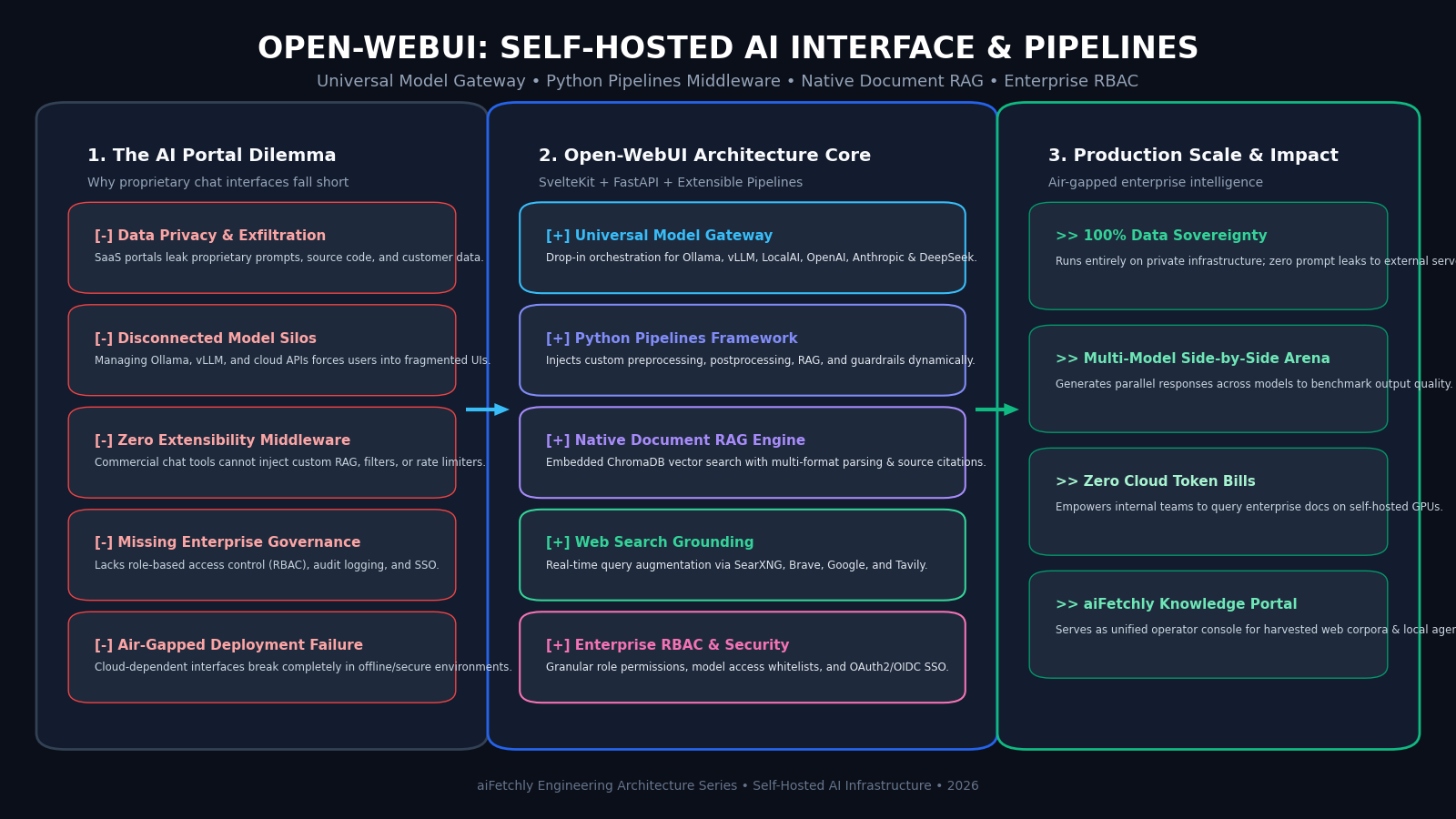
The Problem: The Security, Governance, and Customization Vacuum of Cloud AI Portals
In modern enterprise workflows, automated web extraction systems, and private data intelligence pipelines powered by AiFetchly, deploying conversational AI interfaces for internal teams, operations analysts, and engineers has become mission-critical. Organizations need a centralized portal where team members can query technical documentation, interact with multi-agent research tools, extract unstructured tables from web data, and compare model outputs.
However, relying on proprietary cloud chat portals (such as public consumer ChatGPT, Claude web, or closed SaaS platforms) creates severe operational and architectural risks:
The Enterprise AI Portal Dilemma:
┌────────────────────────────────────────────────────────┐
│ Vulnerability 1: Intellectual Property Exfiltration    │
│ • Employees paste internal source code & financials    │
│ ❌ Transmitted over public internet to third-party APIs│
│ ❌ Violates strict GDPR, HIPAA, and SOC 2 mandates     │
├────────────────────────────────────────────────────────┤
│ Vulnerability 2: Fractured Model Infrastructure        │
│ • Engineering runs Ollama on workstations & vLLM in k8s│
│ ❌ Users toggle between five disconnected web UIs      │
│ ❌ Zero centralized model switching or arena comparison│
├────────────────────────────────────────────────────────┤
│ Vulnerability 3: The Rigid "Black-Box" Interface Wall  │
│ • SaaS portals disallow custom Python middleware       │
│ ❌ Cannot inject enterprise RAG, PII scrubbing, or guards│
│ ❌ Cannot connect internal company search engines      │
└────────────────────────────────────────────────────────┘
Result: Enterprises compromise either employee data security or AI agility! 1. Intellectual Property Exfiltration and Cloud Data Leaks
When employees use commercial cloud interfaces, every prompt, uploaded PDF contract, source code snippet, and financial ledger is transmitted across external networks and stored in vendor databases:
- Even with business enterprise agreements, proprietary trade secrets and personally identifiable information (PII) leave the perimeter of the corporate Virtual Private Cloud (VPC).
- For organizations operating in regulated sectors (such as fintech, healthcare, defense, or competitive data mining), third-party data transmission triggers immediate compliance violations.
2. Disconnected Model Silos and Multi-Tool Fatigue
Modern enterprise AI deployments rarely rely on a single foundation model:
- Data scientists run open-weights models (such as LLaMA 3.3 70B, Qwen 2.5 Coder, or DeepSeek-R1) on local GPU clusters via Ollama or vLLM to minimize cloud API spend.
- Concurrently, product managers access frontier commercial APIs (such as Claude 3.5 Sonnet or GPT-4o) for high-order multimodal drafting.
- Without a unified interface, teams suffer from tool fragmentation: switching between command-line terminals, vendor playgrounds, and custom scripts without unified chat history or shared knowledge stores.
3. The Lack of Extensible Middleware and Custom Ingestion Pipes
Commercial web interfaces are closed black boxes:
- Developers cannot inject custom Python logic before an LLM receives a prompt (e.g., masking credit card numbers or querying internal CRM databases).
- Teams cannot replace the default web search with private internal indices (e.g., SearXNG or internal corporate intranets).
- There is no native support for routing requests dynamically based on prompt complexity or user authorization roles.
To overcome these structural roadblocks, the open-source community created Open-WebUI: a modular, self-hosted, enterprise-grade AI operating interface that combines a reactive SvelteKit frontend, a high-throughput FastAPI backend, and an extensible Python Pipelines middleware framework.
The Solution: Open-WebUI Architecture, Python Pipelines & Native Document RAG
Open-WebUI acts as a universal operating system for foundation models. It unifies local inference servers (Ollama, vLLM, llama.cpp, LocalAI) with external cloud providers (OpenAI, Anthropic, Gemini, Groq, DeepSeek) behind a single OpenAI-compatible gateway.
Open-WebUI Comprehensive System Architecture:
┌─────────────────────────────────────────────────────────────────┐
│ User Client: Browser / Mobile Web App / SvelteKit Frontend     │
└─────────────────────────────────────────────────────────────────┘
                               │ (WebSocket / SSE / REST)
                               ▼
┌─────────────────────────────────────────────────────────────────┐
│ Open-WebUI FastAPI Backend Server (Port 8080)                  │
│ • Role-Based Access Control (RBAC): Admin / User Roles          │
│ • Native SQLite / PostgreSQL Relational Metadata Store          │
│ • Web Search Grounding: SearXNG, Brave, Google, Tavily          │
│ • Voice Synthesis (Kokoro/TTS) & Audio Transcription (Whisper)  │
└──────────────────────────────┬──────────────────────────────────┘
                               │
        ┌──────────────────────┼──────────────────────┐
        ▼                      ▼                      ▼
┌───────────────┐      ┌───────────────┐      ┌───────────────┐
│ Open-WebUI    │      │ Embedded RAG  │      │ Model Gateway │
│ Pipelines     │      │ Engine        │      │ Dispatched    │
│ • Python hooks│      │ • Docling/PyPDF│     │ • Ollama / vLLM│
│ • PII Masking │      │ • ChromaDB    │      │ • Open-Weights│
│ • Guardrails  │      │ • Hybrid BM25 │      │ • Cloud APIs  │
└───────────────┘ └───────────────┘ └───────────────┘ 1. Dual SvelteKit and FastAPI Architecture
Open-WebUI achieves high responsiveness and scalability through a decoupled full-stack architecture:
- SvelteKit Frontend: Delivers a lightweight, reactive user interface featuring markdown rendering, LaTeX equation typesetting, code syntax highlighting with copy-paste diffs, and real-time streaming via Server-Sent Events (SSE).
- FastAPI Core Engine: An asynchronous Python backend that manages user authentication (JWT tokens, OAuth2, OpenID Connect), chat history persistence in SQLite or PostgreSQL, document ingestion queues, and model API key encryption.
2. The Python Pipelines Plugin Framework
Open-WebUI’s most powerful architectural innovation is Pipelines: an independent, modular middleware framework that runs alongside the main server:
- Rather than modifying the core codebase, developers author standalone Python scripts containing
@pipelinedecorators. - Inlet & Outlet Filters: Pipelines intercept requests before they reach the model (e.g., stripping sensitive employee IDs or enriching prompts with live SQL data) and after the model responds (e.g., verifying factual citations or formatting JSON schemas).
- Dynamic Model Injection: Pipelines can expose entirely new virtual models to users (e.g., a “Customer Support Pipeline” that automatically routes between Claude and local Ollama based on request complexity).
3. Native Document RAG with ChromaDB and Citations
Open-WebUI includes a complete, out-of-the-box Retrieval-Augmented Generation (RAG) subsystem:
- Multi-Format Parsing: Users upload PDF, DOCX, CSV, TXT, and Markdown files directly into the chat window or knowledge collections.
- Embedded Vector Database: Ingested documents are chunked and embedded using local sentence transformers or fast ONNX embeddings, stored inside an integrated ChromaDB vector instance.
- Hybrid Retrieval & Reranking: Queries execute hybrid vector search and BM25 keyword matching, returning relevant passages with clickable inline source citations that display the exact document page and paragraph in a side modal.
4. Web Search Grounding with Real-Time Synthesis
When enabled, Open-WebUI integrates directly with search providers (including self-hosted SearXNG, Brave Search, Google PSE, or Tavily):
- When a user asks about breaking news or live documentation, Open-WebUI issues a background search, scrapes the top result pages, extracts clean text, and injects the synthesized evidence into the prompt context with source URLs.
5. Enterprise Multi-User Governance and Model Whitelisting
Open-WebUI is built from the ground up for multi-tenant enterprise deployment:
- Granular RBAC: Administrators assign fine-grained permissions: controlling who can create knowledge collections, execute web searches, or export chat transcripts.
- Model Whitelists: Restrict specific user groups to cost-effective local models (e.g., Ollama LLaMA-3.2 3B) while reserving costly frontier models for authorized engineers.
- Single Sign-On (SSO): Integrates natively with corporate identity providers via Okta, Microsoft Entra ID, Keycloak, or Google Workspace via OAuth2/OIDC.
Architectural Comparison: Open-WebUI vs. Proprietary Web UIs vs. LibreChat vs. Text-Generation-WebUI
The table below contrasts Open-WebUI with competing conversational interfaces:
| Metric / Capability | Proprietary SaaS (ChatGPT) | Text-Generation-WebUI | LibreChat | Open-WebUI |
|---|---|---|---|---|
| Data Privacy | Cloud Third-Party | 100% Local | Self-Hosted | 100% Air-Gapped Local |
| Model Support | Closed Vendor Only | Local Models Only | Cloud & Local | Universal (Local + Cloud) |
| Python Middleware | None (Closed) | Basic Extensions | Node Plugins | Open-WebUI Pipelines |
| Native Document RAG | Limited Cloud Files | Brittle Third-Party | Basic Vector RAG | ChromaDB + Hybrid BM25 |
| Enterprise RBAC | Basic Workspace | None (Single User) | Strong | Granular Roles + Whitelists |
| Web Search Grounding | Proprietary Bing | None | Google/Brave | SearXNG, Brave, Google, Tavily |
| Voice & Speech | Cloud Voice Only | Heavy CUDA TTS | Basic Web Speech | Integrated Whisper + Kokoro |
| Deployment Model | Managed SaaS | Python CLI | Docker Compose | Single Docker Container |
Hands-On Implementation: Deploying Open-WebUI with Docker and Custom Python Pipeline
Below is a complete, production-grade guide demonstrating how to launch Open-WebUI with Docker Compose, connect it to a local Ollama instance, and build a custom Python Pipeline for automated PII masking.
Step 1: Launch Open-WebUI via Docker Compose with Ollama Support
Create a docker-compose.yml file to run Open-WebUI alongside an Ollama inference runner on your workstation:
version: '3.8'

services:
  ollama:
    image: ollama/ollama:latest
    container_name: ollama
    restart: unless-stopped
    ports:
      - '11434:11434'
    volumes:
      - ollama_data:/root/.ollama

  open-webui:
    image: ghcr.io/open-webui/open-webui:main
    container_name: open-webui
    restart: unless-stopped
    ports:
      - '8080:8080'
    environment:
      - OLLAMA_BASE_URL=http://ollama:11434
      - WEBUI_SECRET_KEY=supersecretenterprisekey12345
      - ENABLE_SIGNUP=true
      - DEFAULT_MODELS=llama3.2:latest
    volumes:
      - open_webui_data:/app/backend/data
    depends_on:
      - ollama

volumes:
  ollama_data:
open_webui_data: Launch the stack:
docker compose up -d Navigate to http://localhost:8080 in your browser. The first account created automatically receives full Administrator privileges.
Step 2: Build a Custom Python Pipeline with PII Scrubbing and Web Grounding
Open-WebUI Pipelines allows developers to create custom filters in standard Python. Below is a complete pipeline that intercepts user prompts, masks email addresses and phone numbers with regex, and logs the cleansed prompt:
"""
title: Enterprise PII Masking Filter Pipeline
author: aiFetchly Engineering
date: 2026-10-03
version: 1.0.0
license: MIT
description: Intercepts prompts to scrub emails and phone numbers before LLM processing.
"""

from typing import List, Optional, Dict, Any
import re
from pydantic import BaseModel

class Pipeline:
    class Valves(BaseModel):
        pipelines: List[str] = ["*"]
        priority: int = 0
        mask_emails: bool = True
        mask_phones: bool = True

    def __init__(self):
        self.type = "filter"
        self.name = "PII Sanitizer Filter"
        self.valves = self.Valves()

    async def on_startup(self):
        print(f"[{self.name}] Pipeline initialized successfully.")

    async def on_shutdown(self):
        print(f"[{self.name}] Pipeline shut down.")

    async def inlet(self, body: dict, user: Optional[dict] = None) -> dict:
        """Inlet filter executes BEFORE the prompt reaches the foundation model."""
        messages = body.get("messages", [])
        if not messages:
            return body

        # Extract latest user message
        last_message = messages[-1]
        content = last_message.get("content", "")

        # 1. Mask Email Addresses
        if self.valves.mask_emails:
            email_pattern = r"[a-zA-Z0-9_.+-]+@[a-zA-Z0-9-]+\.[a-zA-Z0-9-.]+"
            content = re.sub(email_pattern, "[REDACTED_EMAIL]", content)

        # 2. Mask Phone Numbers
        if self.valves.mask_phones:
            phone_pattern = r"\b\d{3}[-.\s]??\d{3}[-.\s]??\d{4}\b"
            content = re.sub(phone_pattern, "[REDACTED_PHONE]", content)

        # Update message with sanitized content
        last_message["content"] = content
        body["messages"][-1] = last_message

        print(f"[{self.name}] Sanitized User Prompt: {content}")
        return body

    async def outlet(self, body: dict, user: Optional[dict] = None) -> dict:
        """Outlet filter executes AFTER model emits completion."""
        # Optional: Add post-processing or audit logging
return body Deploying this pipeline inside Open-WebUI’s Admin Panel > Pipelines ensures that all prompts submitted across the enterprise are sanitized automatically before reaching local GPUs or cloud model endpoints.
Step 3: Configure Enterprise Model Access Whitelists and Ingest Documents
In Open-WebUI, configure document RAG and user access:
- Document Ingestion: Navigate to Workspace > Knowledge, create a collection named
Scraped-Market-Reports, and drag-and-drop harvested PDF or text files. Open-WebUI automatically parses text, extracts tables, chunks content into 512-token segments, and embeds them into ChromaDB. - Knowledge Querying: In any chat, type
#Scraped-Market-Reportsfollowed by a query. Open-WebUI executes hybrid vector search and displays verified passage citations in real-time. - Model Whitelisting: Navigate to Admin Settings > Models, select model access, and restrict high-cost cloud models (such as GPT-4o) exclusively to the
AdminorResearchrole, while assigningllama3.2:3bto all general users.
Production Deployment with aiFetchly
In enterprise data harvesting, market intelligence, and continuous web monitoring pipelines engineered by AiFetchly, Open-WebUI acts as the central interactive workstation for operations teams and researchers.
aiFetchly Enterprise Intelligence Integration with Open-WebUI:
┌─────────────────────────────────────────────────────────────────┐
│ 1. Autonomous Web Ingestion Engine                              │
│ • aiFetchly crawls competitor portals, tables, and disclosures  │
│ • Cleanses HTML, extracts metadata, outputs structured JSON     │
├─────────────────────────────────────────────────────────────────┤
│ 2. Automated Knowledge Base Synchronization                     │
│ • aiFetchly pushes scraped corpora into Open-WebUI Knowledge API│
│ • Vector embeddings generated locally via FastEmbed / ChromaDB  │
├─────────────────────────────────────────────────────────────────┤
│ 3. Secure Internal Analysis Portal                              │
│ • Analysts query harvested web data via self-hosted Open-WebUI  │
│ • 100% confidential; zero risk of third-party cloud data leaks  │
├─────────────────────────────────────────────────────────────────┤
│ 4. Multi-Model Side-by-Side Validation                          │
│ • Compare local SLMs against cloud reasoning models in parallel │
│ • Review inline web citations to verify extracted market facts │
└─────────────────────────────────────────────────────────────────┘ - Guaranteed Enterprise Confidentiality: By pairing aiFetchly’s web collection workers with self-hosted Open-WebUI on private servers, financial analysts and competitive intelligence teams review sensitive market data without exposing prompts to external providers.
- Actionable Inline Citations: Open-WebUI’s native RAG citations allow human operators to audit extracted claims directly against raw crawled web pages, eliminating hallucinated statistics.
- Custom Workflow Automation: Utilizing Open-WebUI Pipelines, aiFetchly operators trigger automated web re-scraping jobs directly from chat prompts using custom tool-calling hooks.
To learn more about how aiFetchly combines automated web extraction with private foundation model architectures, explore our AiFetchly Documentation or review our AiFetchly Pricing.