Moondream 2 Guide: Tiny 1.86B Vision AI for Edge Devices
The Problem: The Computational Weight and Cloud Latency of Frontier VLMs
In modern automated data harvesting, web scraping, and intelligent desktop copilots built with AiFetchly, vision is an indispensable modality: understanding dynamic web viewports, verifying rendered charts, solving visual verification challenges, and localizing user interface components without brittle DOM selectors.
Historically, multimodal understanding required deploying massive, frontier-grade Vision-Language Models (VLMs) such as GPT-4o, Claude 3.5 Sonnet, Qwen2-VL-72B, or Pixtral 12B. While these models deliver impressive general reasoning, operationalizing them for high-frequency, client-side tasks introduces three acute operational bottlenecks:
The Frontier VLM Deployment Bottleneck on Edge Workflows:
Client Task: "Verify if webpage loaded login modal and return button coordinates."
  │
  ▼ [Frontier Cloud VLM Approach]
┌────────────────────────────────────────────────────────┐
│ Cloud Multi-Modal API (e.g., 72B Parameters)          │
│ • Upload 2MB PNG Screenshot over Internet              │
│ • Metered API Cost: $0.01 to $0.03 per image           │
│ • Cloud Processing & Token Generation: 1,500ms–3,500ms │
│ • High VRAM Footprint: Requires 40GB–80GB Datacenter GPU│
└────────────────────────────────────────────────────────┘
  │
  ├──► Failure 1: High Latency & Sluggish Automation
  │    ❌ A 2-second roundtrip per frame makes real-time scraping impossible!
  │
  ├──► Failure 2: Privacy & Compliance Violations
  │    ❌ Uploading confidential screens to external cloud endpoints violates GDPR!
  │
  └──► Failure 3: Lack of Precise Coordinate Grounding
❌ Chat-tuned models emit verbose descriptions instead of exact [x, y] clicks! 1. The VRAM Wall of Large Multimodal Foundation Models
Frontier vision models feature parameter counts ranging from 12 billion to over 70 billion parameters:
- Running them locally requires enterprise datacenter accelerators (such as NVIDIA A100 or H100 GPUs with 80GB VRAM).
- On standard developer laptops, edge devices (such as Raspberry Pi 5), or client desktop applications, allocating 24GB+ of VRAM exclusively for vision inference is completely impossible.
2. Network Latency, Cloud API Costs, and Data Privacy Bottlenecks
Offloading image analysis to commercial cloud vision endpoints creates severe friction:
- Roundtrip Latency: Compressing, transmitting, and processing a 1080p screenshot over standard broadband consumes 1,200ms to 3,000ms per step.
- Metered Expenses: Scraping 50,000 e-commerce pages daily with cloud vision APIs costs thousands of dollars per month in metered token fees.
- Data Sovereignty: Enterprise desktop agents frequently capture sensitive client data (financial records, internal dashboards, PII) that cannot legally leave the local machine.
3. The Lack of Specialized Pointing and Detection in General Chat Models
Standard conversational VLMs are optimized for narrative prose rather than spatial action:
- When prompted with “Where is the Submit button?”, general models respond with lengthy text paragraphs (“The blue button is located near the bottom right of the main white card…”).
- They lack native, deterministic APIs to return standardized bounding boxes or normalized
[x, y]coordinates needed by automated click handlers.
The Solution: Moondream 2 Lightweight Multimodal Architecture
To eliminate cloud dependencies and bring instantaneous multimodal reasoning to consumer devices, AI researcher Vikhyat developed Moondream 2 (and its ultra-compact 0.5B sibling).
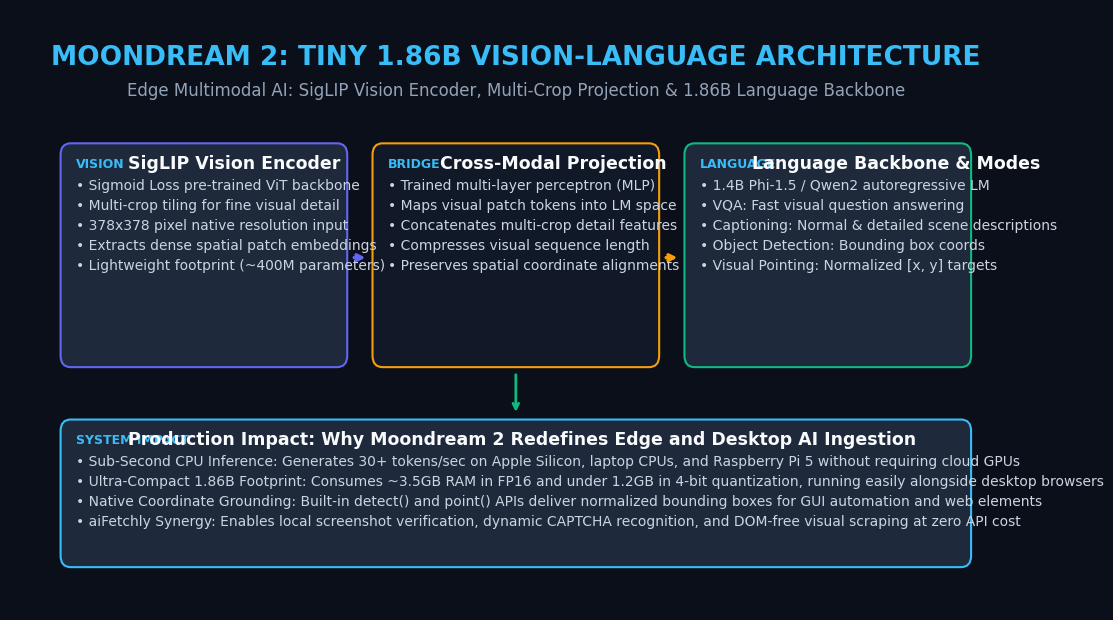
Moondream 2 is an open-source, Apache 2.0-licensed vision-language model engineered from the ground up for extreme parameter efficiency and sub-second CPU inference. With a total footprint of just 1.86 billion parameters, Moondream 2 runs comfortably inside consumer RAM, executing at 30+ tokens per second on Apple Silicon and modern CPUs.
Moondream 2 System Topology:
                        ┌────────────────────────┐
                        │   Input Image & Prompt │
                        └───────────┬────────────┘
                                    │
                                    ▼
┌────────────────────────────────────────────────────────────────────────┐
│ 1. SigLIP Vision Encoder (~400M Parameters)                            │
│ • Processes 378x378 base patches via Sigmoid Loss ViT                  │
│ • Multi-crop slicing preserves fine detail across non-square images   │
│ • Emits rich spatial visual embeddings without heavy token bloat       │
└───────────────────────────────────┬────────────────────────────────────┘
                                    │
                                    ▼
┌────────────────────────────────────────────────────────────────────────┐
│ 2. Cross-Modal MLP Projection Layer                                    │
│ • Linear projection maps visual token dimension into text hidden space │
│ • Concatenates global overview tokens with high-resolution crops       │
└───────────────────────────────────┬────────────────────────────────────┘
                                    │
                                    ▼
┌────────────────────────────────────────────────────────────────────────┐
│ 3. Compact Language Backbone: Phi-1.5 / Qwen2 (~1.4B Parameters)       │
│ • Autoregressive transformer generating answers, captions & coordinates│
│ • Built-in functional APIs: caption(), query(), detect(), point()      │
└───────────────────────────────────┬────────────────────────────────────┘
                                    │
                                    ▼
                        ┌────────────────────────┐
                        │ Grounded Text / Coords │
└────────────────────────┘ 1. The SigLIP Vision Transformer with Multi-Crop Tiling
Moondream 2 utilizes a SigLIP (Sigmoid Loss for Language-Image Pre-Training) vision encoder:
- Unlike legacy CLIP models trained with softmax contrastive loss across mini-batches, SigLIP treats image-text pairs as independent binary classification problems using a sigmoid loss function.
- This produces superior visual representations for fine-grained object semantics while requiring significantly fewer parameters (~400M parameters).
- Multi-Crop Detail Processing: To process high-resolution images without loss of fine details, Moondream splits non-square images into a global overview tile plus localized high-resolution crops, concatenating the visual feature tokens before language projection.
2. Cross-Modal Projection Layer and Spatial Feature Alignment
The visual embeddings produced by SigLIP are projected into the textual representation space using a lightweight, two-layer Multi-Layer Perceptron (MLP):
- The projection matches the visual channel dimension to the language model’s hidden dimension ($d = 2,048$).
- This architectural bridge preserves topological spatial relationships, ensuring that the model retains an intuitive sense of coordinate geometry for pointing and detection.
3. Compact 1.4B Causal Language Backbone and Built-In Inference Modes
The textual reasoning engine is powered by a customized causal language model (such as Microsoft Phi-1.5 or Qwen2):
- The model accepts visual prefix tokens followed by textual prompt tokens, autoregressively decoding text answers.
- Rather than forcing developers to write complex parsing regexes, Moondream 2 exposes high-level Python methods natively on the model class:
query(),caption(),detect(), andpoint().
Deep Dive: Specialized Functional Modes in Moondream 2
What sets Moondream 2 apart from other lightweight models is its diverse suite of built-in functional modes specifically designed for automation and visual grounding.
The Four Functional Modes of Moondream 2:
┌────────────────────────────────────────────────────────────────┐
│ Input: Image of an E-Commerce Checkout Form                   │
└───────────────────────────────┬────────────────────────────────┘
                                │
        ┌───────────────────────┼───────────────────────┐
        ▼                       ▼                       ▼
┌──────────────┐        ┌──────────────┐        ┌──────────────┐
│ Mode 1: VQA  │        │Mode 2: Detect│        │Mode 3: Point │
│ model.query()│        │model.detect()│        │model.point() │
│              │        │              │        │              │
│ Q: "Is promo │        │ Target:      │        │ Target:      │
│ code applied?│        │ "coupon box" │        │ "Pay button" │
│              │        │              │        │              │
│ Answer:      │        │ Bounding Box:│        │ Normalized:  │
│ "Yes, -$15.00│        │ [ymin, xmin, │        │ x: 0.82      │
│ discount."   │        │  ymax, xmax] │        │ y: 0.91      │
└──────────────┘ └──────────────┘ └──────────────┘ 1. Visual Question Answering (VQA) and Contextual Captioning
Moondream 2 answers natural language queries grounded in visual context with exceptional conciseness:
- Normal Caption: Returns a single, informative sentence summarizing the core subject.
- Detailed Caption: Produces a comprehensive paragraph detailing foreground objects, background scenery, text signage, and lighting.
- VQA: Answers specific questions with direct factual accuracy, ignoring conversational filler.
2. Object Detection with Normalized Bounding Box Coordinates
Using the native detect(image, object_name) API:
- Moondream identifies instances of a specified entity and returns a list of normalized bounding boxes formatted as dictionaries:
{"ymin": float, "xmin": float, "ymax": float, "xmax": float}. - Coordinates range from
0.0to1.0, allowing host applications to instantly scale box dimensions to arbitrary screen resolutions and DPI displays.
3. Visual Pointing for UI Grounding and Coordinate Targeting
For GUI automation, web scraping, and robotic click targeting, point(image, target_name) is a game changer:
- It returns a normalized point
{ "x": float, "y": float }representing the visual center of mass of the target element. - This allows autonomous agents to target buttons, checkboxes, and form inputs directly from screenshots without inspecting DOM HTML trees or dealing with shadow roots.
Benchmark & Hardware Comparison: Moondream 2 vs. Frontier and Edge VLMs
To evaluate how Moondream 2 compares against contemporary edge and cloud vision models, consider the following technical benchmark:
| Metric / Attribute | Cloud VLM (GPT-4o) | Qwen2-VL-7B | SmolVLM (Hugging Face) | Moondream 2 (Vikhyat) |
|---|---|---|---|---|
| Total Parameters | Closed (~200B+) | 7.6 Billion | 2.2 Billion | 1.86 Billion (Also 0.5B) |
| VRAM Footprint (FP16) | Cloud Server (80GB) | ~16.5 GB | ~4.8 GB | ~3.5 GB (1.2GB in INT4) |
| CPU Serving Speed | N/A (Cloud only) | 2–5 tokens/sec | 12–18 tokens/sec | 30+ tokens/sec (Instant!) |
| On-Device Hardware | None (Requires API) | High-end GPU | Mid-range Laptop | Raspberry Pi 5 / M-series |
| Native Pointing API | Text-based heuristic | Text bounding box | Basic coordinates | Native point() & detect() |
| Cost per 10k Images | $150.00 – $300.00 | Self-hosted GPU | $0.00 (Self-hosted) | $0.00 (100% Free/Local) |
| Data Privacy | Cloud transmission | Local or Cloud | 100% On-device | 100% On-device airgapped |
Practical Implementation: Running Moondream 2 on Local Hardware and CPUs
Let us implement a complete Python application demonstrating visual question answering, captioning, object detection, and visual coordinate pointing using the official transformers library.
Step 1: Install Dependencies and Initialize Moondream 2
# Install PyTorch, Transformers, Pillow, and Accelerate
pip install torch torchvision transformers pillow accelerate Save the initialization script as run_moondream.py:
import torch
from PIL import Image
from transformers import AutoModelForCausalLM, AutoTokenizer

def initialize_moondream():
    model_id = "vikhyat/moondream2"
    revision = "2025-01-09"  # Specify pinned production checkpoint

    print(f"Loading Moondream 2 ({model_id})...")

    # Detect hardware acceleration: Apple Silicon (MPS), CUDA, or CPU
    device = "cuda" if torch.cuda.is_available() else "mps" if torch.backends.mps.is_available() else "cpu"
    dtype = torch.float16 if device in ["cuda", "mps"] else torch.float32

    model = AutoModelForCausalLM.from_pretrained(
        model_id,
        trust_remote_code=True,
        revision=revision,
        torch_dtype=dtype,
        device_map={"": device}
    )
    tokenizer = AutoTokenizer.from_pretrained(model_id, revision=revision)

    print(f"Model successfully loaded on device: {device} ({dtype})\n")
    return model, tokenizer

if __name__ == "__main__":
model, tokenizer = initialize_moondream() Step 2: Executing Visual Question Answering and Captioning
Extend the script to query images and generate descriptions:
def run_vqa_and_caption(model, tokenizer, image_path: str):
    image = Image.open(image_path).convert("RGB")

    # 1. Generate standard concise caption
    print("--- Generating Standard Caption ---")
    caption = model.caption(image)["caption"]
    print(f"Caption: {caption}\n")

    # 2. Query specific visual questions
    question = "What color is the main heading banner, and what text is visible?"
    print(f"--- Querying Visual Question: '{question}' ---")
    answer = model.query(image, question)["answer"]
    print(f"Answer: {answer}\n")

if __name__ == "__main__":
    # Create sample dummy image for verification
    sample_img = Image.new("RGB", (600, 400), color=(30, 41, 59))
    sample_img.save("sample_screen.png")
run_vqa_and_caption(model, tokenizer, "sample_screen.png") Step 3: Running Object Detection and Coordinate Pointing for GUI Automation
Leverage Moondream 2’s built-in spatial APIs to calculate physical click targets:
def run_grounding_and_clicks(model, image_path: str):
    image = Image.open(image_path).convert("RGB")
    img_width, img_height = image.size

    # 1. Visual Pointing: Find the click center of an element
    target_element = "button"
    print(f"--- Locating Target Point for '{target_element}' ---")
    points = model.point(image, target_element)["points"]

    for idx, pt in enumerate(points):
        # Convert normalized [0, 1] coordinates to absolute screen pixels
        pixel_x = int(pt["x"] * img_width)
        pixel_y = int(pt["y"] * img_height)
        print(f"Target {idx + 1}: Normalized=({pt['x']:.3f}, {pt['y']:.3f}) -> Pixel=({pixel_x}px, {pixel_y}px)")

    # 2. Object Detection: Extract Bounding Boxes
    print(f"\n--- Detecting Bounding Boxes for '{target_element}' ---")
    objects = model.detect(image, target_element)["objects"]
    for idx, obj in enumerate(objects):
        print(f"Box {idx + 1}: ymin={obj['ymin']:.3f}, xmin={obj['xmin']:.3f}, ymax={obj['ymax']:.3f}, xmax={obj['xmax']:.3f}")

if __name__ == "__main__":
run_grounding_and_clicks(model, "sample_screen.png") Production Architecture Best Practices: Integrating Moondream 2 in aiFetchly
When integrating Moondream 2 into desktop extraction agents, automated web crawlers, and quality assurance bots in AiFetchly, follow these architectural guidelines:
1. Client-Side Screen Parsing and DOM-Free Element Localization
Modern web applications frequently render interactive content through HTML5 Canvas, WebGL, or complex shadow DOMs that resist conventional CSS/XPath extractors:
- Capture viewport screenshots and pass them to Moondream 2’s
point()API. - Use the resulting normalized coordinates to dispatch native mouse events via Playwright or OS-level inputs, completely bypassing obfuscated DOM trees.
2. Edge CAPTCHA Verification and Quality Assurance Gates
Instead of making costly cloud API calls for routine visual checks:
- Deploy Moondream 2 as a lightweight verification filter.
- Let the local model confirm whether an anti-bot CAPTCHA overlay is present, if a page rendered blank, or if data tables finished loading before initiating full data parsing.
3. ONNX and 4-Bit GGUF Quantization for Zero-Latency Scraping Workers
To minimize CPU consumption on multi-worker scraping nodes:
- Export Moondream 2 to ONNX Runtime or quantized GGUF format using llama.cpp.
- In 4-bit quantization, Moondream 2 consumes less than 1.2 GB of RAM, allowing up to 8 parallel vision workers to run concurrently on a single 16GB developer machine with zero memory thrashing.
- Combine local vision filtering with high-throughput inference backends like LMCache or RadixAttention to create an end-to-end, ultra-fast local AI ingestion stack.