Model Context Protocol (MCP): Architecture & Setup Guide
The Problem: The N×M Tool Integration Bottleneck
As enterprise engineering teams build autonomous AI agents and retrieval-augmented systems, connecting foundation models to external data stores and APIs has become a primary operational bottleneck. Historically, each AI platform required proprietary connectors:
- Proprietary Tooling Specifications: OpenAI Assistants used one function-calling format, Anthropic used another, LangChain maintained custom wrappers, and desktop clients required dedicated plugins.
- The $N \times M$ Integration Complexity: If an engineering team maintains $N$ different AI client interfaces (chatbots, code editors, automation agents) and needs access to $M$ external data sources (SQL databases, scraping endpoints, CRMs, file stores), they must build and maintain $N \times M$ unique integrations.
- Context Fragmentation and Security Risks: Point-to-point custom integrations frequently pass raw API credentials directly into prompts or client environments, increasing security vulnerabilities and failing enterprise auditability requirements.
- Brittle Schema Sync: When an underlying backend API or database schema updates, custom tool definitions break across every downstream application simultaneously.
The Solution: Standardized Client-Server Architecture via MCP
The Model Context Protocol (MCP), launched as an open industry standard and rapidly adopted across the AI ecosystem, solves the integration bottleneck by establishing a clean, universal contract between AI hosts and external environments.
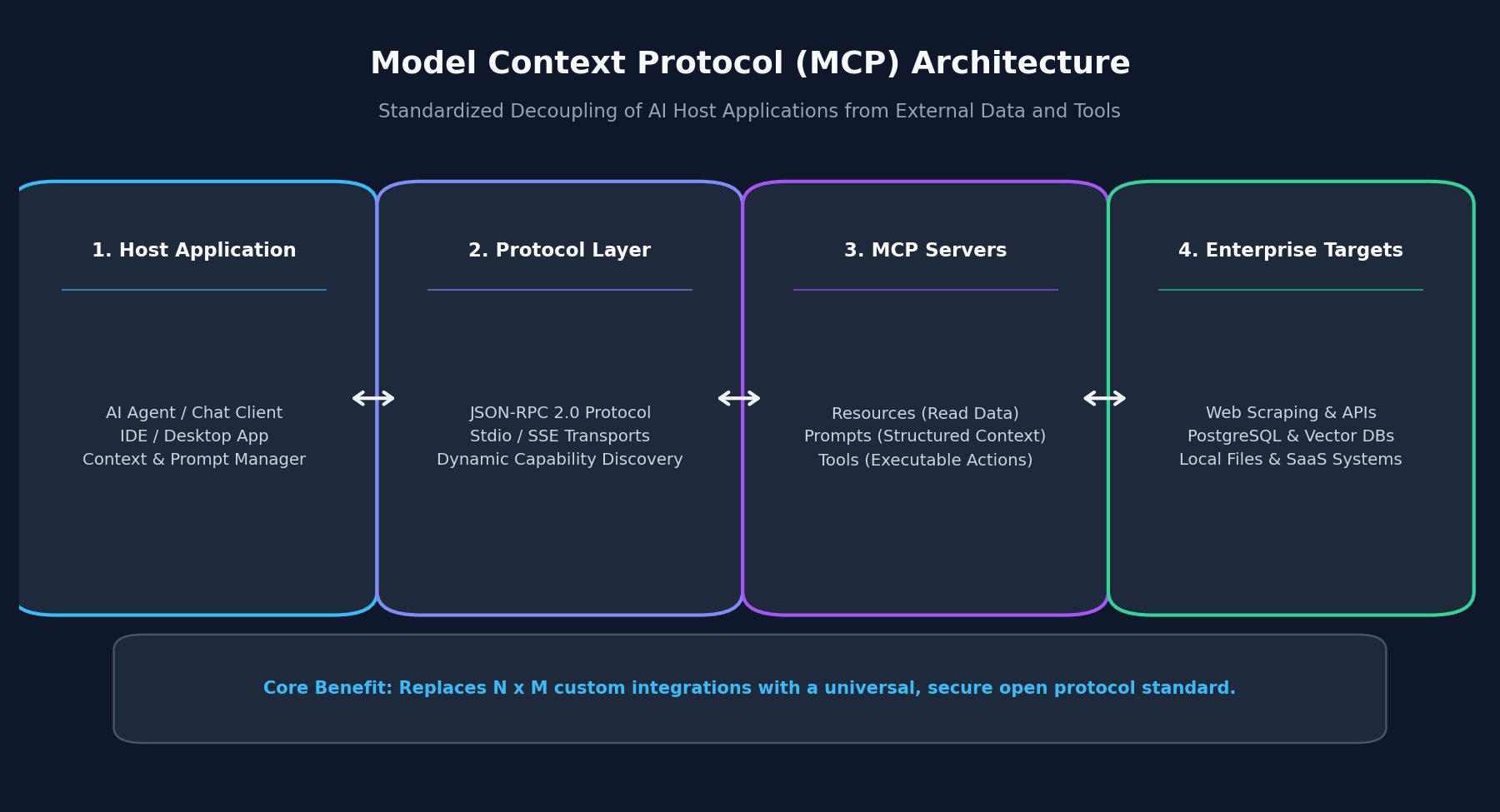
Modeled after the Language Server Protocol (LSP) that revolutionized code editor integrations, MCP separates the client (the AI host application) from the server (the service providing data or actions).
Custom Connectors vs. Model Context Protocol
| Dimension | Custom Point-to-Point Connectors | Model Context Protocol (MCP) |
|---|---|---|
| Architectural Model | Tightly coupled custom SDKs | Standardized JSON-RPC 2.0 client-server |
| Integration Scaling | Scales at $O(N \times M)$ complexity | Scales at $O(N + M)$ universal protocol |
| Transport Flexibility | Hardcoded HTTP / SDK bindings | Pluggable transports (Stdio, HTTP with SSE) |
| Discovery Mechanism | Static, pre-configured function definitions | Dynamic runtime capability discovery |
| Security Boundaries | Credentials often exposed to application code | Granular resource URI and tool authorization |
The Three Primitives of MCP
MCP servers expose three fundamental building blocks to host models:
- Resources (Passive Data Context): Read-only data endpoints identified by standard URIs (e.g.,
postgres://db/usersorfile:///docs/api.json). Resources allow models to ingest context without triggering side effects. - Prompts (Structured Workflows): Reusable, templated interaction patterns and system prompts that guide models through domain-specific workflows.
- Tools (Executable Actions): Executable functions that allow models to mutate external state, run queries, or trigger workflows (e.g., executing web fetches or updating customer records).
Implementation: Building an MCP Server for Data Fetching
Let us implement a production-ready MCP server in TypeScript that provides autonomous data fetching and API querying capabilities to any MCP-compliant AI host.
Step 1: Install the MCP TypeScript SDK
Initialize your project and install the official Model Context Protocol server SDK:
pnpm add @modelcontextprotocol/sdk zod
pnpm add -D typescript @types/node Step 2: Initialize Server and Define Capabilities
Configure the MCP server with declared capabilities for resources and tools:
import { McpServer } from '@modelcontextprotocol/sdk/server/mcp.js';
import { StdioServerTransport } from '@modelcontextprotocol/sdk/server/stdio.js';
import { z } from 'zod';

const server = new McpServer({
  name: 'aifetchly-data-server',
  version: '1.0.0',
}); Step 3: Register an Executable Data Fetching Tool
Expose a structured tool that allows connected AI models to query endpoints and retrieve sanitized web context:
server.tool(
  'fetch_market_data',
  'Fetches real-time structured market and web intelligence for a given target domain.',
  {
    domain: z.string().url('Must be a valid target URL'),
    extractFields: z.array(z.string()).min(1, 'Specify at least one field to extract'),
  },
  async ({ domain, extractFields }) => {
    try {
      // Execute data retrieval and structured parsing
      const response = await fetch(
        `https://api.aifetchly.com/v1/extract?url=${encodeURIComponent(domain)}`,
        {
          headers: { Authorization: `Bearer ${process.env.AIFETCHLY_API_KEY}` },
        },
      );
      const data = await response.json();

      return {
        content: [
          {
            type: 'text',
            text: JSON.stringify({ domain, fields: extractFields, result: data }, null, 2),
          },
        ],
      };
    } catch (error) {
      return {
        isError: true,
        content: [{ type: 'text', text: `Failed to fetch data: ${(error as Error).message}` }],
      };
    }
  },
); Step 4: Connect Transport and Launch
Connect the server over standard input/output (stdio) transport for seamless integration with desktop clients and CLI agents:
async function main() {
  const transport = new StdioServerTransport();
  await server.connect(transport);
  console.error('AiFetchly MCP Server running on stdio');
}

main().catch((err) => {
  console.error('Fatal MCP Server error:', err);
  process.exit(1);
}); Production Deployment & Security Best Practices
When deploying MCP servers across enterprise agent workflows:
- Principle of Least Privilege: Restrict MCP server permissions to read-only resource URIs where mutation is not explicitly required.
- Process Isolation: Execute local stdio MCP servers in sandboxed container environments to prevent unauthorized filesystem access.
- Audit Logging: Log all tool invocations, parameter payloads, and execution latencies to centralized observability platforms.
Conclusion
The Model Context Protocol represents a major step forward for autonomous AI architecture. By transforming fragmented, one-off integrations into a standardized protocol layer, MCP allows engineers to build resilient, plug-and-play connections between foundation models and live enterprise data.