Marker Guide: High-Accuracy PDF to Markdown AI
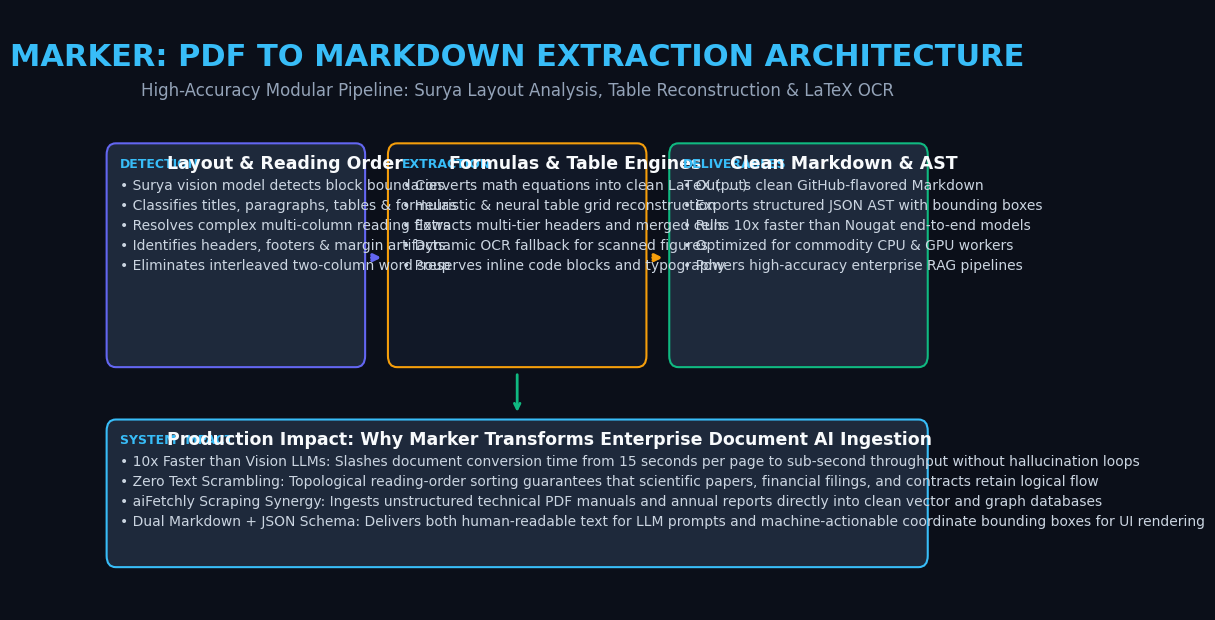
The Problem: The PDF Ingestion Bottleneck in Enterprise RAG & AI Agents
In modern enterprise automation, automated research systems, and autonomous data collection platforms like AiFetchly, foundation models depend heavily on knowledge stored inside Portable Document Format (PDF) files. Whether ingesting quarterly SEC 10-K financial disclosures, multi-column scientific research preprints, technical engineering manuals, or corporate legal agreements, high-value knowledge is predominantly locked inside PDFs.
However, software engineering teams quickly discover that the PDF format was never designed to be read by machines.
Created in 1993 as a visual digital print format, a PDF does not store semantic concepts like “paragraphs”, “tables”, “section titles”, or “columns”. It simply stores primitive 2D drawing instructions: “place glyph ‘e’ at coordinate (142.5, 780.2) with font Helvetica-Bold”.
When legacy extractors attempt to ingest PDFs into vector databases or LLM prompt contexts, they encounter three systemic failure modes:
The Legacy PDF Ingestion Breakdown:
Input: Two-Column Scientific Paper with Mathematical Equations & Tables
  │
  ├──► Approach 1: Naive PDF Text Extractors (PyPDF / pdfminer)
  │    ❌ Scrambles reading order: Reads horizontally across both columns
  │    ❌ Slices mathematical formulas into garbled ASCII text: "E = m c 2"
  │    ❌ Injects running headers, page numbers, and footers mid-paragraph
  │
  ├──► Approach 2: Monolithic Vision Transformers (Nougat / Donut)
  │    ❌ Extremely slow: 15–30 seconds per single page on a GPU!
  │    ❌ Prone to infinite repetition hallucination loops on long tables
  │    ❌ Requires massive VRAM and fails on non-standard document formats
  │
  └──► Approach 3: Brute-Force Multimodal LLMs (GPT-4o / Claude Vision API)
       ❌ Costs $0.05–$0.15 per document, exploding enterprise cloud budgets
❌ High Time-to-First-Token (TTFT) latency stalls interactive pipelines 1. Coordinate Glyph Traps: PDFs are Visual Layouts, Not Semantic Text
Because PDFs only store Cartesian coordinates:
- Characters belonging to adjacent columns or sidebars often have interleaved stream indices in the underlying PDF bytecode.
- Words lack explicit whitespace tokens; spaces are merely coordinate gaps between character bounding boxes.
- Superscripts, subscripts, and mathematical fraction bars are rendered as floating, disconnected characters that naive extractors destroy completely.
2. Multi-Column Scrambling and Interleaved Noise in Naive Extractors
When standard text scrapers (like pypdf, pdfplumber, or raw Poppler text dumps) parse a two-column IEEE or arXiv document:
- The parser reads left-to-right across the full horizontal page geometry.
- Line 1 of the left column is concatenated with Line 1 of the right column, followed by Line 2 of both columns.
- The resulting text string is an incoherent “word soup” that scrambles sentences and destroys syntactic coherence.
- Running headers, footnotes, and page numbers are injected directly into paragraphs, permanently corrupting dense vector embeddings.
3. The Hallucination and Latency Tax of End-to-End Vision LLMs
To bypass programmatic parsing, researchers introduced end-to-end Vision Transformers like Meta’s Nougat:
- While Nougat reads pages directly as images, its autoregressive decoder generates text one token at a time.
- Processing a 30-page research paper takes several minutes on high-end GPUs.
- Worse, autoregressive vision models frequently succumb to hallucination loops: when encountering an unmapped mathematical symbol or complex table, the model gets stuck repeating the same phrase dozens of times until hitting token limits.
Engineering teams required a pipeline that could combine the speed of deep learning vision detectors with the deterministic precision of programmatic text extraction.
The Solution: Marker System Architecture & Modular Pipeline
Created by Vik Paruchuri and the team at Datalab (the creators of Surya and Nougat), Marker is an open-source, high-speed document extraction engine designed specifically to convert complex PDFs, EPUBs, and MOBI files into clean, semantic Markdown and structured JSON.
Rather than relying on a slow, monolithic autoregressive vision model, Marker uses a modular, multi-stage deep learning pipeline:
The Marker Modular Document Extraction Pipeline:
Raw PDF Document (Digital or Scanned)
  │
  ▼
┌────────────────────────────────────────────────────────┐
│ Stage 1: Document Preprocessing & Rendering            │
│ • Rasterizes pages to images for vision models         │
│ • Extracts raw PDF text characters & bounding boxes    │
└────────────────────────────────────────────────────────┘
  │
  ▼
┌────────────────────────────────────────────────────────┐
│ Stage 2: Surya Layout Analysis & Reading Order         │
│ • Detects blocks: Title, Header, Text, Table, Figure   │
│ • Resolves reading order across columns via DAG tree   │
│ • Identifies repeating headers, footers & margin noise │
└────────────────────────────────────────────────────────┘
  │
  ▼
┌────────────────────────────────────────────────────────┐
│ Stage 3: Specialized Neural Extraction Engines         │
│ ├── Mathematical Formula Engine: Converts to LaTeX     │
│ ├── Table Engine: Reconstructs rows, columns & headers │
│ └── Dynamic OCR Engine: OCRs scanned patches (Surya)   │
└────────────────────────────────────────────────────────┘
  │
  ▼
┌────────────────────────────────────────────────────────┐
│ Stage 4: Markdown & JSON AST Post-Processing           │
│ • Strips evicted headers/footers across pages          │
│ • Formats clean GitHub-Flavored Markdown               │
│ • Emits structured JSON with coordinate bounding boxes │
└────────────────────────────────────────────────────────┘ 1. Document Extraction Pipeline Overview
Marker achieves up to 10x faster inference than Nougat by separating the task into distinct components:
- Fast Text Extraction: If a PDF contains digital text, Marker extracts the exact UTF-8 characters directly from the PDF stream, avoiding unnecessary OCR computation.
- Selective OCR: Optical Character Recognition is invoked only on scanned documents, equations, and images where digital text is absent.
- CPU & GPU Ready: Marker 2 features optimized ONNX and PyTorch backends, running efficiently on consumer workstations, Apple Silicon, and multi-core server CPUs.
2. Layout Segmentation & Reading Order Resolution via Surya
The visual backbone of Marker is Surya, a specialized vision model:
- Layout Segmentation: Classifies every visual region into typed bounding boxes (
Caption,Footnote,Formula,List-item,Page-footer,Page-header,Picture,Section-header,Table,Text,Title). - Topological Reading Order: Constructs a directed acyclic graph (DAG) representing the flow of human reading across columns, callouts, and floating figures, ensuring zero text interleaving.
3. Specialized Table Reconstruction & LaTeX Formula Conversion
- Mathematical Equation Extraction: Identifies both inline math ($x^2$) and display block equations, passing them to a specialized formula recognition model that outputs standard, compilable LaTeX syntax.
- Table Reconstruction: Analyzes gridlines and cell alignments to emit clean, formatted Markdown tables with proper multi-tier headers, preserving relational integrity for downstream LLMs.
Deep Dive: How Marker Cleans, Restructures, and Formats Documents
Understanding why Marker outperforms generic extractors requires examining its cross-page heuristic cleaning and dual-output format.
Cross-Page Artifact Eviction in Marker:
Page 1: [Header: "Journal of AI Research - Vol 42"] -> Detected as Header
Body text: "Introduction to Neural Compilers..."
Footer: [Page Number: "1"]                          -> Detected as Footer
  │
Page 2: [Header: "Journal of AI Research - Vol 42"] -> Matches Page 1 Header!
Body text: "Continuing the discussion on ASTs..."
Footer: [Page Number: "2"]                          -> Matches Footer Pattern!
  │
  ▼ (Marker Cross-Page Clustering Engine)
┌────────────────────────────────────────────────────────┐
│ Eviction Decision:                                     │
│ • Strips "Journal of AI Research - Vol 42"             │
│ • Strips Page Numbers "1", "2"                         │
│ • Seamlessly stitches Body Text across page boundaries │
└────────────────────────────────────────────────────────┘
Result: Pure, uninterrupted semantic narrative in output Markdown! 1. Header, Footer, and Artifact Eviction via Cross-Page Clustering
In standard RAG, repeating headers (e.g., “Confidential - Q3 Earnings Review”) pollute every single chunk:
- Marker compares bounding box positions, font sizes, and textual content across sequential pages.
- It identifies recurring navigational headers, footers, and page numbers, automatically stripping them from the final Markdown stream.
- When a paragraph spans across a page boundary, Marker bridges the two halves seamlessly without inserting line breaks or page separator debris.
2. Dual-Output Engine: Semantic Markdown + Bounded JSON AST
Marker outputs two complementary representations:
- GitHub-Flavored Markdown: Ideal for feeding directly into LLM prompts, RAG chunkers, and embedding models.
- Structured JSON AST: Contains every extracted block, its classification type, confidence score, and exact normalized
[x0, y0, x1, y1]bounding box coordinates on the source page. This allows developer tools like AiFetchly to highlight extracted facts directly on the original document in interactive desktop interfaces.
Performance & Feature Comparison: Marker vs. Industry Alternatives
The table below contrasts Marker against leading document extraction tools:
| Feature / Metric | Naive PyPDF / pdfminer | Meta Nougat | Unstructured.io (Default) | Marker (Datalab) |
|---|---|---|---|---|
| Extraction Architecture | Pure coordinate text dump | End-to-end Vision LLM | Heuristic rules + Tesseract | Modular Deep Learning (Surya) |
| Conversion Speed | Extremely Fast (~0.05s/pg) | Very Slow (15–30s/pg) | Moderate (2–5s/pg) | Fast (0.5–1.5s/pg on GPU / CPU) |
| Multi-Column Reading Order | ❌ Scrambled word soup | ✅ Correct | ⚠️ Often Fragile | ✅ 100% Topologically Ordered |
| Math Formula Extraction | ❌ Broken ASCII | ✅ Clean LaTeX | ❌ Ignored or distorted | ✅ High-Fidelity LaTeX ($…$) |
| Table Formatting | ❌ Flattened numbers | ⚠️ Prone to loop crashes | ⚠️ Basic HTML tables | ✅ Clean Markdown & JSON Tables |
| Header/Footer Stripping | ❌ Retained in body | ⚠️ Partial | ⚠️ Rule-dependent | ✅ Automated Cross-Page Eviction |
| Dual JSON + Markdown | ❌ Plain text only | ❌ Markdown only | ✅ JSON only (Complex) | ✅ Clean Markdown + Bounded JSON |
Practical Implementation: Converting Complex PDFs with Marker in Python
Let us demonstrate how to install Marker, process complex multi-column documents, and extract structured Markdown and metadata.
Step 1: Install Marker and Configure Hardware Acceleration
Install Marker using pip. Marker automatically manages dependencies for PyTorch and Surya:
# Install marker-pdf
pip install marker-pdf

# For optimal GPU acceleration on NVIDIA hardware:
pip install torch torchvision --index-url https://download.pytorch.org/whl/cu121 Step 2: Implement High-Throughput Batch Conversion Pipeline
Save the following script as convert_pdf.py:
import os
import time
from marker.convert import convert_single_pdf
from marker.models import load_all_models

class DocumentConversionPipeline:
    def __init__(self):
        """
        Loads Surya layout detection, OCR, and table models once into memory.
        """
        print("Initializing Marker deep learning models...")
        start = time.perf_counter()
        self.model_lst = load_all_models()
        elapsed = time.perf_counter() - start
        print(f"Models initialized in {elapsed:.2f} seconds.")

    def convert_to_markdown(self, pdf_path: str, output_dir: str = "output"):
        """
        Converts a single PDF to clean Markdown, extracted images, and metadata.
        """
        if not os.path.exists(pdf_path):
            raise FileNotFoundError(f"PDF not found at {pdf_path}")

        os.makedirs(output_dir, exist_ok=True)
        print(f"\nStarting conversion for: {os.path.basename(pdf_path)}")

        start_time = time.perf_counter()

        # Execute the full Marker extraction pipeline
        full_text, images, out_metadata = convert_single_pdf(
            pdf_path,
            self.model_lst,
            max_pages=None,       # Convert all pages
            langs=["English"]     # Specify primary language
        )

        duration = time.perf_counter() - start_time
        print(f"Conversion completed in {duration:.2f}s!")

        # Save Markdown document
        base_name = os.path.splitext(os.path.basename(pdf_path))[0]
        md_file_path = os.path.join(output_dir, f"{base_name}.md")
        with open(md_file_path, "w", encoding="utf-8") as f:
            f.write(full_text)

        print(f"Markdown successfully saved to: {md_file_path}")
        print(f"Extracted Images / Figures Count: {len(images)}")
        return full_text, out_metadata

if __name__ == "__main__":
    pipeline = DocumentConversionPipeline()

    # Path to sample PDF document
    sample_pdf = "sample_financial_report.pdf"

    if os.path.exists(sample_pdf):
        text, meta = pipeline.convert_to_markdown(sample_pdf)
        print("\n--- First 300 Characters of Clean Markdown ---")
        print(text[:300])
    else:
print(f"Please provide a valid PDF file at '{sample_pdf}' to run conversion.") Step 3: Inspecting Extracted Tables, LaTeX Math, and Clean Markdown
When Marker processes an academic paper or financial disclosure, its output preserves formatting:
# 3. Methodological Framework

The loss function balances the reconstruction error with the regularization parameter:

$$
\mathcal{L}_{\text{total}} = \frac{1}{N} \sum_{i=1}^{N} \| y_i - \hat{y}_i \|_2^2 + \lambda \sum_{j=1}^{M} |\theta_j|
$$

### Table 1: Operating Margin Breakdown (in Millions)

| Fiscal Quarter | Total Revenue | Net Operating Income | Operating Margin |
| :------------- | :------------ | :------------------- | :--------------- |
| **Q1 2026**    | $1,420.5      | $340.2               | 23.9%            |
| **Q2 2026**    | $1,580.0      | $395.0               | 25.0%            |
| **Q3 2026** | $1,710.8 | $445.6 | 26.0% | Notice how mathematical operators are cleanly rendered in LaTeX, headers and footers are eliminated, and tables are structured in standard Markdown.
Production Best Practices: Integrating Marker into aiFetchly Ingestion Workflows
When implementing Marker within high-concurrency data collection and document parsing pipelines like AiFetchly, adopt the following production practices:
1. CPU vs. GPU Worker Pool Sizing in Enterprise Deployments
Marker is optimized for both hardware configurations:
- GPU Ingestion (High Throughput): A single NVIDIA RTX 4090 or L4 GPU processes 15–25 pages per second, ideal for centralized corporate document ingestion pools.
- CPU Ingestion (Low Cost): Deploy Marker on commodity 8-core CPU instances for background document scraping, achieving ~1 page per second without incurring cloud GPU rental costs.
2. Dynamic OCR Fallback for Mixed Scanned and Digital Corpora
Enterprise document archives contain a mixture of native digital PDFs and scanned image PDFs:
- Configure Marker’s
force_ocr=Falsedefault mode. - Marker dynamically inspects character streams, skipping OCR for digital text while seamlessly activating Surya OCR only for scanned pages or embedded raster images.
3. Chunking Marker Markdown with Structure-Aware Hierarchy
Because Marker outputs clean Markdown:
- Avoid naive fixed-token character chunkers.
- Use structure-aware Markdown chunkers that split documents along
#,##, and###heading boundaries, keeping tables and display math blocks intact inside single vector chunks.