llama.cpp Architecture: C++ Local LLM Inference Guide
The Problem: The Heavyweight Python Tax in Local LLM Deployment
In modern enterprise automation, automated web data extraction, and privacy-conscious desktop copilots powered by AiFetchly, foundation models are increasingly deployed directly on local hardware: developer laptops, on-premise workstations, and edge appliances. Running models locally guarantees complete data privacy, eliminates per-token API billing, and enables offline operation.
However, software engineering teams attempting to serve Large Language Models (LLMs) locally using standard machine learning stacks encounter a punishing systems barrier: the heavyweight Python runtime tax.
The Traditional Python LLM Serving Dilemma:
┌────────────────────────────────────────────────────────┐
│ Barrier 1: Massive Runtime Dependency Bloat            │
│ • PyTorch, CUDA binaries, Transformers, & Accelerate   │
│ ❌ Requires 8 GB to 15 GB disk space just for packages!│
│ ❌ Fragile Python virtual environments break easily!   │
├────────────────────────────────────────────────────────┤
│ Barrier 2: Painful Cold Starts (30–60 Seconds)         │
│ • Reads weights from disk, allocates heap tensors,     │
│   and serializes PyTorch modules into memory           │
│ ❌ Users wait nearly a minute just to load the model!   │
├────────────────────────────────────────────────────────┤
│ Barrier 3: The All-or-Nothing VRAM Wall                │
│ • Standard CUDA runtimes require 100% of weights in VRAM│
│ ❌ Model requires 16.5 GB VRAM; GPU has 16.0 GB VRAM    │
│ ❌ Crashes with torch.cuda.OutOfMemoryError!           │
├────────────────────────────────────────────────────────┤
│ Barrier 4: Python GIL Contention & CPU Inefficiency    │
│ • Multi-client streaming locked behind Python's GIL    │
│ ❌ High CPU overhead starves GPU Tensor Cores!         │
└────────────────────────────────────────────────────────┘
Result: Running local LLMs remained bloated, slow to load, and inaccessible on consumer hardware! 1. Massive Runtime Footprints and Dependency Fragility
Standard deep learning frameworks (PyTorch, Hugging Face Transformers) were engineered for distributed research and model training in cloud data centers:
- Deploying a basic Python LLM script requires packaging hundreds of megabytes of Python dependencies, multiple gigabytes of CUDA shared libraries (
libcudart,libcublas), and specific C++ compiler toolchains. - For desktop applications (such as Electron or native desktop wrappers), bundling an entire Python runtime introduces distribution bloat, security vulnerabilities, and frequent environment breakage across disparate operating system versions.
2. The 30-to-60 Second Cold Start Bottleneck
In conventional PyTorch pipelines:
- When a model is loaded, the process reads multi-gigabyte safetensors or pickle files sequentially from disk into CPU host RAM, parses tensor headers, instantiates Python classes, and then copies tensors across the PCIe bus into GPU High-Bandwidth Memory (HBM).
- For a 70-billion parameter quantized model, this deserialization process requires 30 to 60 seconds. In interactive desktop tools where models should spin up instantly on demand, minute-long startup pauses destroy user experience.
3. The All-or-Nothing GPU Memory Ceiling
Standard GPU inference frameworks enforce rigid memory boundaries:
- If a 14B or 70B parameter model requires 16.5 gigabytes of VRAM, but the user’s workstation GPU (such as an RTX 4080) only provides 16.0 gigabytes of VRAM, standard PyTorch scripts fail immediately with a fatal
OutOfMemoryError. - PyTorch provides no clean, performant mechanism to offload just two or three layers to system RAM while keeping the remaining layers executing on GPU Tensor Cores.
4. Global Interpreter Lock (GIL) and High-Concurrency Stalls
In production web serving or multi-tab browser automation:
- When multiple requests query a local model concurrently, Python’s Global Interpreter Lock (GIL) serializes thread scheduling.
- The host CPU spends up to 40% of its operating cycles stalled in mutex synchronization, unable to dispatch tokens fast enough to saturate high-speed memory buses.
The Solution: llama.cpp’s Dependency-Free C/C++ Architecture
To dismantle these runtime barriers and unlock bare-metal inference on any hardware, Georgi Gerganov created llama.cpp and its underlying tensor compute library, GGML.
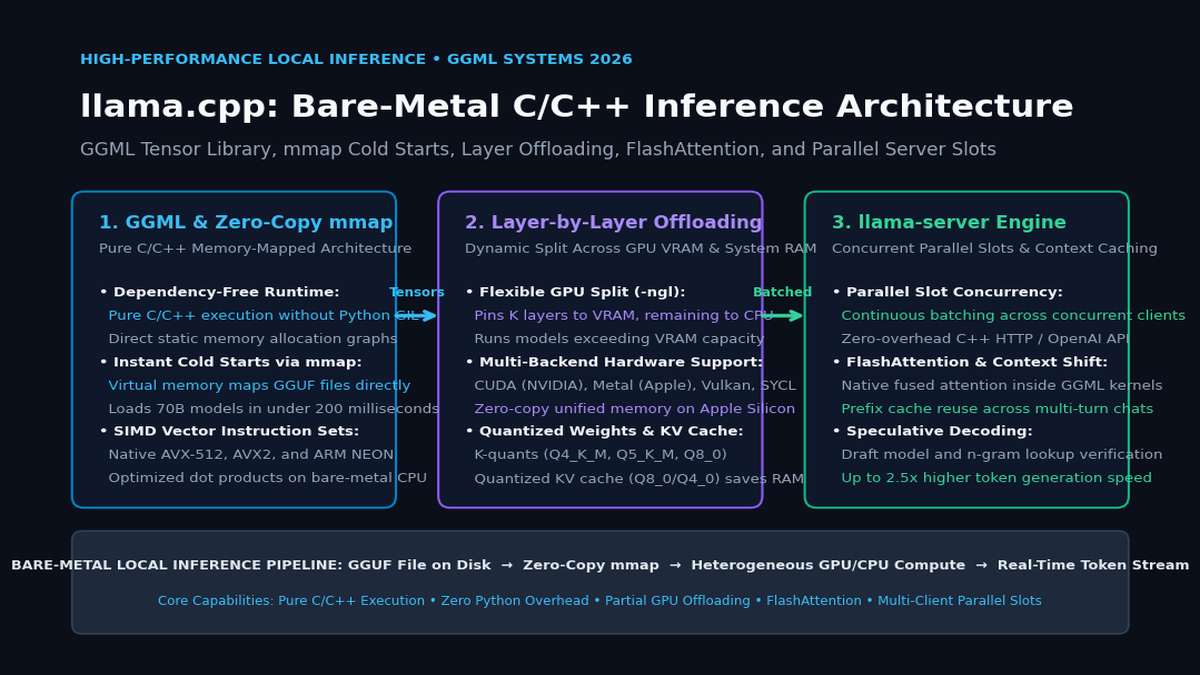
Written in pure, dependency-free C and C++, llama.cpp completely eliminates Python, PyTorch, and heavy CUDA runtimes. By consolidating model weights into the standardized GGUF format, llama.cpp introduces instant zero-copy memory mapping (mmap), flexible heterogeneous layer-by-layer GPU offloading (-ngl), native FlashAttention, and a high-concurrency C++ server engine (llama-server).
llama.cpp Bare-Metal Architecture:
┌─────────────────────────────────────────────────────────────────────────┐
│ GGUF Model Binary on Disk (Quantized Weights: Q4_K_M, Q5_K_M, Q8_0)      │
└────────────────────────────────────┬────────────────────────────────────┘
                                     │
                                     ▼ (mmap() System Call: <200ms Cold Start)
┌─────────────────────────────────────────────────────────────────────────┐
│ 1. Virtual Address Space Pointer (Zero-Copy Host RAM Mapping)           │
└────────────────────────────────────┬────────────────────────────────────┘
                                     │
                    ┌────────────────┴────────────────┐
                    ▼                                 ▼
┌───────────────────────────────────────┐ ┌───────────────────────────────────────┐
│ 2. GPU VRAM Offloading (CUDA / Metal) │ │ 3. CPU Host Compute (SIMD Vectorized) │
│ • First K Layers pinned to VRAM (-ngl)│ │ • Remaining Layers computed in Host RAM│
│ • Custom CUDA / Metal GEMM Kernels    │ │ • Handwritten AVX-512 / ARM NEON SIMD │
│ • Fused FlashAttention Kernel         │ │ • Quantized KV Cache (Q8_0 / Q4_0)    │
└───────────────────┬───────────────────┘ └───────────────────┬───────────────────┘
                    │                                         │
                    └────────────────────┬────────────────────┘
                                         ▼
┌─────────────────────────────────────────────────────────────────────────┐
│ 4. llama-server Engine (Multi-Client High-Concurrency API)              │
│ • Continuous Batching across Parallel Slots (Zero Python GIL overhead)  │
│ • Context Shifting & Prompt Cache Prefix Reuse                          │
│ • Speculative Decoding via Draft Models & N-Gram Lookup                 │
└─────────────────────────────────────────────────────────────────────────┘ The Architectural Pillars of llama.cpp
- Dependency-Free Pure C/C++ Core: llama.cpp requires no external libraries. It compiles into a single, self-contained binary on Linux, macOS, Windows, and embedded Linux. Memory allocation is completely deterministic, governed by static GGML memory pools that eliminate heap fragmentation and garbage collection pauses.
- Instant Zero-Copy Cold Starts with
mmap: Instead of reading files sequentially into buffers, llama.cpp memory-maps GGUF files directly using the POSIXmmap()system call. The operating system kernel maps file pages into virtual memory pointers instantaneously, dropping model load times from 45 seconds to under 200 milliseconds. - Heterogeneous Layer-by-Layer Offloading (
-ngl): Using the--n-gpu-layersparameter, developers can split transformer layers across hardware boundaries. A system with an 8 GB GPU and 64 GB of system RAM can offload 20 layers to CUDA/Metal while executing the remaining 12 layers on CPU SIMD, running 70B models that would otherwise crash standard frameworks. - Hardware-Specific SIMD Acceleration: For CPU execution, GGML features handwritten assembly kernels optimized for modern vector extensions: AVX-512, AVX2, and FMA on x86 processors, and ARM NEON and Apple Accelerate on ARM / Apple Silicon chips.
- High-Concurrency
llama-server: llama.cpp includes an integrated C++ HTTP server implementing OpenAI-compatible endpoints (/v1/chat/completions). Featuring continuous batching across parallel slots, prefix prompt caching, and speculative decoding, it matches datacenter serving engines while running entirely in-process.
Comparing LLM Serving Frameworks
The table below contrasts llama.cpp against Python-based PyTorch inference and cloud-native serving engines like vLLM:
Inference Engine Architecture Comparison:
┌───────────────────────────┬───────────────────────────────┬───────────────────────────────┬───────────────────────────────┐
│ Dimension                 │ Python PyTorch / Transformers │ vLLM Engine                   │ llama.cpp Core                │
├───────────────────────────┼───────────────────────────────┼───────────────────────────────┼───────────────────────────────┤
│ Language & Runtime        │ Python + PyTorch + C++        │ Python + C++ / CUDA           │ Pure C / C++ (Zero Python)    │
│ Package Dependencies      │ Heavy (10 GB+ PyTorch/CUDA)   │ Heavy (Ray, PyTorch, Triton)  │ Zero (Single standalone exec) │
│ Cold Start Latency        │ 30–60 seconds (Disk read)     │ 15–30 seconds (Weight load)   │ <200 milliseconds (mmap)      │
│ Partial GPU Offloading    │ Extremely difficult / slow    │ Not supported (GPU only)      │ Native (-ngl layer split)     │
│ Apple Silicon Support     │ Poor (PyTorch MPS incomplete) │ Experimental / Limited        │ Exceptional (Native Metal)    │
│ CPU SIMD Acceleration     │ Generic MKL / OpenBLAS        │ Limited CPU optimization      │ Hand-tuned AVX-512 / NEON     │
│ Memory Overhead (RAM)     │ High (Python interpreter heap)│ Moderate (KV cache manager)   │ Ultra-low (Static memory pool)│
│ Embedded Desktop Friendly │ ❌ Impossible without Python  │ ❌ Heavy datacenter focus     │ ✅ Perfect for Electron/Apps  │
└───────────────────────────┴───────────────────────────────┴───────────────────────────────┴───────────────────────────────┘ Deep Dive into llama.cpp Core Subsystems & Execution Graph
To understand how llama.cpp achieves bare-metal performance, let’s explore its core architectural subsystems: the GGML Computation Graph, Virtual Memory Mapping, and Heterogeneous Layer Scheduling.
llama.cpp Subsystem Breakdown:
llama.cpp
 ├──► 1. GGML Tensor Engine: Static memory contexts, zero-alloc computation graphs
 ├──► 2. Virtual Memory Paging: POSIX mmap() for zero-copy file pointer access
 ├──► 3. Heterogeneous Offloading: Dynamic splitting of layers across VRAM and RAM
 ├──► 4. Memory Optimization: FlashAttention & Quantized KV Caches (Q8_0/Q4_0)
└──► 5. llama-server Engine: Continuous batching across parallel client slots 1. The GGML Tensor Engine & Computation Graph
Unlike general-purpose machine learning libraries that dynamically allocate and free tensors on the heap during every forward pass:
ggml_contextMemory Arena: GGML allocates a single, contiguous memory arena at initialization. All tensors, metadata structs, and computation graph nodes reside within this static pool.- Two-Pass Execution Model:
- Graph Construction Phase: During the forward pass definition, functions like
ggml_mul_mat(),ggml_add(), andggml_rope()do not perform math. Instead, they record operational nodes and pointer references into a directed acyclic graph struct (ggml_cgraph). - Graph Compute Phase: The engine calls
ggml_graph_compute(). The static graph is dispatched across worker threads. Because memory addresses are fixed ahead of time, there are zero memory allocations, zero pointer indirections, and zero garbage collection stalls during token generation.
- Graph Construction Phase: During the forward pass definition, functions like
2. Instant Model Loading via Zero-Copy mmap
Traditional model loading reads bytes from disk into user-space RAM buffers:
Traditional Disk Loading vs. POSIX mmap() in llama.cpp:
Traditional:
Disk Storage ──► [Kernel Page Cache] ──► [Heap RAM Buffer] ──► [PyTorch Tensor]
(Triple buffering! Burns RAM and takes 45 seconds for 30 GB weights!)

llama.cpp Zero-Copy mmap():
Disk Storage ──► Virtual Address Space Pointer (void* ptr)
(Zero disk-to-RAM copies! Pages loaded on demand by OS kernel in <200ms!) - When
llama.cpploads a GGUF model, it invokesmmap(NULL, file_size, PROT_READ, MAP_SHARED, fd, 0). - The operating system kernel immediately returns a virtual memory pointer without reading the file contents into physical RAM upfront.
- When worker threads execute matrix multiplications, the CPU/GPU touches specific memory addresses, prompting the kernel to page in the required weight blocks on demand.
- Shared Memory Benefit: If multiple local applications (e.g., a background web scraper and a desktop chat interface) load the same GGUF file, the OS kernel shares the exact same physical memory pages across both processes.
3. Heterogeneous Layer-by-Layer GPU Offloading (-ngl)
When a user specifies -ngl 28 on a 32-layer model:
Layer Partitioning across Hardware Boundaries:
Input Prompt Tokens
 │
 ▼
[ Embedding Layer ] ──────────────► Executed on GPU VRAM (CUDA / Metal)
 │
 ▼
[ Transformer Layers 1 to 28 ] ───► Executed on GPU VRAM (Fast Tensor Cores)
 │ (Hidden Vector H_28)
 ▼ [PCIe Bus Transfer: Only ~8 KB per token!]
[ Transformer Layers 29 to 32 ] ──► Executed on CPU Host RAM (AVX-512 SIMD)
 │ (Hidden Vector H_32)
 ▼
[ Final Norm & LM Head ] ─────────► Executed on GPU or CPU
 │
 ▼
Next Predicted Token Logits - Instead of moving massive weight matrices across the PCIe bus, the system only transfers the intermediate hidden state activation vector ($\mathbf{h} \in \mathbb{R}^{d_{\text{model}}}$).
- For a 7B model ($d_{\text{model}} = 4096$), transferring $\mathbf{h}$ in FP16 requires only 8 kilobytes of data movement per token.
- This architectural design allows users to maximize whatever GPU VRAM they possess, utilizing fast Tensor Cores for 80% of layers while falling back gracefully to system RAM for the remainder.
4. Memory Optimizations: FlashAttention and Quantized KV Caches
In multi-turn document analysis or long-context web extraction:
- Native FlashAttention: llama.cpp implements fused FlashAttention kernels that tile Queries, Keys, and Values inside fast on-chip SRAM, cutting memory bandwidth traffic and accelerating long-context prompt evaluation.
- Quantized KV Cache (
-ctkand-ctv): Standard serving engines store Key and Value tensors in FP16 precision (2 bytes per element). llama.cpp allows quantizing the KV cache to Q8_0 (8-bit) or Q4_0 (4-bit): $$\text{Memory Saved} = 1 - \frac{4 \text{ bits}}{16 \text{ bits}} = 75% \text{ reduction in KV cache footprint}$$ This enables running 32,768-token context windows on laptops with limited unified memory without degrading perplexity.
Hands-On Implementation: Compiling, Running, and Serving llama.cpp
Let’s walk through building llama.cpp from source, running CLI inference with GPU offloading, launching the high-throughput HTTP server, and querying it via Python.
1. Compiling with Hardware Acceleration
Clone the repository and compile with CUDA (for NVIDIA GPUs) or Metal (for Apple Silicon):
# For NVIDIA CUDA acceleration:
git clone https://github.com/ggml-org/llama.cpp.git
cd llama.cpp
cmake -B build -DGGML_CUDA=ON
cmake --build build --config Release -j $(nproc)

# For Apple Silicon (Metal is enabled by default):
# cmake -B build && cmake --build build --config Release -j $(sysctl -n hw.ncpu) 2. High-Performance Local CLI Execution
Run local inference with layer offloading, FlashAttention, and 8-bit KV cache quantization:
./build/bin/llama-cli \
  -m models/Meta-Llama-3.1-8B-Instruct-Q5_K_M.gguf \
  -ngl 33 \                # Offload all 33 layers to GPU VRAM
  -c 8192 \                # Context window size: 8,192 tokens
  -fa \                    # Enable native FlashAttention
  -ctk q8_0 -ctv q8_0 \    # Quantize KV cache keys and values to 8-bit
  --temp 0.2 \
-p "<|start_header_id|>system<|end_header_id|>\nYou are an expert data extraction assistant.<|eot_id|><|start_header_id|>user<|end_header_id|>\nExtract the quarterly revenue and gross margin from: 'Acme Corp posted $4.2B in revenue with 64.5% gross margin.'<|eot_id|><|start_header_id|>assistant<|end_header_id|>" 3. Launching the Multi-Client llama-server
Deploy the OpenAI-compatible HTTP server with parallel slots and continuous batching:
./build/bin/llama-server \
  -m models/Meta-Llama-3.1-8B-Instruct-Q5_K_M.gguf \
  -ngl 33 \
  -c 16384 \               # Total context memory buffer
  -np 4 \                  # 4 Parallel execution slots for concurrent clients
  --host 0.0.0.0 \
  --port 8080 \
-fa 4. Querying llama-server via Python
Connect to llama-server using standard OpenAI client libraries or raw HTTP requests:
import json
from openai import OpenAI

# Connect to local llama-server instance (Zero external API costs!)
client = OpenAI(
    base_url="http://localhost:8080/v1",
    api_key="not-needed"
)

scraped_html_snippet = """
<div class="financial-summary">
  <h2>Fiscal Q3 Financial Highlights</h2>
  <span class="metric">Total Revenue: $8.45 Billion</span>
  <span class="metric">Cloud ARR: $2.10 Billion (+28% YoY)</span>
  <span class="metric">GAAP Operating Margin: 31.2%</span>
</div>
"""

schema = {
    "fiscal_quarter": "string",
    "total_revenue_billions": "float",
    "cloud_arr_billions": "float",
    "operating_margin_pct": "float"
}

prompt = f"""Extract the financial metrics from the HTML snippet into valid JSON:
HTML: {scraped_html_snippet}
Schema: {json.dumps(schema)}
Output strictly valid JSON with no conversational text."""

response = client.chat.completions.create(
    model="local-model",
    messages=[
        {"role": "system", "content": "You are a precise data extraction engine. Always output valid JSON."},
        {"role": "user", "content": prompt}
    ],
    temperature=0.0
)

extracted_json = json.loads(response.choices[0].message.content.strip())
print("\n--- llama.cpp Structured Extraction Result ---")
print(json.dumps(extracted_json, indent=2)) Production Architecture & Integration for aiFetchly
In client-side software, desktop data harvesters, and privacy-preserving automation copilots like AiFetchly, embedding llama.cpp directly into desktop application binaries provides an unmatched architectural advantage.
aiFetchly Local Desktop Intelligence Topology:
┌─────────────────────────────────────────────────────────────────┐
│ aiFetchly Electron / Desktop UI Workspace                      │
└────────────────────────────────────┬────────────────────────────┘
                                     │
                                     ▼ (Native IPC Subprocess Dispatch)
┌─────────────────────────────────────────────────────────────────┐
│ Embedded llama.cpp Engine (llama-server Daemon)                 │
│ • Zero External Cloud APIs: 100% Offline & Private               │
│ • mmap Instant Loading: Models launch under 200ms               │
│ • Dynamic Hardware Adaptation: CUDA, Metal, or CPU SIMD         │
└───────────────────┬─────────────────────────────────┬───────────┘
                    │                                 │
     (Local Vector Retrieval via ChromaDB)  (Zero-Leakage Tracing)
                    ▼                                 ▼
┌───────────────────────────────────────┐ ┌───────────────────────────────┐
│ In-Process Embedded Vector Database   │ │ Local Observability & Audit   │
│ • ChromaDB / LanceDB local storage    │ │ • Arize Phoenix local traces  │
│ • Sub-10ms semantic document search   │ │ • DeepEval regression testing │
└───────────────────────────────────────┘ └───────────────────────────────┘ 1. Zero-Dependency Desktop Packaging
Packaging AI applications for commercial distribution:
- Instead of requiring end-users to install Python, configure Conda environments, or install multi-gigabyte CUDA drivers, desktop applications bundle a pre-compiled, single-file
llama-serverbinary. - The binary detects available hardware at runtime—activating Metal on macOS, CUDA on NVIDIA Windows systems, or falling back seamlessly to AVX-512 SIMD on standard CPUs.
2. Air-Gapped Enterprise Compliance
For sensitive corporate environments:
- Proprietary customer data—such as scanned PDF invoices, payroll records, and internal sales data—never leaves the local machine.
- Combining local
llama.cppexecution with embedded vector databases like ChromaDB or LanceDB creates a completely self-contained, air-gapped enterprise intelligence workstation.
3. Model Sizing and Local Hardware Optimization
Recommended configurations for local workstations:
- 8B Models (Llama-3.1-8B, Qwen2.5-7B): Quantized to
Q5_K_M(~5.7 GB). Runs at 85+ tokens per second on an RTX 4080 or Apple M3 Max, and 25+ tokens per second on modern x86 laptop CPUs. - 70B Models (Llama-3.3-70B, Qwen2.5-72B): Quantized to
Q4_K_M(~43 GB). By offloading 40 layers to an RTX 3090/4090 and 40 layers to 64 GB host RAM, users can execute frontier-class reasoning locally without cloud APIs. - Monitor prompt drift, token speeds, and accuracy regressions locally using Arize Phoenix and DeepEval.
Summary: Bare-Metal Efficiency as the Standard for Local AI
The democratization of generative artificial intelligence depends on decoupling model execution from multi-thousand-dollar cloud servers.
By replacing heavyweight Python runtimes with a pure, dependency-free C/C++ architecture, llama.cpp transforms modern Large Language Models into lean, portable, and instant-starting software utilities. Through virtual memory mapping (mmap), dynamic heterogeneous layer offloading, handwritten SIMD kernels, and concurrent server scheduling, llama.cpp proves that bare-metal systems engineering is the foundation of high-performance local AI. For desktop applications, privacy-first automation, and offline data extraction engineered with AiFetchly, llama.cpp delivers the gold standard in local foundation model execution.