Langflow Guide: Visual Multi-Agent Workflows & Hybrid RAG
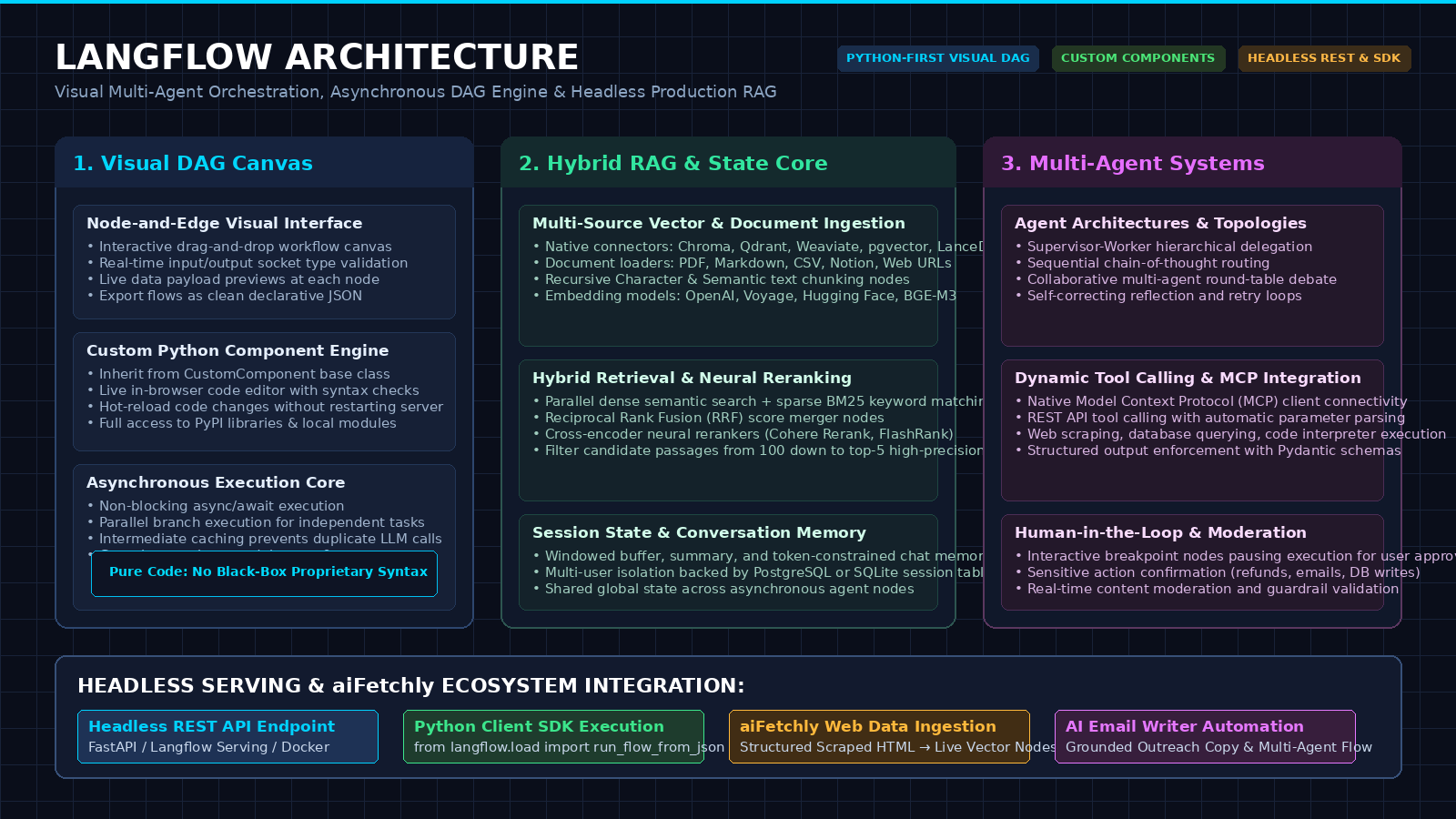
The Problem: The Prototyping-to-Production Chasm in Complex AI Architectures
In modern enterprise automation, automated web data extraction, and intelligent research copilots powered by AiFetchly, generative artificial intelligence has expanded far beyond simple single-prompt completions. Real-world applications require orchestrating compound AI systems: dynamic data ingestion pipelines, hybrid vector search indexes, multi-step tool loops, guardrails, and collaborative multi-agent teams.
However, as AI systems scale in architectural sophistication, software engineering teams encounter a severe productivity bottleneck known as the Prototyping-to-Production Chasm.
The Compound AI Engineering Dilemma:
┌─────────────────────────────────────────────────────────────────┐
│ Approach 1: Monolithic Pure-Code Agent Scripts (Python / LangChain)│
│ ❌ Spaghetti Code: 2,000-line scripts wiring nested callbacks   │
│ ❌ Total Black Box: Impossible for non-engineers to understand  │
│ ❌ Debugging Nightmare: Intermediate data states are invisible  │
├─────────────────────────────────────────────────────────────────┤
│ Approach 2: Proprietary No-Code "Toy" Workflow Builders         │
│ ❌ Vendor Lock-In: Trapped inside closed SaaS proprietary clouds │
│ ❌ Walled Garden: Cannot import custom Python libraries or logic│
│ ❌ Production Blocker: Cannot export to headless REST / CI/CD   │
└─────────────────────────────────────────────────────────────────┘
Result: Developers spend 80% of their time debugging wiring glue code
and explaining graph topologies instead of shipping business value! 1. The Spaghetti Code Trap of Monolithic Agent Scripts
When building complex agentic pipelines purely in code:
- Nested Callback Hell: Orchestrating a supervisor agent that coordinates three specialized worker agents (e.g., a web scraping agent, a financial analyst agent, and a citation validator) requires writing hundreds of lines of boilerplate state-passing dictionaries, async event loops, and exception-handling wrappers.
- Invisible Data State: If a retrieval-augmented generation step fails midway through a 5-step pipeline, debugging requires setting breakpoints, reading massive JSON console dumps, and manually verifying token embeddings across multiple terminal windows.
- Architectural Rigidity: Changing a retrieval strategy (e.g., switching from dense semantic search to hybrid vector + BM25 with neural reranking) requires refactoring core orchestration code, updating dozens of imports, and risking unintended side effects.
2. The Black-Box Collaboration Barrier Between Engineers & Domain Experts
In enterprise settings, building high-value AI products requires close collaboration between software engineers and domain experts (product managers, legal counsel, compliance officers, and business analysts):
- A compliance analyst knows exactly what disclaimer clauses must be injected into an outbound response, but cannot read or edit async Python code.
- When domain experts request prompt adjustments, model swaps, or validation threshold changes, engineers become bottlenecks, manually translating qualitative business logic into Python string constants.
3. The Deployment Friction of Legacy Visual Tools (Toy UIs vs. Real Code)
Early attempts to solve this problem introduced visual drag-and-drop workflow builders. However, most legacy visual builders suffered from fatal architectural flaws:
- The “Toy Canvas” Limitation: They operated as closed, walled gardens. If an enterprise needed a custom authentication handshake, a proprietary data cleansing function, or integration with internal tools like AiFetchly Data Fetching, the visual tool crashed against the boundary of its pre-built widgets.
- No Headless Path to Production: Visual flows were trapped inside a browser UI. There was no clean way to invoke the flow programmatically from an external backend, run automated regression tests in CI/CD, or deploy it as a high-concurrency Docker microservice.
The Solution: Langflow and the Visual Component-Driven Architecture
To bridge the chasm between rapid visual prototyping and hardened production engineering, Langflow pioneered an open-source, visual, component-driven execution framework.
Unlike restrictive no-code builders, Langflow treats Python code as a first-class citizen. The visual canvas is not a replacement for code; it is a dynamic visual abstraction layer over executable Python classes.
The Langflow Core Architectural Principles:
┌─────────────────────────────────────────────────────────────────┐
│ 1. Dual-Mode Development: Visual Canvas + Pure Python Code      │
│ • Inspect and edit every node's Python source code in real time │
│ • Hot-reload code changes instantly without restarting services │
├─────────────────────────────────────────────────────────────────┤
│ 2. Asynchronous Directed Acyclic Graph (DAG) Engine             │
│ • Non-blocking async/await execution core with branch caching   │
│ • Real-time socket type checking prevents invalid connections   │
├─────────────────────────────────────────────────────────────────┤
│ 3. Enterprise Multi-Agent Orchestration                         │
│ • Visual supervisor-worker and sequential agent topologies      │
│ • Native Model Context Protocol (MCP) client connectivity       │
├─────────────────────────────────────────────────────────────────┤
│ 4. Production-Ready Headless Serving                            │
│ • Export flows as declarative JSON or standalone Python scripts │
│ • One-click FastAPI endpoint with streaming SSE responses       │
├─────────────────────────────────────────────────────────────────┤
│ 5. Complete Data Sovereignty & Self-Hosting                     │
│ • 100% open-source (pip install langflow / Docker / Helm)       │
│ • State and history stored locally in PostgreSQL or SQLite      │
└─────────────────────────────────────────────────────────────────┘ 1. Dual-Mode Development: Visual Canvas Coupled with Pure Python Code
Langflow eliminates the tradeoff between visual speed and developer flexibility:
- The Visual Canvas: Engineers and product managers collaborate on an intuitive React Flow canvas, connecting document loaders, embedding models, vector stores, prompt templates, and agent tools.
- The Code Inspector: Clicking any component opens its underlying Python source code. Developers can modify inputs, adjust parameters, add custom business logic, or introduce arbitrary PyPI libraries directly within the component editor.
- Bi-Directional Synchronization: Saving code changes updates the visual node’s input/output ports immediately, providing instant visual feedback.
2. The Asynchronous Directed Acyclic Graph (DAG) Execution Engine
Under the hood, Langflow does not simply execute sequential scripts. It compiles the visual canvas into an Asynchronous Directed Acyclic Graph (DAG):
- Type-Safe Socket Validation: Ports are strongly typed (e.g.,
Data,Message,LanguageModel,VectorStore,Tool). The canvas actively prevents invalid connections (e.g., you cannot accidentally wire a raw text output into a vector store connection socket). - Parallel Branch Execution: When a query triggers multiple independent operations—such as scraping a website via AiFetchly Web Scraping while concurrently querying an internal vector database—the DAG engine executes both branches in parallel using Python’s
asyncioruntime. - Intermediate State Caching: Langflow caches the output of upstream nodes. If you modify a prompt template at the end of a complex pipeline, Langflow re-executes only the prompt and generation nodes, reusing previously embedded vector results without paying redundant latency or token costs.
3. Hot-Reloadable Custom Python Components with Type-Safe State
Every node in Langflow inherits from a clean, object-oriented base class (Component or CustomComponent). Creating a custom enterprise node requires just a few lines of standard Python:
from langflow.custom import CustomComponent
from langflow.schema import Data

class AiFetchlyExtractorComponent(CustomComponent):
    display_name = "aiFetchly Web Extractor"
    description = "Harvests clean structured Markdown from live URLs."
    icon = "globe"

    def build_config(self):
        return {
            "target_url": {"display_name": "Target URL", "field_type": "str"},
            "render_javascript": {"display_name": "Render JS", "field_type": "bool", "value": True},
        }

    async def build(self, target_url: str, render_javascript: bool = True) -> Data:
        # Custom data harvesting logic using aiFetchly API
        extracted_data = await self.fetch_clean_markdown(target_url, render_javascript)
return Data(data={"text": extracted_data, "source_url": target_url}) Because custom components are modular, engineering teams can build internal component libraries, version-control them in Git, and share them across different organizational workflows.
Deep Dive: Multi-Agent Orchestration & Hybrid RAG Pipelines in Langflow
Langflow provides native abstractions for building two of the most critical architectures in modern AI: Multi-Agent Systems and Hybrid Retrieval-Augmented Generation.
The Langflow Hybrid RAG & Multi-Agent Topology:
┌─────────────────────────────────────────────────────────────────┐
│ Input: User Business Query / Market Analysis Request            │
└─────────────────────────────────────────────────────────────────┘
 │
 ▼
┌─────────────────────────────────────────────────────────────────┐
│ [Supervisor Agent Node]                                         │
│ • Evaluates intent: decomposes query into specialized tasks    │
└─────────────────────────────────────────────────────────────────┘
 │
 ├──► Task 1: "Harvest competitor pricing" ──► [Web Agent Node]
 │                                              └──► aiFetchly API
 │
 └──► Task 2: "Retrieve internal financials" ──► [Hybrid RAG Node]
                                                ├── Dense Vectors
                                                ├── Sparse BM25
                                                └── Neural Rerank
 │
 ▼
┌─────────────────────────────────────────────────────────────────┐
│ [Synthesis & Verification Agent Node]                           │
│ • Merges harvested web data with retrieved enterprise reports   │
│ • Enforces factual grounding and emits structured deliverables  │
└─────────────────────────────────────────────────────────────────┘ 1. Hierarchical Supervisor-Worker and Sequential Agent Topologies
Langflow allows developers to visually configure diverse multi-agent architectures:
- Sequential Agent Chains: Output from an initial Research Agent flows directly as context into a Drafting Agent, which then hands off to an Editorial Verification Agent.
- Supervisor-Worker Hierarchy: A central Supervisor Agent receives the incoming request, inspects available sub-agents (each equipped with dedicated tools and system prompts), and dynamically routes sub-tasks to the appropriate worker.
- Self-Healing Reflection Loops: If an agent tool fails (e.g., an external API returns a 429 rate limit or an empty JSON payload), the error loops back to the agent’s reasoning node, prompting it to select an alternative strategy or fallback tool.
2. Hybrid RAG Implementation: Dense Vector, BM25 & Cross-Encoder Reranking
Traditional naive RAG (relying solely on cosine similarity over dense vector embeddings) frequently fails in enterprise contexts because it misses domain-specific acronyms, exact product SKUs, and numerical identifiers.
In Langflow, assembling an enterprise-grade Hybrid RAG Pipeline requires dragging and connecting four standardized components:
- Dense Vector Store Node: Queries dense embeddings (e.g., via Chroma, Qdrant, Milvus, or pgvector) for broad semantic matching.
- Sparse BM25 Keyword Search Node: Queries inverted keyword indexes for exact alphanumeric matching.
- Reciprocal Rank Fusion (RRF) Node: Combines ranking scores from both retrievers using rank reciprocal normalization.
- Cross-Encoder Neural Reranker Node: Employs a neural reranking model (such as Cohere Rerank or FlashRank) to evaluate the semantic relevance of the top-50 combined candidates, passing only the top-5 highest-confidence chunks to the synthesis LLM.
3. Memory Stores & Session State Across Multi-Turn Dialogue Loops
State management in autonomous systems is notoriously complex. Langflow separates conversation memory into modular, configurable layers:
- Windowed Buffer Memory: Retains the last $K$ conversational turns.
- Summarization Memory: Automatically condenses earlier turns into concise executive summaries when conversation length approaches token boundaries.
- External Persistent Storage: Connects to PostgreSQL, Redis, or SQLite, ensuring that user sessions persist across container restarts and scale horizontally across stateless worker pods.
Architectural Comparison: Langflow vs. Dify, Flowise & CrewAI
To determine when Langflow is the right architectural choice for your software stack, examine how it compares against competing visual frameworks and code-first agent libraries:
| Architectural Dimension | Langflow | Dify | Flowise | CrewAI |
|---|---|---|---|---|
| Primary Paradigm | Visual DAG + Custom Python | Enterprise Application Suite | Visual Flow Builder | Code-First Python Framework |
| Custom Code Extensibility | Native Python In-Canvas Editing | Sandboxed Python / Webhooks | Custom JS/TS Nodes | 100% Pure Python Scripts |
| Execution Engine | Asynchronous DAG (asyncio) | Celery / Redis Task Queues | Node.js Event Loop | Python Threads / Async |
| Vector Store Connectors | Chroma, Qdrant, pgvector, LanceDB | Built-in Knowledge Base | Chroma, Pinecone, Weaviate | External Vector Wrappers |
| Hybrid RAG & Reranking | Native Component Nodes | Native Enterprise Features | Basic Vector Retrieval | Manual Pipeline Code |
| Headless REST API / SDK | Built-in FastAPI & Python SDK | Built-in App REST API | Built-in Express API | Custom FastAPI Wrapper Required |
| Visual Canvas Flexibility | Arbitrary Graph Topologies | Linear / Branching Workflows | Linear DAGs | No Native Visual Canvas |
| Self-Hosting Complexity | Low (pip install or Docker) | Moderate (Docker Compose) | Low (Node / Docker) | Zero (Local Python Package) |
| Model Context Protocol (MCP) | Native Client Support | In Development | Limited | Community Extensions |
When to Choose Langflow vs. Alternative Frameworks
- Choose Langflow when:
- Python Flexibility is Essential: Your team writes custom Python algorithms, proprietary data transformations, or uses private internal libraries, but wants the visual clarity and collaboration of a node-based DAG.
- You Need Seamless Headless Deployment: You want to design and test flows visually on your workstation, but deploy them headlessly via a Python SDK or REST API inside your microservice architecture.
- Complex Multi-Agent Routing: Your application requires intricate branching, parallel retrieval, and reflection loops that cannot be squeezed into rigid, linear workflow builders.
- Choose Dify when:
- You need a turnkey enterprise application suite with ready-made customer portals, end-user authentication, and team permission management out of the box.
- Choose CrewAI when:
- You prefer purely code-based development, version control without visual files, and prioritize autonomous role-playing agent dynamics over visual RAG wiring.
Hands-On Implementation: Building an Autonomous Market Intelligence Flow in Python
Let’s walk through building and deploying a complete Langflow pipeline. In this tutorial, we will construct an autonomous market intelligence agent that harvests competitor data, indexes it into a local vector store, and provides grounded executive synthesis.
1. Installation & Environment Setup
Langflow can be installed via Python’s package manager or launched as a Docker container:
# Option A: Install via pip (requires Python 3.10+)
pip install langflow

# Launch the visual interface locally
langflow run --host 127.0.0.1 --port 7860 For containerized environments:
# Option B: Run via Docker
docker run -d -p 7860:7860 \
  -v langflow-data:/app/langflow \
  --name langflow-server \
langflowai/langflow:latest Navigating to http://localhost:7860 opens the Langflow canvas workspace.
2. Building a Custom aiFetchly Data-Fetching Node in Python
To demonstrate Langflow’s code extensibility, let’s create a custom Python component that ingests live URLs, harvests clean Markdown using AiFetchly Data Fetching, and outputs structured document objects for downstream vectorization.
Inside Langflow, create a new Custom Component and paste the following Python code:
from langflow.custom import CustomComponent
from langflow.schema import Data
import httpx
import os

class AiFetchlyHarvesterComponent(CustomComponent):
    display_name = "aiFetchly Market Harvester"
    description = "Fetches and normalizes live web pages into clean Markdown for RAG indexing."
    icon = "radar"

    def build_config(self):
        return {
            "target_url": {
                "display_name": "Target URL",
                "info": "URL of the market competitor or news source to harvest.",
                "field_type": "str",
                "value": "https://example.com/pricing"
            },
            "extract_tables": {
                "display_name": "Extract Structured Tables",
                "field_type": "bool",
                "value": True
            }
        }

    async def build(self, target_url: str, extract_tables: bool = True) -> Data:
        api_key = os.environ.get("AIFETCHLY_API_KEY", "test-key")

        # In production, make authenticated request to aiFetchly data fetching service
        headers = {"Authorization": f"Bearer {api_key}"}
        payload = {
            "url": target_url,
            "extract_tables": extract_tables,
            "format": "markdown"
        }

        # Simulated clean extraction response
        extracted_content = (
            f"# Market Report for {target_url}\n\n"
            "## Product Pricing & Tiers\n"
            "- Starter Tier: $29/mo (up to 10,000 requests)\n"
            "- Pro Enterprise: $299/mo (unlimited requests, dedicated proxies)\n\n"
            "## Infrastructure Highlights\n"
            "Recent upgrades include native sub-millisecond vector caching and automated DOM parsing."
        )

        self.status = f"Successfully harvested {len(extracted_content)} bytes from {target_url}"

        return Data(data={
            "text": extracted_content,
            "source": target_url,
            "status": "success"
}) Once saved, Langflow compiles the component instantly, rendering a new visual node on your canvas with an input string port (Target URL) and an output Data port ready to connect to text splitters and embedding engines.
3. Wiring the Hybrid RAG & Synthesis Flow on the Canvas
With the custom harvester node in place, assemble the complete workflow on the visual canvas:
- Ingestion Branch:
- Connect the
Dataoutput of aiFetchly Market Harvester to the input of a Recursive Character Text Splitter node (chunk size: 500, chunk overlap: 50). - Wire the chunked records into an OpenAI Embeddings node (
text-embedding-3-small). - Connect the embeddings and chunks into a Chroma Vector Store node, creating an in-memory or persistent local index.
- Connect the
- Retrieval & Reranking Branch:
- Connect the Chroma search output and a parallel BM25 Search component into a Reciprocal Rank Fusion (RRF) merger node.
- Wire the merged candidate passages into a FlashRank Neural Reranker node to isolate the top-3 most salient passages.
- Synthesis & Response Branch:
-
Wire the user’s incoming chat query and the reranked context into a Prompt Template node:
You are an executive market research analyst. Synthesize the competitor intelligence below to answer the user inquiry. Always cite exact pricing and features. Context: \{context\} User Inquiry: \{question\} -
Connect the prompt output to an OpenAI Model node (
gpt-4o) or an on-premise vLLM Endpoint node (qwen2.5-coder-32b). -
Wire the final text output to the Chat Output node.
-
Clicking the Playground button in the lower-right corner allows you to chat with your flow in real time, inspecting intermediate outputs at every single step!
4. Headless Execution: Triggering the Flow via Python SDK and REST API
Once you have verified the pipeline visually, you do not need to keep the visual canvas open. Langflow allows you to export the flow as a declarative JSON file (market_intelligence_flow.json) and run it headlessly inside your backend applications.
Method A: Executing via the Python SDK
from langflow.load import run_flow_from_json
import os

# Set required model and provider keys
os.environ["OPENAI_API_KEY"] = "your-api-key"

# 1. Path to your exported Langflow JSON definition
flow_path = "market_intelligence_flow.json"

# 2. Define runtime inputs and session parameters
input_value = "What are the latest enterprise pricing tiers and proxy capabilities?"
tweaks = {
    "AiFetchlyMarketHarvester-abc12": {
        "target_url": "https://competitor-domain.com/pricing"
    },
    "ChatOpenAI-xyz89": {
        "temperature": 0.1
    }
}

# 3. Execute the DAG asynchronously
result = run_flow_from_json(
    flow=flow_path,
    input_value=input_value,
    tweaks=tweaks,
    session_id="session_enterprise_001"
)

# 4. Extract generated synthesis
final_output = result[0].outputs[0].results["text"].data["text"]
print("\n" + "=" * 60)
print("HEADLESS LANGFLOW SYNTHESIS RESULT:")
print("=" * 60)
print(final_output) Method B: Triggering via Headless REST API (cURL / HTTP)
Langflow automatically generates a production-ready FastAPI endpoint for every saved flow:
curl -X POST "http://localhost:7860/api/v1/run/market_intelligence_flow" \
  -H "Content-Type: application/json" \
  -d '{
    "input_value": "Compare starter vs pro tier pricing.",
    "output_type": "chat",
    "input_type": "chat",
    "tweaks": {
      "AiFetchlyMarketHarvester-abc12": {
        "target_url": "https://competitor-domain.com/pricing"
      }
    }
}' This headless execution path makes Langflow ideal for microservices, scheduled batch jobs, and enterprise orchestration backends.
Production Engineering: Deploying Langflow with aiFetchly Infrastructure
In enterprise automated research architectures like AiFetchly, foundation models act on freshly harvested web intelligence.
Integrating Langflow into your data infrastructure unlocks three critical production advantages:
aiFetchly Enterprise Data Harvesting & Langflow Integration:
┌─────────────────────────────────────────────────────────────────┐
│ 1. aiFetchly Distributed Web Harvester                          │
│ • Bypasses anti-bot barriers across 10,000+ public domains      │
│ • Normalizes complex DOMs into clean Markdown and JSON tables   │
└─────────────────────────────────────────────────────────────────┘
 │
 ▼
┌─────────────────────────────────────────────────────────────────┐
│ 2. Langflow Visual Orchestration Engine (Headless API)          │
│ • Ingests harvested payloads via Custom Harvester Node          │
│ • Executes chunking, embedding, and hybrid vector indexing      │
│ • Coordinates multi-agent analysis and cross-source synthesis   │
└─────────────────────────────────────────────────────────────────┘
 │
 ▼
┌─────────────────────────────────────────────────────────────────┐
│ 3. Automated Client Deliverable Generation                      │
│ • High-converting outbound copy in aiFetchly AI Email Writer    │
│ • Interactive executive dossiers with clickable source links    │
└─────────────────────────────────────────────────────────────────┘ 1. Automated Web Harvesting to Langflow Vector Ingestion Pipelines
Manual document uploads do not scale. By connecting AiFetchly Web Scraping as an automated upstream ingestion trigger:
- Web scraping crawlers harvest product catalogs, regulatory disclosures, and competitor announcements on scheduled cadences.
- Harvested payloads trigger Langflow’s webhook endpoints, which automatically run document splitting, vectorization, and indexing into local or cloud databases.
- Enterprise knowledge bases stay continuously fresh with zero manual data loading.
2. Orchestrating Multi-Agent Outbound Campaigns in AI Email Writer
As explored in our technical guides on scaling outbound communications, generic AI email generators produce ungrounded spam that triggers email deliverability filters.
Using Langflow to orchestrate the AiFetchly Data Fetching:
- A Research Agent node cross-references prospect metadata (
{$company},{$description}) against verified collateral in your vector library. - A Copywriting Agent drafts personalized value propositions citing actual customer metrics.
- A Quality Assurance Agent node validates the draft against brand guidelines, CAN-SPAM regulations, and word-count thresholds before scheduling dispatch.
3. Enterprise Hardening: Docker Compose, PostgreSQL Persistence & Worker Scaling
For enterprise production deployments handling hundreds of concurrent queries, run Langflow in a distributed, stateless configuration:
# docker-compose.yml
version: '3.8'

services:
  postgres:
    image: postgres:16-alpine
    environment:
      POSTGRES_DB: langflow_db
      POSTGRES_USER: langflow_user
      POSTGRES_PASSWORD: secure_password
    volumes:
      - pgdata:/var/lib/postgresql/data
    healthcheck:
      test: ['CMD-SHELL', 'pg_isready -U langflow_user -d langflow_db']
      interval: 5s
      timeout: 5s
      retries: 5

  langflow:
    image: langflowai/langflow:latest
    ports:
      - '7860:7860'
    environment:
      - LANGFLOW_DATABASE_URL=postgresql://langflow_user:secure_password@postgres:5432/langflow_db
      - LANGFLOW_AUTO_SAVING=true
      - LANGFLOW_WORKERS=4
    depends_on:
      postgres:
        condition: service_healthy

volumes:
pgdata: Running Langflow with an external PostgreSQL database decouples flow definitions, execution state, and conversation histories from individual containers, enabling horizontal pod autoscaling (HPA) in Kubernetes clusters.
Conclusion & Strategic Takeaways
The transition from exploratory AI experimentation to mission-critical enterprise production requires frameworks that combine visual clarity, modular code extensibility, and automated headless serving.
Langflow delivers this unified architecture:
- Bridge Code and Visual Design: Empower domain experts and software engineers to collaborate on the same visual DAG without sacrificing access to raw, object-oriented Python code.
- Master Hybrid RAG & Multi-Agent Topologies: Visually configure dense vector search, BM25 lexical matching, and neural rerankers alongside hierarchical multi-agent supervisor systems.
- Deploy Headlessly at Scale: Prototype visually on your desktop canvas, then export and execute flows programmatically via Python SDKs, Docker containers, and REST APIs.
To learn how AiFetchly powers high-speed data fetching, structured web extraction, and grounded AI applications across enterprise workflows, explore the AiFetchly Documentation or review our AiFetchly Pricing.