Inside aiFetchly Voice Mode: On-Device Push-to-Talk AI
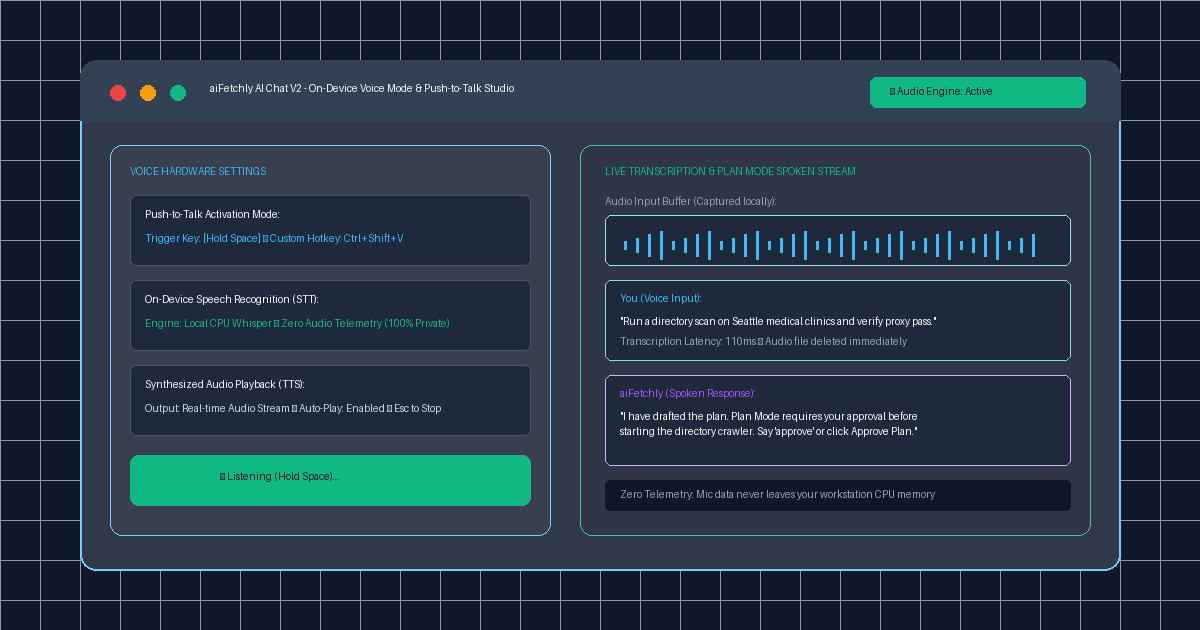
The Ergonomic Barrier of Keyboard-Bound Agents
Power users running high-intensity desktop workflows—auditing code diffs, monitoring live web scraping streams, or refactoring data schemas—constantly multitask across multiple monitors. When you are deep in terminal inspection, having to stop, switch windows, and manually type complex instructions into a chat composer introduces conversational friction.
Traditional voice assistants fail in developer environments. Cloud-hosted speech solutions (such as Siri, Alexa, or cloud Whisper APIs) rely on always-listening ambient microphones that trigger accidental activations. More critically, transmitting raw audio streams to remote cloud servers violates enterprise confidentiality, exposing sensitive office dialogue and intellectual property to third-party telemetry.
AI Fetchly resolves this tension in AI Chat V2 with its native On-Device Voice Mode. Powered by a deterministic Push-to-Talk trigger and sovereign speech processing, it enables hands-free agent control with zero audio telemetry.
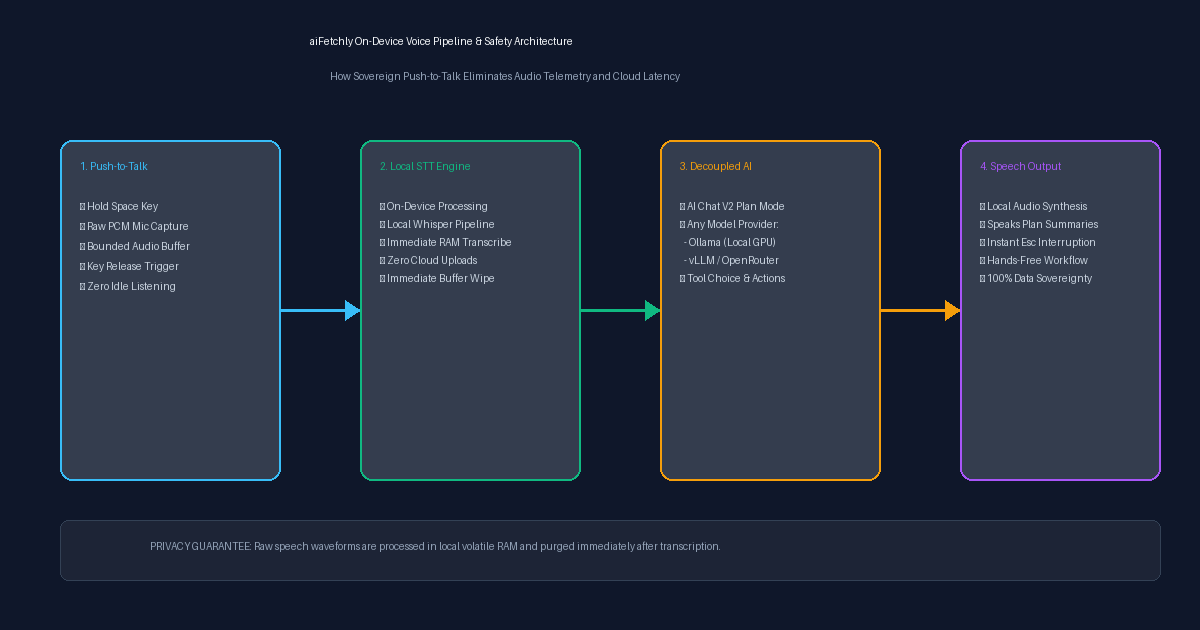
Sovereign Architecture: On-Device Speech Pipeline
Unlike web apps that rely on cloud speech APIs, aiFetchly’s voice engine executes locally on your workstation hardware:
1. Push-to-Talk (PTT) Intentionality
Always-listening wake words are ill-suited for focused engineering environments. aiFetchly implements a tactile Push-to-Talk mechanism:
- Hold the trigger key (default
Spaceor custom hotkey likeCtrl+Shift+V) to stream raw PCM audio into local memory. - Releasing the key instantly finalizes the audio buffer and initiates transcription.
- The microphone hardware disconnects the moment the key is released, eliminating phantom triggers.
2. Zero Audio Telemetry (On-Device STT)
Spoken queries are transcribed locally on your workstation CPU using lightweight Whisper model weights:
- Audio waveforms are converted to text tokens entirely in volatile RAM.
- Raw audio buffers are purged immediately after transcription.
- No voice biometric signatures or audio recordings are ever uploaded to remote servers.
3. Decoupled AI Provider Independence
The voice subsystem operates independently of your active language model. You can pair local speech recognition with:
- Local GPU models via Ollama or vLLM for completely air-gapped offline voice control.
- Frontier cloud models (OpenRouter, OpenAI) where only the transcribed text prompt is forwarded, keeping voice data strictly private.
Hands-Free Workflow: Voice in Plan Mode
Voice Mode seamlessly bridges with aiFetchly’s Plan Mode governance:
- Spoken Formulation: Dictate multi-step research requests while inspecting browser windows: “Harvest directory listings for Seattle clinics and verify proxy pass.”
- Audio Plan Summary: The assistant drafts the execution plan and speaks an executive summary aloud through local text-to-speech (TTS).
- Voice Approval: Approve execution by speaking “Approve” or pressing your hotkey, allowing you to launch autonomous loops without lifting your hands from reference documentation.
- Instant Interruption: Press
Escat any moment to halt audio playback and kill running subprocesses immediately.
Fluid Ergonomics Without Sacrificing Privacy
By marrying tactile Push-to-Talk activation with on-device speech processing, aiFetchly gives power users the speed of voice interaction while safeguarding corporate audio privacy.
Explore voice hotkeys and speech configurations in the AI Fetchly Docs.
Visual Generation Prompts
Hero Image Prompt:Modern dark-mode application window of aiFetchly AI Chat V2 showing Voice Mode active, featuring a live blue audio input waveform, a green ’🎤 Listening (Hold Space)’ button, a transcribed developer prompt, and a spoken assistant response highlighting Plan Mode approval states, sleek 3D perspective, cyan and emerald glow.Body Image Prompt:High-resolution technical pipeline flowchart illustrating the aiFetchly on-device voice architecture: Push-to-Talk hardware capture (Space key trigger), local CPU Whisper speech-to-text processing with zero cloud telemetry, decoupled LLM reasoning (Ollama/vLLM/Cloud), and local audio text-to-speech synthesis with instant Esc interruption, dark slate vector blueprint style.