Inside aiFetchly System Settings: Optimizing Scraping & RAG
The Under-the-Hood Engine of High-Volume Scraping
Data analysts extracting market intelligence, directories, and corporate websites at scale face severe operational bottlenecks. Without proper runtime tuning, automated scraping pipelines stall when encountering Cloudflare challenge walls, trigger bot detection due to misconfigured headless browsers, or suffer from low semantic retrieval precision due to suboptimal vector embeddings.
While conversational AI interfaces emphasize front-end prompts, sustained background automation depends on low-level infrastructure configuration.
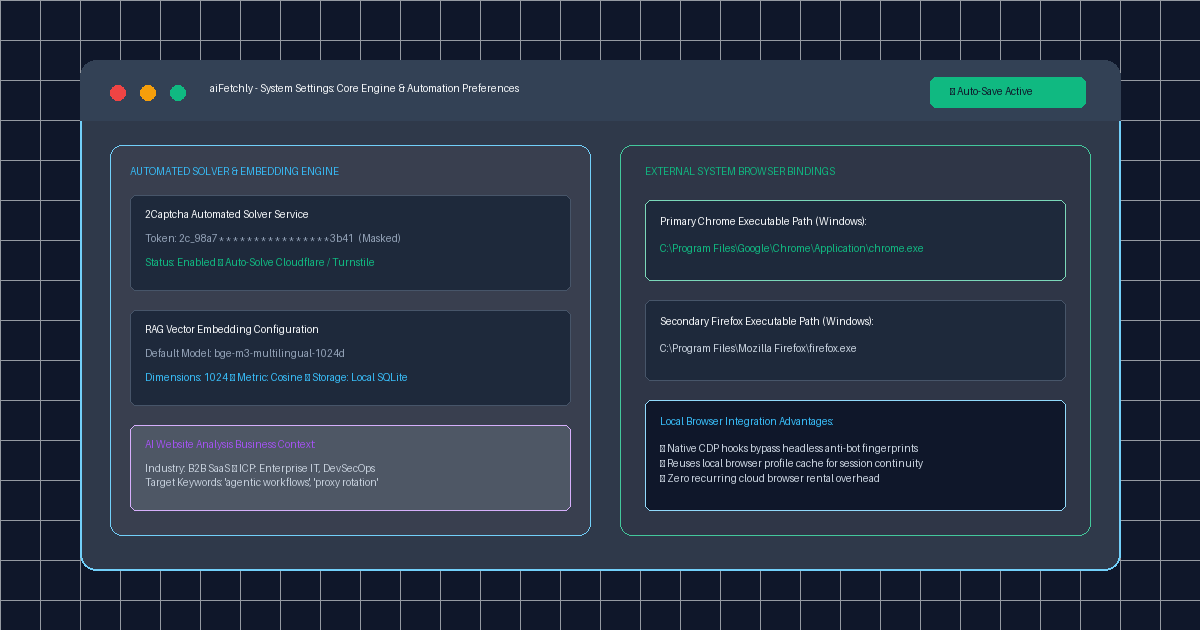
AI Fetchly centralizes these critical controls within System Settings. Functioning as the workstation command center, this section enables analysts to bind automated captcha solvers, configure dimensional RAG embedding weights, bind native local browser binaries, and inject structured business context into AI analysis engines.
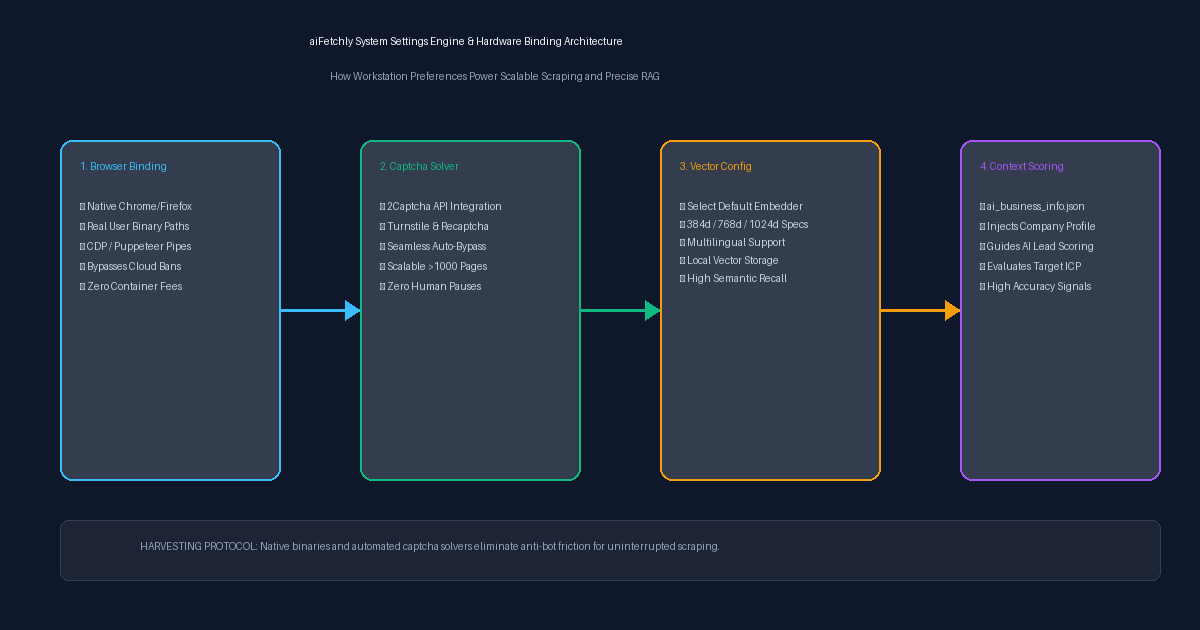
Four Essential Configuration Pillars
1. Automated 2Captcha Resolution
When crawling thousands of pages across Google Maps, commercial directories, or protected search engines, rate limits and anti-bot captchas inevitably trigger.
In System Settings > 2Captcha Service, analysts can input their API token and toggle automated solving. When a scraper encounters a challenge wall during unattended runs, aiFetchly delegates the puzzle resolution seamlessly in the background, eliminating manual developer intervention and preventing pipeline crashes.
2. Tailored Embedding Model Configuration
Retrieval-Augmented Generation (RAG) performance depends on matching embedding dimensions to your linguistic and analytical requirements. Under Embedding Configuration, analysts select from supported vector models:
- Adjust dimensionality (e.g., 384d, 768d, or 1024d) to balance memory footprint against semantic nuance.
- Optimize for multilingual lead datasets across English, Chinese, and regional European markets.
- All vector representations are cached locally in SQLite for instant cosine-similarity matching.
3. Native Browser Path Binding (Chrome & Firefox)
Unlike cloud SaaS platforms that run emulated browser containers with obvious headless fingerprints, aiFetchly connects directly to your installed desktop browsers:
- Chrome Path:
C:\Program Files\Google\Chrome\Application\chrome.exe(Primary recommendation for full CDP compatibility). - Firefox Path:
C:\Program Files\Mozilla Firefox\firefox.exe(Open-source fallback).
Binding local executables enables aiFetchly to launch realistic browser sessions, leverage local cache stores, and bypass sophisticated anti-bot fingerprinting without costly cloud infrastructure.
4. Structured Business Context Ingestion
Under User Preferences, analysts can define an AI Website Analysis Business Info JSON schema. By defining industry, company_size, target_markets, and strategic keywords, the AI automatically evaluates scraped target websites through the lens of your company’s ICP, generating accurate relevance scores rather than generic summaries.
High-Performance Desktop Data Harvesting
By marrying local browser hardware with automated captcha bypasses and custom vector models, aiFetchly delivers enterprise-grade data extraction directly from your desktop.
Explore the complete configuration parameters in the AI Fetchly Docs.
Visual Generation Prompts
Hero Image Prompt:Modern dark-mode developer UI of aiFetchly System Settings, showing the 2Captcha token field with a green ‘Enabled’ badge, the RAG embedding model dropdown set to multilingual 1024d, and verified Windows Chrome browser path C:\Program Files\Google\Chrome\Application\chrome.exe, sleek 3D perspective, cyan and emerald accents.Body Image Prompt:High-resolution technical pipeline flowchart illustrating the aiFetchly System Settings architecture: native desktop browser binary binding, automated 2Captcha challenge resolution, vector embedding model selection with local SQLite storage, and structured business context JSON injection for ICP scoring, dark slate vector blueprint style.