Inside ~/.aifetchly: SQLite Architecture & WAL Concurrency
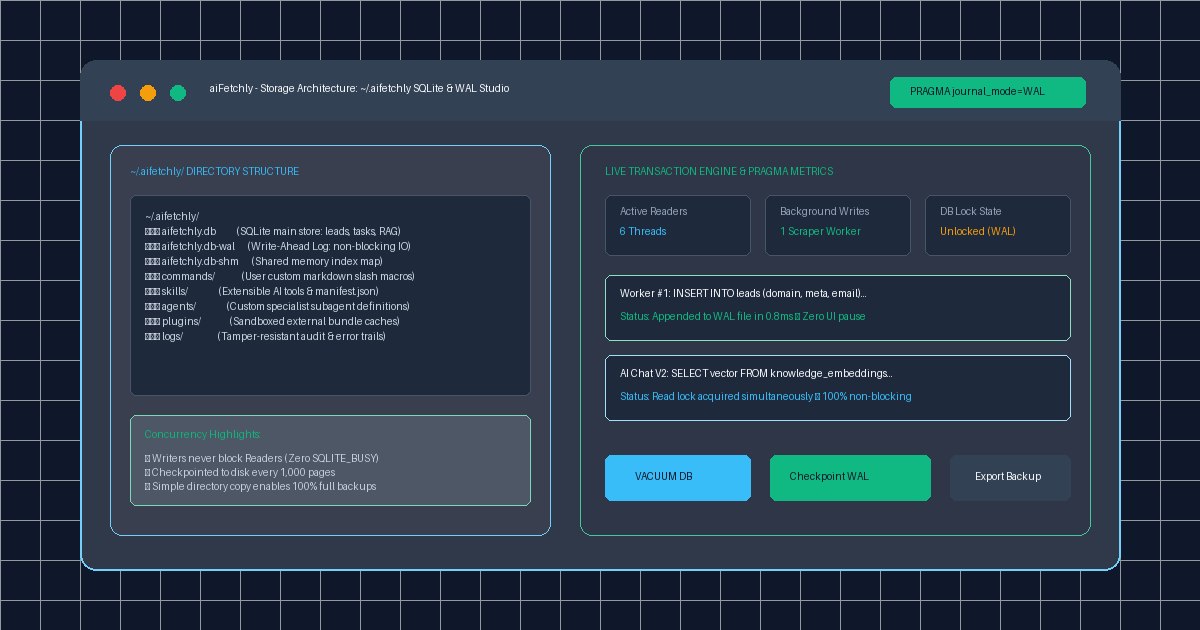
The Storage Dilemma in High-Throughput Desktop AI
Desktop AI automation platforms handle an intensive mix of I/O workloads. A single user session may simultaneously run background multi-engine search scrapers, process streaming web crawls, update email campaign registries, and query dense vector embeddings during interactive AI Chat.
For software engineers, managing these concurrent data operations locally is fraught with architectural pitfalls. Traditional embedded database implementations that use naive rollback journals frequently trigger SQLITE_BUSY database lock errors. When a background scraper writes a batch of 100 harvested contacts, the entire database locks, freezing the frontend UI and stalling in-flight vector searches.
AI Fetchly resolves this concurrency bottleneck through its sovereign, embedded storage architecture housed in ~/.aifetchly/. By leveraging SQLite in Write-Ahead Logging (WAL) mode, aiFetchly delivers enterprise-grade concurrency and ACID reliability directly on desktop hardware.
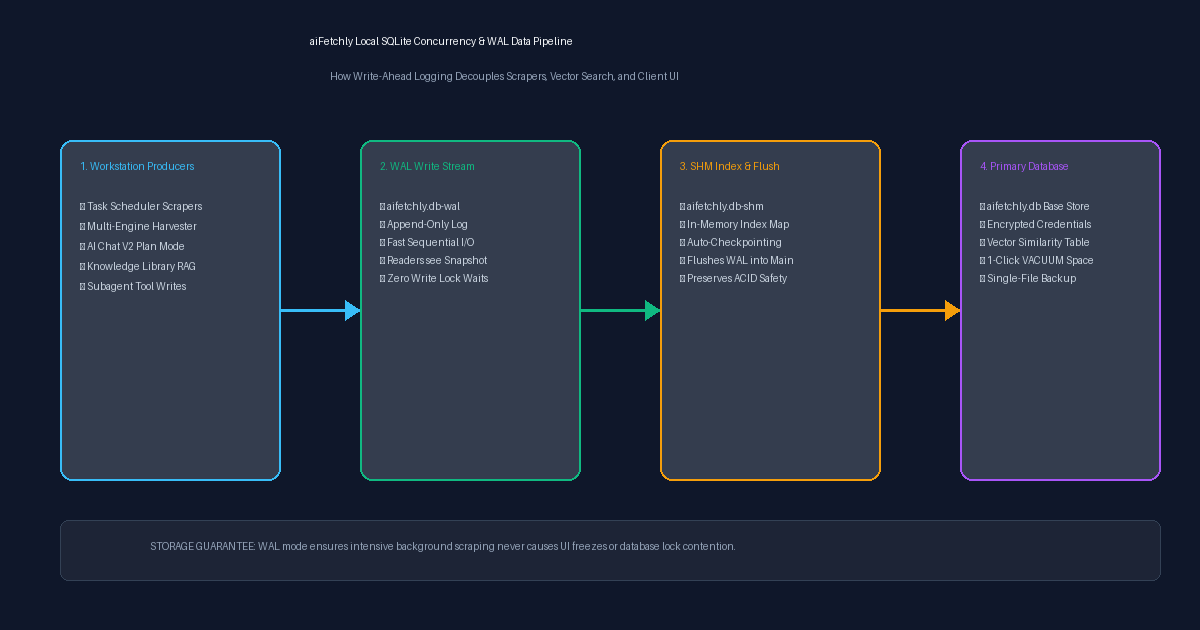
The ~/.aifetchly Filesystem Layout
aiFetchly organizes all persistent workstation state inside a clean, predictable directory structure located at ~/.aifetchly/ (or %USERPROFILE%\.aifetchly on Windows):
~/.aifetchly/
├── aifetchly.db          # Main relational & vector database
├── aifetchly.db-wal      # Write-Ahead Log (fast sequential write buffer)
├── aifetchly.db-shm      # Shared-memory index mapping active readers
├── commands/             # Custom Markdown slash command macros
├── skills/               # Extensible custom AI skills and tool manifests
├── agents/               # Custom specialist subagent configurations
├── plugins/              # Sandboxed plugin bundle caches
└── logs/ # Local diagnostic and audit ledgers Separating user data from core application binaries (/opt or %LOCALAPPDATA%) ensures software updates never overwrite user configurations. Furthermore, backing up or migrating your entire aiFetchly environment requires nothing more than copying this single directory.
Why Write-Ahead Logging (WAL) Mode Matters
By default, standard SQLite locks the database file whenever a write transaction occurs. In high-frequency scraping pipelines, this causes severe read/write starvation.
aiFetchly configures its embedded database with PRAGMA journal_mode=WAL;, unlocking three vital concurrency guarantees:
1. Readers Never Block Writers, Writers Never Block Readers
When background workers in the Task Scheduler insert freshly discovered leads, changes are appended to the separate aifetchly.db-wal file sequentially. Live read queries in AI Chat V2 read uncommitted snapshots without pausing. Scrapers write at disk-speed without freezing UI threads.
2. Microsecond Append Performance
Appending transactions to the end of a WAL file requires sequential disk writes rather than expensive random page seeks. This drastically reduces SSD write amplification during large-scale contact enrichment tasks.
3. Automatic Checkpointing and Space Recovery
aiFetchly monitors log growth and flushes the WAL stream back into the primary database (aifetchly.db) automatically every 1,000 pages. To reclaim unallocated space after deleting large historical lead campaigns, developers can execute VACUUM directly from System Settings, defragmenting database pages and reducing file size instantly.
Sovereign, Zero-Maintenance Desktop Storage
By combining Write-Ahead Logging with transparent directory separation, aiFetchly ensures desktop AI workflows remain responsive, reliable, and completely private on your hardware.
Explore system storage maintenance in the AI Fetchly Docs.
Visual Generation Prompts
Hero Image Prompt:Modern dark-mode developer UI showing the aiFetchly storage architecture studio, displaying the ~/.aifetchly directory tree (aifetchly.db, WAL log, commands/, skills/), active PRAGMA journal_mode=WAL status pills, live transaction throughput metrics (6 Readers, 1 Background Scraper), and a ‘VACUUM DB’ action button, sleek 3D perspective, cyan and emerald glow.Body Image Prompt:High-resolution technical pipeline flowchart illustrating the aiFetchly local SQLite concurrency architecture: concurrent workstation producers (Task Scheduler, AI Chat, Subagents), append-only write streaming into aifetchly.db-wal, shared memory indexing (db-shm), and non-blocking checkpoint flushing into the primary aifetchly.db store, dark slate vector blueprint style.