Inside aiFetchly Slash Commands: Prompt Macros & Agent Loops
Accelerating Agent Interaction with Keyboard Primitives
Power users who rely on autonomous desktop agents for market intelligence, code refactoring, and data pipelines quickly encounter prompt friction. Typing lengthy, multi-clause instructions repeatedly across different sessions wastes time and introduces prompt variance.
Traditional web chat interfaces force users to maintain external snippet managers or copy-paste text files from secondary screens. Furthermore, managing agent settings—such as clearing conversations, inspecting active skills, or triggering bounded execution cycles—typically requires navigating nested settings menus.
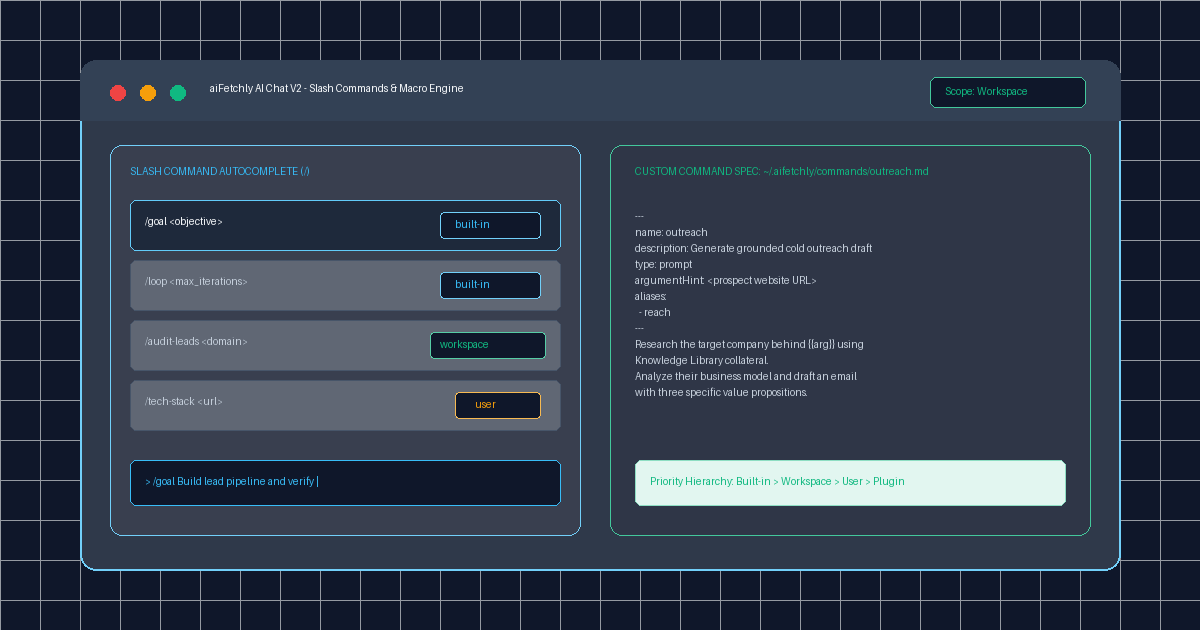
AI Fetchly solves this operational friction in AI Chat V2 with its native Slash Command Engine. By prefixing prompts with /, power users trigger instant system utilities, expand parameterized Markdown prompt templates, and orchestrate autonomous agent loops directly from the keyboard.
Scope Hierarchy and Priority Resolution
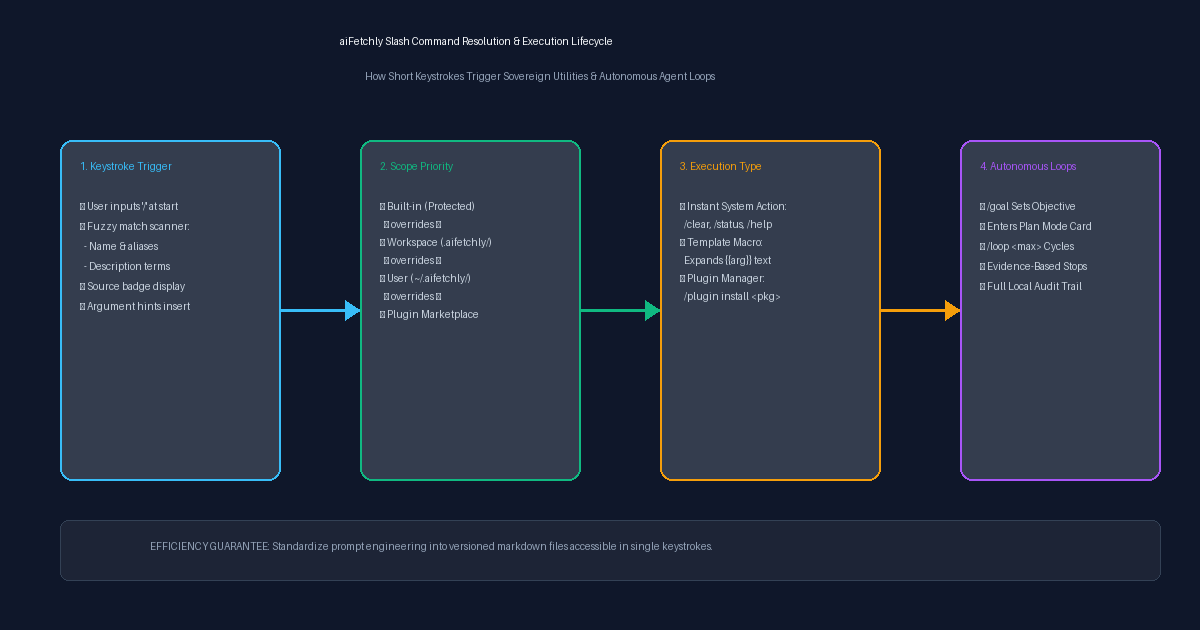
Commands in aiFetchly are modular, versioned, and tagged with explicit Source Badges. To ensure predictability, the engine resolves identical command names through a strict priority hierarchy:
$$\text{Built-in} \longrightarrow \text{Workspace} \longrightarrow \text{User} \longrightarrow \text{Plugin}$$
built-in(Protected): Core system shortcuts (/clear,/status,/help,/skills,/agents,/reload-config) that cannot be overwritten by custom definitions.workspace(Project-Scoped): Commands defined inside an approved project’s.aifetchly/commands/*.mdfolder, tailoring prompts to specific repository conventions.user(Global User): Reusable personal prompt macros stored under~/.aifetchly/commands/*.md, accessible across every chat session.plugin(Ecosystem): Specialized commands contributed by installed community extensions.
Authoring Custom Prompt Macros
Custom commands are lightweight Markdown files containing YAML frontmatter and template instructions.
For example, saving ~/.aifetchly/commands/audit-lead.md creates a reusable company analysis macro:
---
name: audit-lead
description: Analyze company business model and verify tech stack
type: prompt
argumentHint: <company website URL>
aliases:
  - audit
---

Inspect the company collateral behind {{arg}}.
Cross-reference our local Knowledge Library to identify:

1. Target Customer Profile (ICP fit score 1-10)
2. Core technology stack and cloud footprint
3. Three tailored outreach angles for leadership When a user types /audit-lead https://example.com, aiFetchly replaces {{arg}} with the parameter, expanding the macro into a complete, structured prompt in milliseconds.
Driving Autonomous Iterations: /goal and /loop
Beyond static text expansions, aiFetchly pairs slash commands with autonomous execution control:
/goal <objective>: Establishes a persistent, verifiable milestone for the active session and automatically transitions the assistant into Plan Mode./loop <maxIterations>: Commands the agent to execute bounded autonomous iterations toward the defined goal.
Rather than relying on unconstrained auto-generation, /loop halts automatically once verifiable evidence criteria are satisfied or when the iteration limit is reached, maintaining complete user control.
Frictionless Desktop Automation
By turning repetitive prompts into versioned, scoped Markdown files and providing native agent control shortcuts, aiFetchly enables power users to drive complex AI workflows at the speed of thought.
Explore the complete list of built-in commands and macro templates in the AI Fetchly Docs.
Visual Generation Prompts
Hero Image Prompt:Modern dark-mode application window of aiFetchly AI Chat V2 showing an active slash command autocomplete dropdown with colorful source badges (‘built-in’, ‘workspace’, ‘user’), an expanded /goal command in the composer, and a side drawer previewing a custom Markdown prompt macro, sleek 3D perspective, cyan and emerald accents.Body Image Prompt:High-resolution technical pipeline blueprint illustrating the four-stage Slash Command resolution lifecycle: keystroke trigger and fuzzy matching, four-tier scope hierarchy resolution (built-in > workspace > user > plugin), macro parameter expansion, and bounded /goal /loop agent execution, dark vector schematic style.