Inside aiFetchly Plugin Manager: Modular Agent Lifecycle
The Packaging Fragmentation in Desktop AI Extensibility
As autonomous AI agents scale, developer extensions inevitably become fragmented. Configuring an advanced agentic workflow often requires assembling separate tools: importing custom prompt macros, setting up standalone Model Context Protocol (MCP) servers, dropping Python scripts into local skill folders, and scripting lifecycle security hooks.
Managing these moving pieces individually creates severe operational headaches. If an extension breaks, developers must track down orphaned background processes, untangle conflicting directory configs, and manually purge residual files.
AI Fetchly solves this architectural challenge with its unified Plugin Manager. A plugin acts as a single, sovereign package that bundles AI Skills, Subagents, Slash Commands, Lifecycle Hooks, and MCP Servers under a single manifest, a single installation path, and an atomic lifecycle.
Six Ingestion Routes with Zero-Execution Guarantees
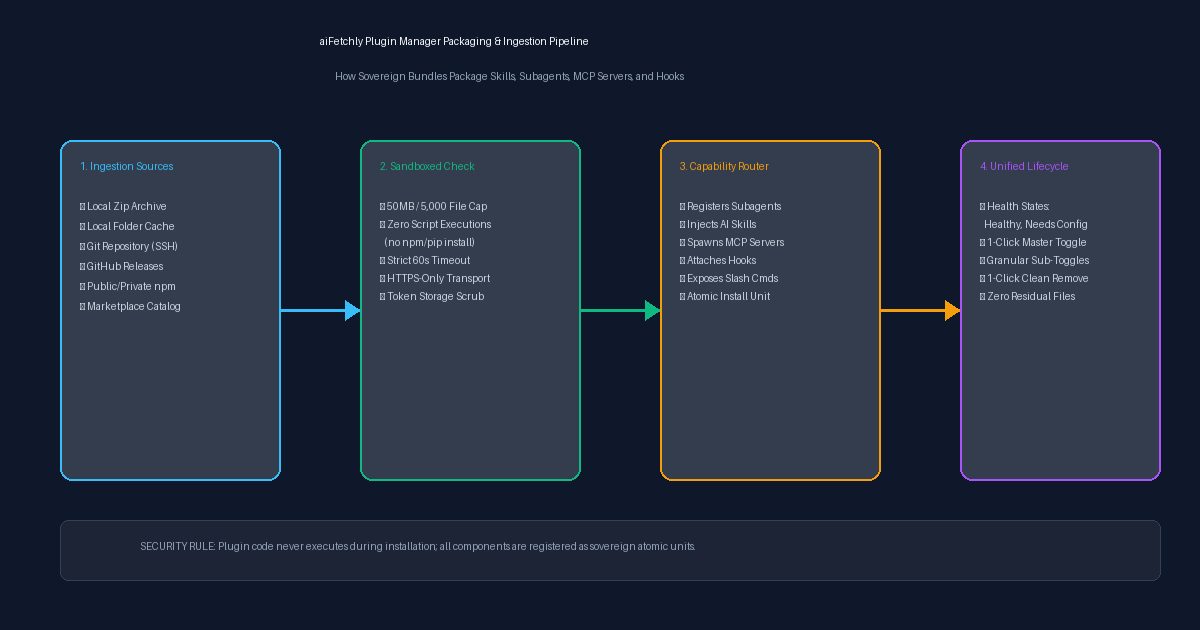
The Plugin Manager supports six flexible distribution channels without compromising workstation safety:
| Install Source | Accepted Format | Authentication Model |
|---|---|---|
| Local Folder | Local directory copied into the plugin cache | None (source remains untouched) |
| Local ZIP | Compressed .zip archive | None |
| Git Repository | Any HTTPS or SSH Git URL (git@...) | SSH agent / OS Git credential helper |
| GitHub Releases | Repo URLs (cloned) or release asset binaries | Public repos / release assets |
| npm Registry | Public npm packages or scoped private registries | Optional token written to a temporary 0600 .npmrc |
| Direct URL | Auto-routes between ZIP, Git, or GitHub | Inherits target source protocol |
Hardened Installation Guardrails
Unlike typical package managers that execute arbitrary setup scripts, aiFetchly enforces strict zero-execution guarantees during installation:
- No Build Scripts:
npm packruns with--ignore-scripts. Nonpm install,pip install, or post-install shell hooks are ever executed. - Strict Size Bounds: Packages are capped at 50 MB compressed, 250 MB extracted, and 5,000 files maximum.
- Process Safeguards: All spawned
git,npm, andtarchild processes have a hard 60-second timeout. Plain HTTP URLs are strictly rejected.
Transparent Risk Audits and Granular Health States
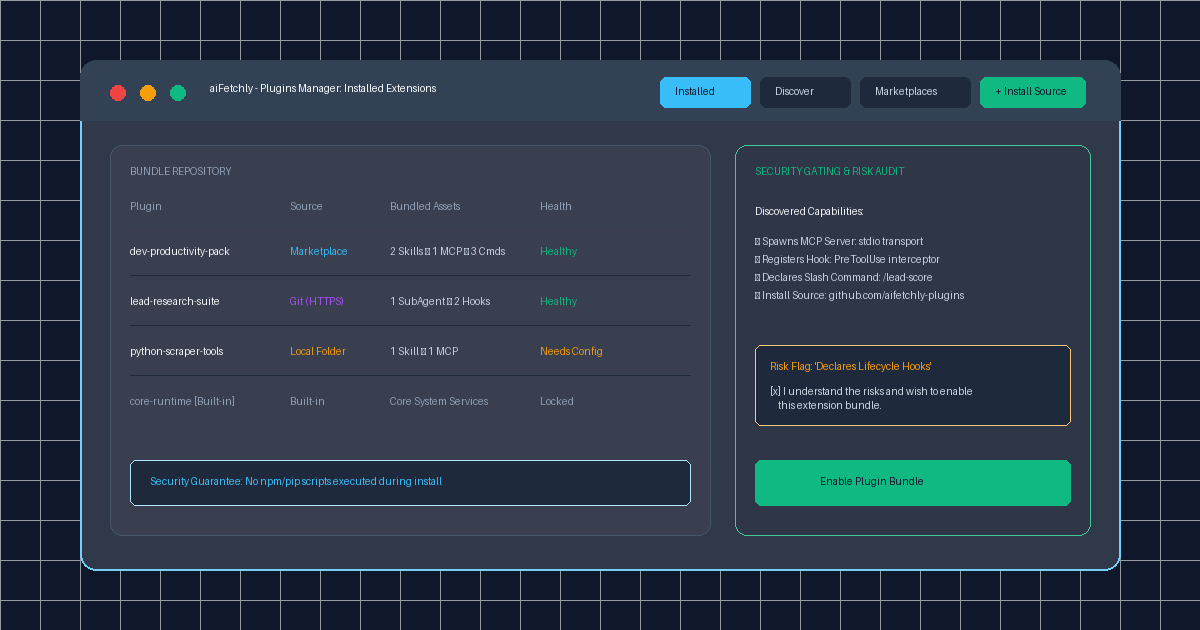
Before installing any third-party bundle from a marketplace or external URL, aiFetchly scans the manifest and displays an explicit Risk Flag Drawer if the bundle declares sensitive capabilities:
- Spawns background MCP servers
- Registers PreToolUse / PostToolUse Lifecycle Hooks
- Installs from unpinned commits
Developers must explicitly confirm these permissions before activation.
Once installed, the manager tracks real-time health across six deterministic states: Healthy, Disabled, Needs Config (e.g., awaiting Python virtualenv instantiation), Partially Loaded, Invalid, or Missing Files. Developers retain master toggle controls to enable or disable the entire bundle with a single click, or selectively toggle individual skills and subagents inside the 9-tab inspection modal.
Sovereign, Unified Extensibility for Desktop Agents
By consolidating disparate agent capabilities into atomic, sandboxed packages, aiFetchly empowers developers to distribute complex agent tooling reliably and safely.
To explore building and publishing your first plugin manifest, visit the AI Fetchly Docs.
Visual Generation Prompts
Hero Image Prompt:Modern dark-mode developer UI of aiFetchly Plugins Manager, showing the Installed tab with modular extension bundles (‘dev-productivity-pack’, ‘lead-research-suite’), capability count tags (MCP Servers, Skills, Subagents), health status pills (‘Healthy’), and a side drawer displaying security risk gating checkboxes, sleek 3D perspective, cyan and emerald accents.Body Image Prompt:High-resolution technical pipeline flowchart illustrating the aiFetchly Plugin Manager architecture: six ingestion sources (Git, GitHub, npm, Local Folder, ZIP, Marketplace), zero-execution sandbox verification (size caps, no-script guarantee), atomic capability router registering Skills/Subagents/MCP, and unified 1-click lifecycle toggles, clean vector schematic style on slate background.