Inside aiFetchly Plan Mode: Governing Autonomous Agents
The Peril of Ungoverned Agentic Tool Calls
Autonomous AI agents equipped with file system access, terminal execution, and external Model Context Protocol (MCP) servers are transforming software development and data extraction. However, granting agents unconstrained autonomy introduces severe risks: accidental file overwrites, runaway recursive API calls, silent context truncation, and unintended side effects.
Standard conversational interfaces fail to govern multi-step agent actions because they execute commands reactively on the fly. When a developer asks an assistant to refactor an authentication module or crawl complex domains, the agent often initiates destructive edits before the developer can inspect its intended methodology.
AI Fetchly resolves this governance problem in AI Chat V2 with its native Plan Mode architecture. Instead of leaping straight into tool execution, the AI formulates and validates an explicit roadmap first, providing developers with deterministic oversight.
Core Architectural Pillars of aiFetchly Plan Mode
1. Inline Plan Cards and Two-Stage Approval
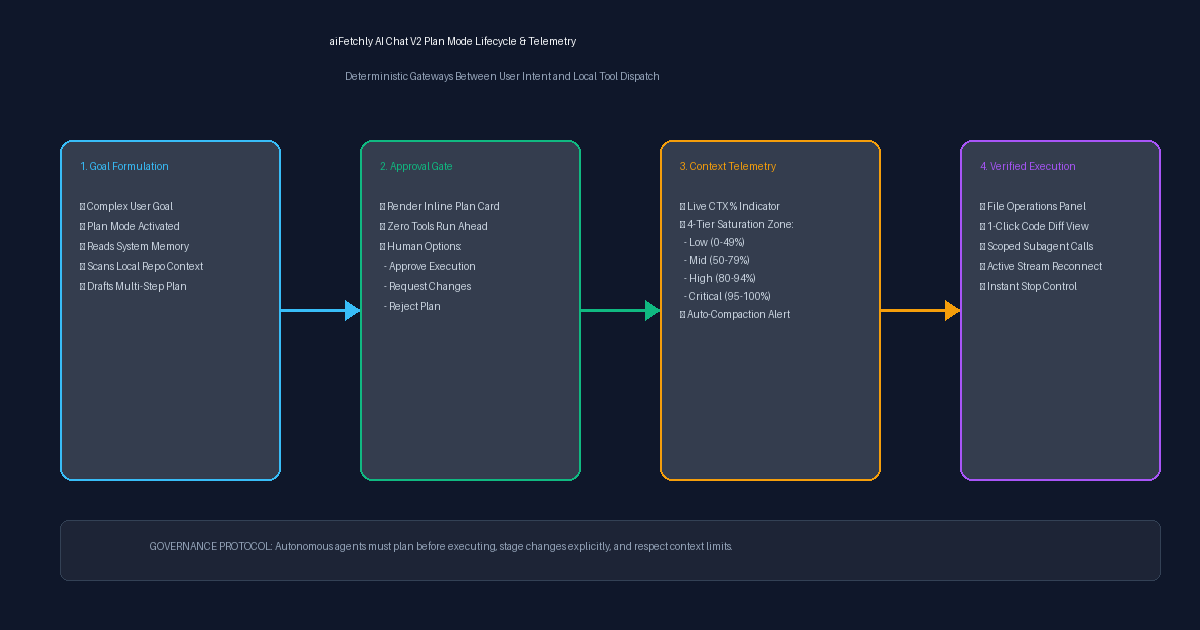
In standard Chat Mode, queries execute immediately. In Plan Mode, aiFetchly intercepts requests involving tool calls or file modifications, drafting an interactive Markdown plan before invoking a single tool.
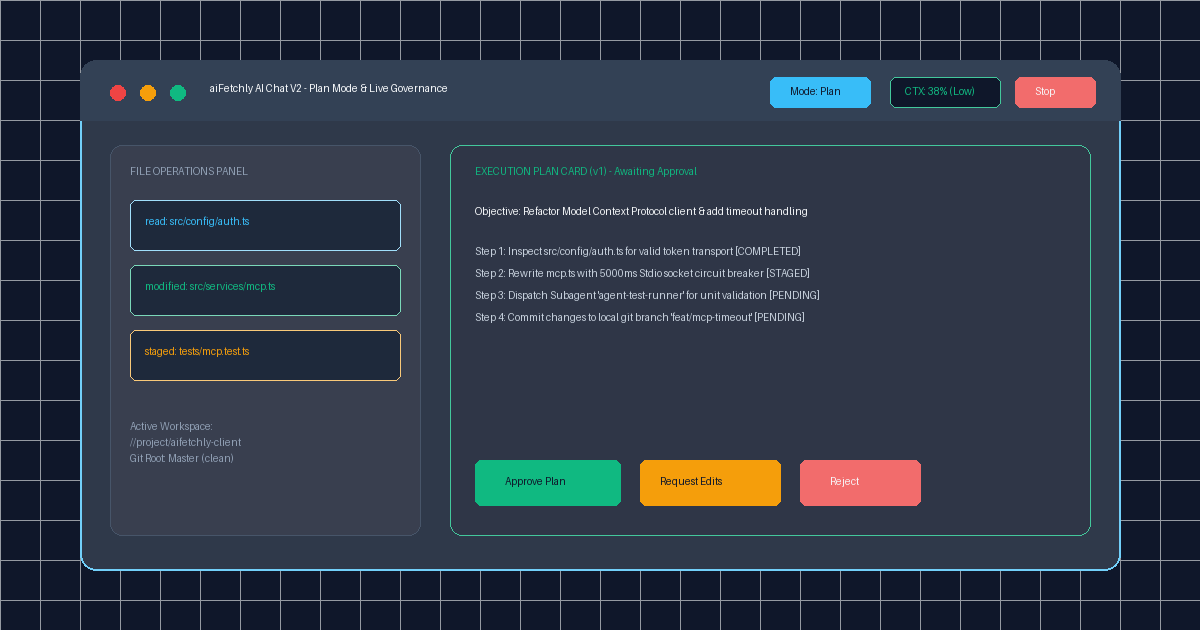
The plan appears in the conversation stream as an Inline Plan Card detailing:
- The specific objective and estimated sub-steps.
- Staged tool calls and file modification targets.
- Explicit approval options: Approve (launches execution immediately), Request Changes (prompts the AI to revise its strategy), or Reject (halts the workflow entirely).
Execution only proceeds once the developer explicitly clicks Approve, preventing speculative code edits from altering production directories.
2. Live Context Telemetry (CTX % Badge)
A major failure mode in complex developer workflows is context rot: as conversation histories fill up, models quietly drop early architectural rules or crash mid-refactor.
AI Chat V2 introduces a real-time Context-Usage Badge positioned alongside the composer:
- Low (0–49%, Grey): Ample working buffer for deep file ingestion.
- Mid (50–79%, Yellow): Approaching dense reasoning; subagents recommended.
- High (80–94%, Orange): Context warning; session pruning recommended.
- Critical (95–100%, Red): Immediate risk of automated compaction or truncation.
3. Collapsible File Operations Panel
Developers no longer need to parse verbose agent chat logs to determine which files were touched. Positioned directly above the message composer, the File Operations Panel aggregates real-time chips of every file read or modified during the current turn. Clicking any modified chip opens an inline side-by-side diff view to verify syntax before committing.
4. Streaming Reconnect and Instant Interrupts
Network drops during long-running tool runs no longer cause silent hangs. AI Chat V2 features resilient stream reconnection with visual status indicators, alongside a dedicated Stop Button that immediately kills in-flight subprocesses and cancels active MCP tool calls.
Deterministic Control for Desktop AI Workflows
By decoupling planning from execution and providing real-time telemetry, aiFetchly enables developers to harness autonomous agent speed without sacrificing safety or code integrity.
Explore the complete AI Chat V2 specification in the AI Fetchly Docs.
Visual Generation Prompts
Hero Image Prompt:Modern dark-mode developer UI showing aiFetchly AI Chat V2 with an active Plan Mode card, featuring step-by-step checkboxes (‘Refactor MCP Transport’, ‘Validate Auth Schemas’), a glowing ‘Approve Plan’ button, a real-time CTX: 38% telemetry pill, and a file operations drawer with color-coded diff chips, sleek isometric 3D perspective, cyan and emerald accents.Body Image Prompt:High-resolution technical pipeline blueprint illustrating the four-stage Plan Mode lifecycle: intent decomposition, inline approval card gating, live context telemetry monitoring across four saturation tiers, and verified file operations execution with diff verification, vector schematic style on slate background.