Geospatial Scraping: aiFetchly Google & Yandex Maps Guide
The High Cost of Commercial Mapping APIs
Data analysts and competitive intelligence teams mapping regional vendor ecosystems face an expensive dilemma. Commercial mapping APIs, such as the official Google Places API, charge between $17 and $32 per thousand requests while prohibiting data caching and offline storage. For an analyst evaluating regional suppliers across multiple metropolitan hubs, these recurring fees make wide-radius research prohibitively expensive.
Furthermore, Western mapping APIs provide minimal visibility into Eastern European and Central Asian markets where Yandex Maps dominates over 70% of local search volume.
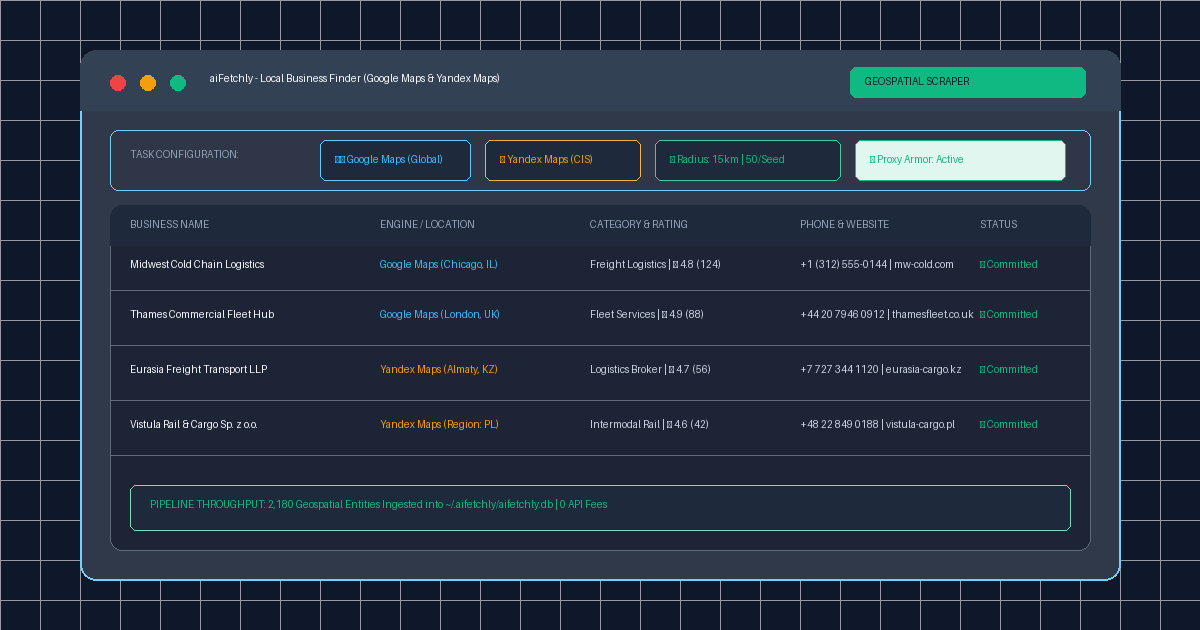
AI Fetchly resolves these constraints through its native Local Business Finder. By driving local Chromium instances via the Chrome DevTools Protocol (CDP), analysts extract complete geospatial datasets across Google Maps and Yandex Maps directly onto desktop hardware with zero per-record API fees.
Step 1: Define Target Niche and Geographic Coordinates
Setting up an extraction task takes under two minutes:
- Open Lead Generation from the left navigation and select Google Maps or Yandex Maps.
- Click Create New Task and configure your parameters:
- Target Industry: Input focused keywords (e.g., “Cold Chain Logistics”, “Industrial Precision Tooling”).
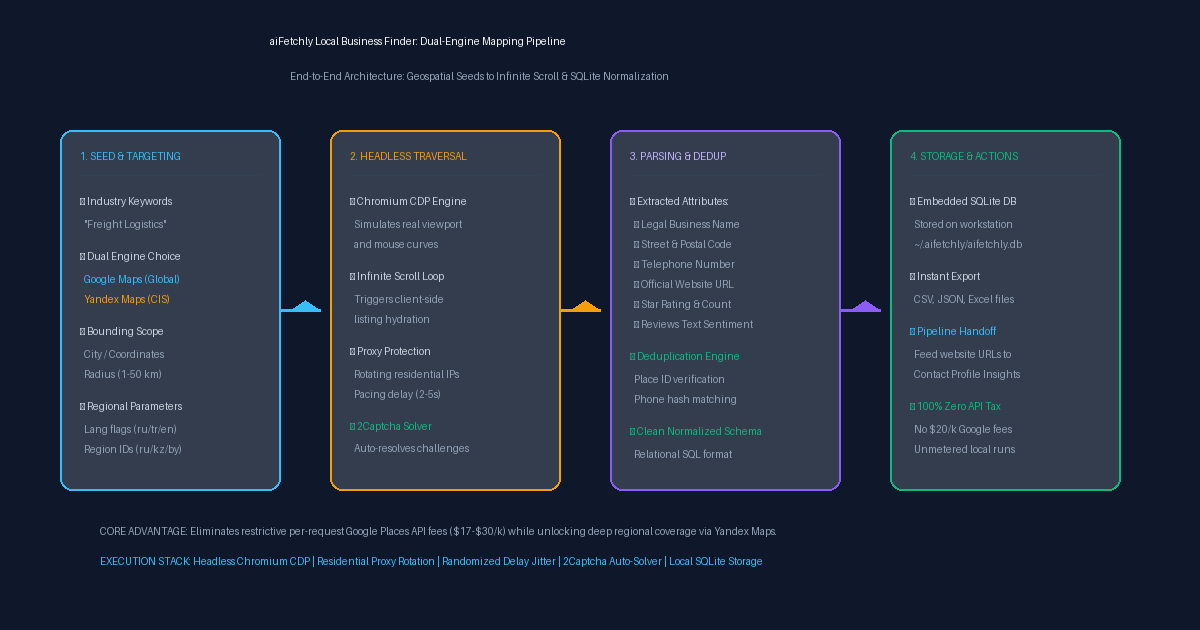
- Geographic Center: Enter a target city, postal code, or coordinate center with a search radius (1–50 km).
- For Yandex Maps sweeps, configure regional ISO parameters (e.g., language flags
ru,tr,enand territory codesru,kz,by) to target CIS commercial markets accurately.
Step 2: Configure Residential Proxy Armor & Behavioral Pacing
High-throughput mapping extraction requires strict anti-bot hygiene to avoid IP bans:
- Proxy Pool Rotation: Under Proxy Setup, connect your authenticated SOCKS5 or HTTPS residential proxy pool to rotate IPs automatically.
- Randomized Delay Jitter: aiFetchly injects a randomized delay buffer (2–5 seconds) between viewport scrolls to emulate organic browsing patterns.
- 2Captcha Automatic Solver: In System Settings, supply your 2Captcha API key. If challenge walls appear, aiFetchly resolves them in the background without halting your pipeline.
Step 3: Launch Headless Infinite Scroll Traversal
Click Start Extraction. aiFetchly initiates a background headless browser session:
- Client-Side Hydration: The browser navigates the mapping viewport and systematically micro-scrolls the results pane, triggering dynamic JavaScript hydration until every listing in the grid is captured.
- Deep Field Extraction: As business cards render, the DOM parser extracts core attributes: legal company name, category tags, physical street address, phone number, official website URL, star rating, total review count, and recent review text.
Step 4: Deduplicate and Commit to Local SQLite
Raw listings automatically stream in real time into your local SQLite database (~/.aifetchly/aifetchly.db):
- Automated Deduplication: The engine cross-references unique Google Place IDs and normalized phone number hashes to eliminate overlapping records.
- Export Formats: Export verified datasets into CSV, JSON, or Excel spreadsheets with a single click.
- Downstream Pipeline Handoff: Pass harvested website domains directly into Contact Profile Insights to discover verified decision-maker email addresses.
By combining unmetered dual-engine mapping with local data governance, aiFetchly delivers sovereign local business intelligence at scale.
Explore advanced scraper parameters in the AI Fetchly Docs.
Visual Generation Prompts
Hero Image Prompt:Modern dark-mode SaaS dashboard showing the aiFetchly Local Business Finder console, displaying active Google Maps and Yandex Maps task badges, a live data stream table of verified B2B companies with star ratings, telephone numbers, and domains, green proxy status pills, and local SQLite commit counters, sleek isometric perspective, slate-900 background with cyan and amber accents.Body Image Prompt:High-resolution technical pipeline flowchart illustrating the aiFetchly Dual-Engine Mapping architecture: Seed Configuration (Keywords, Coordinates, Radius, Yandex regional flags), Headless Traversal (Chromium CDP, Infinite Scroll, Proxy Armor, 2Captcha), Parsing & Deduplication (Place ID and phone hashing), and Local Storage (SQLite, CSV export, Contact Profile Insights handoff), clean dark vector blueprint style.