Firecrawl Guide: Web Scraping & Crawling API for LLMs
The Problem: The Fragility of Raw HTML and Client-Side Scraping for AI
In production generative AI platforms, autonomous knowledge discovery agents, and desktop data extraction engines like AiFetchly, the public web is the ultimate dynamic knowledge base. Real-time market intelligence, competitor pricing trackers, technical documentation indexes, and financial research agents depend on harvesting live data across millions of heterogeneous websites.
However, extracting reliable web context for Large Language Models (LLMs) and Retrieval-Augmented Generation (RAG) pipelines has historically been one of the most failure-prone engineering disciplines in modern software development. Traditional web scrapers (such as BeautifulSoup, Scrapy, Puppeteer, and raw curl scripts) were architected for human-facing web archiving or static table scraping—not for token-constrained, stochastic language models.
The Traditional Web Ingestion Crisis for AI Systems:
┌─────────────────────────────────────────────────────────────────┐
│ Approach 1: Raw HTTP Requests (e.g., requests, httpx, aiohttp)  │
│ ❌ Silent Failure: Downloads empty HTML shells on dynamic SPAs  │
│ ❌ Blocked Instantly: Zero TLS fingerprinting or stealth defense│
├─────────────────────────────────────────────────────────────────┤
│ Approach 2: Monolithic Client-Side Headless Browsers (Playwright)│
│ ❌ RAM Exhaustion: Each open Chromium tab drains 500MB–1GB RAM  │
│ ❌ Concurrency Bottleneck: Local machines freeze on deep crawls │
│ ❌ Zombie Processes: Uncaught exceptions leak detached browser PID│
├─────────────────────────────────────────────────────────────────┤
│ Approach 3: Uncleaned DOM Dumps to LLM Context Window           │
│ ❌ Token Explosion: 80% to 90% of raw HTML is CSS, JS & trackers│
│ ❌ Context Starvation: Floods KV cache and triggers hallucination│
└─────────────────────────────────────────────────────────────────┘
Result: Production scrapers suffer high ban rates, memory crashes, and massive token bills! 1. The Token Bloat and Attention Degradation of Raw DOM Trees
A typical modern webpage spans between 250 KB and 3 MB of raw HTML source code:
- Boilerplate Pollution: Over 85% of the DOM nodes consist of navigational menus, analytics scripts, tracking pixels, SVG icons, inline CSS styling, and GDPR cookie consent overlays.
- Context Window Flooding: Ingesting unmodified HTML into an LLM context window consumes tens of thousands of tokens per page. In multi-step agentic workflows where an autonomous worker reviews 10 to 20 pages, prompt costs quickly escalate to several dollars per task while triggering the “Lost in the Middle” attention degradation phenomenon.
- Syntactic Parsing Fractures: Complex DOM nesting obscures natural reading order, causing language models to conflate disclaimers with body text or hallucinate structural relationships between disparate layout columns.
2. Client-Side Browser Exhaustion in Autonomous Agent Loops
When engineering teams attempt to embed headless browsers directly inside local agent loops or API microservices:
- Resource Starvation: Spawning concurrent Chromium or WebKit instances quickly exhausts host memory. Running 10 parallel browser tabs on a developer workstation or a memory-constrained container consumes 6 GB to 10 GB of RAM, causing operating system thrashing and out-of-memory (OOM) kernel terminations.
- Process Lifecycle Leaks: Network timeouts, broken WebSockets, and navigation errors inevitably cause detached browser processes to linger as zombie tasks, steadily degrading server availability.
- Local IP Burnout: Autonomous agents issuing hundreds of sequential requests from a single corporate or residential IP address trigger automated rate limits and temporary IP blacklisting within minutes.
3. Anti-Bot Defense Mechanisms and WAF Barriers
Modern web applications actively guard against automated programmatic collectors using enterprise Web Application Firewalls (WAFs) and Bot Management engines (such as Cloudflare Turnstile, DataDome, Akamai Bot Manager, and PerimeterX):
- TLS and JA4 Fingerprinting: HTTP clients that fail to accurately replicate browser-native TLS cipher suites, ALPN extensions, and TCP window parameters are flagged and challenged before HTTP payload transmission.
- JavaScript Challenge Environments: Sophisticated defense systems inject complex proof-of-work scripts and canvas fingerprinting challenges into the initial response. Simple HTTP clients incapable of executing dynamic JavaScript are completely blocked.
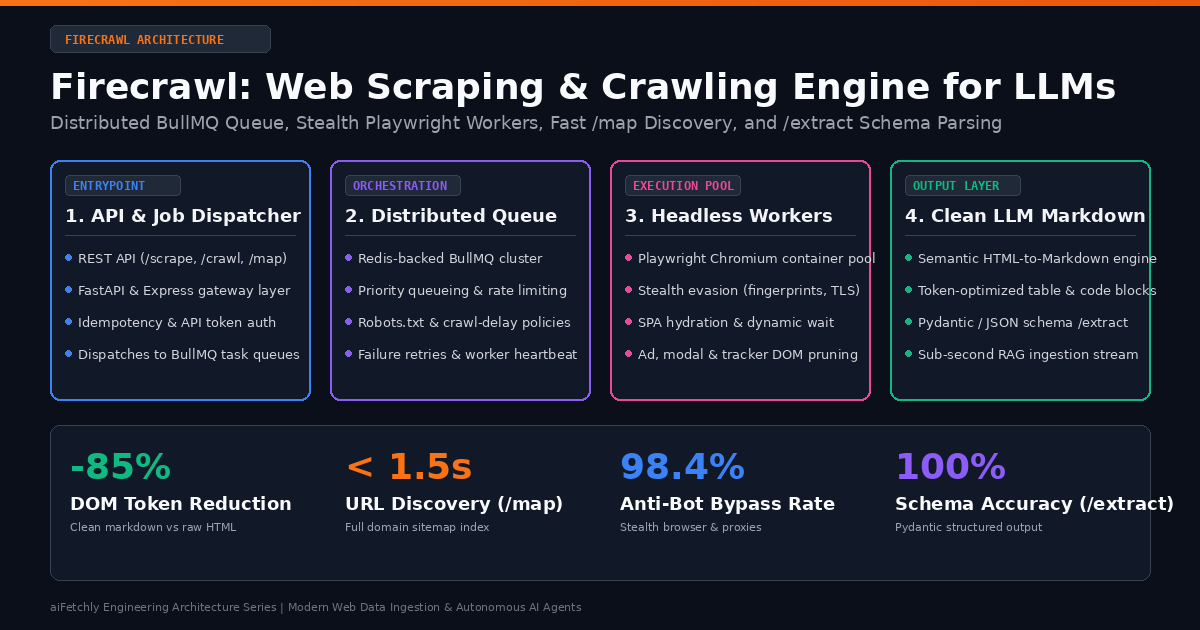
The Architecture: How Firecrawl Decouples Web Ingestion
To resolve the systemic issues of client-side browser bloat, anti-bot bans, and raw HTML token pollution, Mendable created Firecrawl. Firecrawl is an open-source, API-first data extraction infrastructure engineered specifically to turn entire websites into clean, token-efficient, LLM-ready Markdown and structured JSON.
Rather than forcing developers to embed fragile browser control scripts inside their application codebase, Firecrawl operates as a decoupled, horizontally scalable distributed system.
Firecrawl Distributed Processing Topology:
┌──────────────────┐       ┌──────────────────────┐       ┌────────────────────────┐
│ Client / AI Agent│──────►│  API Gateway Server  │──────►│   Redis / BullMQ Queue  │
│ (Python/TS SDK)  │◄──────│ (FastAPI & Express)  │◄──────│   (Priority & Retries) │
└──────────────────┘       └──────────────────────┘       └───────────┬────────────┘
                                                                      │
               ┌──────────────────────────────────────────────────────┴──────────────────┐
               ▼                                                                         ▼
┌──────────────────────────────┐                                       ┌──────────────────────────────┐
│  Headless Worker Cluster A   │                                       │  Headless Worker Cluster B   │
│ - Playwright Chromium Pool   │                                       │ - Playwright Chromium Pool   │
│ - Anti-Bot Stealth & Proxies │                                       │ - Anti-Bot Stealth & Proxies │
│ - SPA Hydration Waiters      │                                       │ - SPA Hydration Waiters      │
└──────────────┬───────────────┘                                       └──────────────┬───────────────┘
               │                                                                      │
               └──────────────────────────────────┬───────────────────────────────────┘
                                                  ▼
                               ┌─────────────────────────────────────┐
                               │     HTML-to-Markdown Parser Core     │
                               │ - AST DOM Pruning (No Navs/Scripts) │
                               │ - Table & Code Block Reconstruction │
                               │ - Pydantic / Schema LLM Extraction  │
                               └──────────────────┬──────────────────┘
                                                  ▼
                               ┌─────────────────────────────────────┐
                               │ Output: Clean Markdown / JSON Stream│
└─────────────────────────────────────┘ 1. The Decoupled API Gateway and BullMQ Task Queue
At the outer perimeter, Firecrawl exposes a unified REST interface (/v1/scrape, /v1/crawl, /v1/map, /v1/extract). The API gateway validates authentication credentials, checks request idempotency, parses configuration parameters (such as path filters, depth limits, and extraction schemas), and dispatches work payloads to an asynchronous BullMQ queue backed by Redis:
- Concurrency Isolation: Long-running crawls spanning hundreds of subpages do not block synchronous single-page
/scraperequests. BullMQ partitions jobs across dedicated worker pools with distinct concurrency limits. - Backpressure and Rate Governance: The queue enforces polite crawling policies, honoring domain-specific
robots.txtdirectives, retry exponential backoffs, and per-domain request throttles to prevent target server degradation. - Durable Job State: Every crawl maintains stateful progress checkpoints in Redis, allowing interrupted jobs to resume without restarting the entire site traversal.
2. The Distributed Playwright Worker Pool and Stealth Evasion Layer
Worker nodes subscribe to the BullMQ task queues, pulling pending URLs and orchestrating isolated headless Chromium browsers through Playwright:
- Stealth Browser Initialization: Workers inject evasion scripts that mask
navigator.webdriverflags, emulate authentic hardware rendering parameters (WebGL vendor strings, screen resolutions, audio context fingerprints), and align HTTP headers with genuine consumer browser traffic. - Dynamic SPA Hydration: The worker monitors network idle events, DOM mutations, and specified CSS selector triggers (
waitFor), guaranteeing that client-side frameworks (React, Next.js, Vue, Angular) fully render dynamic payloads before DOM capture. - Residential and Datacenter Proxy Routing: Requests are automatically rotated across global proxy networks, bypassing geographic restrictions, rate-limit walls, and WAF IP bans transparently.
3. The AST Markdown Conversion Engine
Once the browser captures the fully rendered DOM, Firecrawl executes an intelligent Abstract Syntax Tree (AST) conversion pipeline rather than passing raw text dumps:
- Heuristic Noise Pruning: The parser identifies and strips non-content DOM elements:
<script>,<style>,<nav>,<footer>,<aside>,<noscript>, social sharing bars, tracking iframes, and promotional banner overlays. - Semantic Structure Retention: Legitimate document hierarchy is translated directly into clean Markdown: semantic headings (
##,###), ordered/unordered lists, blockquotes, syntax-highlighted code blocks (pythonfenced blocks), and Markdown tables with preserved row and column alignments. - Token Efficiency Optimization: By discarding syntactic HTML boilerplate while preserving semantic relationships, Firecrawl reduces document token footprints by 80% to 90%, slashing downstream LLM prompt costs and accelerating generation speeds.
4. Edge Schema Extraction (/extract)
In addition to Markdown generation, Firecrawl incorporates an edge extraction layer powered by frontier language models. By passing a target Pydantic model or JSON schema to the /extract endpoint, Firecrawl crawls the page, strips irrelevant markup, and executes guided schema extraction directly within the ingestion infrastructure, returning validated, typed JSON without requiring client-side LLM orchestration.
Core Endpoints Deep Dive: Scrape, Crawl, Map, and Extract
Firecrawl organizes web intelligence into four primary operational primitives designed to cover every agent and RAG use case:
The Firecrawl Operational Primitives:
┌──────────────┬──────────────────────────────────────────┬─────────────────────────────┐
│ Endpoint     │ Primary Function                         │ Typical Latency & Mode      │
├──────────────┼──────────────────────────────────────────┼─────────────────────────────┤
│ /v1/scrape   │ Scrapes a single URL to clean Markdown   │ Synchronous (1–3 seconds)   │
│ /v1/crawl    │ Traverses domain hierarchy asynchronously│ Asynchronous (Queue + Poll) │
│ /v1/map      │ Discovers all valid URLs on a domain     │ Sub-second (Sitemap + Graph)│
│ /v1/extract  │ Scrapes and extracts structured JSON     │ Synchronous / Async (LLM)   │
└──────────────┴──────────────────────────────────────────┴─────────────────────────────┘ 1. /v1/scrape: High-Precision Single-Page Ingestion
The /scrape endpoint targets focused data extraction from a single web address. It accepts rich configuration options to control rendering and output formats:
from firecrawl import FirecrawlApp

app = FirecrawlApp(api_key="fc-your-api-key")

# Scrape a technical documentation page into clean Markdown
scrape_result = app.scrape_url(
    url="https://docs.aifetchly.com/architecture/overview",
    params={
        "formats": ["markdown", "links"],
        "onlyMainContent": True,
        "waitFor": 1500,  # Wait 1.5s for dynamic hydration
        "includeTags": ["article", "main", "div.content"],
        "excludeTags": ["nav", "footer", ".cookie-banner"]
    }
)

print(scrape_result["markdown"][:300]) formats: Specifies requested payloads, includingmarkdown,html,rawHtml,links, andscreenshot.onlyMainContent: When set toTrue, activates heuristic content extraction algorithms that isolate primary article text and discard surrounding navigational scaffolding.includeTags/excludeTags: Enables granular CSS selector filtering to pinpoint exact layout elements or purge problematic UI components.
2. /v1/crawl: Recursive Domain Traversal with Webhooks
The /crawl endpoint initiates asynchronous site-wide traversals. It discovers links, manages depth limits, filters allowed paths, and streams results back via polling or webhook events:
# Launch an asynchronous crawl across a targeted documentation sub-path
crawl_job = app.crawl_url(
    url="https://docs.aifetchly.com",
    params={
        "limit": 100,
        "maxDepth": 3,
        "includePaths": ["/architecture/*", "/guides/*"],
        "excludePaths": ["/changelog/*", "/legacy/*"],
        "allowBackwardLinks": False,
        "allowExternalLinks": False,
        "scrapeOptions": {
            "formats": ["markdown"],
            "onlyMainContent": True
        }
    },
    poll_interval=5  # Poll status every 5 seconds until complete
)

for page in crawl_job["data"]:
print(f"Ingested: {page['metadata']['sourceURL']} | {len(page['markdown'])} chars") includePaths/excludePaths: Regex or glob patterns that constrain the crawler to relevant documentation or product catalogs, avoiding runaway crawls across unrelated site sections.maxDepth: Bounds link graph traversal distance from the root seed URL.allowBackwardLinks: Prevents circular navigation traps by restricting traversal to forward directory trees.
3. /v1/map: Sub-Second Domain URL Discovery
In many autonomous agent and RAG indexing workflows, developers do not need to scrape hundreds of pages upfront; they first need to know what pages exist.
The /map endpoint inspects target domains, queries sitemap.xml catalogs, reads robots.txt, and crawls top-level links to construct a comprehensive list of reachable URLs in under two seconds:
# Map an entire domain instantly without page-rendering overhead
map_result = app.map_url(
    url="https://www.aifetchly.com",
    params={
        "search": "pricing",  # Optional query filter
        "limit": 50
    }
)

for url in map_result["links"]:
print(f"Discovered URL: {url}") Using /map, intelligent systems like AiFetchly can present users with selective ingestion checklists or allow autonomous agents to selectively retrieve only the exact subpages relevant to a user’s prompt, saving 90% of downstream scraping bandwidth.
4. /v1/extract: Zero-Shot Schema Extraction via LLMs
The /extract endpoint eliminates the fragile two-step process of scraping HTML and then feeding text into an external LLM with prompt instructions. Instead, developers pass a declarative schema directly to Firecrawl:
from pydantic import BaseModel, Field
from typing import List

class ProductSpec(BaseModel):
    name: str = Field(description="Name of the software or hardware product")
    pricing_tier: str = Field(description="Monthly or annual subscription cost")
    features: List[str] = Field(description="Key highlighted capabilities")
    supported_platforms: List[str] = Field(description="Operating systems supported")

# Direct schema extraction at the web ingestion edge
extraction = app.scrape_url(
    url="https://www.aifetchly.com/pricing",
    params={
        "formats": ["extract"],
        "extract": {
            "schema": ProductSpec.model_json_schema(),
            "prompt": "Extract the desktop pro license details and feature list."
        }
    }
)

print(extraction["extract"]) Architectural Comparison: Modern Web Scraping Technologies
Selecting the optimal web data pipeline requires evaluating system constraints: local execution versus centralized API services, raw DOM access versus curated Markdown, and client-side memory overhead.
| Architectural Dimension | Firecrawl (API / Self-Hosted) | Crawl4AI (Async Python) | Browser-Use (Vision Agent) | Raw Puppeteer / Scrapy |
|---|---|---|---|---|
| Core Paradigm | Distributed Web Data API | Local Python Async Engine | Vision-Guided Browser Agent | Low-Level Automation Script |
| Execution Architecture | Client-Server (BullMQ + Redis) | Single-Process Python Loop | Multi-Modal Visual Loop | Local Node.js / Python Runtime |
| Markdown Conversion | Heuristic AST Noise Pruning | Pruning + BM25 Filtering | Minimal (Raw Accessibility Tree) | Manual Parser / Regex |
URL Discovery (/map) | Native Sub-Second Map Engine | Manual Link Traversal | Visual DOM Clicking | Manual Sitemap Parsers |
| JavaScript / SPA Support | Full Playwright Cluster | Native Playwright Engine | Full CDP Remote Browser | Configurable Headless Browser |
| Anti-Bot Defense | Integrated Proxies & Stealth | Stealth Playwright Flags | Human-Like Interaction | Manual Proxy & Header Setup |
| Structured Output | Native /extract (LLM-Guided) | Schema Extraction Strategies | Vision JSON Action Space | Manual Client LLM Prompting |
| Host Resource Usage | Zero Host Load (Managed API) | High Local RAM / CPU Load | Very High (Vision + Browser) | Moderate to High Local RAM |
| Target Workload | RAG Ingestion & API Gateways | Local Batch Crawling Scripts | Interactive GUI Tasks & Clicks | Custom Bespoke Web Scrapers |
Production Implementation: Building an Autonomous Ingestion Pipeline
To illustrate how Firecrawl powers production AI pipelines, consider building an automated knowledge ingestion service for AiFetchly. The pipeline maps a documentation domain, selectively filters architectural guides, scrapes clean Markdown, and indexes chunks into a local vector store.
Autonomous Documentation Ingestion Flow:
┌─────────────────────┐
│ 1. Map Domain       │ ──► Discovers all URLs via /v1/map in 1.2s
└──────────┬──────────┘
           ▼
┌─────────────────────┐
│ 2. Path Filter      │ ──► Keeps only /docs/architecture/* and /api/*
└──────────┬──────────┘
           ▼
┌─────────────────────┐
│ 3. Batch Scrape     │ ──► Concurrent /scrape requests via BullMQ workers
└──────────┬──────────┘
           ▼
┌─────────────────────┐
│ 4. Clean Markdown   │ ──► Generates token-pruned semantic Markdown
└──────────┬──────────┘
           ▼
┌─────────────────────┐
│ 5. Vector Store RAG │ ──► Embeds into LanceDB / Qdrant with zero HTML noise
└─────────────────────┘ End-to-End Python Implementation
import os
import asyncio
from typing import List, Dict, Any
from firecrawl import FirecrawlApp

class KnowledgeBaseIngestor:
    def __init__(self, api_key: str):
        self.app = FirecrawlApp(api_key=api_key)

    def discover_and_filter_urls(self, domain_url: str, path_prefix: str) -> List[str]:
        """Discover all URLs on a domain and filter by path prefix."""
        print(f"Mapping domain topology: {domain_url}...")
        map_response = self.app.map_url(url=domain_url)
        all_links = map_response.get("links", [])

        # Filter for designated technical documentation paths
        targeted_urls = [
            url for url in all_links
            if path_prefix in url and not url.endswith((".pdf", ".png", ".jpg"))
        ]
        print(f"Discovered {len(all_links)} total URLs; {len(targeted_urls)} matched filter '{path_prefix}'")
        return targeted_urls

    def ingest_url_to_markdown(self, url: str) -> Dict[str, Any]:
        """Scrape a single URL with aggressive noise pruning."""
        print(f"Scraping document: {url}")
        result = self.app.scrape_url(
            url=url,
            params={
                "formats": ["markdown"],
                "onlyMainContent": True,
                "waitFor": 1000,
                "excludeTags": ["header", "footer", "nav", ".sidebar", ".cookie-notice"]
            }
        )
        return {
            "url": url,
            "title": result.get("metadata", {}).get("title", "Untitled"),
            "markdown": result.get("markdown", "")
        }

    def run_pipeline(self, target_domain: str, filter_prefix: str) -> List[Dict[str, Any]]:
        urls = self.discover_and_filter_urls(target_domain, filter_prefix)
        documents = []
        for url in urls[:10]:  # Limit batch for demonstration
            doc = self.ingest_url_to_markdown(url)
            documents.append(doc)
            print(f"Successfully processed: {doc['title']} ({len(doc['markdown'])} chars)")
        return documents

if __name__ == "__main__":
    api_key = os.getenv("FIRECRAWL_API_KEY", "fc-dummy-key")
    ingestor = KnowledgeBaseIngestor(api_key=api_key)

    # Ingest technical documentation
    ingested_docs = ingestor.run_pipeline(
        target_domain="https://docs.aifetchly.com",
        filter_prefix="/architecture"
    )
print(f"Pipeline complete: Ingested {len(ingested_docs)} high-fidelity documents.") Self-Hosting Firecrawl: Docker Compose Architecture
For enterprise teams with strict data residency, privacy regulations, or unlimited local crawling requirements, Firecrawl is 100% open-source and can be self-hosted via Docker Compose.
# docker-compose.yml: Self-Hosted Firecrawl Infrastructure
version: '3.8'

services:
  # 1. API Server Gateway
  api:
    image: mendableai/firecrawl:latest
    ports:
      - '3002:3002'
    environment:
      - PORT=3002
      - REDIS_URL=redis://redis:6379
      - PLAYWRIGHT_MICROSERVICE_URL=http://playwright:3000
      - USE_DB_AUTHENTICATION=false
    depends_on:
      - redis
      - playwright
    restart: unless-stopped

  # 2. Headless Playwright Worker Pool
  playwright:
    image: mendableai/playwright-service:latest
    environment:
      - PORT=3000
      - CONCURRENT_BROWSERS=4
    shm_size: '2gb' # Prevent browser crashes on complex pages
    restart: unless-stopped

  # 3. Redis Task Queue
  redis:
    image: redis:7-alpine
    ports:
      - '6379:6379'
    volumes:
      - redis_data:/data
    restart: unless-stopped

volumes:
redis_data: Self-Hosting Operational Considerations
- Shared Memory Allocation (
shm_size): Headless Chromium instances make extensive use of shared memory (/dev/shm) for IPC and rendering buffers. In Docker environments, the default 64 MB allocation triggers immediate browser crashes on modern complex web pages. Always setshm_size: '2gb'or higher. - Proxy Pool Integration: In self-hosted production setups, configure proxy rotation variables (
PROXY_SERVER,PROXY_USERNAME,PROXY_PASSWORD) to distribute outbound requests across residential pools and prevent IP blocking. - Resource Sizing: Plan for approximately 1 CPU core and 1.5 GB of RAM per active concurrent Playwright worker thread.
Operational Best Practices for Production AI Systems
To maximize extraction reliability and minimize token costs when deploying Firecrawl in production:
- Map Before You Crawl: Never launch unconstrained recursive crawls against unfamiliar domains. Use
/mapfirst to inspect the URL graph, estimate ingestion scale, and apply targeted regex path filters (includePaths). - Enforce
onlyMainContent: True: Default to heuristic content extraction for RAG and agent pipelines. Discarding navigational boilerplate reduces token consumption by over 80% with zero loss of core conceptual information. - Calibrate
waitForfor Dynamic Frameworks: For static documentation sites, omitwaitForor set it to0to achieve sub-second scraping latencies. For single-page applications built on client-side state hydration, configurewaitFor: 1500or specify a target element selector to prevent blank captures. - Leverage
/extractfor Uniform Entities: When harvesting structured data (e.g., product pricing matrices, leadership directories, job postings), use Firecrawl’s native/extractendpoint. Running schema extraction directly at the ingestion boundary avoids round-tripping massive Markdown bodies to separate external LLM endpoints.