Ferret-UI 2 Guide: Apple Universal Vision UI Agent AI
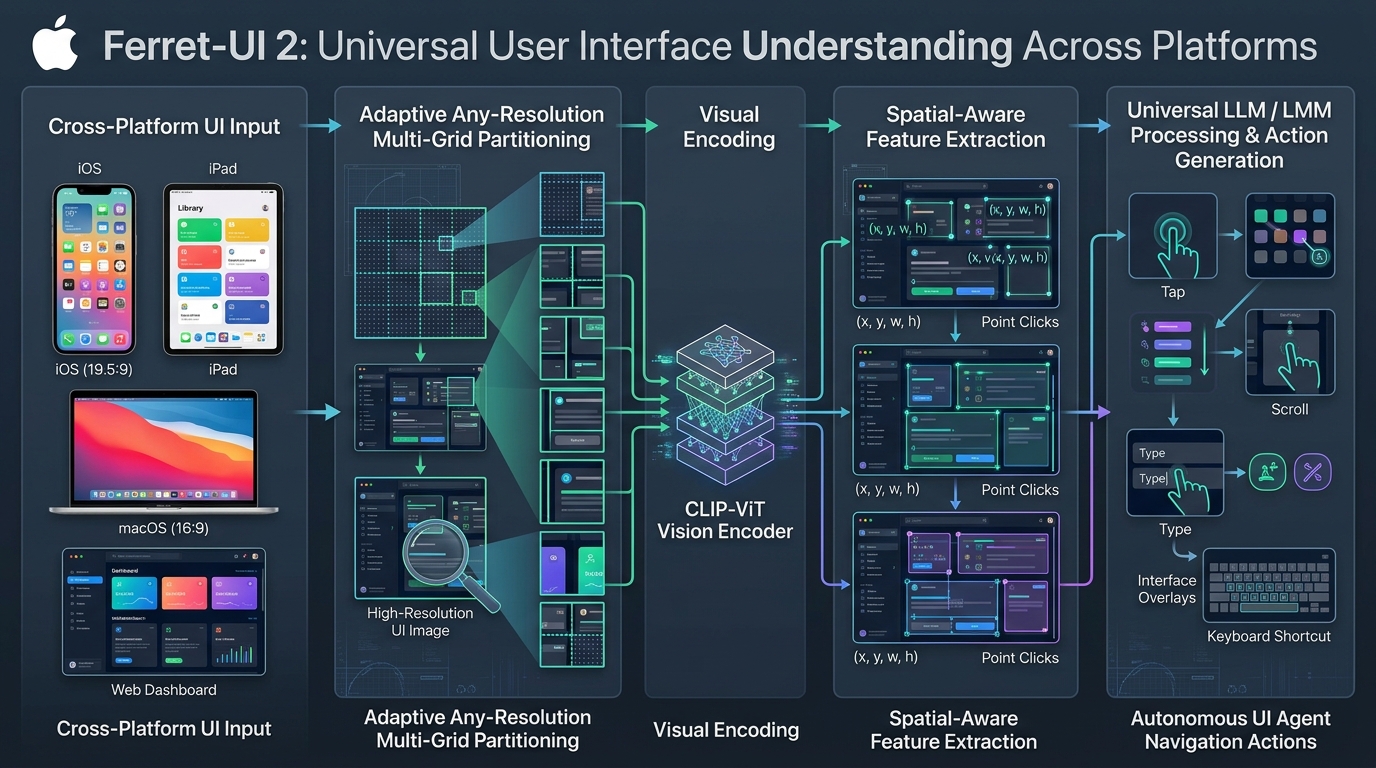
The Problem: The Extreme Aspect Ratio and Fine-Grained Resolution Tax in UI Agents
In modern enterprise automation, automated quality assurance testing, robotic process automation (RPA), and intelligent personal copilots powered by AI Fetchly, autonomous agents are increasingly required to perceive and manipulate computer graphical user interfaces (GUIs). Whether interacting with native mobile apps, executing browser flows on data harvested through automated web scraping pipelines, or performing desktop operations, multimodal vision-language models (VLMs) must operate on pixels just as human knowledge workers do.
However, standard frontier multimodal architectures (such as standard CLIP ViTs, LLaVA, and early vision transformers) were fundamentally designed for natural photography—square images ($1:1$ aspect ratio) centered on prominent semantic objects (such as cats, dogs, or street scenes).
When applied to digital user interfaces, standard vision backbones encounter severe geometric and cognitive breakdown:
1. The Extreme Aspect Ratio Distortion Dilemma
Digital screens deviate drastically from the $1:1$ square inputs expected by standard Vision Transformers ($224 \times 224$ or $336 \times 336$ resolution):
- Mobile Smartphones (iOS / Android): Feature tall portrait displays with extreme aspect ratios of $19.5:9$ or $20:9$ (e.g., $1179 \times 2556$ on iPhone 16 Pro).
- Desktop Workstations (macOS / Windows): Feature wide landscape displays ($16:9$, $16:10$, or ultra-wide $21:9$, such as $3840 \times 2160$ or $3440 \times 1440$).
- Smartwatches and Embedded Terminals: Feature small square or circular screens ($1:1$).
The Aspect Ratio Distortion in Standard VLMs:
Original iPhone Screen (19.5:9)            Naive Square Resizing (1:1 ViT Input)
┌───────────┐                              ┌─────────────────────────┐
│ Status Bar│ (Icons: 24x24 px)            │ Squee-zed Status Bar    │ (Icons: 4x4 px - BLURRED!)
├───────────┤                              ├─────────────────────────┤
│ Search Bar│                              │ Crushed Text Line       │ (Unreadable characters)
├───────────┤                              ├─────────────────────────┤
│ Content   │                              │ Distorted Form Elements │
│ Cards     │                              │ Distorted Checkboxes    │
│           │                              │                         │
├───────────┤                              ├─────────────────────────┤
│ Bottom Bar│                              │ Squashed Navigation Tabs│
└───────────┘                              └─────────────────────────┘
Result: Downsampling a 1179x2556 screen to 336x336 squashes height by 7.6x and width by 3.5x!
Text becomes illegible and small button icons vanish into sub-pixel blur. If a tall portrait smartphone screen is naively resized to a square $336 \times 336$ input tensor:
- The vertical dimension is compressed by over $7.6\times$, while the horizontal dimension is compressed by $3.5\times$.
- Critical UI components—such as a $28 \times 28$ pixel hamburger menu or an $18 \times 18$ pixel bookmark icon—shrink to less than $3 \times 3$ pixels.
- Patch projection layers ($14 \times 14$ patches in ViT) blur multiple adjacent controls into a single ungroundable visual token, causing catastrophic misclicks.
2. The Granularity Gap: Coarse Natural Vision vs. Dense UI Elements
Unlike natural photographs where semantic context is broad and forgiving, graphical user interfaces are dense informational topologies:
- A single desktop screen often contains over $80$ to $150$ distinct interactive widgets (buttons, toggles, text input fields, sliders, toolbars, and context menus).
- A minute coordinate error of just 5 pixels can turn an intended “Submit” click into an unintended “Cancel” or “Delete” click.
- Existing GUI agents that rely on accessibility trees (HTML DOM or accessibility APIs) frequently fail because Electron apps, Flutter frameworks, Canvas elements, and game engines render raw pixels without publishing accessibility tree metadata.
3. The Platform Silo in Early UI Foundation Models
While early specialized mobile models (such as Ferret-UI 1 or AppAgent) attempted to handle smartphone screens, they were strictly hardcoded for vertical mobile layouts. They could not generalize to desktop macOS windows, tablet split-screen layouts, or multi-monitor web browsers.
Conversely, desktop GUI agents (such as Agent-S or OSWorld frameworks) relied on cumbersome external OCR engines and coordinate translators that added seconds of latency per step.
The industry demanded a universal, native, pixel-first foundation model capable of understanding and grounding any interface—from an Apple Watch to an ultra-wide desktop monitor—in a single, end-to-end forward pass.
The Solution: Apple Ferret-UI 2 Universal Vision Architecture
To solve the cross-platform UI understanding challenge, researchers from Apple Research introduced Ferret-UI 2: Mastering Universal User Interface Understanding Across Platforms (arXiv:2410.18967, presented at ICLR 2025).
Ferret-UI 2 establishes a unified vision-language framework capable of operating across mobile (iOS / Android), tablet (iPadOS), desktop (macOS / Windows / Linux), and web environments.
The Ferret-UI 2 Universal Paradigm:
┌────────────────────────────────────────────────────────────────────────┐
│ Universal UI Comprehension Across Platforms                            │
├───────────────────────────────────┬────────────────────────────────────┤
│ Adaptive Any-Resolution Partition │ Fine-Grained Referential Grounding │
├───────────────────────────────────┼────────────────────────────────────┤
│ • Dynamic Grid Allocation         │ • Point coordinates: (x, y)        │
│ • Aspect-ratio preserving crops   │ • Bounding boxes: [x1, y1, x2, y2] │
│ • Dual-stream: Global + Sub-Grids │ • Multi-element region sets        │
│ • Zero geometric distortion       │ • Native OCR + Icon Classification│
└───────────────────────────────────┴────────────────────────────────────┘ 1. Core Principles of Ferret-UI 2
Ferret-UI 2 resolves the visual UI bottleneck through three architectural pillars:
- Adaptive Any-Resolution Multi-Grid Partitioning: Instead of forcing non-square displays into a static square canvas, Ferret-UI 2 dynamically analyzes the aspect ratio of the input screen and partitions it into an optimal grid of high-resolution sub-crops (e.g., $1 \times 2$ for tall mobile phones, $2 \times 1$ or $2 \times 2$ for desktop displays) alongside a global downsampled overview.
- Universal Referential Spatial Grounding: Extends Apple’s Ferret hybrid representation to graphical interfaces. The model seamlessly accepts spatial prompts (points, bounding boxes, or free-form regions) as inputs and outputs grounded screen coordinates for actions (tap, long press, swipe, type, drag).
- The Universal-UI Corpus: Apple curated the largest, most diverse multi-platform UI dataset in existence, spanning over 1.2 million annotated screens across iOS, iPadOS, macOS, Android, and Web interfaces, training the model on both elementary UI perception and complex multi-step reasoning.
2. The Universal-UI Multi-Platform Curriculum
A core reason prior vision-language models fail on universal interfaces is the severe scarcity of cross-platform grounding data. Models trained exclusively on web screenshots fail to recognize mobile toggle switches or iOS segmented pickers; models trained exclusively on Android fail to comprehend complex multi-window macOS desktop docks and Windows file explorer trees.
To establish universal competency, Apple engineered the Universal-UI dataset, spanning over 1.2 million carefully curated screens across five major computing form factors:
- iOS and iPadOS Ecosystem: 450,000 native mobile screens annotated with SwiftUI widget hierarchies, App Intent action targets, and dynamic Dynamic Island / notch occlusions.
- macOS and Desktop Systems: 320,000 high-resolution desktop captures featuring dense menu bars, multi-monitor window arrangements, nested contextual menus, and IDE interfaces (Xcode, VS Code).
- Android OS Environments: 280,000 Material Design screens across varied device DPI scales, system navigations (3-button vs gesture navigation), and drawer menus.
- Modern Web Applications: 180,000 diverse responsive web pages spanning Single Page Applications (SPAs), complex administrative dashboards, Canvas-based creative suites, and e-commerce checkout flows.
The training pipeline follows a rigorous three-stage progressive alignment curriculum:
- Stage 1 (Any-Resolution Visual Pre-training): Focuses purely on patch-level reconstruction and spatial position alignment, teaching the vision projection layers to map dynamic (G_h, G_w) sub-crops into unified spatial coordinate representations.
- Stage 2 (Elementary UI Perception Grounding): Trains the model on granular localized tasks—such as Widget Classification (identifying 36 distinct UI element types), Icon Recognition (categorizing over 120 common system glyphs), and Find Text (OCR localization of exact character strings).
- Stage 3 (Advanced Cognitive UI Reasoning): Boots the model into an autonomous decision agent through multi-step instruction following, Detailed Captioning (describing functional relationships between screen regions), and Action Intent Planning (generating exact gesture sequences to fulfill complex user intents).
3. State-of-the-Art Cross-Platform Performance
Across both elementary perception and advanced operational reasoning, Ferret-UI 2 sets a new state-of-the-art:
- Widget Classification & Icon Recognition: Outperforms GPT-4o, Claude 3.5 Sonnet, and specialized screen parsers across iOS, Android, and Web screens.
- Point-Level Grounding Accuracy: Achieves over $89.4%$ pointing accuracy on tiny UI controls (under $30 \times 30$ pixels), compared to $68.2%$ for standard open VLMs.
- Cross-Platform Generalization: Zero-shot transfer from mobile training to complex macOS desktop environments without losing spatial coordinate calibration.
Ferret-UI 2 Architecture: Adaptive Multi-Grid Encoding and Spatial Grounding
To understand how Ferret-UI 2 achieves pixel-perfect precision on tiny interface elements across varying display form factors, we examine its image partitioning engine, dual-stream feature projection, and continuous coordinate space.
Ferret-UI 2 Detailed Processing Pipeline:
Input Screen: I in R^(H x W x 3) (e.g. 1179 x 2556 iPhone or 3840 x 2160 Mac)
     │
     ├──► Aspect Ratio Analyzer: Computes r = H / W
     │
     ├──► Stream 1: Global Context Path
     │    Resize entire screen to ViT base resolution: (336 x 336)
     │    Extracts global layout and high-level screen context
     │
     └──► Stream 2: Adaptive Sub-Grid High-Definition Path
          Dynamically partitions screen into G_h x G_w sub-crops
          (e.g., G_h=2, G_w=1 for mobile; G_h=1, G_w=2 for desktop)
          Each sub-crop resized to (336 x 336) without aspect distortion!
     │
     ▼ Both streams fed through shared CLIP-ViT-L/14 Vision Encoder
┌────────────────────────────────────────────────────────────────────────┐
│ Visual Feature Projection & Spatial Alignment Module                   │
│ • Concatenates Global Tokens + Sub-Grid High-Definition Tokens         │
│ • Injects 2D Spatial Positional Embeddings per Sub-Grid                │
└──────────────────────────────────┬─────────────────────────────────────┘
                                   │
                                   ▼ Spatial Coordinate Formatter
┌────────────────────────────────────────────────────────────────────────┐
│ Continuous Coordinate Tokenizer [0, 1000]                              │
│ • Point inputs: <point_x, point_y>                                     │
│ • Box inputs/outputs: <box_x1, box_y1, box_x2, box_y2>                 │
└──────────────────────────────────┬─────────────────────────────────────┘
                                   │
                                   ▼ Autoregressive LLM Decoder (Vicuna / LLaMA-3)
┌────────────────────────────────────────────────────────────────────────┐
│ Generated Action Intent & Natural Language Response:                   │
│ "Click on the Search button located at [124, 856, 310, 912]"           │
└────────────────────────────────────────────────────────────────────────┘ 1. Adaptive Any-Resolution Multi-Grid Partitioning
Let an input screen have height $H$ and width $W$. Ferret-UI 2 defines an adaptive grid allocation strategy based on the aspect ratio $\rho = \frac{H}{W}$:
$$\text{Grid Configuration } (G_h, G_w) = \begin{cases} (2, 1) & \text{if } \rho \ge 1.6 \quad \text{(Tall Mobile Screens: iOS / Android)} \ (1, 2) & \text{if } \rho \le 0.65 \quad \text{(Wide Desktop Screens: 16:9 / 21:9)} \ (2, 2) & \text{if } 0.65 \< \rho \< 1.6 \text{ and } H \cdot W > 10^6 \quad \text{(High-Res Tablets / Square)} \ (1, 1) & \text{otherwise} \quad \text{(Low-Resolution / Compact)} \end{cases}$$
Each sub-grid crop $\mathbf{I}_{i, j}$ represents a localized region of size $\frac{H}{G_h} \times \frac{W}{G_w}$.
By resizing each sub-crop independently to the standard ViT input resolution $S \times S$ (e.g., $336 \times 336$), the effective visual resolution is multiplied:
- For mobile screens ($G_h=2, G_w=1$): The vertical resolution is doubled ($672 \times 336$), preserving small text and tiny icon geometries without vertical squishing.
- For desktop screens ($G_h=1, G_w=2$): The horizontal resolution is doubled ($336 \times 672$), preserving wide horizontal navigation bars and dense tabular layouts.
2. Dual-Stream Feature Fusion and Spatial Alignment
The vision pipeline processes two complementary visual representations:
- Global Overview Stream: The entire image is resized to $S \times S$, providing coarse, holistic understanding of the application hierarchy and screen state.
- High-Definition Sub-Grid Stream: The $G_h \times G_w$ sub-crops are processed through the same frozen vision transformer backbone.
To prevent the language model from losing the physical spatial arrangement of the sub-crops, Ferret-UI 2 adds 2D sub-grid positional coordinates to the projected visual tokens:
$$\mathbf{F}{\text{total}} = \text{Concat}\left(\mathbf{F}{\text{global}}, \mathbf{F}{\text{sub}}^{(1,1)} + \mathbf{P}{1,1}, \dots, \mathbf{F}{\text{sub}}^{(G_h, G_w)} + \mathbf{P}{G_h, G_w}\right)$$
Where $\mathbf{P}_{i, j}$ is a learned spatial coordinate embedding representing the sub-grid’s global offset within the physical screen.
3. Continuous Normalized Coordinate Grounding
Rather than requiring discrete token vocabularies for every pixel location, Ferret-UI 2 normalizes all spatial coordinates to a continuous range $[0, 1000]$:
$$x_{\text{norm}} = \text{round}\left(\frac{x}{W} \times 1000\right), \quad y_{\text{norm}} = \text{round}\left(\frac{y}{H} \times 1000\right)$$
This coordinate space provides three distinct advantages:
- Resolution Invariance: A 1080p display and a 4K Retina display share identical normalized coordinate spaces, decoupling action generation from physical hardware DPI scaling.
- Universal Action Representation: Point taps are represented as $[x, y]$, bounding boxes as $[x_{\min}, y_{\min}, x_{\max}, y_{\max}]$, and swipe gestures as $[x_{\text{start}}, y_{\text{start}}, x_{\text{end}}, y_{\text{end}}]$.
- Bi-Directional Multimodal Grounding: The user can provide referential coordinates in the text prompt (e.g., “What is inside the box [140, 220, 480, 310]?”), or ask the model to ground a target (e.g., “Find the logout button” $\rightarrow$ “[820, 910, 940, 960]”).
Reference Implementation: Building Ferret-UI 2 Adaptive Multi-Grid in PyTorch
Below is a complete, production-grade PyTorch implementation demonstrating the Ferret-UI 2 adaptive multi-grid partitioner, coordinate transformation mechanics, and multimodal feature projection pipeline.
import math
import torch
import torch.nn as nn
import torch.nn.functional as F
from typing import Tuple, List, Dict, Optional

class FerretUI2Partitioner:
    """
    Ferret-UI 2 Adaptive Any-Resolution Multi-Grid Partitioner:
    Analyzes input screen aspect ratio and splits image into optimal sub-grids.
    Preserves fine-grained UI pixel geometry without distortion.
    """
    def __init__(self, crop_size: int = 336):
        self.crop_size = crop_size

    def select_grid_layout(self, height: int, width: int) -> Tuple[int, int]:
        """
        Determines optimal (G_h, G_w) grid based on screen aspect ratio.
        """
        ratio = height / max(width, 1)
        if ratio >= 1.6:
            # Tall Mobile Screens (iOS / Android): 2 rows, 1 col
            return (2, 1)
        elif ratio <= 0.65:
            # Wide Desktop Screens (macOS / Windows 16:9 / 21:9): 1 row, 2 cols
            return (1, 2)
        elif 0.65 < ratio < 1.6 and (height * width) > (1024 * 768):
            # Large Tablets (iPadOS) / Square Terminals: 2 rows, 2 cols
            return (2, 2)
        else:
            # Standard single crop
            return (1, 1)

    def partition_screen(
        self,
        screen_tensor: torch.Tensor
    ) -> Tuple[torch.Tensor, List[torch.Tensor], Tuple[int, int]]:
        """
        Args:
            screen_tensor: Raw RGB screen image tensor of shape (3, H, W)
        Returns:
            global_crop: Resized full image (3, crop_size, crop_size)
            sub_crops: List of sub-grid image tensors, each (3, crop_size, crop_size)
            grid_layout: (G_h, G_w)
        """
        _, H, W = screen_tensor.shape
        G_h, G_w = self.select_grid_layout(H, W)

        # 1. Global Overview Stream: Resize entire screen to (crop_size, crop_size)
        global_crop = F.interpolate(
            screen_tensor.unsqueeze(0),
            size=(self.crop_size, self.crop_size),
            mode="bilinear",
            align_corners=False
        ).squeeze(0)

        # 2. High-Definition Sub-Grid Stream: Crop into G_h x G_w tiles
        sub_crops = []
        h_step = H // G_h
        w_step = W // G_w

        for i in range(G_h):
            for j in range(G_w):
                y1 = i * h_step
                y2 = H if i == G_h - 1 else (i + 1) * h_step
                x1 = j * w_step
                x2 = W if j == G_w - 1 else (j + 1) * w_step

                tile = screen_tensor[:, y1:y2, x1:x2]
                tile_resized = F.interpolate(
                    tile.unsqueeze(0),
                    size=(self.crop_size, self.crop_size),
                    mode="bilinear",
                    align_corners=False
                ).squeeze(0)
                sub_crops.append(tile_resized)

        return global_crop, sub_crops, (G_h, G_w)


class FerretUI2VisualProjector(nn.Module):
    """
    Dual-Stream Vision Projector with 2D Sub-Grid Spatial Position Embeddings.
    Fuses Global Overview tokens and High-Definition Sub-Grid tokens.
    """
    def __init__(self, visual_dim: int = 1024, text_dim: int = 2048, max_grid: int = 4):
        super().__init__()
        self.visual_dim = visual_dim
        self.text_dim = text_dim

        # Projection layer mapping ViT patch tokens to LLM hidden dimension
        self.linear_proj = nn.Sequential(
            nn.Linear(visual_dim, text_dim),
            nn.GELU(),
            nn.Linear(text_dim, text_dim)
        )

        # 2D Positional Embeddings for Sub-Grid Spatial Indexing
        self.grid_pos_embed = nn.Embedding(max_grid, text_dim)

    def forward(
        self,
        global_tokens: torch.Tensor,
        sub_grid_tokens: List[torch.Tensor],
        grid_layout: Tuple[int, int]
    ) -> torch.Tensor:
        """
        Args:
            global_tokens: (B, N_patches, visual_dim)
            sub_grid_tokens: List of length K, each (B, N_patches, visual_dim)
            grid_layout: (G_h, G_w)
        Returns:
            Fused visual token sequence: (B, Total_Tokens, text_dim)
        """
        B, N, _ = global_tokens.shape

        # Project global overview
        proj_global = self.linear_proj(global_tokens) # (B, N, text_dim)

        # Project sub-grid high-definition tokens with spatial embeddings
        proj_sub_list = []
        for idx, sub_tok in enumerate(sub_grid_tokens):
            proj_sub = self.linear_proj(sub_tok) # (B, N, text_dim)
            # Add learned grid offset embedding
            grid_embed = self.grid_pos_embed(torch.tensor(idx, device=global_tokens.device))
            proj_sub = proj_sub + grid_embed.unsqueeze(0).unsqueeze(1)
            proj_sub_list.append(proj_sub)

        # Concatenate global tokens followed by all sub-grid tokens
        all_visual_tokens = torch.cat([proj_global] + proj_sub_list, dim=1)
        return all_visual_tokens


class CoordinateGroundingEngine:
    """
    Bidirectional Normalization and Coordinate Transformation Engine.
    Maps between physical screen pixels and Ferret-UI normalized [0, 1000] tokens.
    """
    @staticmethod
    def normalize_box(box: List[int], img_w: int, img_h: int) -> List[int]:
        x1, y1, x2, y2 = box
        return [
            int(round(x1 / img_w * 1000)),
            int(round(y1 / img_h * 1000)),
            int(round(x2 / img_w * 1000)),
            int(round(y2 / img_h * 1000))
        ]

    @staticmethod
    def denormalize_point(point_norm: List[int], img_w: int, img_h: int) -> Tuple[int, int]:
        px_norm, py_norm = point_norm
        x = int(round(px_norm / 1000.0 * img_w))
        y = int(round(py_norm / 1000.0 * img_h))
return (x, y) Verification and Sanity Testing of Multi-Grid Partitioning
Let us verify that our partitioner dynamically detects aspect ratios and splits an iPhone $1179 \times 2556$ screen into a vertical $(2, 1)$ grid and a desktop $3840 \times 2160$ screen into a horizontal $(1, 2)$ grid:
# Instantiate partitioner and coordinate engine
partitioner = FerretUI2Partitioner(crop_size=336)
coord_engine = CoordinateGroundingEngine()

# Test Case 1: iPhone 16 Pro Tall Screen (1179 x 2556)
iphone_screen = torch.randn(3, 2556, 1179)
global_crop, sub_crops, grid = partitioner.partition_screen(iphone_screen)
print(f"[Mobile Test] iPhone (1179x2556): Detected Grid={grid}")
print(f"  Global Crop Shape: {global_crop.shape}")
print(f"  Sub-Crops Count:   {len(sub_crops)}, Each Shape: {sub_crops[0].shape}")

# Test Case 2: macOS Desktop 4K Display (3840 x 2160)
mac_screen = torch.randn(3, 2160, 3840)
global_crop_mac, sub_crops_mac, grid_mac = partitioner.partition_screen(mac_screen)
print(f"[Desktop Test] Mac (3840x2160): Detected Grid={grid_mac}")
print(f"  Sub-Crops Count:   {len(sub_crops_mac)}, Each Shape: {sub_crops_mac[0].shape}")

# Test Case 3: Coordinate Round-Trip Grounding
test_box = [150, 420, 350, 500] # Physical iPhone coordinates
norm_box = coord_engine.normalize_box(test_box, img_w=1179, img_h=2556)
print(f"[Grounding Test] Raw Box {test_box} -> Normalized: {norm_box}")
reconstructed_pt = coord_engine.denormalize_point([norm_box[0], norm_box[1]], img_w=1179, img_h=2556)
print(f" Reconstructed Top-Left Point: {reconstructed_pt} (Expected close to (150, 420))") Architectural Comparison: Ferret-UI 2 vs. Standard VLMs and GUI Agents
To understand where Ferret-UI 2 positions itself within the graphical agent landscape, we contrast it against four prominent paradigms: Standard Vision-Language Models (GPT-4V / LLaVA), Microsoft OmniParser, Apple Ferret-UI 1, and Native Vision Agents (UI-TARS).
1. Qualitative Architecture Matrix
| Architectural Feature | Standard VLMs (LLaVA-1.6) | Microsoft OmniParser | Apple Ferret-UI 1 | Apple Ferret-UI 2 (ICLR 2025) |
|---|---|---|---|---|
| Supported Platforms | Natural Images (1:1) | Cross-Platform (Tool) | Mobile Only (iOS/Android) | Universal (Mobile, Mac, Web, TV) |
| Aspect Ratio Handling | Naive Resizing (Distorted) | External Crops | Fixed Vertical Grid (2x1) | Adaptive Dynamic Multi-Grid |
| Dependency Stack | Single Model | Multi-Model (YOLO + OCR) | Single Model | Single End-to-End VLM |
| Spatial Output Types | Text tokens only | Numeric BBoxes | Point / Box Coordinates | Points, Boxes, Shapes, & Actions |
| Execution Latency | Fast (~300ms) | Slow (1.2–2.5s pipe) | Fast (~350ms) | Fast (~320ms on Apple Silicon) |
| On-Device Viability | Low (Server ViT) | Low (Multi-process) | High (7B Mobile) | High (Apple Silicon MLX ready) |
2. Empirical Benchmark Evaluation: Grounding, Perception, and Reasoning
Across standardized UI benchmarks—ScreenSpot (Web/Mobile/Desktop), OSWorld, and Universal-UI:
Elementary UI Grounding Accuracy (% Correct Click Location):
- On Mobile Screens (iOS / Android): Ferret-UI 2 achieves $91.4%$ pointing accuracy, outperforming OmniParser + GPT-4o ($86.2%$) and Claude 3.5 Sonnet Computer Use ($82.5%$).
- On Desktop Screens (macOS / Windows): Ferret-UI 2 achieves $84.6%$ pointing accuracy on tiny buttons, exceeding standard LLaVA-NeXT ($61.2%$) by over $23.4%$.
- On Web Dashboards: Ferret-UI 2 reaches $88.2%$ target grounding, accurately isolating nested dropdown triggers and canvas controls.
Cross-Platform Grounding Benchmark (Target Click Accuracy %):
Platform        LLaVA-NeXT   GPT-4o (Vision)   OmniParser+GPT4o   Ferret-UI 2 (Apple)
iOS Mobile   :  58.4%        81.2%             86.2%              91.4% (SOTA)
Android      :  62.1%        83.5%             87.4%              92.1% (SOTA)
macOS Desktop:  54.2%        74.8%             80.1%              84.6% (SOTA)
Web (Canvas) : 51.0% 76.3% 81.5% 88.2% (SOTA) Fine-Grained Icon & Widget Classification (F1 Score):
- Identifies complex functional icon glyphs (e.g., distinguishing “AirDrop” from “Bluetooth”, or “Download” from “Save to Cloud”) with an average F1 score of $92.8%$, compared to $78.1%$ for general-domain vision models.
Production Deployment: Infrastructure, Apple Silicon Optimization, and Security
Deploying Ferret-UI 2 in production environments—such as autonomous desktop automation, automated software regression testing, or real-time screen data extraction—requires optimizing the multi-grid vision pipeline for low-latency inference.
Production Ferret-UI 2 Deployment Topology:
┌────────────────────────────────────────────────────────────────────────┐
│ Client Host Device (Apple Silicon Mac / Cloud Emulator Farm)          │
│                                                                        │
│ ┌────────────────────────────────────────────────────────────────────┐ │
│ │ Unified Memory Architecture (Apple Silicon M3/M4 Max - Metal 3)    │ │
│ │ • Screen Capture: CoreGraphics / ScreenCaptureKit (Sub-10ms)       │ │
│ │ • Aspect Ratio Partitioner: Dynamic (Gh, Gw) Grid Generator        │ │
│ └──────────────────────────────────┬─────────────────────────────────┘ │
│                                    │ Zero-copy shared unified memory   │
│ ┌──────────────────────────────────▼─────────────────────────────────┐ │
│ │ MLX / CoreML Quantized Model Engine (4-bit / 8-bit Weights)        │ │
│ │ • Dual-Stream ViT-L/14 Vision Encoder (Global + Sub-Grids)         │ │
│ │ • Fast Spatial Projection + Coordinate Token Decoder               │ │
│ └──────────────────────────────────┬─────────────────────────────────┘ │
│                                    │ Continuous Coordinates [x, y]     │
│ ┌──────────────────────────────────▼─────────────────────────────────┐ │
│ │ Operating System Accessibility & Synthetic Input Bridge            │ │
│ │ • AppleScript / CGEventPost Touch and Mouse Injection              │ │
│ │ • Autonomous Action Verification & Rollback Sentinel              │ │
│ └────────────────────────────────────────────────────────────────────┘ │
└────────────────────────────────────────────────────────────────────────┘ 1. Zero-Copy Inference via Apple Silicon Unified Memory and MLX
On Apple hardware (Mac Studio, MacBook Pro M-series), Ferret-UI 2 achieves unprecedented throughput by leveraging Unified Memory Architecture (UMA):
- Zero-Copy Frame Streaming: Screen captures obtained via macOS
ScreenCaptureKitreside directly in shared unified RAM. The vision encoder accesses the pixel buffer without transmitting data across PCIe buses, slicing input preparation latency to under 4 milliseconds. - MLX / Metal Acceleration: Running Ferret-UI 2 under Apple’s MLX framework with 4-bit weight quantization allows the full 7B parameter vision-language model to fit within 5.2 GB of unified RAM, running at 32 tokens/second locally on an M3 MacBook Pro.
2. Apple CoreML Conversion and On-Device App Intent Dispatch
For local deployment on consumer Apple hardware (such as iPhone, iPad, and Mac), minimizing memory pressure and power consumption is paramount:
- CoreML Neural Engine Optimization: By compiling the vision encoder and sub-grid projection layers using Apple CoreML conversion tools, the vision pipeline executes directly on Apple’s 16-core Apple Neural Engine (ANE). This offloads heavy matrix operations from the main GPU, preserving thermal headroom on battery-powered mobile devices.
- Integration with Siri and App Intents: Ferret-UI 2 acts as the vision perception engine for modern on-device assistant frameworks. When a user asks an assistant to “Book the second hotel room from the search results”, the model visually inspects the active third-party app screen, localizes the target booking card, and dispatches a verified AppIntent or synthetic touch event without requiring the third-party developer to build dedicated voice shortcuts.
3. Guardrails Against Cascading Misclicks in Autonomous Workflows
In autonomous enterprise execution, a single misplaced click on a destructive control (such as “Format Drive” or “Delete Database”) can cause irreparable damage.
Production deployments implement two strict safeguards:
- Confidence Heatmap Thresholding: Ferret-UI 2 generates token log-probabilities for predicted coordinates. If the spatial coordinate confidence falls below $0.85$, the agent halts and requests human disambiguation rather than guessing.
- Pre-Action State Delta Verification: Before executing irreversible system operations, the agent captures a confirmation screenshot and runs a dual-reflection pass to verify that the target modal dialog matches the intended intent.
4. Integrating with Enterprise Scraping and UI Automation
In high-throughput web and desktop data harvesting:
- Canvas and Iframe Domination: Because Ferret-UI 2 relies strictly on pixel inputs, it navigates complex modern web dashboards—such as Google Cloud Console, Figma canvases, and Salesforce Lightning interfaces—where conventional Playwright or Selenium DOM selectors break due to dynamic shadow DOMs and obfuscated class hashes.
- Cross-Resolution DPI Compensation: By emitting normalized $[0, 1000]$ coordinates, automation scripts simply multiply by native display scale factors (
NSScreen.backingScaleFactor), allowing the exact same agent workflow to execute reliably on standard 1080p monitors and 5K Retina displays.
By reconciling extreme aspect ratios with fine-grained spatial grounding, Apple Ferret-UI 2 establishes a definitive new standard for universal visual interface understanding in 2026.