FastMCP Guide: High-Performance Python MCP Servers
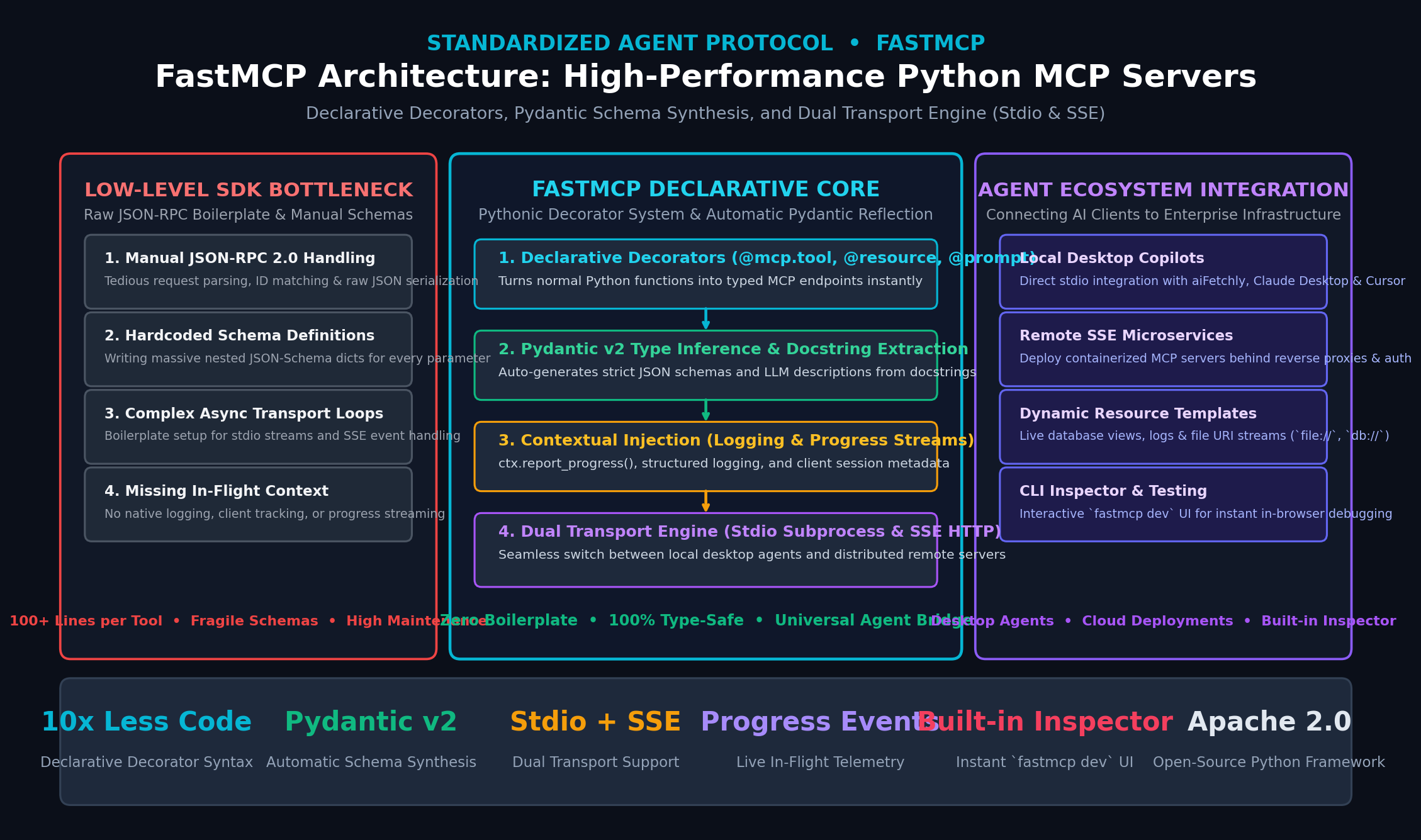
The Problem: The Low-Level Boilerplate of Raw MCP SDKs
The release of the Model Context Protocol (MCP) marked an architectural turning point in artificial intelligence engineering. By establishing a standardized, bidirectional JSON-RPC 2.0 contract between host applications (AI desktop assistants, IDEs, and autonomous agents) and external systems, MCP decoupled intelligence from tool integration.
In autonomous data collection, real-time desktop intelligence, and multi-agent workflows like AiFetchly, MCP enables language models to seamlessly query private PostgreSQL databases, interact with file systems, run browser automation scripts, and trigger enterprise APIs.
However, while the protocol specification is clean and universal, building MCP servers using the official low-level Python SDK (mcp) quickly becomes an engineering bottleneck.
The Low-Level MCP Developer Dilemma:
Goal: "Expose a simple Python function as an MCP tool for an AI agent."
 │
 ▼ [Using Raw Low-Level MCP SDK]
┌─────────────────────────────────────────────────────────────────┐
│ 1. Manual JSON-RPC 2.0 Wire Serialization                       │
│ • Write explicit request/response handlers & error codes        │
├─────────────────────────────────────────────────────────────────┤
│ 2. Handcrafted JSON-Schema Dictionaries                         │
│ • Write 40+ lines of nested schema dictionaries for every tool: │
│   {"type": "object", "properties": {"query": {"type": "string"}}}│
├─────────────────────────────────────────────────────────────────┤
│ 3. Complex Asynchronous Transport Event Loops                   │
│ • Manually bind stdio streams or ASGI Starlette SSE routers     │
├─────────────────────────────────────────────────────────────────┤
│ 4. No In-Flight Context or Progress Reporting                   │
│ • Zero built-in mechanism for progress bars or server logs      │
└─────────────────────────────────────────────────────────────────┘
Result: 100+ lines of low-level plumbing for a 5-line business logic function! 1. The Manual JSON-Schema Authoring Nightmare
Under the raw MCP specification, tools must expose their parameter schemas using standard JSON Schema. When developers write raw MCP servers:
- Redundant Schema Duplication: Every parameter name, type, default value, and description must be declared twice: once in the Python function signature and once inside a verbose, nested dictionary.
- Type Drift: Changing a Python argument from
inttofloator adding an optional field requires manually updating the dictionary schema. A single mismatch between the Python signature and the JSON-Schema dictionary crashes the agent during runtime tool calling. - Complex Nested Types: Validating nested Pydantic models, enums, dates, and optional arrays requires handwriting hundreds of lines of error-prone schema boilerplate.
2. Transport Management and Async Event Loop Friction
The MCP specification defines two primary communication transports:
stdio(Standard Input/Output): Where the host process spawns the MCP server as a local child process and exchanges newline-delimited JSON-RPC messages over standard streams.sse(Server-Sent Events over HTTP): Where the MCP server runs as a standalone network daemon, streaming server events over HTTP GET and receiving client RPC commands via HTTP POST.
Implementing both transports manually requires configuring asynchronous streams (anyio or asyncio), managing process termination signals, avoiding buffering deadlocks on stdout, and building Starlette endpoint routers.
3. Missing Telemetry, Logging, and Progress Reporting
When an autonomous agent invokes a long-running tool—such as scraping a multi-page website via ScrapeGraphAI or indexing a massive PDF document—the user experience suffers if the system goes silent.
Raw SDK implementations require manual construction of custom notification packets to report progress percentages, warnings, or debug traces back to the client.
The Solution: The FastMCP Declarative Framework
To eliminate the friction of low-level protocol plumbing, the open-source community and engineering teams at Prefect developed FastMCP.
FastMCP does for Model Context Protocol servers what FastAPI did for REST APIs and what Click did for command-line interfaces: it turns plain, idiomatic Python functions into fully compliant, type-safe MCP servers through simple decorators.
FastMCP High-Level Architecture Flow:
┌─────────────────────────────────────────────────────────────────┐
│ User-Defined Python Functions with Type Hints & Docstrings      │
│ @mcp.tool()  |  @mcp.resource("uri://...")  |  @mcp.prompt()    │
└─────────────────────────────────────────────────────────────────┘
 │
 ▼
┌─────────────────────────────────────────────────────────────────┐
│ FastMCP Core Reflection & Schema Engine                         │
│ • Pydantic v2 type inference & automatic JSON-Schema generation │
│ • Docstring parsing for LLM tool & argument descriptions        │
│ • Context injection (logging, progress reporting, client info)  │
└─────────────────────────────────────────────────────────────────┘
 │
 ▼
┌─────────────────────────────────────────────────────────────────┐
│ Unified Dual Transport Dispatcher                               │
│ ├──► stdio: Local subprocess for aiFetchly, Claude, Cursor      │
│ └──► sse: Remote HTTP microservice (FastAPI/Starlette ASGI)      │
└─────────────────────────────────────────────────────────────────┘ Comparing Raw MCP SDK vs. FastMCP
The table below highlights the operational advantages of building with FastMCP over the low-level SDK:
MCP Server Development Comparison:
┌───────────────────────────┬───────────────────────────────┬───────────────────────────────┐
│ Feature / Dimension       │ Official Low-Level MCP SDK    │ FastMCP Framework             │
├───────────────────────────┼───────────────────────────────┼───────────────────────────────┤
│ Tool Definition Syntax    │ Imperative handler classes    │ Declarative `@mcp.tool`       │
│ Parameter Schema Creation │ Handwritten JSON Schema dicts │ Auto-inferred via Pydantic v2 │
│ Tool Description Source   │ Manual string literals        │ Python docstrings (PEP 257)   │
│ Transport Switching       │ Re-architect server loops     │ Single parameter: `mcp.run()` │
│ Context & Progress        │ Manual notification frames    │ Injected `Context` parameter  │
│ Resource Templating       │ Manual regex URI routing      │ Dynamic URI string templates  │
│ Interactive Debugging     │ Third-party manual testing    │ Built-in `fastmcp dev` UI     │
│ Code Lines per Tool       │ 40 – 80 lines of boilerplate  │ 5 – 10 lines of clean Python  │
└───────────────────────────┴───────────────────────────────┴───────────────────────────────┘ Deep Dive into FastMCP Architecture & Primitives
FastMCP structures server capabilities around three core primitives defined by the Model Context Protocol, augmented by an execution context:
The FastMCP Server Primitives:
FastMCP Server Instance
 ├──► Tools (@mcp.tool): Executable functions that take arguments and return data
 ├──► Resources (@mcp.resource): Read-only passive context data exposed at specific URIs
 ├──► Prompts (@mcp.prompt): Pre-engineered prompt templates for common user tasks
└──► Context (Context): Injected handle for real-time progress, logging, and client info 1. Tools (@mcp.tool): Executable Agent Actions
Tools are the active operational verbs in an agentic system. When decorated with @mcp.tool(), FastMCP performs dynamic reflection:
- Type Inspection: Reads type annotations (
int,str,list[str],pydantic.BaseModel) and converts them into strict JSON Schema. - Description Extraction: Extracts the summary line and parameter descriptions directly from the function’s docstring, presenting clean instructions to the language model.
- Automatic Coercion & Validation: When an LLM sends a JSON payload, FastMCP parses and validates the arguments against the declared types before invoking the Python function, shielding your application code from malformed inputs.
2. Resources (@mcp.resource): Passive Context Streams
Resources are read-only data endpoints that an AI agent can read to ground its reasoning:
- Static Resources: Direct pointers to fixed files or data streams (e.g.,
@mcp.resource("system://diagnostics")). - Dynamic URI Templates: Parameterized routes using path templates (e.g.,
@mcp.resource("company://financials/{year}/{quarter}")). When an agent queriescompany://financials/2026/Q3, FastMCP extracts the path variables and passes them as arguments to your handler. - Multimodal Support: Supports returning structured text or raw binary assets (such as images, PDF documents, or audio files).
3. Prompts (@mcp.prompt): Standardized Workflow Templates
Prompts allow developers to package proven prompt engineering techniques directly into the server:
- Instead of relying on the user to craft complex instructions, a prompt accepts input arguments (such as a target URL or code snippet) and returns a structured list of system and user messages.
- Hosts like AiFetchly can surface these prompts as quick-action slash commands or UI dropdowns.
4. The Injected Context Object
One of FastMCP’s most powerful architectural features is context injection. If a tool or resource includes an argument typed as Context, FastMCP automatically injects an execution context object:
from fastmcp import Context

@mcp.tool()
async def batch_vector_indexer(document_ids: list[str], ctx: Context) -> str:
    ctx.info(f"Beginning indexing for {len(document_ids)} items.")
    for idx, doc_id in enumerate(document_ids):
        # Report progress percentage back to the agent client
        await ctx.report_progress(progress=idx + 1, total=len(document_ids))
return "Indexing complete." Through Context, servers can:
- Stream informational logs (
ctx.info,ctx.warning,ctx.error) back to the client interface. - Transmit live progress updates (
ctx.report_progress(current, total)), which client applications render as progress bars. - Access client session identifiers to enforce authorization or multi-tenant scoping.
5. Dual Transport Engine: Stdio vs. SSE
FastMCP encapsulates the underlying transport mechanisms into a unified interface:
FastMCP Dual Transport Architecture:
1. Stdio Mode (Local Subprocess):
   Host Application (e.g. aiFetchly, Claude Desktop, Cursor)
     │ stdin / stdout (Newline-delimited JSON-RPC 2.0)
     ▼
   FastMCP Server Process (Python script)

2. SSE Mode (Remote HTTP / Web Microservice):
   Remote Client / Cloud Agent
     ├──► GET /sse  (Persistent Server-Sent Events stream for downstream events)
└──► POST /messages (JSON-RPC requests dispatched to FastMCP) - Stdio Execution: Default for local desktop deployment. When configured in an agent’s configuration file, the host executes
python server.py, communicating silently over standard I/O with sub-millisecond local dispatch latency. - SSE (Server-Sent Events) Execution: Ideal for containerized cloud deployment. FastMCP spins up an ASGI server (powered by Starlette and Uvicorn), exposing standard HTTP endpoints that remote clients can subscribe to across networks.
Hands-On Implementation: Building a Production FastMCP Server
Let’s build a production-grade FastMCP server that equips AI agents with enterprise database queries, dynamic file resources, and contextual web extraction.
1. Installation
Install FastMCP and Pydantic:
pip install fastmcp pydantic httpx 2. Complete Server Implementation
Create a file named enterprise_mcp.py:
from datetime import datetime
from typing import Optional
from pydantic import BaseModel, Field
from fastmcp import FastMCP, Context

# 1. Initialize FastMCP Server
mcp = FastMCP(
    name="EnterpriseDataGateway",
    instructions="Production server providing SQL database lookups, financial resources, and live health metrics."
)

# 2. Define Pydantic Schema for Structured Tool Inputs
class QueryFilter(BaseModel):
    department: str = Field(description="Corporate department name (e.g., Engineering, Sales, HR)")
    min_salary: float = Field(default=50000.0, description="Minimum compensation threshold")
    is_active: bool = Field(default=True, description="Filter only active personnel")

# 3. Tool: Typed Database Search with Contextual Progress
@mcp.tool()
async def query_employee_records(criteria: QueryFilter, ctx: Context) -> list[dict]:
    """Search enterprise employee database with typed filtering and progress telemetry."""
    ctx.info(f"Filtering records for department: {criteria.department}")

    # Simulate step-by-step processing with progress updates
    total_steps = 3
    for step in range(1, total_steps + 1):
        await ctx.report_progress(progress=step, total=total_steps)

    # Mock database result set
    return [
        {
            "id": "EMP-1042",
            "name": "Sarah Chen",
            "department": criteria.department,
            "role": "Staff Systems Architect",
            "salary": max(criteria.min_salary, 145000.0)
        },
        {
            "id": "EMP-2098",
            "name": "David Miller",
            "department": criteria.department,
            "role": "Senior Infrastructure Engineer",
            "salary": max(criteria.min_salary, 120000.0)
        }
    ]

# 4. Tool: External Web Intelligence Ingestion
@mcp.tool()
async def fetch_api_status(service_endpoint: str) -> dict:
    """Check the real-time operational status and latency of an external API service."""
    return {
        "service": service_endpoint,
        "status": "operational",
        "latency_ms": 24.8,
        "timestamp": datetime.utcnow().isoformat() + "Z"
    }

# 5. Resource: Dynamic Parameterized URI Template
@mcp.resource("reports://quarterly/{year}/{quarter}")
async def get_quarterly_report(year: int, quarter: str) -> str:
    """Retrieve summarized executive financial disclosures for a specific fiscal quarter."""
    return f"""
    # Fiscal Performance Report: {year} - {quarter.upper()}
    - Gross Operating Revenue: $18.4M USD
    - Net Operating Margin: 34.2%
    - Active Cloud Enterprise Subscriptions: 1,420
    - Status: Audited & Approved
    """

# 6. Prompt: Reusable Prompt Template for Code Review
@mcp.prompt()
def generate_code_review(code_diff: str, focus_area: Optional[str] = "performance") -> str:
    """Generate a structured system prompt guiding the LLM through a code architecture audit."""
    return f"""
    You are a Principal Software Architect. Review the following code diff with primary focus on {focus_area}.

    Code Diff:
    ```
    {code_diff}
    ```

    Provide:
    1. Potential race conditions or concurrency deadlocks.
    2. Memory allocation inefficiencies and vectorization opportunities.
    3. Actionable code refactorings with syntax-highlighted examples.
    """

# 7. Server Execution Entry Point
if __name__ == "__main__":
    # Runs stdio transport by default (ideal for local desktop agents)
    # To run SSE transport over HTTP: mcp.run(transport="sse", port=8000)
mcp.run() 3. Testing with the FastMCP Developer CLI
FastMCP includes an interactive in-browser development environment. You can test your tools, inspect auto-generated schemas, and trigger function executions without connecting an external client:
fastmcp dev enterprise_mcp.py This launches a local web inspector on http://localhost:5173, allowing you to inspect all registered tools, simulate LLM inputs, verify Pydantic type errors, and observe live Context logs in real time.
Production Architecture & Integration with aiFetchly
Integrating FastMCP servers into production desktop intelligence systems like AiFetchly creates a unified interface between autonomous reasoning models and your local infrastructure.
Enterprise Integration Topology:
┌─────────────────────────────────────────────────────────────────┐
│ aiFetchly Desktop Application (Host Client)                     │
│ • Reads configuration block from mcpServers settings            │
│ • Spawns local FastMCP process via stdio                        │
│ • Dispatches LLM tool calls & renders interactive UI cards      │
└─────────────────────────────────────────────────────────────────┘
 │ (JSON-RPC 2.0 via Stdio Pipe)
 ▼
┌─────────────────────────────────────────────────────────────────┐
│ FastMCP Gateway Server (Python Subprocess)                      │
│ ├──► Tool 1: PostgreSQL Enterprise Data Bridge                  │
│ ├──► Tool 2: Web Scraper (Playwright / ScrapeGraphAI)           │
│ └──► Tool 3: Vector Store Query (Qdrant / LanceDB)              │
└─────────────────────────────────────────────────────────────────┘ 1. Configuring FastMCP inside aiFetchly
To register your FastMCP server with AiFetchly, add the server definition to your desktop settings configuration file:
{
  "mcpServers": {
    "enterprise-gateway": {
      "command": "python",
      "args": ["/absolute/path/to/enterprise_mcp.py"],
      "env": {
        "PYTHONUNBUFFERED": "1",
        "DATABASE_URL": "postgresql://admin:secret@localhost:5432/corp_data"
      }
    }
  }
} Once saved, AiFetchly automatically executes capability discovery, registers query_employee_records and fetch_api_status into the agent’s available tool catalog, and binds real-time progress events directly to the desktop status indicator.
2. Bridging FastMCP with High-Speed Vector Stores
For Retrieval-Augmented Generation workflows, FastMCP acts as a lightweight proxy over high-performance vector databases like Qdrant:
from fastmcp import FastMCP
from qdrant_client import QdrantClient

mcp = FastMCP("VectorSearchGateway")
qdrant = QdrantClient(host="localhost", port=6333)

@mcp.tool()
async def semantic_doc_search(query_text: str, top_k: int = 5) -> list[dict]:
    """Search technical knowledge base using vector similarity in Qdrant."""
    # Compute vector embedding and search Qdrant collection
    results = qdrant.query(
        collection_name="technical_specs",
        query_text=query_text,
        limit=top_k
    )
return [{"id": hit.id, "score": hit.score, "payload": hit.payload} for hit in results] 3. Production Security & Sandboxing Best Practices
When deploying FastMCP in production environments:
- Subprocess Isolation: Run stdio servers under dedicated system service accounts with restricted filesystem read/write privileges.
- Strict Input Sanitization: Never concatenate tool arguments directly into raw SQL statements or shell commands. Rely on parameterized SQL queries and validated Pydantic schemas to block prompt injection attacks.
- SSE Authentication: When exposing FastMCP servers across network boundaries via SSE, deploy them behind an API gateway with bearer token authentication or mutual TLS (mTLS) to prevent unauthorized tool execution.
Summary: The New Standard for Agent-Tool Interoperability
The Model Context Protocol has resolved the fragmentation of custom agent integrations, establishing a universal standard for AI tool connectivity. FastMCP elevates this protocol from an imperative, low-level transport specification into a modern, declarative developer experience.
By combining Pythonic decorators, automatic Pydantic v2 schema synthesis, in-flight progress telemetry, and zero-configuration transport switching, FastMCP empowers software engineers to build reliable, type-safe agent backends in minutes. Whether connecting autonomous research assistants in AiFetchly to local databases or deploying distributed cloud microservices, FastMCP provides the architectural foundation for scalable agentic infrastructure.