Desktop vs. Web AI Agents: The Power User Advantage
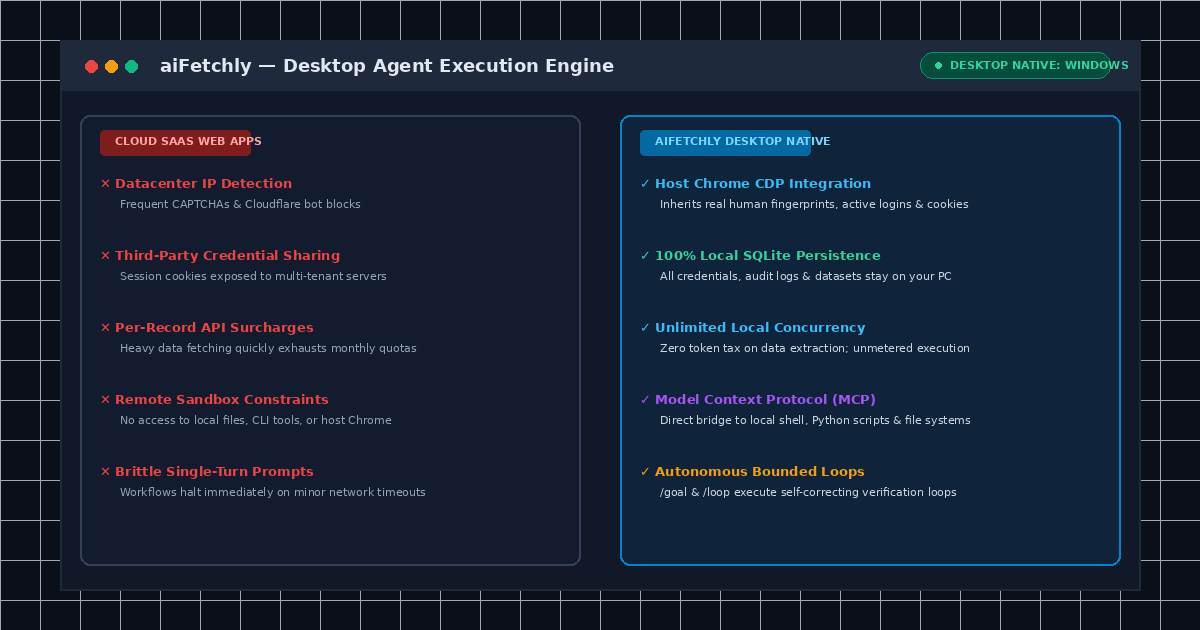
The Cloud SaaS Bottleneck: Why Web Apps Restrict Power Users
Power users, data engineers, and technical researchers increasingly rely on AI agents to gather intelligence, monitor competitors, and automate complex workflows. However, most modern AI agent tools are packaged as multi-tenant web applications hosted in the cloud.
While web apps offer convenient zero-install access, they hit severe operational walls during intensive automation. Cloud scrapers throttle concurrency, bill users per token or per extracted record, and demand full custody of sensitive login credentials. Furthermore, remote headless browsers run on datacenter IP blocks that trigger aggressive Cloudflare Turnstiles, CAPTCHAs, and anti-bot bans.
The Solution: Desktop-Native Agent Architecture
By contrast, desktop-native architectures such as AI Fetchly represent a paradigm shift. Executing agents locally on your machine eliminates cloud bottlenecks, guarantees privacy, and unlocks native OS-level capabilities that remote web SaaS platforms cannot replicate.
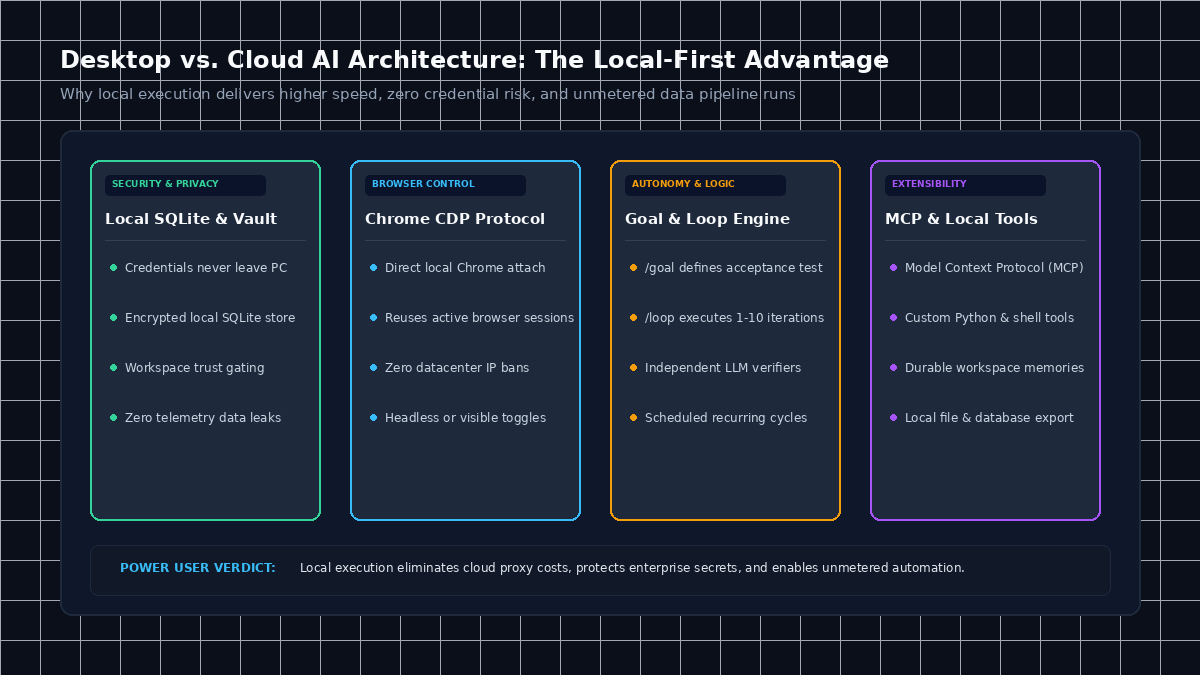
Implementation: Desktop vs. Web Architectural Comparison & Workflows
| Capability | Cloud SaaS Web Apps | aiFetchly Desktop Native |
|---|---|---|
| Execution Environment | Remote multi-tenant cloud sandbox | Local Windows PC host runtime |
| Browser Integration | Datacenter headless browser pool | Direct host Chrome attach via CDP |
| Credential Security | Cookies stored on third-party cloud | 100% local encrypted SQLite vault |
| Billing Model | Per-record, per-credit token limits | Unlimited local data processing |
| Autonomous Loops | Single-turn prompts; halts on error | Bounded verification via /goal and /loop |
| System Extensibility | Vendor-locked pre-built integrations | Model Context Protocol (MCP) & Python CLI |
Key Advantages of Desktop-Native Execution with aiFetchly
1. Direct Chrome Integration via Chrome DevTools Protocol
Cloud web scrapers trigger bot detection because their TLS fingerprints and headless canvas states do not match genuine user sessions.
aiFetchly runs natively on your machine. Through its Local Browser Integration, aiFetchly connects directly to your existing Google Chrome browser via Chrome DevTools Protocol (CDP). The agent operates using your active session state, authenticated cookies, and human browsing fingerprints. You can inspect internal dashboards and dynamic single-page applications without exposing enterprise passwords or purchasing third-party proxies.
2. Local SQLite Persistence with Zero Cloud Credential Exposure
When using cloud web apps, every URL visited, document summarized, and lead enriched is stored on external multi-tenant infrastructure.
With aiFetchly, your data never leaves your workstation. All extracted records, conversation histories, and audit trails are committed directly to a local SQLite database (~/.aifetchly). You retain complete data sovereignty with zero telemetry leakage, fully complying with GDPR and corporate security policies.
3. Bounded Autonomous Iteration Loops with /goal and /loop
Standard web apps rely on brittle turn-by-turn chat interfaces where a minor timeout halts progress. aiFetchly introduces autonomous workflow control through AI Chat V2 slash commands:
- The
/goalcommand captures durable objectives paired with verifiable acceptance criteria, such as verifying terminal command exit codes or testing file state modifications. - The
/loopcommand executes bounded autonomous iterations (e.g.,/loop 5) using an Observe → Act → Observe → Reflect loop. The agent self-corrects using fresh evidence until all criteria pass. - Scheduled loops (e.g.,
/loop every 1h --for 8h --) monitor long-running workflows within the same conversation without generating fragmented threads.
4. Hardware Extensibility with Local MCP Servers and Skills
Cloud SaaS platforms restrict you to closed ecosystems. In aiFetchly, power users can connect any Model Context Protocol (MCP) server, local Python script, or terminal CLI tool through the Plugin Manager. Detailed configuration instructions are available in the AI Fetchly Docs.
Visual Generation Prompts
Hero Image Prompt:Modern SaaS application window in dark mode, showing a side-by-side comparison of restricted cloud web scrapers versus the aiFetchly desktop agent workspace with local Chrome CDP integration, real-time loop indicators, isometric 3D perspective, cyan and emerald glowing accents.Body Image Prompt:Clean technical comparison infographic illustrating four architectural pillars of desktop-native AI agents: Local SQLite vault, Chrome CDP protocol, Goal and Loop engine, and MCP tool integrations, dark slate vector styling.