Crawling Web Docs into RAG: aiFetchly Website Import Guide
The Ingestion Friction in Enterprise RAG
Data analysts and AI engineers building Retrieval-Augmented Generation (RAG) pipelines spend an inordinate amount of time on data preparation. Ingesting external documentation, API references, competitor pricing tables, and product catalogs typically requires writing custom scrapers, stripping unwanted HTML headers, chunking raw text, and computing embeddings via external scripts.
Worse, manual web ingestion often introduces two severe failure modes:
- Boilerplate Noise: Uncleaned DOM elements (cookie notices, navigation bars, tracking scripts) pollute embedding spaces, degrading vector retrieval precision.
- Context Fragmentation: Merging an entire multi-page documentation website into a single monolithic document creates massive chunk spans, obscuring specific source URLs and making fine-grained citations impossible.
AI Fetchly eliminates this extraction tax through its native Website Import pipeline. Analysts can convert any public web documentation directly into indexed vector collections with a single click or conversational AI command.
Three Flexible Ingestion Topologies
aiFetchly structures web ingestion into three purpose-built modes:
| Ingestion Mode | Input Pattern | Best Suited For |
|---|---|---|
| Single Page | Individual URL (+ optional title override) | Targeted pricing pages, legal terms, or whitepapers |
| URL List | Up to 50 URLs (one per line) | Curated multi-domain research lists and specific blog posts |
| Site Crawl | Start URL + Max Depth (0–4) + Max Pages (1–100) | Recursive documentation libraries, developer guides, and FAQs |
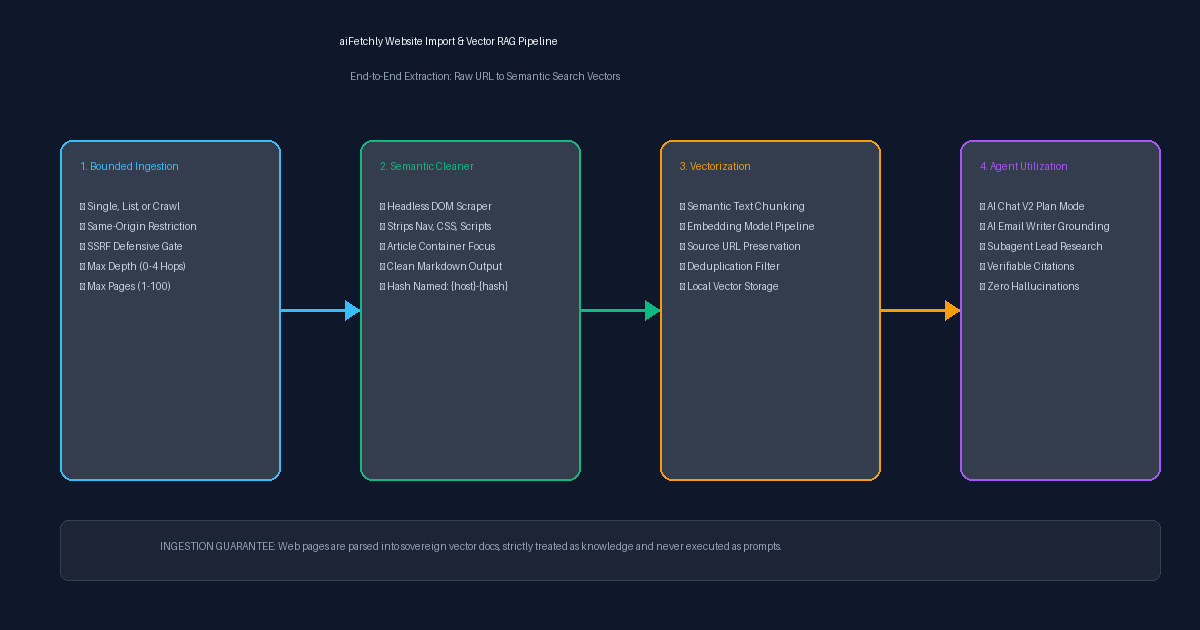
Every imported webpage is stored as an independent document named {hostname}-{path}-{hash}.md. This modular approach ensures exact source citations during AI Chat reasoning and enables surgical updates without re-indexing your entire library.
Step-by-Step Tutorial: Ingesting an API Documentation Site
Follow this walkthrough to crawl and vectorize technical web documentation inside aiFetchly.
Step 1: Open the Import Website Dialog
- Launch aiFetchly on your Windows desktop.
- Select Knowledge from the left navigation sidebar.
- Click the Import Website button in the top toolbar.
Step 2: Configure Crawl Boundaries and Metadata
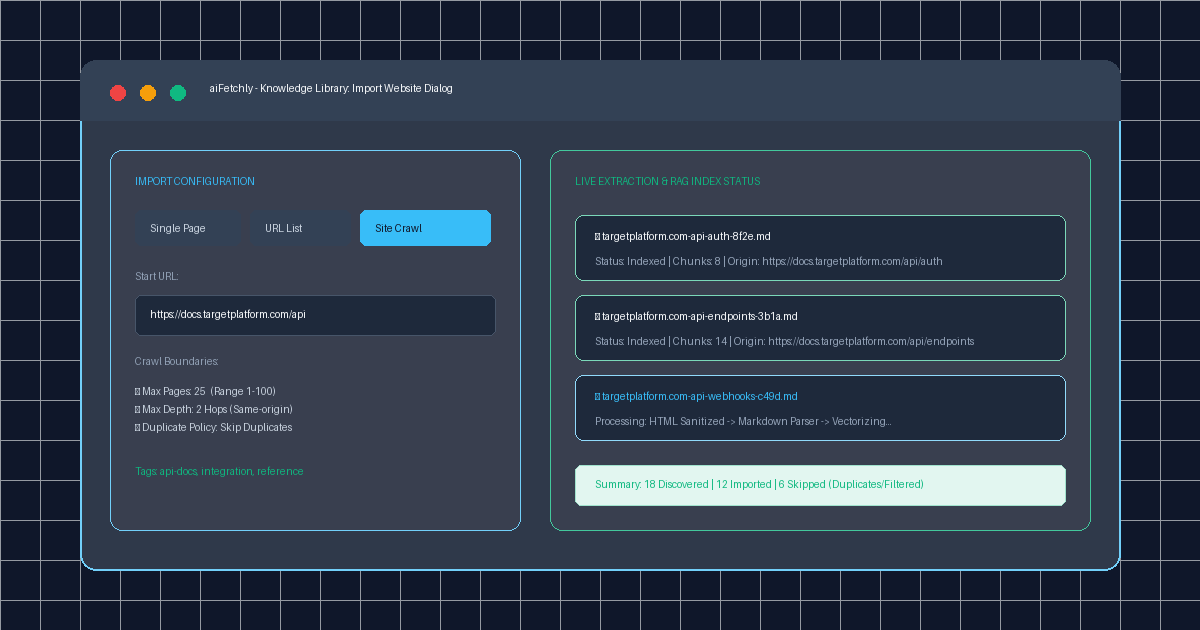
- Select the Site Crawl tab.
- In the Start URL field, enter your target documentation root (e.g.,
https://docs.example.com/api). - Set Max Pages to
25and Max Depth to2hops. aiFetchly strictly enforces same-origin boundaries to prevent unintended external domain crawling. - Add organizational tags: enter
api-docs, reference, v2. - Keep the default Duplicate Policy set to
Skip Duplicatesto ensure clean index hygiene.
Step 3: Launch Ingestion and Review Index Status
Click Import. The real-time progress monitor displays discovered same-origin links, DOM cleanup progress, and vector chunk counts.
Behind the scenes, aiFetchly’s headless parser strips headers and footers, converts the primary <article> or <main> content to clean Markdown, generates dense vector embeddings, and stores the chunks locally. Once complete, the documents are immediately queryable in AI Chat V2, Plan Mode, and the AI Email Writer.
Real-Time Knowledge Grounding for Desktop AI
By automating the web-to-vector pipeline, aiFetchly empowers data analysts to build authoritative, noise-free RAG knowledge bases in minutes.
Explore the complete API and conversational import options in the AI Fetchly Docs.
Visual Generation Prompts
Hero Image Prompt:Modern dark-mode SaaS UI showing the aiFetchly Knowledge Library modal with the ‘Import Website’ dialog active, featuring ‘Site Crawl’ parameters (Start URL, Max Depth: 2, Max Pages: 25) and a live background progress ledger displaying newly vectorized markdown documents, glowing cyan and amber accents, isometric view.Body Image Prompt:High-resolution technical pipeline diagram illustrating the four-stage website-to-RAG ingestion workflow: URL input and SSRF safety gating, headless DOM scraping and boilerplate stripping, Markdown conversion with semantic chunking, and multi-agent vector retrieval in AI Chat, vector blueprint style.