Connecting Local AI Providers: Ollama & LM Studio Guide
Freedom from Metered Cloud APIs: The Local Provider Edge
Power users and technical researchers frequently hit the limits of hosted cloud AI services: strict rate limits, recurring token fees, and mandatory data transmission over public networks. When analyzing confidential internal spreadsheets, extracting competitor pricing, or drafting customer outreach, uploading sensitive data to multi-tenant cloud servers introduces compliance friction.
AI Fetchly resolves this challenge with its native AI Provider configuration. Instead of forcing users onto hosted cloud models, aiFetchly speaks the universal OpenAI chat-completions standard (/v1/chat/completions). This allows you to unlock full AI Chat functionality using open-weights models running directly on your own hardware—with zero cloud token markups and no aiFetchly AI subscription required.
Supported Local Engines and Presets
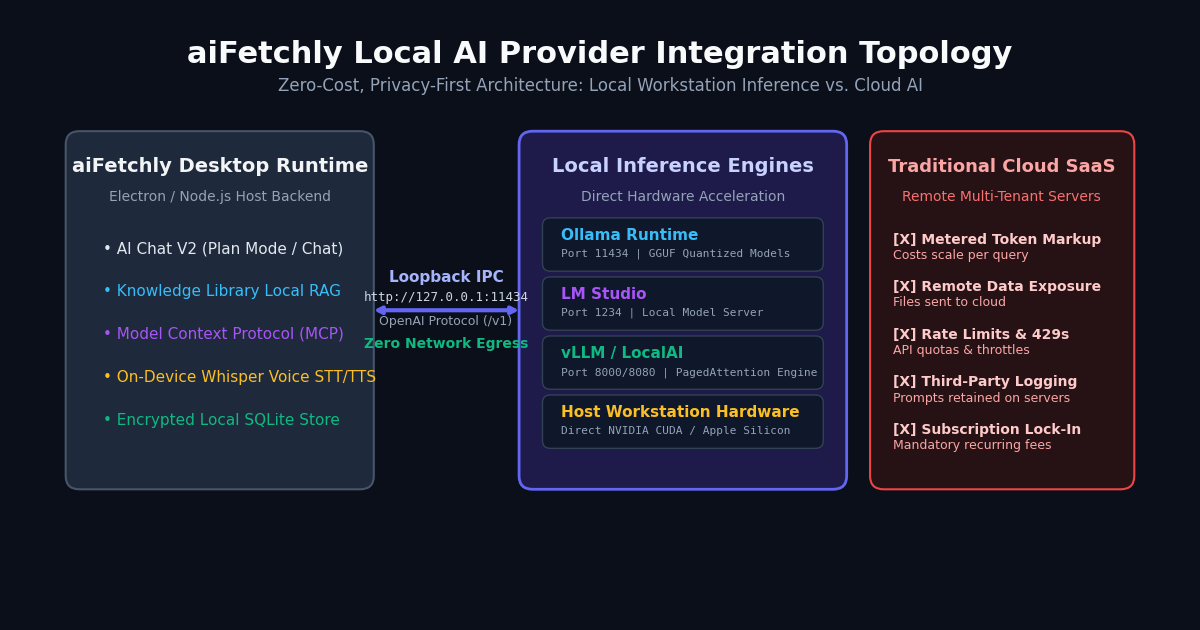
aiFetchly features built-in presets that configure connection URLs instantly:
- Ollama (
http://localhost:11434/v1): The premier CLI daemon for quantized GGUF models on macOS, Windows, and Linux. - LM Studio (
http://localhost:1234/v1): An intuitive desktop GUI for discovering and running Hugging Face models locally. - vLLM / LocalAI (
http://localhost:8000/v1): High-throughput inference engines utilizing PagedAttention for concurrent local environments. - Custom Endpoints: Any self-hosted gateway or proxy supporting OpenAI-compatible REST schemas.
Because aiFetchly communicates directly from its desktop backend to your local loopback socket, your prompts, context chunks, and API keys never leave your machine.
Step-by-Step Tutorial: Connecting Ollama or LM Studio
Follow this walkthrough to configure your local inference runtime in aiFetchly.
Step 1: Launch Your Local Inference Server
Before configuring aiFetchly, ensure your local server is active and serving its /v1 endpoint:
- For Ollama, start the background daemon:
ollama serve ollama run qwen2.5:14b-instruct - For LM Studio, open the Local Server tab, load your desired model (such as LLaMA 3.2), and click Start Server.
Step 2: Open the AI Provider Settings
- Launch AI Fetchly and navigate to System Settings in the left sidebar.
- Click the AI Provider button in the settings panel.
- In the Provider Mode radio group, select Custom / Local Provider.
Step 3: Configure Endpoint Parameters
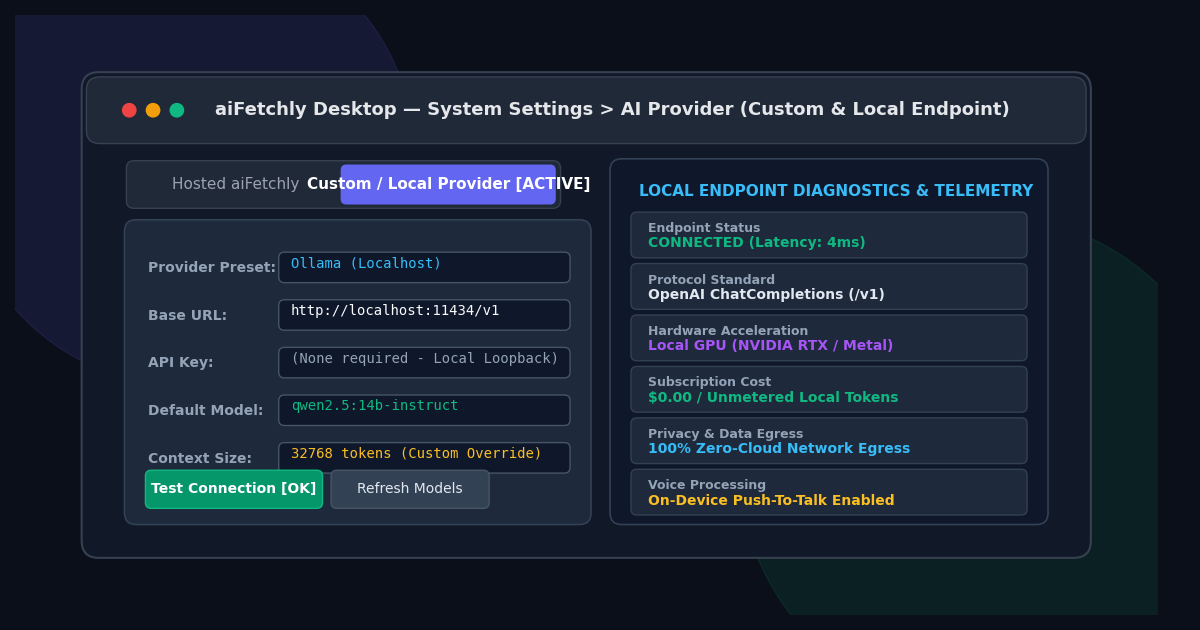
- Under Provider preset, select Ollama or LM Studio. aiFetchly automatically populates the default Base URL.
- For local servers, leave the API key field blank.
- Click Refresh Models to populate the Default model dropdown from the server’s
/v1/modelsendpoint. - Select your preferred model and optionally configure a custom Context size override (e.g.,
32768). - Click Test Connection. Once the green badge confirms socket reachability, click Save.
Local Voice and AI Chat Integration
Once saved, open AI Chat or press Ctrl/Cmd + K. The model selector chip displays your custom provider label (e.g., Local: Ollama). You can now execute conversational research, analyze local documents, and draft campaign copy with unmetered speed.
Furthermore, on-device Voice settings operate seamlessly alongside your local model. You can speak queries using local push-to-talk speech-to-text and hear spoken audio replies—completely offline.
Explore the AI Fetchly Docs for advanced configurations, including pairing local providers with Plan Mode and scoped Subagents.
Image Generation Prompts
- Hero Image Prompt: Modern SaaS dark mode interface displaying aiFetchly System Settings AI Provider dashboard, Custom/Local Provider active toggle, Ollama localhost configuration, green connection verification badge, clean glassmorphic cards, emerald and violet accents, 8k resolution.
- Body Image Prompt: Detailed technical architecture diagram contrasting aiFetchly local loopback IPC connection to Ollama/LM Studio GPU runners against multi-tenant cloud SaaS API limitations, emphasizing data sovereignty, zero token cost, and private SQLite storage.