Configuring Native Browsers in aiFetchly: Chrome & Firefox
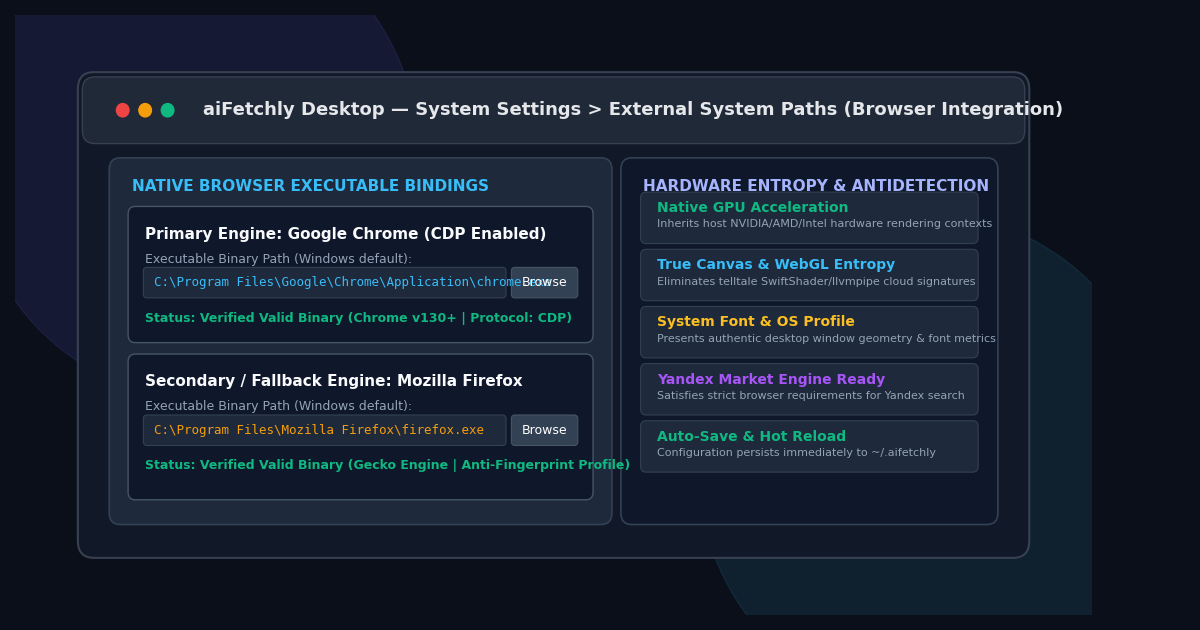
The Failure of Bundled Headless Scraping Containers
Developers building automated web intelligence pipelines frequently run into aggressive bot defense platforms like Cloudflare Turnstile, DataDome, and Akamai. When engineering teams deploy traditional headless browser scrapers—such as Puppeteer or Playwright bundled inside cloud Linux containers—their tasks suffer from alarming block rates.
Cloud serverless containers fail modern anti-bot audits because they lack genuine physical workstation hardware:
- Emulated WebGL Shaders: Cloud VMs render 3D canvas calls through software emulators like
SwiftShaderorllvmpipe, instantly exposing virtualized environments. - Missing Font Metric Entropy: Stripped-down Docker images lack local system fonts, presenting suspicious typography footprints.
- Audio Context Inconsistencies: Virtualized operating systems report flat or missing hardware audio sample buffers.
AI Fetchly resolves this architectural bottleneck through its External System Paths subsystem. Instead of packaging a brittle virtualized browser, aiFetchly hooks directly into your workstation’s installed Chrome and Firefox binaries, inheriting authentic physical hardware entropy that effortlessly passes bot evaluations.
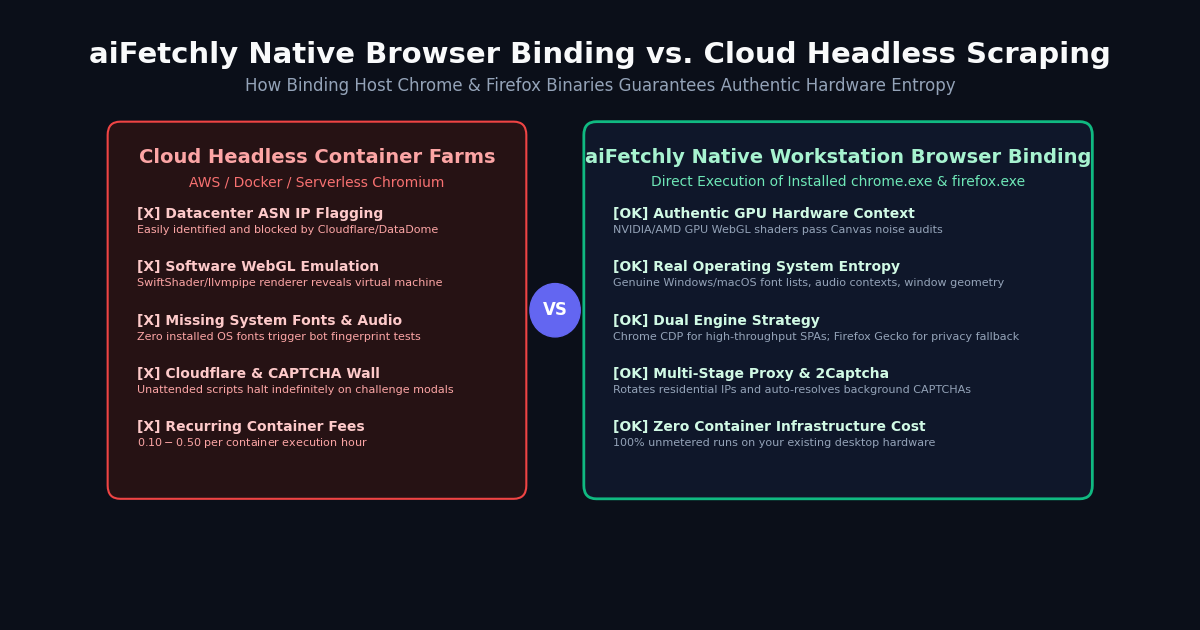
Dual-Engine Strategy: Chrome vs. Firefox
In System Settings > External System Paths, developers can configure two distinct browser executables to build a resilient multi-tier extraction pipeline:
1. Google Chrome (Primary Workhorse)
- Default OS Path (Windows):
C:\Program Files\Google\Chrome\Application\chrome.exe - macOS / Linux:
/Applications/Google Chrome.app/Contents/MacOS/Google Chromeor/usr/bin/google-chrome - Operational Strengths: Native Chrome DevTools Protocol (CDP) connectivity, exceptional DOM traversal throughput, and mandatory support for automated Yandex market insight discovery.
2. Mozilla Firefox (Privacy & Fallback Armor)
- Default OS Path (Windows):
C:\Program Files\Mozilla Firefox\firefox.exe - macOS / Linux:
/Applications/Firefox.app/Contents/MacOS/firefoxor/usr/bin/firefox - Operational Strengths: Built on the open-source Gecko engine. Firefox provides a completely separate browser fingerprint and alternate JavaScript execution engine, making it an ideal fallback when Cloudflare challenges flag Chromium TLS handshakes.
Step-by-Step Configuration and Validation
Setting up your native browser executables in aiFetchly requires just a few clicks:
- Launch AI Fetchly and click Settings in the left navigation sidebar.
- In the tree panel, select External System Paths.
- Under Chrome Path, click Browse and navigate to your installed
chrome.exeor accept the auto-detected path. - Under Firefox Path, click Browse and select your local
firefox.exe. - aiFetchly validates the binary execution permissions and saves your settings automatically to local desktop configuration (
~/.aifetchly/).
Production Best Practices for Anti-Bot Resilience
To maximize extraction success across protected directories:
- Configure Chrome as Primary, Firefox as Backup: Route heavy SPA crawls through Chrome CDP, while failing over to Firefox when encountering strict anti-fingerprint hurdles.
- Pair with Rotating Residential Proxies: In Proxy Setup, bind authenticated SOCKS5 proxies to distribute IP addresses across residential ASNs.
- Enable Background Captcha Solving: Supply a 2Captcha token in System Settings so unexpected puzzle modals resolve automatically without halting background pipelines.
Consult the AI Fetchly Docs to learn how to integrate native browser bindings with automated Task Schedules and autonomous Subagents.
Image Generation Prompts
- Hero Image Prompt: Modern SaaS dark mode interface showing aiFetchly System Settings External System Paths dashboard, Chrome and Firefox executable file path inputs with green verified status badges, sleek glassmorphic UI cards, cyan and indigo accents, 8k resolution.
- Body Image Prompt: Detailed technical architecture diagram contrasting virtualized cloud headless scraping containers (software WebGL, missing fonts, Cloudflare blocks) against aiFetchly native desktop browser binding (real NVIDIA GPU entropy, authentic OS fonts, residential proxies, 100% bypass).