Custom AI Subagents in aiFetchly: Developer Walkthrough
Why Agent Specialization Outperforms Monolithic Prompts
As AI workflows evolve from simple prompt-response interactions to complex multi-step automations, monolithic AI prompts quickly break down. A single generalist agent tasked with browsing dynamic websites, parsing nested HTML, verifying data integrity, and formatting clean JSON frequently loses focus, skips validation rules, or hits context exhaustion.
The proven architectural solution is agent specialization: decomposing complex workflows into focused subagents governed by explicit operational boundaries.
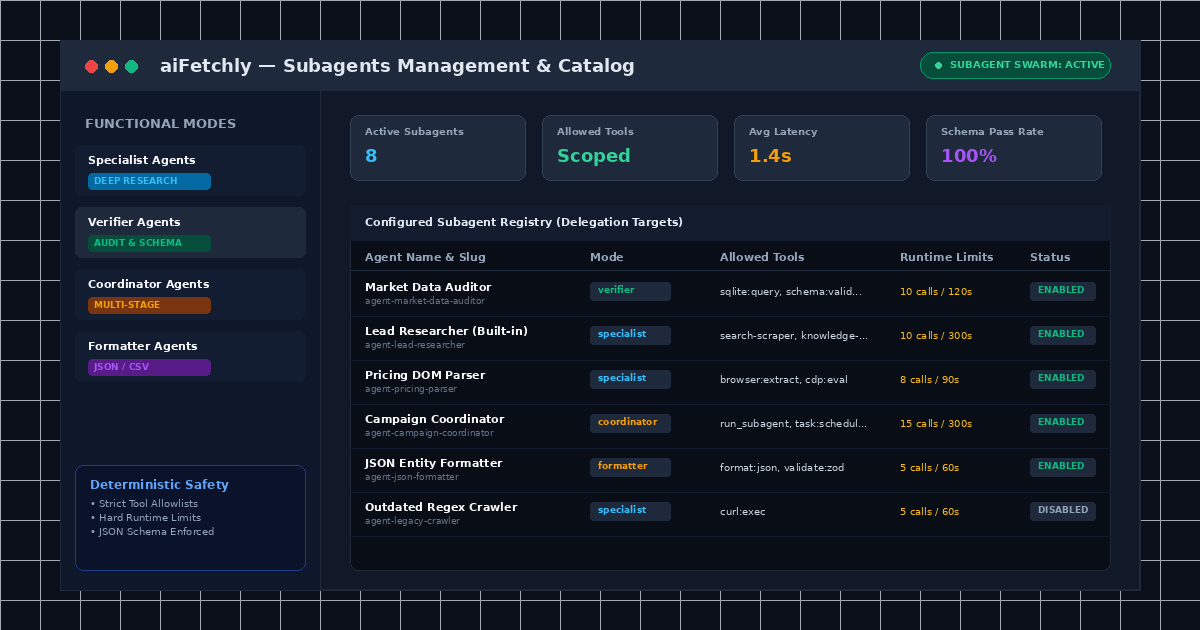
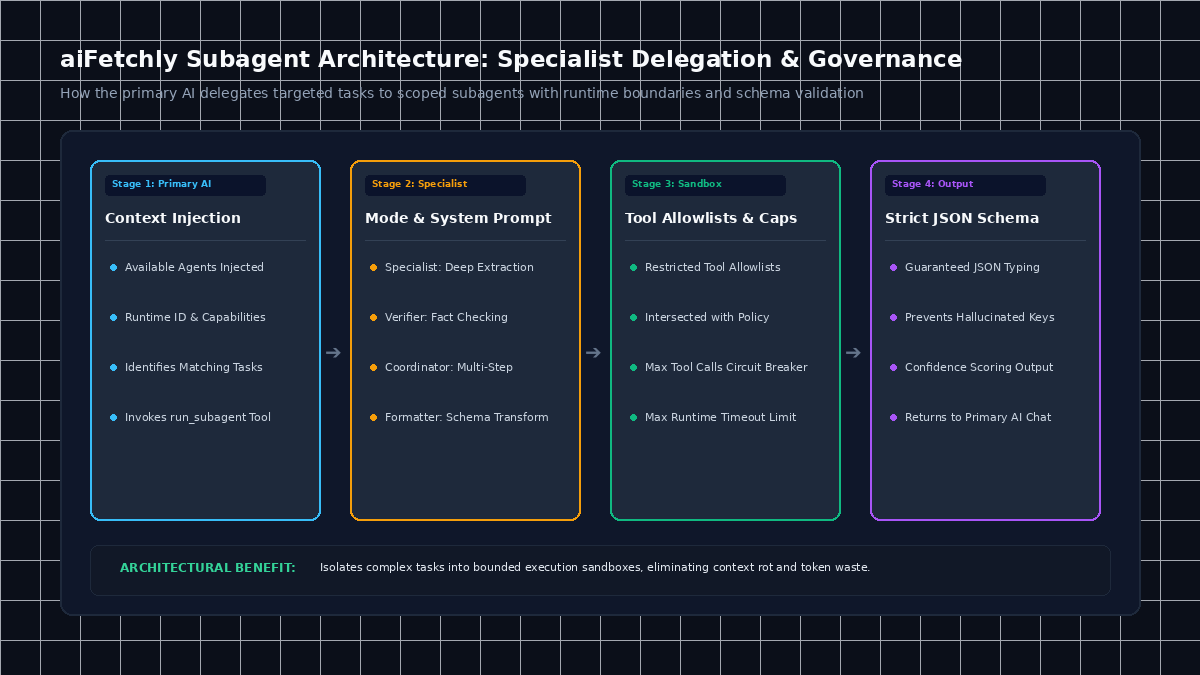
AI Fetchly natively supports modular AI Subagents. In aiFetchly, subagents are reusable specialist definitions characterized by an explicit role mode, custom system prompt, restricted tool allowlist, runtime limits, and a strict JSON output schema. When complex tasks arise in AI Chat, the primary agent autonomously delegates work to these specialists via the run_subagent tool.
The Four Functional Subagent Modes in aiFetchly
aiFetchly categorizes subagents into four purpose-built execution roles:
| Subagent Mode | Primary Function | Ideal Use Case |
|---|---|---|
| Specialist | Domain-specific deep execution | Extracting technical specs or financial filings |
| Verifier | Independent auditing & fact-checking | Validating extracted records against strict source truth |
| Coordinator | Multi-task planning & orchestration | Decomposing broad goals into sequential batch jobs |
| Formatter | Normalization & transformation | Converting raw multi-source text into strict JSON/CSV |
Step-by-Step Tutorial: Creating a Custom Verifier Subagent
Follow this guide to build a custom data-auditor subagent that verifies extracted competitor data against strict schemas.
Step 1: Open the Subagents Manager
- Open System Settings from the left navigation menu.
- Select Manage Subagents to open the Subagents catalog.
- Click the purple Add Subagent button in the upper right corner.
Step 2: Define Name, ID Slug, and Functional Mode
- Enter a clear Name:
Market Data Auditor. - Verify the auto-generated ID slug:
agent-market-data-auditor(this identifier locks permanently upon saving to ensure runtime stability). - Set the Description:
Verifies extracted pricing records, detects anomalies, and validates JSON schema compliance. - Select the Mode: Choose Verifier from the dropdown menu.
Step 3: Specify System Prompts and Tool Allowlists
Configure what the subagent knows and what tools it can access:
- System Prompt: Write focused, self-contained instructions:
You are an independent data verification subagent. Your sole responsibility is inspecting extracted market records. Check that pricing fields contain positive numeric floats, verify currency ISO codes, and flag records older than 48 hours. - Allowed Tools: Specify comma-separated tool permissions (e.g.,
sqlite:query,schema:validate). Subagents only inherit tools explicitly listed here, preventing unauthorized file system or network actions.
Step 4: Configure Execution Limits and Output Schema
Enforce deterministic safety limits to prevent runaway loops during unattended execution:
- Set Max Tool Calls to
10and Max Runtime to120seconds. - Under Output Schema, define your required JSON structure:
\{ "type": "object", "properties": \{ "verifiedRecords": \{ "type": "number" \}, "anomaliesDetected": \{ "type": "array", "items": \{ "type": "string" \} \}, "auditPassed": \{ "type": "boolean" \} \}, "required": ["verifiedRecords", "auditPassed"] \} - Ensure Enabled is toggled on, then click Save.
The new subagent is instantly active and available for delegation during AI Chat sessions and scheduled background pipelines.
Modular Multi-Agent Orchestration on Desktop
By separating concerns into discrete subagents with strict output schemas, developers prevent hallucination cascades and ensure reliable, repeatable execution.
To explore manifest schemas and plugin packaging for subagents, visit the AI Fetchly Docs.
Visual Generation Prompts
Hero Image Prompt:Modern SaaS application window in dark mode, showing the aiFetchly Subagents catalog with configured specialist, verifier, and coordinator agents, active status badges, tool allowlist chips, and runtime limit indicators, isometric 3D perspective, cyan and emerald glowing accents.Body Image Prompt:Clean technical architecture diagram illustrating the subagent delegation lifecycle in aiFetchly: primary AI chat router calling run_subagent, sandboxed tool execution within strict allowlists, and JSON schema validation returning structured results, dark slate vector styling.