Configuring Custom AI Providers in aiFetchly: Setup Guide
Freedom from Cloud Vendor Lock-In
Many enterprise developers building agentic workflows and local scraping pipelines encounter artificial SaaS friction. Proprietary desktop AI tools often force users into expensive recurring subscriptions, restrict model selection to a handful of commercial cloud APIs, and route prompts through remote proxy servers that compromise API key privacy.
AI Fetchly breaks this paradigm by adhering to a strict local-first philosophy. Through its native AI Provider subsystem, developers can decouple the AI Chat interface from hosted cloud infrastructure.
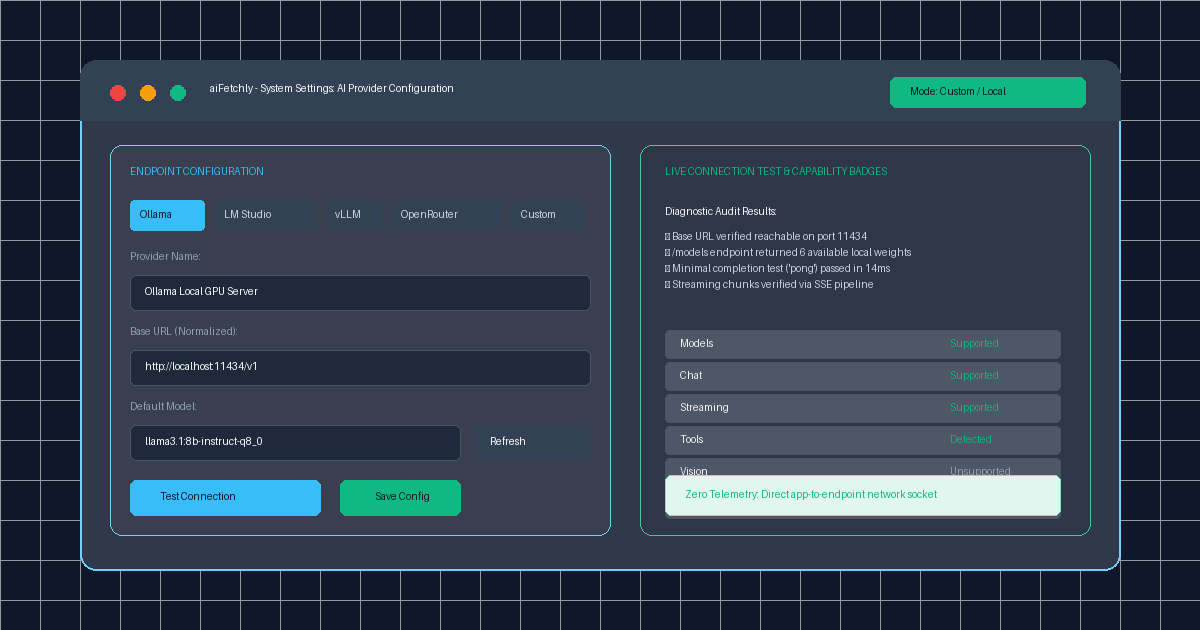
Crucially, you can connect your own models to AI Chat—whether hosted on an on-premise GPU cluster via vLLM, run locally on your workstation via Ollama or LM Studio, or routed through OpenRouter—without needing an active aiFetchly AI subscription. All communication flows directly from your desktop backend to the endpoint, ensuring zero telemetry leakage.
Supported Presets and Base URL Normalization
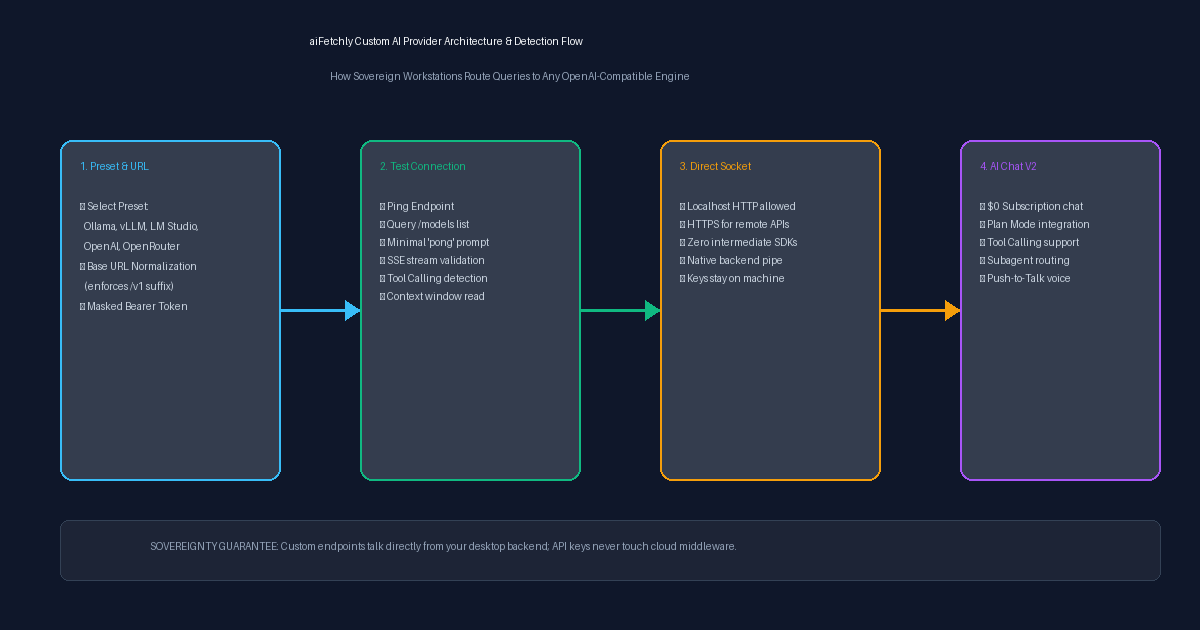
aiFetchly implements the standard OpenAI Chat Completions contract (/v1/chat/completions and /v1/models). To streamline configuration, the interface includes one-click presets:
| Provider Preset | Default Base URL | Authentication Requirement |
|---|---|---|
Ollama | http://localhost:11434/v1 | Not required for local instances |
LM Studio | http://localhost:1234/v1 | Not required for local instances |
vLLM | http://localhost:8000/v1 | Optional (configurable token) |
OpenRouter | https://openrouter.ai/api/v1 | Required (Bearer token) |
OpenAI | https://api.openai.com/v1 | Required (Bearer token) |
Custom | User-defined root URL | Supports enterprise gateways |
The engine automatically normalizes your Base URL, appending /v1 and stripping trailing slashes so you never encounter malformed route errors. Furthermore, API keys are encrypted in your local OS storage and never displayed in plaintext after saving.
Step-by-Step Tutorial: Connecting a Local Ollama Model
Follow this walkthrough to configure and verify a local LLM in aiFetchly.
Step 1: Open AI Provider Settings
- Launch aiFetchly on your Windows desktop.
- Click System Setting in the left navigation sidebar.
- Click the AI Provider button (or click the provider chip directly beside the model selector in AI Chat).
Step 2: Select Preset and Model
- At the top of the panel, toggle the mode from Hosted aiFetchly to Custom / Local Provider.
- Click the Ollama preset button. The Base URL automatically populates as
http://localhost:11434/v1. - Click Refresh Models. aiFetchly queries your local Ollama
/modelsendpoint and populates the dropdown. - Select your preferred model (e.g.,
llama3.1:8b-instruct-q8_0orqwen2.5-coder:14b). - (Optional) Set Context Size to override the default token window (e.g.,
32768).
Step 3: Run Diagnostic Connection Test
Before saving, click Test Connection. aiFetchly validates the pipeline in sequence:
- Pings network reachability and queries
/models. - Dispatches a minimal completion prompt (
pong) to verify non-streaming latency. - Validates Server-Sent Events (SSE) streaming chunks.
- Inspects model metadata for tool calling and vision capabilities.
Once verified, green capability badges (Models, Chat, Streaming, Tools) appear on screen. Click Save Config. Your local endpoint is now active across AI Chat V2 and Plan Mode.
Sovereign AI Inference on Your Hardware
By granting developers complete control over model routing and preserving API key privacy, aiFetchly pairs frontier agentic desktop tooling with zero subscription overhead.
Explore the complete provider specification in the AI Fetchly Docs.
Visual Generation Prompts
Hero Image Prompt:Modern dark-mode developer UI of aiFetchly AI Provider settings, displaying the Custom/Local Provider panel with Ollama selected, Base URL http://localhost:11434/v1, green diagnostic capability badges (‘Chat’, ‘Streaming’, ‘Tools’), and a zero-telemetry shield icon, sleek isometric 3D perspective, cyan and emerald glow.Body Image Prompt:High-resolution technical pipeline blueprint illustrating the aiFetchly custom AI provider architecture: preset selection (Ollama, vLLM, OpenRouter), Base URL normalization, direct socket dispatch without cloud middleware, and diagnostic capability detection matrix, clean vector line art on dark slate background.