Configuring AI Message Tasks: Risk Tiers & Circuit Breakers
The Safety Challenge in Unattended Agent Workflows
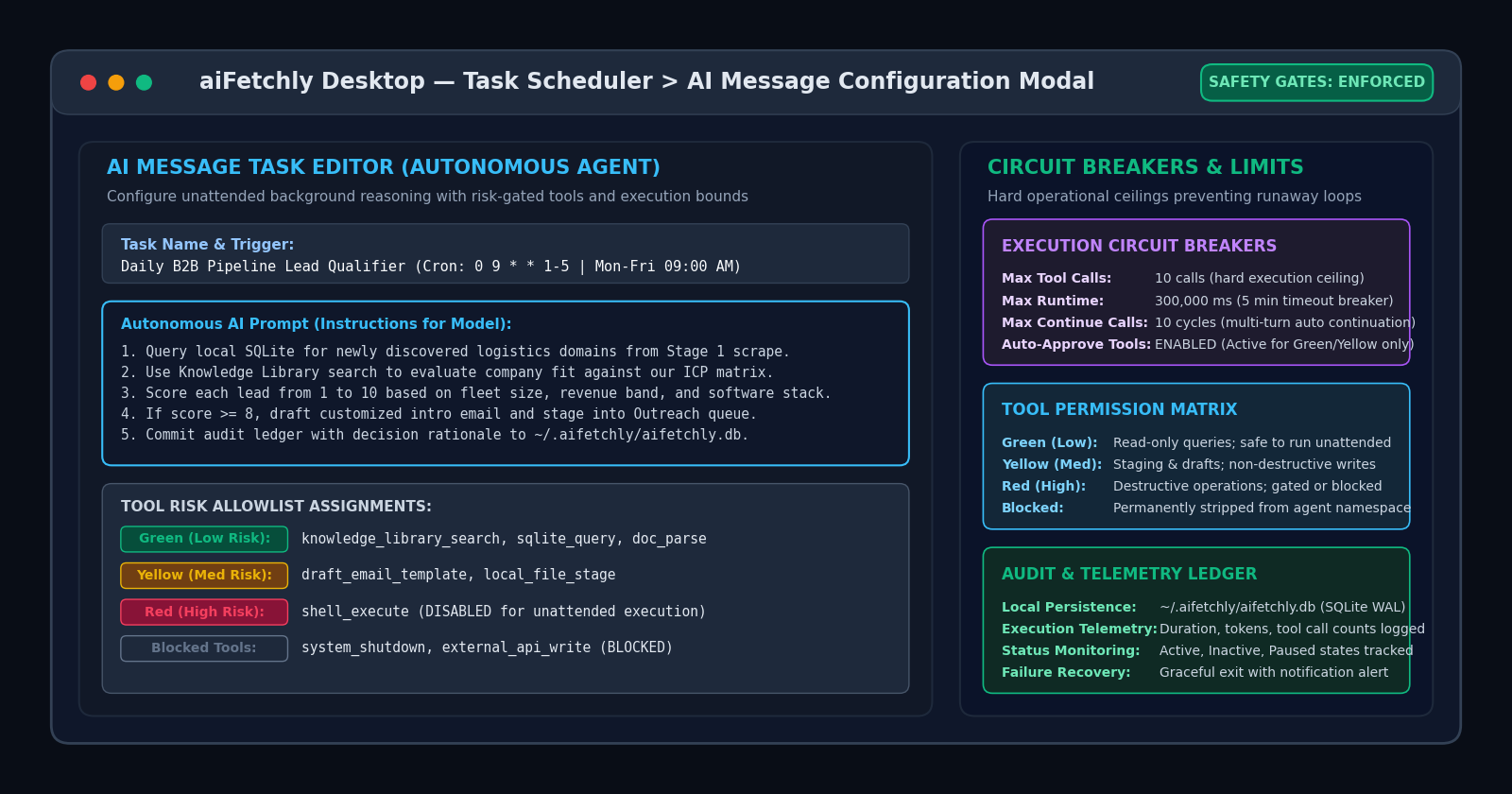
Developers deploying autonomous AI agents for recurring data processing, codebase auditing, or market qualification face an urgent engineering challenge: unattended execution risk. When an agent runs on a recurring schedule without a human watching the screen, prompt drift or unexpected tool exceptions can trigger infinite retry loops, consume thousands of tokens, or execute destructive operating system mutations.
Traditional cloud agent frameworks attempt to solve this with soft system prompts (e.g., “please be careful not to delete files”), which frequently fail when subjected to adversarial inputs or complex edge cases.
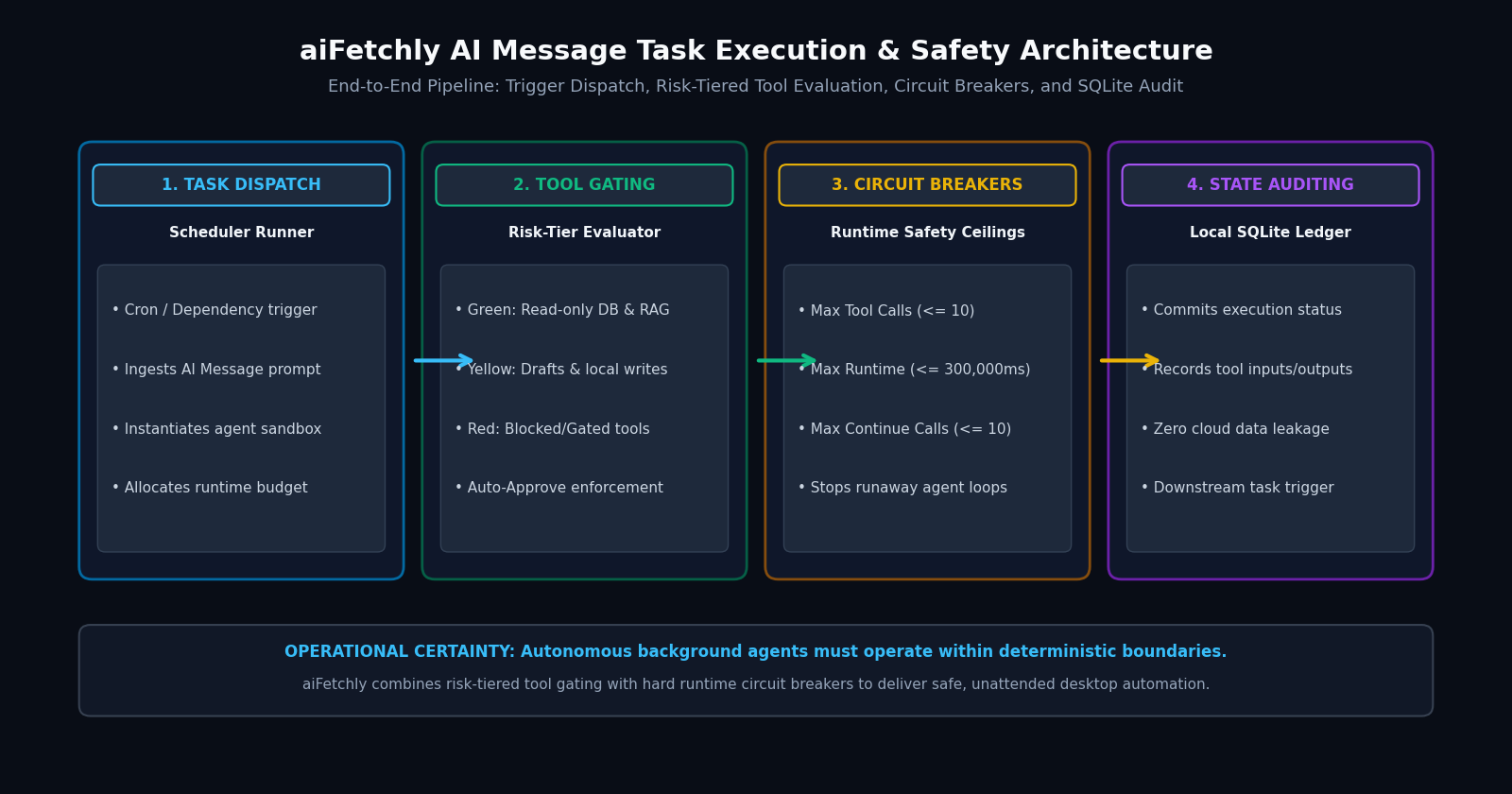
AI Fetchly resolves this operational hazard through AI Message Tasks in the native desktop Task Scheduler. By combining granular tool risk allowlists with hard runtime circuit breakers, developers deploy reliable, unattended background agents directly on workstation silicon.
Step 1: Initialize the AI Message Schedule
Setting up an autonomous agent task takes less than two minutes:
- Open Schedule from the left navigation and click New Schedule.
- Define a descriptive Schedule Name (e.g., “Automated B2B Lead Qualification Agent”).
- Set the Task Type to AI Message. An advanced configuration modal appears containing the autonomous agent parameters.
- Select your Trigger Type: choose Cron for time-based recurrences (e.g.,
0 9 * * 1-5for weekday mornings) or Dependency to trigger on upstream scraper completion.
Step 2: Author Structured Agent Instructions
In the AI Message prompt editor, write declarative, multi-step operating instructions:
- State the Objective: Direct the agent to query local tables (
"Inspect newly harvested company records in SQLite from Stage 1"). - Define Evidence Rules: Require verifiable citations (
"Evaluate company fit against the uploaded ICP matrix in Knowledge Library"). - Specify Action Outputs: Define exact output staging (
"If fit score >= 8, draft customized outreach copy and stage in local queue; otherwise mark Skipped").
Step 3: Assign Tool Risk Tiers and Auto-Approve Permissions
To protect workstation integrity, aiFetchly categorizes tools across four deterministic risk tiers:
- Green (Low Risk): Read-only operations (e.g., vector search in Knowledge Library, SQLite queries, document parsing).
- Yellow (Medium Risk): Moderate side effects (e.g., draft email template creation, local file staging).
- Red (High Risk): Permanent mutations, shell commands, or external network requests.
- Blocked: Tools permanently stripped from the agent’s runtime namespace.
Toggle Auto-Approve Tools to active, enabling the agent to execute vetted Green and Yellow tools autonomously without manual confirmation prompts.
Step 4: Enforce Hard Runtime Circuit Breakers
Prevent runaway loops by establishing strict operational ceilings:
- Max Tool Calls: Hard-capped per execution (default: 10 calls, min: 1).
- Max Runtime: Hard timeout threshold (default: 300,000 ms / 5 minutes, min: 1,000 ms).
- Max Continue Calls: Caps multi-turn continuation cycles (default: 10 cycles, min: 1).
All execution telemetry, token usage, and tool arguments commit immediately to ~/.aifetchly/aifetchly.db.
Explore complete scheduler parameters in the AI Fetchly Docs.
Visual Generation Prompts
Hero Image Prompt:Modern dark-mode SaaS developer dashboard showing the aiFetchly Task Scheduler console, displaying an active AI Message task configuration modal with a multi-line autonomous prompt, color-coded tool risk tier pills (Green Low Risk, Yellow Medium Risk), and hard circuit breaker gauges (Max 10 Tool Calls, 5-minute timeout), sleek isometric 3D perspective, slate-900 background with cyan and emerald accents.Body Image Prompt:High-resolution technical pipeline flowchart illustrating the aiFetchly AI Message Task Architecture: Scheduler Trigger (Cron / Dependency), Tool Risk Gating (Green/Yellow/Red tiers), Runtime Circuit Breakers (call caps and timeouts), and Local SQLite Audit Persistence, clean dark vector blueprint styling.