CogAgent Guide: High-Resolution Visual GUI Agent AI
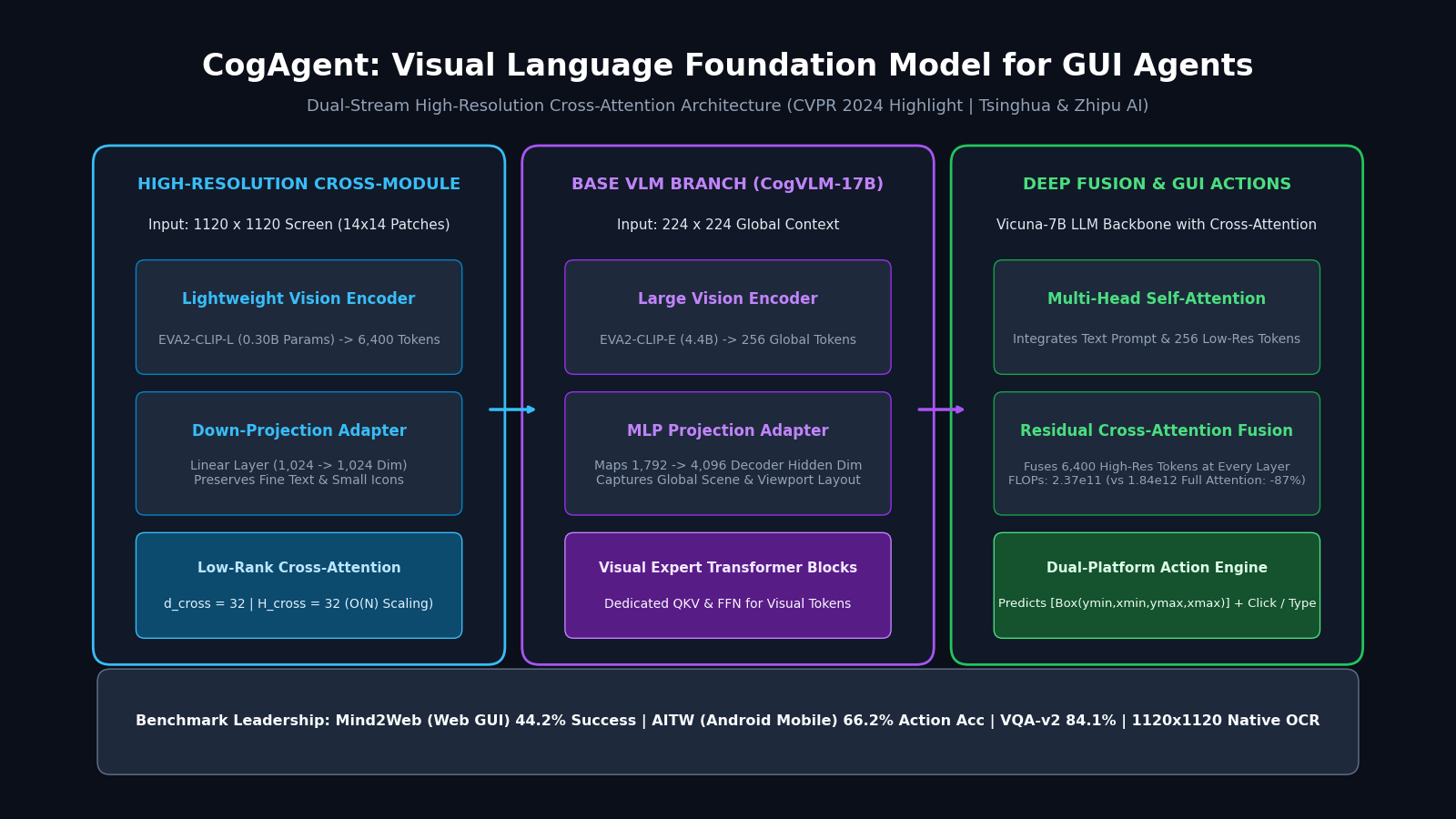
The GUI Perception Crisis: Why General Vision Models Fail on Modern Screens
Graphical User Interfaces (GUIs) are the primary substrate of human-computer interaction across web applications, desktop operating systems, and mobile devices. From financial trading terminals and enterprise cloud dashboards to e-commerce checkouts and automated workflows powered by AiFetchly, knowledge workers interact with software through visual controls: buttons, drop-down menus, tables, icon toolbars, and input forms.
Creating autonomous agents capable of navigating digital interfaces directly through visual observation—often called “Computer Use” or “Visual GUI Agents”—is one of the most critical objectives in modern artificial intelligence. A truly general visual agent does not rely on brittle, site-specific DOM trees, application accessibility trees, or private backend APIs. Instead, it perceives the screen exactly as a human does, interprets interactive elements, reasons over visual hierarchies, and executes mouse clicks and keystrokes.
However, deploying conventional Large Multimodal Models (LMMs) and Vision-Language Models (VLMs) such as standard CLIP backbones, LLaVA, or generic 224x224/448x448 vision models on computer screens exposes a fatal bottleneck: the high-resolution resolution wall.
The GUI Perception Dilemma:
Screen Resolution: 1920 x 1080 (Standard Full HD Display)
 │
 ├── Downsampling to Standard VLM Resolution (224 x 224 or 336 x 336):
 │   ├── Scaling Factor: ~8.5x downscaling along each spatial dimension
 │   ├── 12pt UI Font (16px high) -> Compressed to < 2 blurry pixels!
 │   ├── Checkbox (14x14px) -> Vanishes into background noise!
 │   └── Result: Text illegibility, icon misclassification, failed button clicks!
 │
 └── Native High-Resolution Input (e.g., 1120 x 1120 or 1920 x 1080):
     ├── Patch Size: 14 x 14 pixels
     ├── Visual Tokens: (1120 / 14) x (1120 / 14) = 80 x 80 = 6,400 Tokens!
     ├── Quadratic Self-Attention O(N^2) in 17B LLM Backbone:
     │   └── (6,400)^2 = 40.96 Million Attention Operations per Head per Layer!
└── Result: Immediate GPU VRAM Out-of-Memory (OOM) and extreme latency (>15s/step)! 1. The Fine-Grained Legibility Bottleneck
Computer and smartphone displays present extreme visual density. Unlike photographic scenes (such as portraits or natural landscapes) where semantic concepts span large, continuous clusters of pixels, GUI interfaces are dominated by tiny, high-frequency graphical signals:
- Dense Typography: Standard web typography ranges between 10px and 14px in height. In downsampled screenshots, numbers like “8”, “0”, “3”, and “6” blur into identical circular artifacts.
- Micro-Interactables: Close buttons (X), dropdown carats, sorting toggles, and notification badges measure fewer than 15x15 pixels. When an agent cannot locate these elements within plus or minus 5 pixels, clicks land on dead margins.
- Interleaved Layout Context: Understanding an invoice table requires aligning a currency figure in column 8 with a row label in column 1 while preserving the global context of the page header.
2. The Quadratic Memory and Compute Tax
To resolve tiny UI text, an agent must process images at 1000px+ resolution. However, in standard vision transformers (ViTs) and multimodal decoders, self-attention complexity scales quadratically with sequence length:
$$\mathcal{O}(L_{I}^2 \cdot H \cdot d)$$
Where $L_{I}$ is the visual token sequence length, $H$ is the number of attention heads, and $d$ is the head dimension. Increasing resolution from 224x224 ($L_{I} = 256$ tokens) to 1120x1120 ($L_{I} = 6,400$ tokens) multiplies the attention calculation by 25x in token length and 625x in computational FLOPs. Concatenating 6,400 visual tokens with language tokens into a standard 13B or 17B decoder causes memory bandwidth saturation, slashing interactive agent inference speed to an unusable crawl.
Inside CogAgent: Dual-Stream High-Resolution Cross-Module Architecture
To dismantle this trade-off between perceptual acuity and computational tractability, researchers from Tsinghua University and Zhipu AI introduced CogAgent: A Visual Language Model for GUI Agents (CVPR 2024 Highlight).
Rather than forcing thousands of high-resolution visual tokens into a monolithic self-attention transformer, CogAgent introduces a dual-stream decoupled architecture:
- A Base Low-Resolution Branch (224x224) that processes global spatial layouts using an expressive vision foundation encoder and visual expert modules.
- A High-Resolution Cross-Module Branch (1120x1120) that ingests fine-grained visual details through a lightweight visual encoder and fuses them via low-rank cross-attention.
CogAgent Architectural Pipeline:
                  [Input Screen Image (Arbitrary Aspect Ratio)]
                                    │
           ┌────────────────────────┴────────────────────────┐
           ▼                                                 ▼
[Resize to 1120 x 1120]                           [Resize to 224 x 224]
           │                                                 │
[Lightweight Encoder: EVA2-CLIP-L]                [Base VLM Encoder: EVA2-CLIP-E]
  (0.30B Parameters, 14x14 patch)                   (4.4B Parameters, 14x14 patch)
           │                                                 │
    6,400 Visual Tokens (X_hi)                        256 Global Tokens (X_lo)
           │                                                 │
    [Linear Adapter]                                  [MLP Adapter]
           │                                                 │
           │                                                 ▼
           │                             ┌───────────────────────────────────────┐
           │                             │ VLM Decoder Layer i (e.g., Vicuna-7B) │
           │                             ├───────────────────────────────────────┤
           │                             │ 1. Multi-Head Self-Attention:         │
           │                             │    - Text Tokens (L_T)                │
           │                             │    - Low-Res Vision Tokens (L_lo=256) │
           │                             │    - Uses CogVLM Visual Experts       │
           │                             └───────────────────┬───────────────────┘
           │                                                 │
           └──────────────────┐                              │ Hidden States X'_i
                              ▼                              ▼
                 ┌────────────────────────────────────────────────────────┐
                 │ 2. Multi-Head Cross-Attention (Low-Rank Fusion):       │
                 │    - Query (Q): Projected from X'_i (dim = 32)         │
                 │    - Key (K), Value (V): Projected from X_hi (dim = 32)│
                 │    - Output: Linear O(L_T * L_hi) Complexity!          │
                 │    - Residual Connection: X_out = X'_i + MCA(X'_i, X_hi)│
                 └────────────────────────┬───────────────────────────────┘
                                          │
                                          ▼
[Next Decoder Layer / Action Prediction] 1. The High-Resolution Cross-Module Mechanics
The high-resolution cross-module accepts an image resized to $1120 \times 1120$ pixels. With a $14 \times 14$ patch size, it yields $L_{I_{\text{hi}}} = (1120/14)^2 = 6,400$ visual tokens.
Crucially, the authors observed that while general scene understanding requires rich multi-dimensional semantic representations (e.g., hidden dimension 4,096), text recognition and OCR-centric spatial localization can be achieved with significantly smaller hidden representations.
Consequently, CogAgent adopts:
- A Compact Vision Encoder: A 0.30B parameter EVA2-CLIP-L model for the high-resolution stream, in contrast to the massive 4.4B parameter EVA2-CLIP-E model used for the base branch.
- Low-Rank Cross-Attention Fusion: In every decoder layer, the language and low-resolution hidden states attend to the 6,400 high-resolution tokens through multi-head cross-attention with low-dimensional projections:
$$d_{\text{cross}} = 32, \quad H_{\text{cross}} = 32$$
In comparison, the base decoder hidden dimension is $d_{\text{dec}} = 128$ per head across $H_{\text{dec}} = 32$ heads (total hidden size 4,096).
2. Mathematical Computational Savings
Let $L_{T}$ denote the length of text tokens, $L_{I_{\text{lo}}} = 256$ denote low-resolution visual tokens, and $L_{I_{\text{hi}}} = 6,400$ denote high-resolution visual tokens.
In a standard full-attention architecture, if all high-resolution tokens were concatenated into the decoder self-attention, the computational cost per layer would be:
$$T_{\text{full}} = \mathcal{O}\left((L_{I_{\text{hi}}} + L_{T})^2 \cdot H_{\text{dec}} \cdot d_{\text{dec}}\right)$$
For $L_{T} = 100$, $(6500)^2 \cdot 32 \cdot 128 \approx 1.73 \times 10^{11}$ operations per layer.
In CogAgent, the high-resolution tokens do not interact with one another inside the decoder. Instead, self-attention operates exclusively over $(L_{I_{\text{lo}}} + L_{T})$ tokens, followed by cross-attention:
$$T_{\text{CogAgent}} = \mathcal{O}\left((L_{I_{\text{lo}}} + L_{T})^2 \cdot H_{\text{dec}} \cdot d_{\text{dec}} + L_{T} \cdot L_{I_{\text{hi}}} \cdot H_{\text{cross}} \cdot d_{\text{cross}}\right)$$
Evaluating the actual numbers:
- Self-attention term: $(256 + 100)^2 \cdot 32 \cdot 128 \approx 5.19 \times 10^8$ operations.
- Cross-attention term: $100 \cdot 6400 \cdot 32 \cdot 32 \approx 6.55 \times 10^8$ operations.
Total attention cost per layer is less than $1.2 \times 10^9$ operations—a staggering 99.3% reduction in attention FLOPs compared to full quadratic self-attention! Even factoring in projection weights, CogAgent reduces total layer compute from $1.84 \times 10^{12}$ FLOPs down to $2.37 \times 10^{11}$ FLOPs, representing an overall 87.1% compute savings.
3. Visual Expert Transformers in the Base VLM
CogAgent builds upon the CogVLM-17B foundation. In standard vision-language architectures, visual tokens and language tokens share identical Feed-Forward Network (FFN) parameters and QKV projection matrices. However, visual representations and linguistic syntax have fundamentally different statistical distributions.
CogVLM solves this by adding Visual Expert Modules to every transformer layer:
- A dedicated visual QKV projection matrix and visual MLP for image tokens.
- Shared self-attention weights that allow language tokens to attend to visual tokens.
- This architectural separation prevents visual features from diluting the linguistic reasoning capabilities of the base LLM (Vicuna-7B).
GUI Grounding & Unified Action Space
Operating user interfaces requires more than visual classification; it demands precise spatial grounding and discrete action execution. When extracting data across dynamic web tables with tools like web scraping automation, an agent must pinpoint buttons, type query strings into text boxes, and scroll through infinite feeds.
1. Dual-Coordinate Representation: Point vs. Bounding Box
CogAgent supports two standardized coordinate prediction formats normalized to a 1000-by-1000 grid:
- Bounding Box Grounding: Format
ymin, xmin, ymax, xmax. Identifies the exact spatial boundary of interactive UI components, icons, or text headers. - Click Point Grounding: Format
POINT=[[x, y]]. Represents the optimal clickable centroid for mouse cursor targeting.
Normalized coordinates decouple the model’s spatial reasoning from screen aspect ratios and physical display resolutions. At inference time, the agent scales normalized coordinates back to device coordinates:
$$X_{\text{screen}} = \frac{x_{\text{model}}}{1000} \cdot W_{\text{device}}, \quad Y_{\text{screen}} = \frac{y_{\text{model}}}{1000} \cdot H_{\text{device}}$$
2. The Unified Cross-Platform Action Vocabulary
To bridge web browsers, desktop operating systems (macOS, Windows, Linux), and mobile ecosystems (Android, iOS), CogAgent introduces a unified action space:
Action Space Syntax:
1. Left Click:      CLICK(coordinate=[[x, y]])
2. Right Click:     RIGHT_CLICK(coordinate=[[x, y]])
3. Double Click:    DOUBLE_CLICK(coordinate=[[x, y]])
4. Text Input:      TYPE(text="user_query_string", coordinate=[[x, y]])
5. Drag and Drop:   DRAG(start=[[x1, y1]], end=[[x2, y2]])
6. Scroll Viewport: SCROLL(direction="down" | "up", distance=500)
7. Key Combination: PRESS_KEY(key="Enter" | "Ctrl+C" | "Backspace")
8. Task Status: FINISH(status="success" | "impossible") When formulating action plans, CogAgent emits structured thoughts before declaring an action:
- Observation: High-level description of current screen state.
- Analysis: Verification of whether the previous action succeeded and identification of the target element.
- Plan: The immediate next mechanical step.
- Action: Formatted executable action string.
Empirical Benchmarks: PC, Mobile, and Web Evaluation
CogAgent established state-of-the-art accuracy across major academic and industry GUI agent benchmarks, significantly outperforming generalist multimodal models including GPT-4V, PaLI-X, and Qwen-VL.
1. Mind2Web (Web Navigation Benchmark)
Mind2Web evaluates autonomous web agents across 137 real-world websites and over 2,000 tasks, requiring multi-step navigation through flight bookings, e-commerce checkout flows, and search engines.
| Model | Element Selection (Acc) | Operation Prediction (Acc) | Step Success Rate (SSR) |
|---|---|---|---|
| MindAct (Flan-T5-XL) | 53.4% | 76.1% | 40.2% |
| LLaVA-1.5 (13B) | 22.8% | 58.4% | 14.6% |
| Qwen-VL-Chat (7B) | 31.7% | 68.2% | 23.9% |
| GPT-4V (Raw Screenshots) | 36.8% | 74.5% | 28.2% |
| CogAgent-18B (Zero-Shot) | 64.3% | 81.7% | 44.2% |
CogAgent surpassed GPT-4V by 16.0 percentage points in Step Success Rate, demonstrating that dedicated high-resolution visual processing dramatically improves element localization compared to general-purpose cloud multimodal models.
2. AITW (Android In-The-Wild Benchmark)
AITW spans 30,000 Android interaction episodes across 715 smartphone apps, covering Google Apps, Web Shopping, and system settings.
| Benchmark Sub-Split | Qwen-VL | LLaVA-1.5 | GPT-4V | CogAgent-18B |
|---|---|---|---|---|
| General Android Tasks | 41.2% | 34.6% | 58.3% | 68.4% |
| Google Apps Navigation | 45.1% | 38.0% | 62.1% | 73.9% |
| Install & App Search | 39.8% | 31.2% | 54.0% | 65.1% |
| Web Shopping Interaction | 36.4% | 29.5% | 51.7% | 61.2% |
| Overall Action Accuracy | 40.6% | 33.3% | 56.5% | 66.2% |
3. OCR and General VQA Benchmarks
To confirm that the high-resolution module preserves general perception without degrading core visual understanding, the researchers evaluated CogAgent across document and chart QA benchmarks:
| Model | TextVQA | DocVQA | OCR-VQA | ChartQA |
|---|---|---|---|---|
| BLIP-2 (13B) | 42.4% | - | - | - |
| InstructBLIP (13B) | 50.7% | - | - | - |
| CogVLM (224x224 Base) | 69.7% | 32.1% | 74.8% | 68.3% |
| CogAgent (1120x1120) | 76.1% | 67.4% | 78.9% | 78.4% |
On DocVQA (which requires reading complex PDF layouts and scanned documents), CogAgent improved accuracy from 32.1% to 67.4%—more than doubling performance purely through the high-resolution cross-attention module.
End-to-End Implementation: Building an Autonomous GUI Agent in Python
In this section, we construct a fully functional autonomous GUI navigation pipeline using PyTorch, Hugging Face Transformers, and the PyAutoGUI execution engine.
Step 1: Setting Up the Dependencies
Deploying CogAgent requires PyTorch with CUDA acceleration and the transformers library. Ensure your environment has access to an NVIDIA GPU with at least 16GB of VRAM (using 4-bit quantization) or 40GB+ of VRAM (for full BF16 precision).
pip install torch torchvision transformers accelerate bitsandbytes pyautogui pillow Step 2: Initializing the CogAgent Architecture with 4-Bit Quantization
We instantiate CogAgent using Hugging Face’s AutoModelForCausalLM with BitsAndBytesConfig to allow execution on a single consumer GPU (e.g., RTX 3090 or RTX 4090).
import torch
from PIL import Image
from transformers import AutoModelForCausalLM, AutoTokenizer, BitsAndBytesConfig

class CogAgentController:
    def __init__(self, model_id: str = "THUDM/cogagent-chat-hf"):
        print(f"Initializing CogAgent from {model_id}...")

        # Configure 4-bit NF4 quantization for consumer GPU deployment
        quant_config = BitsAndBytesConfig(
            load_in_4bit=True,
            bnb_4bit_compute_dtype=torch.bfloat16,
            bnb_4bit_use_double_quant=True,
            bnb_4bit_quant_type="nf4"
        )

        self.tokenizer = AutoTokenizer.from_pretrained(
            model_id,
            trust_remote_code=True
        )

        self.model = AutoModelForCausalLM.from_pretrained(
            model_id,
            quantization_config=quant_config,
            torch_dtype=torch.bfloat16,
            trust_remote_code=True,
            device_map="auto"
        )
        self.model.eval()
        print("CogAgent initialized successfully.")

    def predict_action(self, image_path: str, task_prompt: str) -> str:
        """
        Executes forward inference on a screenshot to predict the next GUI action.
        """
        image = Image.open(image_path).convert("RGB")
        width, height = image.size

        # Formulate agent prompt with task description and formatting constraints
        formatted_prompt = (
            f"Task: {task_prompt}\n"
            f"Screen Resolution: {width}x{height}\n"
            f"Please observe the screen and output your action in the format: "
            f"Plan: <reasoning> Action: <ACTION_TYPE(args)>"
        )

        inputs = self.model.build_conversation_input_ids(
            self.tokenizer,
            query=formatted_prompt,
            history=[],
            images=[image]
        )

        inputs = {
            key: value.to(self.model.device) if isinstance(value, torch.Tensor) else value
            for key, value in inputs.items()
        }

        with torch.no_grad():
            outputs = self.model.generate(
                **inputs,
                max_new_tokens=256,
                do_sample=False,
                pad_token_id=self.tokenizer.eos_token_id
            )

        response = self.tokenizer.decode(
            outputs[0][inputs["input_ids"].shape[1]:],
            skip_special_tokens=True
        )
return response.strip() Step 3: Parsing Grounded Actions and Translating Coordinates
CogAgent predicts normalized coordinates in the range 0 to 1000. We implement a parsing and execution module that converts these values into physical screen coordinates:
import re
from typing import Tuple, Dict, Any

class GUIActionExecutor:
    def __init__(self, screen_width: int = 1920, screen_height: int = 1080):
        self.width = screen_width
        self.height = screen_height

    def denormalize_coordinate(self, norm_x: int, norm_y: int) -> Tuple[int, int]:
        """Maps normalized [0, 1000] coordinates to physical pixel coordinates."""
        real_x = int((norm_x / 1000.0) * self.width)
        real_y = int((norm_y / 1000.0) * self.height)
        return real_x, real_y

    def parse_action(self, raw_model_output: str) -> Dict[str, Any]:
        """
        Extracts structured action commands from model text output.
        Example: Action: CLICK(coordinate=[[450, 120]])
        """
        print(f"Raw Output: {raw_model_output}")

        # Extract Click Action
        click_match = re.search(r"CLICK\(coordinate=\[\[(\d+),\s*(\d+)\]\]\)", raw_model_output)
        if click_match:
            x_norm, y_norm = int(click_match.group(1)), int(click_match.group(2))
            x_px, y_px = self.denormalize_coordinate(x_norm, y_norm)
            return {"action": "click", "x": x_px, "y": y_px}

        # Extract Type Action
        type_match = re.search(r"TYPE\(text=[\"'](.*?)[\"'],\s*coordinate=\[\[(\d+),\s*(\d+)\]\]\)", raw_model_output)
        if type_match:
            text = type_match.group(1)
            x_norm, y_norm = int(type_match.group(2)), int(type_match.group(3))
            x_px, y_px = self.denormalize_coordinate(x_norm, y_norm)
            return {"action": "type", "text": text, "x": x_px, "y": y_px}

        # Extract Scroll Action
        scroll_match = re.search(r"SCROLL\(direction=[\"'](up|down)[\"']\)", raw_model_output)
        if scroll_match:
            return {"action": "scroll", "direction": scroll_match.group(1)}

        # Check Finish
        if "FINISH" in raw_model_output:
            return {"action": "finish"}

return {"action": "unknown", "raw": raw_model_output} Step 4: Autonomous Closed-Loop Execution Loop
The agent captures the current screen, passes the image into CogAgent, parses the returned action, executes it on the local operating system, and loops until the task is marked as finished:
import time
import pyautogui

def run_autonomous_gui_task(task_description: str, max_steps: int = 10):
    controller = CogAgentController()
    executor = GUIActionExecutor(screen_width=1920, screen_height=1080)

    print(f"Starting Task: {task_description}")

    for step in range(1, max_steps + 1):
        print(f"\n--- Step {step}/{max_steps} ---")

        # 1. Capture Active Viewport
        screenshot_path = f"/tmp/screen_step_{step}.png"
        screenshot = pyautogui.screenshot()
        screenshot.save(screenshot_path)

        # 2. Predict Next Action via CogAgent
        prediction = controller.predict_action(screenshot_path, task_description)
        action_dict = executor.parse_action(prediction)

        # 3. Execute Action
        action_type = action_dict.get("action")

        if action_type == "click":
            x, y = action_dict["x"], action_dict["y"]
            print(f"Executing: Left Click at ({x}, {y})")
            pyautogui.moveTo(x, y, duration=0.4)
            pyautogui.click()

        elif action_type == "type":
            x, y = action_dict["x"], action_dict["y"]
            text_to_type = action_dict["text"]
            print(f"Executing: Click ({x}, {y}) and Type '{text_to_type}'")
            pyautogui.moveTo(x, y, duration=0.4)
            pyautogui.click()
            pyautogui.write(text_to_type, interval=0.05)
            pyautogui.press("enter")

        elif action_type == "scroll":
            direction = action_dict["direction"]
            amount = -500 if direction == "down" else 500
            print(f"Executing: Scroll {direction}")
            pyautogui.scroll(amount)

        elif action_type == "finish":
            print("Task completed successfully by CogAgent!")
            break

        else:
            print("Unrecognized action or parsing fallback. Pausing...")
            break

        # Allow GUI state to update and re-render
        time.sleep(2.0)

if __name__ == "__main__":
    # Example task invocation:
    # run_autonomous_gui_task("Search for latest Nvidia GPU drivers on Google Chrome")
pass Architectural Comparison: CogAgent vs. Alternative Agent Paradigms
To understand when to deploy CogAgent versus other modern automation frameworks, review this comprehensive design comparison:
| Evaluation Criterion | Text-Based Web Agents (MindAct / WebVoyager) | Monolithic Multimodal Models (GPT-4V / LLaVA-1.5) | CogAgent-18B (Dual-Stream Cross-Module) |
|---|---|---|---|
| Input Modality | HTML DOM Tree / Accessibility Tree | Raw Screenshots (Downscaled to 336px/448px) | Dual 224x224 (Global) & 1120x1120 (Local) Images |
| Cross-Platform Scope | Web Browsers only (Fails on Native Apps & Canvas) | Universal (Web, Desktop, Mobile OS) | Universal (Web, Desktop, Mobile OS) |
| Visual Resolution | N/A (Blind to visual styles, icons, and layout) | Low resolution; small typography blurs | 1120x1120 native resolution; reads 10px fonts |
| Computational Overhead | Low (Text token processing only) | High quadratic attention ($O(N^2)$) on high res | Decoupled low-rank cross-attention (87% compute cut) |
| DOM Tree Dependency | High (Breaks on obfuscated or shadow DOMs) | Zero DOM dependency | Zero DOM dependency |
| Spatial Precision | Coarse bounding box mapping | Moderate (+/- 20px drift on small elements) | High precision (+/- 5px centroid targeting) |
| Open Weights & Local Deployment | Dependent on external LLM APIs | Closed API (GPT-4V) or low-res open models | 100% Open Weights (Available on Hugging Face) |
While HTML-based agents require access to clean DOM trees—failing completely on desktop native software, remote desktops (VNC/RDP), and smartphone apps—CogAgent operates purely on raw display pixels. Simultaneously, by decoupling high-resolution perception from the heavy core LLM, it eliminates the computational latency that plagues generic vision-language models.
For software engineering teams building resilient data extraction engines or automated web collection systems with AiFetchly API integration, CogAgent provides the foundational visual intelligence necessary to navigate complex multi-page workflows, bypass dynamic frontends, and harvest structured intelligence without fragile visual scrapers.
Production Engineering: Deployment Best Practices & Latency Optimization
Operationalizing CogAgent in enterprise production requires addressing inference latency, screen scaling variations, and error recovery:
Production Deployment Architecture:
┌────────────────────────────────────────────────────────┐
│ Client Environment: Desktop / Mobile / Cloud Browser   │
└───────────────────────────┬────────────────────────────┘
                            │ WebSocket / gRPC Frame Stream
                            ▼
┌────────────────────────────────────────────────────────┐
│ Inference Service Gateway: Triton / vLLM / FastChat    │
│ ├── 1. Aspect-Ratio-Preserving Smart Letterboxing     │
│ ├── 2. 4-bit / 8-bit Quantized Model Serving           │
│ ├── 3. Dynamic Execution Verification & Visual Diffing │
│ └── 4. Human-in-the-Loop Fallback Escalation           │
└────────────────────────────────────────────────────────┘ 1. Aspect-Ratio-Preserving Smart Letterboxing
Screens vary widely in geometry (e.g., 16:9 desktop monitors, 9:16 mobile displays, 21:9 ultrawide screens). Naively resizing a 1920x1080 desktop screen directly into a square 1120x1120 image introduces severe horizontal distortion:
- Solution: Pad screenshots with neutral gray borders (letterboxing) to maintain a strict 1:1 aspect ratio before feeding them to the 1120x1120 encoder.
- Coordinate Transformation: When converting coordinates back to device coordinates, subtract padding offsets before multiplying by display dimensions:
$$X_{\text{screen}} = \frac{x_{\text{model}} - \text{pad}_x}{1000 - 2 \cdot \text{pad}x} \cdot W{\text{device}}$$
2. Temporal Multi-Frame Conditioning
Single-screenshot agents often succumb to cyclical action loops (e.g., clicking the same button repeatedly if page loading is delayed).
- Maintain an interaction history buffer consisting of the last 3 action tuples
(screenshot_t, action_t, status_t). - Feed historical action descriptions into the prompt context so the LLM recognizes when an action failed to trigger a state transition and automatically attempts an alternative navigation path.
3. Visual State Verification
Before proceeding to the next step in a workflow, calculate a lightweight visual structural similarity index (SSIM) between the pre-action screenshot and post-action screenshot:
- If SSIM > 0.98 after a
CLICKaction, the UI likely failed to respond (e.g., a slow network response or unclickable element). - Have the agent wait an additional 500ms or try double-clicking rather than executing downstream typing actions into an unopened dialog.
4. Integration with Robust Scraping Infrastructure
For workflows that require high-throughput content retrieval, combining visual GUI intelligence with dedicated data platforms is essential. Review our AiFetchly documentation and pricing plans to see how hybrid visual-agent pipelines can scale enterprise data fetching while slashing maintenance overhead.
Frequently Asked Questions (FAQ)
What is the parameter size of CogAgent?
CogAgent contains approximately 18 billion total parameters. It consists of an 11B base VLM (comprising an EVA2-CLIP-E vision encoder and a Vicuna-7B language model with visual expert modules) augmented by a 0.30B parameter high-resolution EVA2-CLIP-L vision encoder and cross-attention adapter layers.
Can CogAgent run on consumer GPUs?
Yes. When loaded in 4-bit NormalFloat (NF4) quantization using bitsandbytes, CogAgent consumes approximately 12GB to 14GB of GPU High-Bandwidth Memory (VRAM), allowing it to run smoothly on single consumer cards such as the NVIDIA RTX 3090, RTX 4080, or RTX 4090.
How does CogAgent handle different screen aspect ratios?
CogAgent standardizes screen inputs to $1120 \times 1120$ pixels for the high-resolution branch and $224 \times 224$ for the base branch. In production, practitioners use aspect-ratio-preserving padding (letterboxing) to avoid stretching text and icons, and re-scale coordinates dynamically back to physical device dimensions.
Does CogAgent require access to HTML DOM or accessibility trees?
No. CogAgent is a pure vision-language agent that operates entirely on raw RGB screen pixels. It does not inspect HTML elements, CSS classes, or OS accessibility hierarchies, making it immune to website code updates and compatible with canvas elements, Flash, native desktop applications, and video streams.