Cline Guide: Autonomous Coding Agent & MCP Architecture
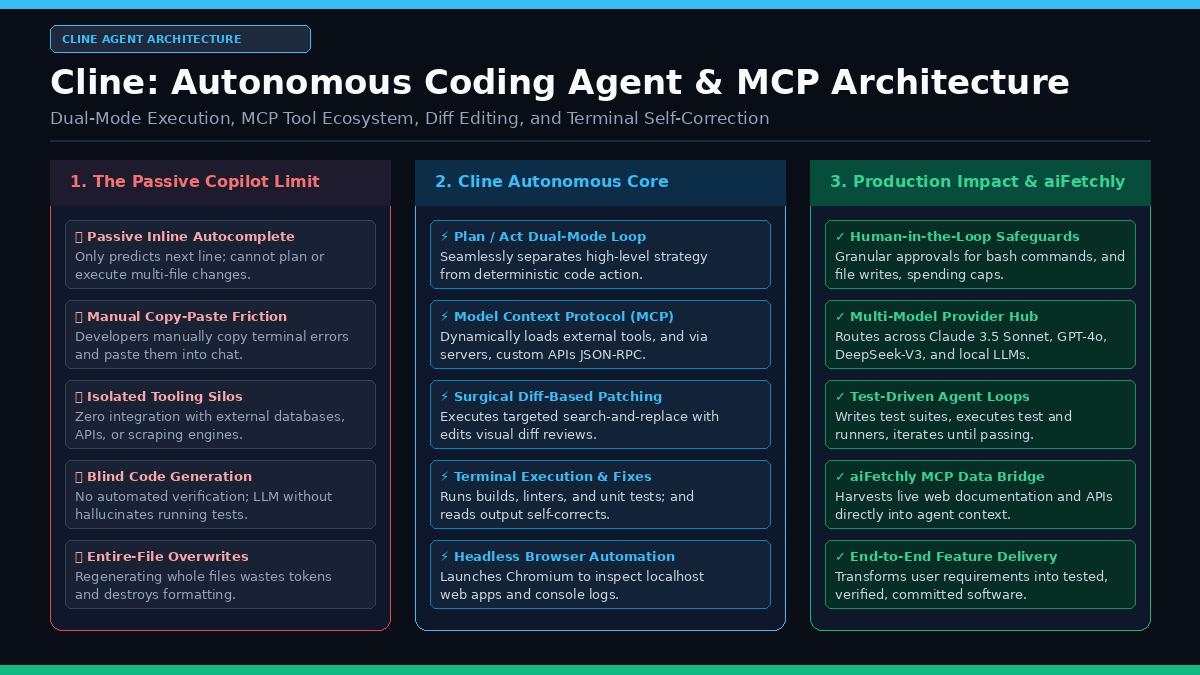
The Problem: The Passive Autocomplete Bottleneck in AI Software Engineering
In modern software development, automated web data platforms, and distributed systems engineering like AiFetchly, developer productivity has been fundamentally reshaped by artificial intelligence. However, the first wave of developer AI assistants—such as GitHub Copilot and simple side-panel chat windows—suffers from severe architectural limitations:
The First-Generation AI Coding Assistant Dilemma:
┌─────────────────────────────────────────────────────────────────┐
│ Bottleneck 1: Passive Inline Autocomplete                       │
│ • Suggests the next 3 lines of code based on cursor position     │
│ ❌ Incapable of planning multi-file refactors or new features   │
│ ❌ Cannot run compilers, linters, or test suites autonomously   │
├─────────────────────────────────────────────────────────────────┤
│ Bottleneck 2: Manual Copy-Pasting and Context Drift             │
│ • Developers copy terminal errors, paste them into chat         │
│ ❌ Chat LLM suggests modified code snippets in markdown         │
│ ❌ Developer must locate exact lines and paste them back        │
│ ❌ High human cognitive load and tedious context switching      │
├─────────────────────────────────────────────────────────────────┤
│ Bottleneck 3: The Entire-File Overwrite Penalty                 │
│ • Naive code generators rewrite whole 600-line files            │
│ ❌ Wastes thousands of output tokens per minor edit             │
│ ❌ Erases adjacent comments, breaks indentation, causes latency │
├─────────────────────────────────────────────────────────────────┤
│ Bottleneck 4: Isolated Environment & Zero Verification          │
│ • The LLM cannot see local localhost web servers or dev tools   │
│ ❌ Hallucinates working code that crashes on import             │
│ ❌ Inability to connect private databases, APIs, or MCP servers │
└─────────────────────────────────────────────────────────────────┘
Result: Developers remain human glue code, manually executing
every terminal command and pasting every code snippet! 1. The Friction of Manual Execution Loops
When an engineering task requires building a new feature—such as implementing a typed REST API endpoint, adding database migrations, or integrating an external data scraper—first-generation assistants require the developer to act as the runner:
- The human must copy compiler error stack traces and paste them into the chat window.
- The human must manually verify that dependencies are installed in
package.jsonorrequirements.txt. - The human must execute test commands (
pytest,npm test,cargo check) and relay output back to the model.
This manual loop breaks developer flow and introduces significant latency into iterative debugging.
2. High Token Overhead from Naive File Rewriting
Many legacy chat agents lack AST-aware diffing capabilities. When requested to change a single variable name or add an optional parameter inside a complex class, they regenerate the entire file from start to finish.
This introduces two major liabilities:
- Token Waste and Latency: Generating 800 lines of code takes 30–60 seconds on cloud foundation models and costs tens of thousands of output tokens.
- Accidental Regressions: LLMs frequently omit existing helper functions, summarize code with comments like
// ... rest of implementation, or alter unrelated formatting rules.
3. Closed Tool Ecosystems
Most proprietary coding copilots cannot interact with external systems. They cannot query a local SQLite database, inspect live browser DOM trees, execute custom shell scripts, or connect to external data extraction engines like AiFetchly Data Fetching without brittle custom plugins.
Cline Architecture: The Autonomous Agent in Your IDE
To overcome these constraints, Cline (formerly Claude Dev) was built as an open-source, human-in-the-loop autonomous coding agent that runs directly inside Visual Studio Code and command-line environments.
Rather than waiting passively for tab-completions, Cline operates as an active software engineer: reading files, exploring project directory trees, applying targeted diff-based edits, running terminal commands, diagnosing test failures, and testing web applications via headless browser automation.
Cline Autonomous Agent Architecture:
┌─────────────────────────────────────────────────────────────────┐
│ 1. Developer Interface & VS Code Extension Core                 │
│ • Sidebar Webview UI (React, Tailwind, Monorepo State)          │
│ • Plan / Act Mode Switcher (Strategic Planning vs. Execution)   │
│ • Human-in-the-Loop Permission Dialogs & Spend Budget Controls  │
└─────────────────────────────────┬───────────────────────────────┘
                                  │ JSON-RPC / VS Code API
                                  ▼
┌─────────────────────────────────────────────────────────────────┐
│ 2. Agent Execution Loop & Context Manager                       │
│ • Context Synthesizer: Workspace indexing, file tree, history   │
│ • Sliding Window Message Trimmer (prevents context exhaustion)  │
│ • ReAct Decision Loop (Thought -> Tool Call -> Observation)     │
└──────────────────┬──────────────────────────────┬───────────────┘
                   │ Tool Invocations             │ Model Requests
                   ▼                              ▼
┌──────────────────────────────────────┐  ┌───────────────────────┐
│ 3. Native Local Tool Suite           │  │ Multi-Model Hub       │
│ • write_to_file (create files)       │  │ • Anthropic Claude    │
│ • replace_in_file (surgical diffs)   │  │   3.5 Sonnet / 3.7    │
│ • execute_command (VS Code pty)      │  │ • OpenAI GPT-4o / o1  │
│ • read_file & list_files             │  │ • DeepSeek-V3 / R1    │
│ • browser_action (Puppeteer / CDP)   │  │ • Local: Ollama, vLLM │
└──────────────────┬───────────────────┘  └───────────────────────┘
                   │ Extensible JSON-RPC Protocol
                   ▼
┌─────────────────────────────────────────────────────────────────┐
│ 4. Model Context Protocol (MCP) Ecosystem                       │
│ • Built-in MCP Client supporting stdio and SSE transports       │
│ • Custom Tool Servers: PostgreSQL, GitHub, FileSystem, APIs     │
│ • aiFetchly MCP Server: Live web extraction & doc harvesting    │
└─────────────────────────────────────────────────────────────────┘ 1. The Plan / Act Dual-Mode Paradigm
A core architectural breakthrough in Cline is the separation of concerns between high-level reasoning and physical workspace mutation:
- Plan Mode: In Plan mode, Cline operates in a strictly read-only, analytical capacity. It can recursively search files, inspect architecture, ask clarifying questions, and formulate step-by-step implementation plans without touching code or executing mutating shell commands.
- Act Mode: Once the developer approves the plan, Cline switches to Act mode. It iteratively executes tools: creating files, applying diffs, running tests, and updating documentation until the objective is reached.
2. Surgical Diff-Based Editing (replace_in_file)
Instead of overwriting whole files, Cline employs a precise search-and-replace patching mechanism:
Diff-Based Search-and-Replace Workflow:
Original File Content:
  def get_user_profile(user_id: str) -> dict:
      user = db.query(user_id)
      return {"id": user.id, "email": user.email}

Cline `replace_in_file` Tool Call:
  <search>
  return {"id": user.id, "email": user.email}
  </search>
  <replace>
  return {
      "id": user.id,
      "email": user.email,
      "role": user.role,
      "verified": user.is_verified
  }
  </replace>

Result:
• Modifies only 5 targeted lines instead of re-streaming 600 lines.
• Reduces output token consumption by up to 90%!
• Shows visual green/red git diff directly in the editor for human review. 3. Terminal Execution with Self-Correcting Test Loops
Cline executes shell commands inside an integrated pseudo-terminal (pty):
- Execution: Runs commands such as
npm run build,pytest tests/, orcargo test. - Observation: Captures real-time output, compiler error codes, and tracebacks.
- Self-Correction: If a test fails, Cline does not give up or ask the user to debug it. It parses the stack trace, identifies the offending file and line number, uses
replace_in_fileto fix the bug, and re-executes the test command until it passes.
4. Headless Browser Automation and Visual Grounding
For front-end and full-stack development, Cline includes native browser automation powered by Puppeteer and the Chrome DevTools Protocol (CDP):
- Launches an isolated local browser instance pointing to
localhost:3000. - Takes full-page screenshots to inspect visual layouts, button alignments, and UI responsiveness.
- Captures client-side JavaScript console errors and network failure status codes.
- Clicks interactive elements, fills out forms, and validates end-to-end workflows before marking tasks complete.
5. Model Context Protocol (MCP) Integration
Cline was built from the ground up as a native Model Context Protocol (MCP) client.
Through MCP, developers can connect arbitrary data sources and tool backends by adding entries to their configuration file (cline_mcp_settings.json):
- Database Servers: Allows Cline to inspect live PostgreSQL schemas and execute read-only queries.
- Git & CI Servers: Inspects GitHub pull requests and review comments.
- Web Data Extraction: Integrates AiFetchly to scrape live documentation, verify API references, and fetch real-time market data.
Hands-On Implementation: Setting Up Cline and Building an Autonomous Agent Workflow
Let us configure Cline in VS Code, connect custom MCP tools, and execute an autonomous test-driven engineering task.
Step 1: Install and Configure Cline
- Open Visual Studio Code.
- Navigate to the Extensions marketplace (
Ctrl+Shift+XorCmd+Shift+X) and search for Cline. - Click Install.
- Open the Cline sidebar icon.
- In the settings panel, select your preferred API provider:
- Anthropic: Claude 3.5 Sonnet or Claude 3.7 Sonnet.
- OpenRouter / DeepSeek: DeepSeek-V3 or DeepSeek-R1 for cost-effective local reasoning.
- Local Inference: Ollama, LM Studio, or vLLM via OpenAI-compatible endpoints.
Step 2: Configure Model Context Protocol (MCP) Tools
Open the Cline MCP settings file (~/.vscode/extensions/.../cline_mcp_settings.json or click the MCP server icon in the Cline sidebar):
{
  "mcpServers": {
    "fetchly-scraper": {
      "command": "python",
      "args": ["-m", "mcp_server_aifetchly"],
      "env": {
        "AIFETCHLY_API_KEY": "fetchly-live-prod-key-xyz"
      }
    },
    "postgres-db": {
      "command": "npx",
      "args": [
        "-y",
        "@modelcontextprotocol/server-postgres",
        "postgresql://user:pass@localhost:5432/app_dev"
      ]
    }
  }
} Once saved, Cline automatically discovers all tools exposed by the configured servers:
fetchly_scrape_url: Fetches clean Markdown from client-rendered web pages.postgres_query: Inspects schema tables and executes read-only validation queries.
Step 3: Executing a Test-Driven Development Task
Initiate a task in Cline’s chat interface:
Task:
"Build a typed Python service in `services/pricing.py` that extracts SaaS
tier information from an external API payload and writes unit tests in
`tests/test_pricing.py`. Run pytest to verify all tests pass." Cline autonomously executes the following steps:
-
Exploration: Uses
list_filesandread_fileto inspect the project layout and existing dependencies. -
File Creation: Calls
write_to_fileto writeservices/pricing.py:from dataclasses import dataclass from typing import List, Optional @dataclass class PricingTier: name: str price_monthly: float features: List[str] is_popular: bool = False class PricingService: @staticmethod def calculate_annual_discount(monthly_price: float, discount_percent: float = 0.2) -> float: annual_total = monthly_price * 12 return round(annual_total * (1.0 - discount_percent), 2) -
Test Generation: Calls
write_to_fileto createtests/test_pricing.py:import pytest from services.pricing import PricingService def test_annual_discount_calculation(): # $50/mo with 20% discount = $600 * 0.8 = $480 result = PricingService.calculate_annual_discount(50.0, 0.2) assert result == 480.0 def test_zero_price(): result = PricingService.calculate_annual_discount(0.0) assert result == 0.0 -
Terminal Verification: Prompts to execute
execute_command:pytest tests/test_pricing.py -
Observation: Parses the terminal output:
============================= test session starts ============================== tests/test_pricing.py .. [100%] ============================== 2 passed in 0.04s =============================== -
Task Completion: Summarizes the architectural additions and returns control to the developer.
Architectural Comparison: Cline vs. Alternative Coding Assistants
To understand Cline’s position within developer AI tooling, consider the following comparison:
| Dimension | GitHub Copilot | Cursor IDE | Aider | Cline |
|---|---|---|---|---|
| Primary Form Factor | VS Code / JetBrains Plugin | Forked VS Code IDE | Standalone Terminal CLI | Native VS Code Extension & CLI |
| Execution Model | Passive inline autocomplete | Chat + Composer agent | Terminal git-aware agent | Autonomous Plan/Act agent loop |
| Tool Extensibility | Closed proprietary tools | Proprietary tool integrations | Git, bash, and lint tools | Native Model Context Protocol (MCP) |
| File Editing Engine | Direct completions | Whole/chunk generation | Unified git diff format | Surgical replace_in_file search/replace |
| Browser Automation | None | Limited web viewing | None | Native Puppeteer / CDP browser actions |
| Model Freedom | OpenAI / Anthropic restricted | Cursor-managed models | Bring your own API key | 50+ models via API, OpenRouter, or Local |
| Security & Controls | Auto-executed suggestions | Semi-prompted edits | Auto-commits to git | Granular human-in-the-loop approvals |
Synergistic Integration with aiFetchly
For autonomous coding agents, access to up-to-date documentation and clean web data is essential.
Foundation model training cutoffs frequently mean that models lack knowledge of newly released library versions, breaking API changes, or internal enterprise documentation.
By pairing AiFetchly with Cline via MCP:
Cline + aiFetchly Synergistic Architecture:
┌───────────────────────────┐      ┌───────────────────────────┐
│       Target Web Page     │ ───► │  aiFetchly Engine         │
│ Live Docs, API Changelog  │      │  • Headless Chrome CDP    │
└───────────────────────────┘      │  • DOM pruning & Markdown │
                                   └─────────────┬─────────────┘
                                                 │ Cleaned Markdown
                                                 ▼
┌───────────────────────────┐      ┌───────────────────────────┐
│ Local IDE Workspace       │ ◄─── │  Cline Autonomous Agent   │
│ Codebase, Tests, Terminal │      │  • Model Context Protocol │
└───────────────────────────┘      │  • Diff-based file edits  │
                                   │  • Terminal test runner   │
└───────────────────────────┘ - Real-Time Documentation Ingestion: When Cline encounters an unfamiliar library or updated SDK method, it calls
aiFetchlyvia MCP to fetch the live documentation URL and convert it into clean Markdown. - Web Application Testing: Developers testing complex web scrapers or browser agents can have Cline write extraction code and immediately test it against real-world target sites using AiFetchly Data Fetching.
- Automated Schema Synthesis: Cline consumes scraped HTML tables and automatically writes type-safe Pydantic models and database migrations.
To learn more about connecting live data extraction into your agent toolchains, explore the AiFetchly Documentation or review our AiFetchly Pricing.