ChromaDB Guide: Embedded Vector Database for Local AI Apps
The Problem: The Operational and Architectural Overhead of Client-Side Vector Search
In modern desktop applications, autonomous browser extensions, and edge-native tools powered by AiFetchly, foundation models process vast amounts of personal and proprietary data: local code repositories, web scrapings, PDF technical specifications, and internal corporate databases. To perform context-grounded reasoning without hallucinating, these systems rely heavily on Retrieval-Augmented Generation (RAG).
However, software engineers building client-side desktop software or local CLI agents face a severe deployment dilemma when choosing a vector database.
The Local Vector Database Deployment Dilemma:
┌─────────────────────────────────────────────────────────────────┐
│ Approach 1: Managed Cloud Vector Databases (Pinecone, Weaviate) │
│ ❌ High Latency: 100ms–300ms roundtrips over public internet    │
│ ❌ Privacy Violation: Uploads proprietary user files to cloud   │
│ ❌ Cost & Offline Failure: Fails when user is offline / metered │
├─────────────────────────────────────────────────────────────────┤
│ Approach 2: Heavy Distributed Self-Hosted Engines (Milvus, Qdrant)│
│ ❌ Docker Dependency: Requires end-user to run Docker daemon    │
│ ❌ Port Conflicts & Background Services: Fails on client PCs    │
│ ❌ Resource Bloat: Consumes 1GB+ idle RAM on user workstations  │
├─────────────────────────────────────────────────────────────────┤
│ Approach 3: Flat Files or Naive In-Memory Arrays (JSON, NumPy)  │
│ ❌ O(N) Linear Scan Bottleneck: Freezes UI on 50,000+ vectors   │
│ ❌ No ACID Persistence: Crashes corrupt vector indexes          │
│ ❌ Brittle Filtering: Lacks structured SQL-like boolean filters │
└─────────────────────────────────────────────────────────────────┘
Result: Developers sacrifice either user privacy, deployment simplicity, or query speed! 1. The Cloud Dependency and Privacy Penalty
Hosting vector indices in remote cloud services (such as Pinecone, AWS OpenSearch, or managed vector endpoints) introduces acute friction for desktop applications:
- Network Latency: Every semantic retrieval query incurs network handshakes, TLS negotiation, and serialization delays, adding 150ms to 350ms before token generation can even begin.
- Data Compliance Mandates: In privacy-sensitive workflows—such as analyzing medical records, confidential source code, or proprietary financial ledgers—transmitting embedding vectors and document text to third-party cloud infrastructure triggers immediate compliance violations (GDPR, HIPAA, SOC 2).
- Offline Brittleness: If a user loses internet connectivity (e.g., during air travel or in remote field operations), cloud-dependent copilots freeze completely.
2. The Docker and Daemon Friction on End-User Workstations
Traditional open-source vector databases (such as Milvus or distributed cluster nodes) require running independent background daemons, gRPC servers, or Docker containers:
- In client-facing desktop applications (such as Electron or native desktop wrappers), expecting non-technical users to install Docker Desktop, manage Linux containers, or configure port forwarding is an absolute non-starter.
- Background daemons frequently encounter port collisions (
localhost:8000orlocalhost:6333already bound), permissions issues, and sleep-wake state synchronization bugs on macOS and Windows.
3. The Scalability Wall of Flat In-Memory Arrays
To avoid external dependencies, early local AI implementations used simple in-memory vector arrays (such as NumPy dot products or raw JSON files):
- Linear Scaling Penalty $O(N)$: Exact brute-force vector scans scale linearly with the number of documents. While fast for 500 chunks, searching across 100,000 embeddings requires calculating pairwise cosine distances against the entire matrix, freezing CPU threads and stalling user interactions.
- Lack of Structured Predicate Filtering: In real-world data retrieval, users do not search blindly across all text; they filter by author, date ranges, folder hierarchies, and document categories. Without a unified indexing engine, combining vector distance with metadata predicates requires clumsy, error-prone application-level loops.
The Solution: ChromaDB’s Embedded Dual-Engine Architecture
To resolve the tension between operational simplicity and high-performance vector retrieval, the open-source community created ChromaDB.
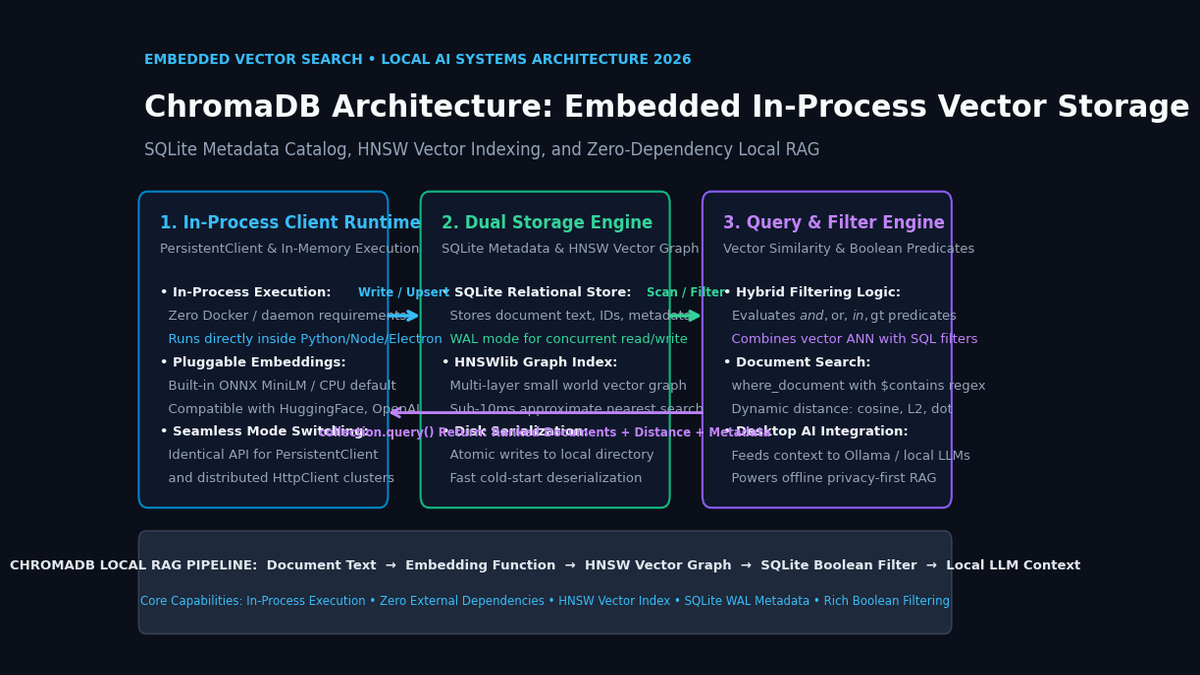
ChromaDB is an AI-native, open-source embedded vector database engineered specifically to provide zero-configuration semantic search directly within an application process. Built around an elegant dual-engine storage architecture, ChromaDB couples a robust relational SQLite metadata store with a high-speed in-memory HNSW (Hierarchical Navigable Small World) vector graph.
ChromaDB Dual-Engine Storage Architecture:
┌─────────────────────────────────────────────────────────────────┐
│ Host Application Process (aiFetchly Electron App / Python Agent)│
└─────────────────────────────────────────────────────────────────┘
 │
 ▼ (In-Process chromadb.PersistentClient API Calls)
┌─────────────────────────────────────────────────────────────────┐
│ ChromaDB Embedded Engine Core                                   │
│                                                                 │
│ ┌─────────────────────────────────────────────────────────────┐ │
│ │ Pluggable Embedding Pipeline                                │ │
│ │ • Default ONNX MiniLM (Zero-dependency local embedding)     │ │
│ │ • Sentence-Transformers, HuggingFace, OpenAI, Custom        │ │
│ └─────────────────────────────────────────────────────────────┘ │
│                                │                                │
│        ┌───────────────────────┴───────────────────────┐        │
│        ▼                                               ▼        │
│ ┌─────────────────────────────┐ ┌─────────────────────────────┐ │
│ │ SQLite Relational Catalog   │ │ HNSWlib Vector Graph Engine │ │
│ │ • Document Text & Raw Chunks│ │ • Multi-layer ANN graph     │ │
│ │ • UUIDs & Primary Keys      │ │ • Sub-10ms vector search    │ │
│ │ • Structured Metadata Keys  │ │ • Cosine / L2 / Inner Prod  │ │
│ │ • WAL Mode (Thread-Safe)    │ │ • Memory-mapped persistence │ │
│ └─────────────────────────────┘ └─────────────────────────────┘ │
│        │                                               │        │
│        └───────────────────────┬───────────────────────┘        │
│                                ▼                                │
│ ┌─────────────────────────────────────────────────────────────┐ │
│ │ Unified Query Coordinator: Intersects ANN + Boolean Preds   │ │
│ └─────────────────────────────────────────────────────────────┘ │
└─────────────────────────────────────────────────────────────────┘
 │
 ▼ (Atomic File System Flushes)
┌─────────────────────────────────────────────────────────────────┐
│ Local Disk Storage Directory (chroma.sqlite3 + index_metadata)  │
└─────────────────────────────────────────────────────────────────┘ The Architectural Pillars of ChromaDB
- True In-Process Execution (
PersistentClient): ChromaDB runs directly within your application’s runtime. It requires no background services, no separate processes, and no network sockets. All data is managed through native Python or JavaScript C++ bindings. - Dual-Engine Persistence:
- SQLite with WAL: Manages relational metadata, document text chunks, collection schemas, and transactional consistency. Write-Ahead Logging (WAL) ensures concurrent read operations never block write transactions.
- HNSWlib Graph Indexing: Employs a multi-layer hierarchical navigable small world graph to perform Approximate Nearest Neighbor (ANN) search with logarithmic time complexity $O(\log N)$, returning top-$k$ nearest vectors in under 10 milliseconds.
- Rich Boolean & Document Filtering: Enables complex SQL-like predicate expressions (
$and,$or,$in,$gt,$contains) evaluated in lockstep with vector distance calculations, eliminating false-positive matches before results reach the LLM. - Batteries-Included Embedding Integration: ChromaDB includes built-in ONNX Runtime embedding functions that run locally on CPU without requiring heavy PyTorch or CUDA installations, while supporting seamless overrides for external embedding providers.
- Architectural Flexibility (Embedded to Distributed): Applications can develop and deploy locally using
PersistentClient(path="./data")and transition to remote multi-tenant microservices viaHttpClient(host="...")without changing a single line of data-access logic.
Comparing Modern Embedded and Local Vector Engines
The table below highlights how ChromaDB compares against other embedded and local vector search solutions:
Embedded Vector Database Architectural Comparison:
┌───────────────────────────┬───────────────────────────────┬───────────────────────────────┬───────────────────────────────┐
│ Dimension                 │ SQLite-vec                    │ ChromaDB                      │ LanceDB                       │
├───────────────────────────┼───────────────────────────────┼───────────────────────────────┼───────────────────────────────┤
│ Primary Focus             │ C-based SQLite extension      │ AI-native embedded database   │ Serverless disk-native vector │
│ Storage Engine            │ Native SQLite virtual tables  │ SQLite (metadata) + HNSWlib   │ Lance columnar format (Arrow) │
│ Indexing Algorithm        │ Flat / Inverted File (IVF)    │ HNSW (Hierarchical Graph)     │ DiskANN / IVF-PQ              │
│ In-Memory Overhead        │ Minimal (Disk-paged)          │ Medium (HNSW graph in RAM)    │ Zero (Zero-copy disk memory)  │
│ Max Recommended Scale     │ < 500k vectors                │ 5M–10M vectors per node       │ 100M+ vectors (Disk-bound)    │
│ Built-in Embeddings       │ None (Raw vectors only)       │ Yes (ONNX, Sentence-Transf)   │ Yes (Pydantic / Transformers) │
│ Query Interface           │ Pure SQL queries              │ Pythonic / JS Collection API  │ Pandas / Arrow / PyTorch API  │
│ Multi-Modal Support       │ Manual serialization          │ Built-in multimodal functions │ Native image/video columnar   │
│ Client-Server Mode        │ No (Embedded only)            │ Yes (Drop-in HTTP client)     │ Yes (Remote object storage)   │
└───────────────────────────┴───────────────────────────────┴───────────────────────────────┴───────────────────────────────┘ Deep Dive into ChromaDB Core Primitives & Mechanics
ChromaDB coordinates four essential subsystems: client execution modes, HNSW graph mechanics, boolean predicate filtering, and pluggable embedding functions.
ChromaDB Subsystem Breakdown:
ChromaDB Engine
 ├──► 1. Client Execution Modes: In-Memory (Ephemeral) vs. Disk-Backed (PersistentClient)
 ├──► 2. HNSW Indexing: Multi-layer graph traversal with configurable distance metrics
 ├──► 3. Hybrid Filtering: Boolean metadata predicates ($and, $or) + document regex
 ├──► 4. Embedding Engine: Built-in local ONNX MiniLM pipeline with custom adapters
└──► 5. Collection Isolation: Namespace partitioning with independent metric spaces 1. In-Process Client Modes: Ephemeral vs. Persistent
ChromaDB provides two distinct in-process execution modes:
EphemeralClient(): Stores all vector indexes and SQLite tables strictly in memory. When the application process terminates, the data is discarded. This mode is optimal for temporary unit testing, ephemeral chat session caching, and scratchpad agent memory.PersistentClient(path="./chroma_db"): Directs ChromaDB to serialize both the SQLite catalog (chroma.sqlite3) and the binary HNSW index files directly to a designated local directory. On application launch, ChromaDB performs fast memory-mapped initialization, reloading collections in milliseconds.
2. Hierarchical Navigable Small World (HNSW) Indexing
Approximate nearest neighbor search in ChromaDB is powered by HNSWlib:
- Graph Topology: The vector space is organized into a multi-layered hierarchy of skip-list graphs. The top layers feature sparse connections spanning long distances for rapid coarse navigation, while the bottom layer contains dense local clusters.
- Distance Metrics: Configurable per collection via metadata:
l2: Squared Euclidean distance ($\sum (u_i - v_i)^2$)cosine: Cosine distance ($1 - \frac{u \cdot v}{|u|_2 |v|_2}$)ip: Inner product / Dot product ($-1 \cdot (u \cdot v)$)
HNSW Multi-Layer Skip-Graph Traversal:
Layer 2 (Coarse):  [Node A] ────────────────────────► [Node Z]
                        │                                  │
                        ▼                                  ▼
Layer 1 (Medium):  [Node A] ──────► [Node M] ───────► [Node Z]
                        │               │                  │
                        ▼               ▼                  ▼
Layer 0 (Dense):   [Node A] ─► [B] ─► [Node M] ─► [P] ─► [Node Z]
Search Query (Q) ──► Enters at Top Layer, Zooms into Local Neighborhood at Layer 0! ChromaDB allows fine-tuning HNSW hyperparameters during collection creation:
hnsw:space: Distance function ("cosine","l2", or"ip").hnsw:construction_ef: Controls search depth during index build (higher values increase build time but improve recall).hnsw:M: Number of bi-directional links per node (typical values: 16 to 64).hnsw:search_ef: Exploration factor during query time (balances retrieval latency vs. recall accuracy).
3. Rich Metadata & Document Content Filtering
Unlike simple vector indexes that require manual post-filtering, ChromaDB executes predicate evaluation directly in coordination with vector retrieval:
- Metadata Filters (
where): Supports equality ($eq,$ne), relational bounds ($gt,$gte,$lt,$lte), list membership ($in,$nin), and logical conjunctions ($and,$or). - Document Text Filters (
where_document): Enables regex and substring searches ($contains,$not_contains) directly against document content strings.
4. Pluggable Embedding Pipelines
When documents are ingested without pre-calculated vectors, ChromaDB routes text through an embedding function:
- Default Pipeline: An embedded ONNX Runtime execution of
all-MiniLM-L6-v2(384 dimensions). It requires no external API keys, runs purely on the host CPU, and downloads lightweight weights (~80MB) automatically on first run. - Custom Functions: ChromaDB exposes a clean Python protocol allowing developers to plug in custom local models (such as Ollama embeddings or FastEmbed) or cloud APIs (such as OpenAI
text-embedding-3-smallor Cohere).
Hands-On Implementation: Building a Production Local RAG System
Let’s build a production-grade local knowledge retrieval engine using ChromaDB in Python. We will configure persistent storage, ingest technical web extractions with structured metadata, execute complex hybrid queries, and update document records.
1. Installation and Environment Setup
Install ChromaDB using pip:
pip install chromadb sentence-transformers For ultra-lightweight deployments without heavy PyTorch dependencies, ChromaDB operates out of the box with its built-in ONNX runtime.
2. Initializing Persistent Storage & Creating Collections
Create a persistent client and define a collection with custom HNSW distance parameters:
import chromadb
from chromadb.config import Settings

# 1. Initialize persistent disk-backed client
client = chromadb.PersistentClient(
    path="./local_knowledge_vault",
    settings=Settings(
        anonymized_telemetry=False,
        allow_reset=True
    )
)

# 2. Create or load collection with Cosine distance space
collection = client.get_or_create_collection(
    name="enterprise_knowledge",
    metadata={
        "hnsw:space": "cosine",
        "hnsw:construction_ef": 128,
        "hnsw:M": 32,
        "description": "Indexed documentation and scraped web context"
    }
)

print(f"Collection '{collection.name}' initialized. Current count: {collection.count()}") 3. Ingesting Documents with Structured Metadata
Add documents with unique identifiers, raw text, and rich metadata attributes:
# 1. Prepare raw document chunks harvested by aiFetchly
documents = [
    "TensorRT-LLM accelerates inference using in-flight batching and paged attention.",
    "SQLite-vec is a lightweight embedded vector search extension written in pure C.",
    "ChromaDB provides an in-process dual-engine vector store with SQLite and HNSW.",
    "Ollama orchestrates local GGUF models across Apple Silicon and NVIDIA GPUs.",
    "FastRank uses quantized ONNX cross-encoders for sub-10ms RAG reranking."
]

metadatas = [
    {"category": "inference", "source": "nvidia", "tier": "enterprise", "stars": 4500},
    {"category": "database", "source": "sqlite", "tier": "embedded", "stars": 1200},
    {"category": "database", "source": "chroma", "tier": "embedded", "stars": 14000},
    {"category": "serving", "source": "ollama", "tier": "desktop", "stars": 92000},
    {"category": "reranking", "source": "flashrank", "tier": "embedded", "stars": 3400}
]

ids = ["doc_trt", "doc_sqlvec", "doc_chroma", "doc_ollama", "doc_flashrank"]

# 2. Upsert into collection (automatically computes embeddings via ONNX)
collection.upsert(
    documents=documents,
    metadatas=metadatas,
    ids=ids
)

print(f"Successfully indexed {collection.count()} documents into ChromaDB.") 4. Advanced Hybrid Querying: Vector Search with Boolean Filters
Perform semantic similarity searches constrained by complex boolean metadata criteria:
# Query: "Find embedded database tools with high community adoption"
query_text = "lightweight embedded database for local desktop storage"

results = collection.query(
    query_texts=[query_text],
    n_results=2,
    where={
        "$and": [
            {"tier": {"$eq": "embedded"}},
            {"stars": {"$gte": 2000}}
        ]
    },
    where_document={"$contains": "vector"}
)

print("\n--- ChromaDB Hybrid Retrieval Results ---")
for i in range(len(results["ids"][0])):
    doc_id = results["ids"][0][i]
    document = results["documents"][0][i]
    metadata = results["metadatas"][0][i]
    distance = results["distances"][0][i]

    print(f"[{i+1}] ID: {doc_id} | Cosine Distance: {distance:.4f}")
    print(f"    Category: {metadata['category']} | Stars: {metadata['stars']}")
print(f" Snippet: {document}\n") 5. Node.js & TypeScript Integration for Desktop Applications
For desktop applications built with Electron or Node.js (like AiFetchly), ChromaDB provides an official client library:
import { ChromaClient } from 'chromadb';

async function queryLocalVault() {
  // Connect to local or embedded Chroma instance
  const client = new ChromaClient({ path: 'http://localhost:8000' });

  const collection = await client.getOrCreateCollection({
    name: 'desktop_user_context',
    metadata: { 'hnsw:space': 'cosine' },
  });

  // Query vector store
  const results = await collection.query({
    queryTexts: ['How do I configure offline scraping?'],
    nResults: 3,
    where: { status: 'active' },
  });

  console.log('Top Matched Document:', results.documents[0]);
}

queryLocalVault().catch(console.error); Production Engineering & Performance Tuning for aiFetchly
Integrating ChromaDB into desktop copilots, automated web harvesting pipelines, and edge document extraction engines like AiFetchly requires optimizing memory usage, concurrency, and hybrid ranking.
aiFetchly Desktop Storage & Local Intelligence Pipeline:
┌─────────────────────────────────────────────────────────────────┐
│ aiFetchly Web Scrapers & Local Document Ingestion Engine        │
└─────────────────────────────────────────────────────────────────┘
 │
 ▼ (Text Chunking & Metadata Enrichment)
┌─────────────────────────────────────────────────────────────────┐
│ Local ChromaDB PersistentClient Storage (`./app_data/chroma`)   │
│ • SQLite Catalog: Document text, URLs, extraction timestamps    │
│ • In-Memory HNSW Graph: Sub-10ms similarity search              │
└─────────────────────────────────────────────────────────────────┘
 │
 ├──► Fast Bi-Encoder Retrieval (Top-20 Candidate Chunks)
 │
 ▼
┌─────────────────────────────────────────────────────────────────┐
│ FlashRank ONNX Reranking Engine (Sub-10ms Cross-Encoder)        │
│ • Rescores candidate chunks against raw query cross-attention   │
│ • Selects Top-3 highest-precision passages                      │
└─────────────────────────────────────────────────────────────────┘
 │
 ▼
┌─────────────────────────────────────────────────────────────────┐
│ Local LLM Generation via Ollama / LM Studio (e.g., LLaMA-3.2)   │
│ • Zero Cloud Data Transmission: 100% Offline Privacy Guaranteed  │
└─────────────────────────────────────────────────────────────────┘ 1. Managing Memory Footprint vs. Dataset Scale
Because ChromaDB keeps the active HNSW graph in system RAM for fast vector traversal:
- RAM Calculation: Each 1,000 vectors at 384 dimensions consumes approximately 2.5 MB of RAM including graph overhead. A collection of 100,000 vectors requires roughly 250 MB, making it ideal for desktop workstations.
- Partitioning Collections: For applications managing diverse projects or separate website domains, create separate collections per project rather than one monolithic collection. This ensures only relevant graphs are loaded into memory, keeping the desktop application lean.
2. Thread Safety and SQLite WAL Mode Concurrency
In high-throughput multi-threaded applications:
- ChromaDB leverages SQLite’s Write-Ahead Logging (WAL) mode.
- In WAL mode, concurrent reader threads never block incoming writer threads, allowing automated scraping background tasks to continuously upsert new document chunks while the user actively queries the search interface.
- Always reuse a single
PersistentClientinstance across application worker threads rather than instantiating multiple clients pointing to the same folder path, avoiding database lock contention.
3. Two-Stage RAG Pipeline: Pairing ChromaDB with FlashRank
While ChromaDB’s bi-encoder ANN retrieval rapidly narrows millions of documents down to 20 candidates, bi-encoders occasionally miss subtle semantic nuances or keyword negations:
- Combine ChromaDB with a lightweight ONNX cross-encoder like FlashRank.
- Retrieve the top 20 candidate chunks from ChromaDB in 5ms.
- Rerank the top 20 candidates using FlashRank in 8ms to filter out semantic distractors before passing the top 3 chunks to a local Ollama or LM Studio instance.
Summary: Delivering Zero-Config Semantic Intelligence to Desktop AI
Local artificial intelligence demands infrastructure that balances developer simplicity, query speed, and data sovereignty.
By combining an in-process SQLite metadata catalog with HNSW vector graph traversal, rich boolean filtering, and built-in local embedding functions, ChromaDB eliminates the operational friction of Docker daemons, complex server configurations, and third-party cloud lock-in. For privacy-first desktop copilots, automated web harvesting systems, and edge data processing pipelines built with AiFetchly, ChromaDB provides the foundational vector storage engine necessary to deliver instant, reliable semantic intelligence directly on user hardware.