Bypassing Rate Limits: aiFetchly Proxy Setup Guide
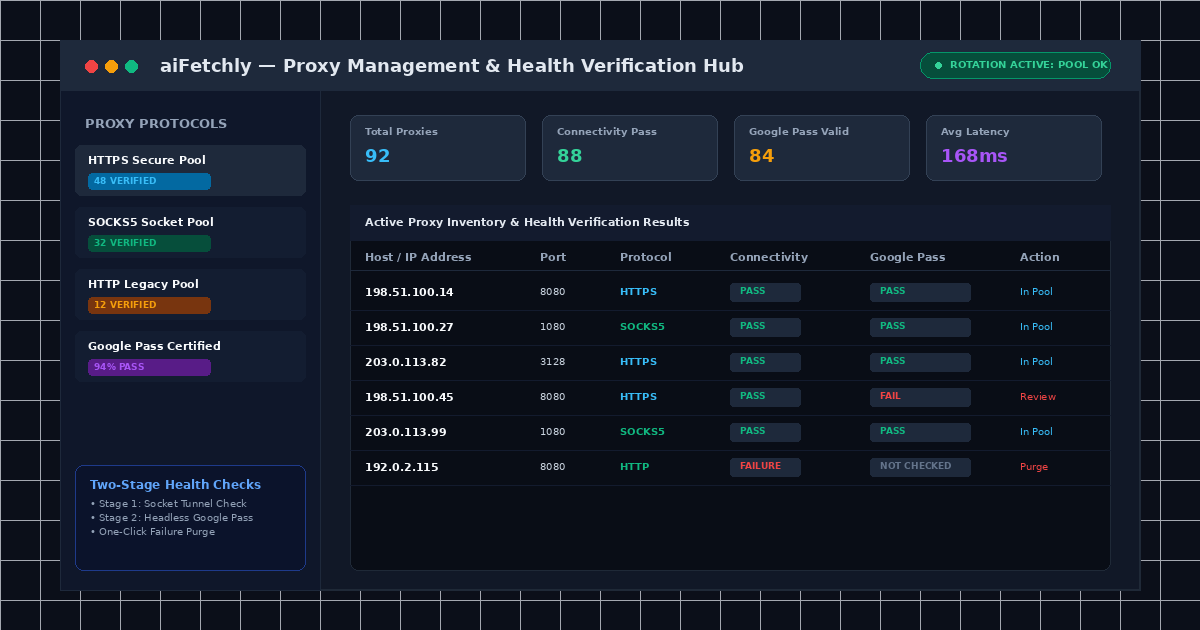
The Rate-Limiting Barrier in Enterprise Data Harvesting
Data analysts and market researchers running large-scale data harvesting inevitably collide with the same operational barrier: IP rate limiting. When querying search engines or regional business directories for thousands of commercial records, issuing requests from a single residential or office IP address quickly triggers CAPTCHAs, Cloudflare Turnstiles, or temporary IP bans.
While using proxies in AI Fetchly is optional for casual querying, deploying a reliable proxy pool is essential for enterprise-scale lead extraction and competitor benchmarking across international markets.
aiFetchly features an integrated Proxy Management Engine supporting HTTP, HTTPS, and SOCKS5 protocols. Built-in batch CSV importing and an automated Two-Stage Health Check ensure your active tasks route exclusively through verified, unbanned IP addresses.
Supported Proxy Protocols: HTTP, HTTPS, and SOCKS5
aiFetchly accommodates a wide range of proxy providers and network topologies:
| Proxy Protocol | Encryption Level | Best Application | Primary Advantage |
|---|---|---|---|
| HTTP | Basic unencrypted tunnel | Legacy non-SSL directories | Lightweight, lower latency |
| HTTPS | Encrypted TLS tunnel | Secure sites & search engines | Universally compatible across modern web |
| SOCKS5 | Full socket-level proxy | Heavy scrapers & UDP/TCP traffic | Superior performance under high concurrency |
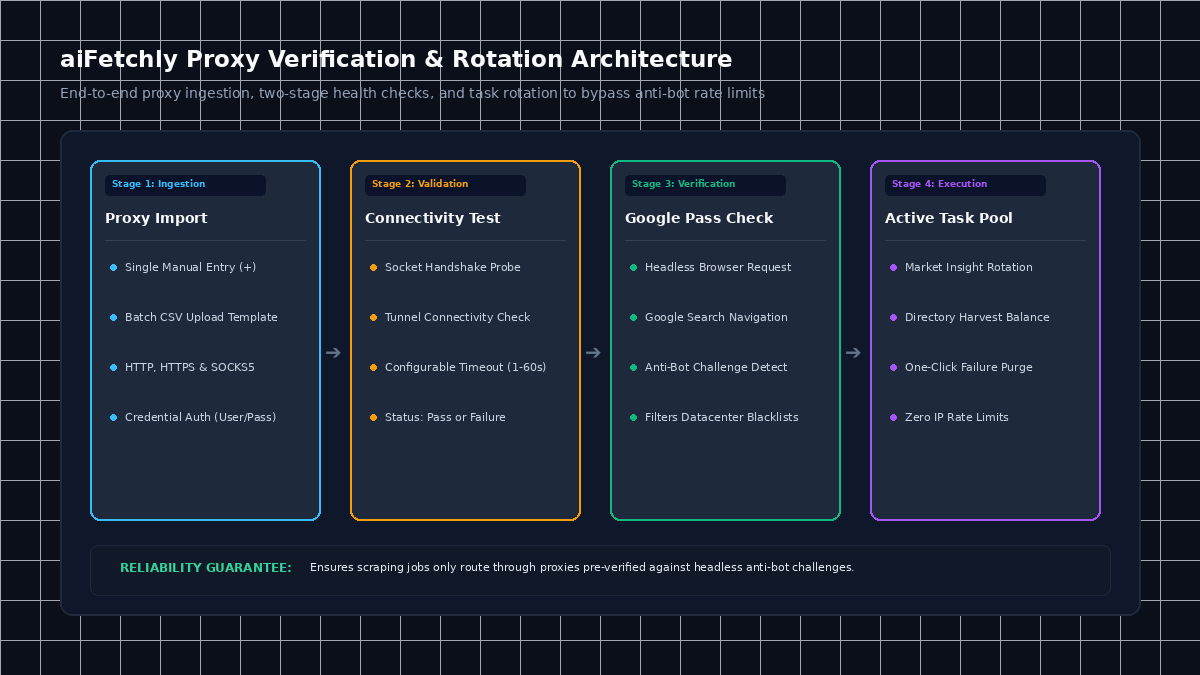
Step-by-Step Tutorial: Managing and Validating Proxies in aiFetchly
Follow this tutorial to configure, validate, and deploy a high-performance proxy pool in aiFetchly.
Step 1: Open the Proxy Manager
- Launch aiFetchly on your Windows desktop.
- Click Proxy in the left navigation menu to open the Proxy Management dashboard.
- Review your proxy inventory, including status columns for connectivity, last check timestamp, and Google Pass health.
Step 2: Add Proxies (Single Entry vs. Batch CSV Import)
Depending on your proxy inventory, select your ingestion method:
- Single Proxy Addition: Click Add Proxy (
+), enter the host, port, protocol, and optional authentication credentials (username/password), then click Submit. - Batch CSV Upload: For large proxy pools, click Batch Upload Proxy and download the CSV template:
Upload your completed CSV or paste raw lines into the dialog. Click Import Proxy to populate your local proxy pool.
host,port,protocols,user,pass
198.51.100.1,8080,https,analyst_user,secret_pass
198.51.100.2,1080,socks5,analyst_user,secret_pass
198.51.100.3,3128,https,,
Step 3: Run the Two-Stage Verification Suite
Untested proxies cause silent scraping failures. aiFetchly implements a rigorous two-stage testing protocol:
- Select your imported proxies using the row checkboxes.
- Adjust the Check Timeout slider on the toolbar (default: 10 seconds; range: 1–60s).
- Click Check Proxy. aiFetchly executes two sequential audits:
- Status (Connectivity Check): Verifies basic socket handshake and tunnel establishment (
Passvs.Failure). - Google Pass (Anti-Bot Check): Runs a headless browser instance through the proxy to load Google. Proxies flagged by datacenter IP blacklists return
Fail, while clean residential IPs returnPass.
- Status (Connectivity Check): Verifies basic socket handshake and tunnel establishment (
- Click Remove Failure Proxy to purge unresponsive or blocked IPs in a single click.
Step 4: Attach Verified Proxies to Active Extraction Tasks
Once validated, navigate to Insights > Market Insight or Local Business Finder. In your task settings, enable proxy rotation. aiFetchly automatically cycles requests across your healthy proxy pool, balancing traffic loads and eliminating IP rate limits.
Resilient Scraping with Clean Rotating IPs
By enforcing automated two-stage verification before job execution, aiFetchly ensures your scraping pipelines never stall on dead sockets or blacklisted IPs.
For advanced concurrency limits and proxy rotation algorithms, explore the AI Fetchly Docs.
Visual Generation Prompts
Hero Image Prompt:Modern SaaS application window in dark mode, showing the aiFetchly Proxy Management dashboard with verified HTTPS and SOCKS5 proxy pools, green Status and Google Pass badges, latency metrics, and one-click purge toolbar, isometric 3D perspective, cyan and emerald glowing accents.Body Image Prompt:Clean technical architecture diagram illustrating the two-stage proxy verification pipeline in aiFetchly: raw proxy list ingestion via CSV, Stage 1 socket tunnel handshake, Stage 2 headless browser Google challenge test, and clean pool routing to active scraping tasks, dark slate vector styling.