Building Custom Subagents in aiFetchly: Power User Guide
Why Monolithic AI Chats Fail Complex Workflows
Power users running high-frequency market research and automated outreach quickly hit the limitations of monolithic AI chats. When a single conversational agent handles search retrieval, entity extraction, data verification, and email drafting in a continuous session, context windows saturate and reasoning degrades. Furthermore, granting broad tool permissions to a general-purpose assistant risks runaway execution loops and unauthorized actions.
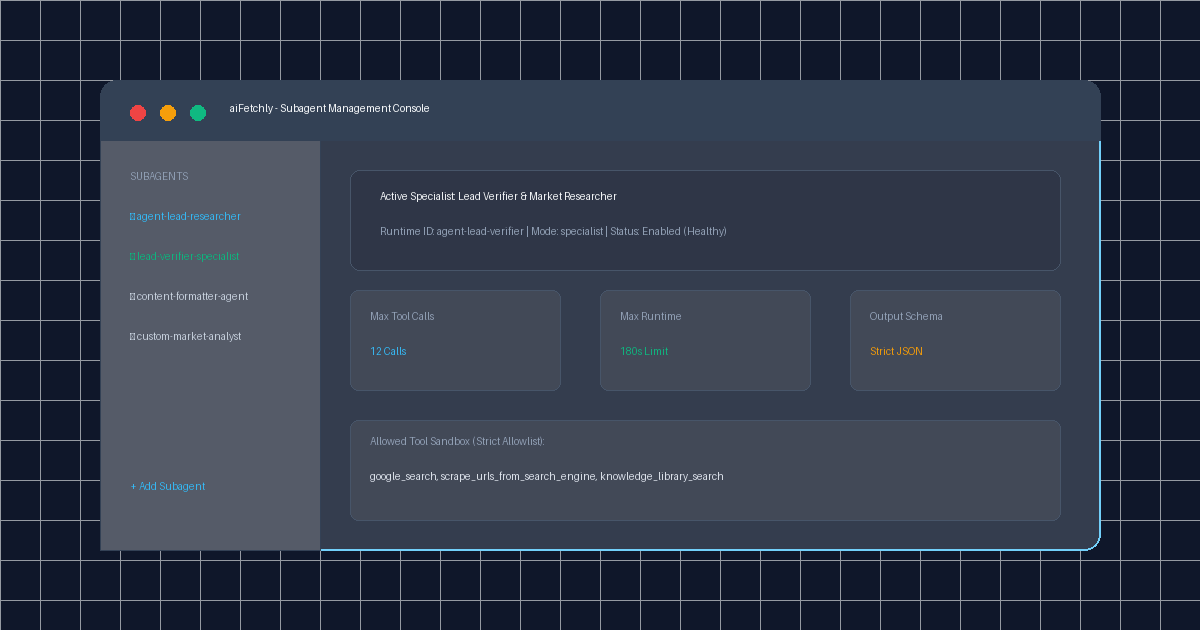
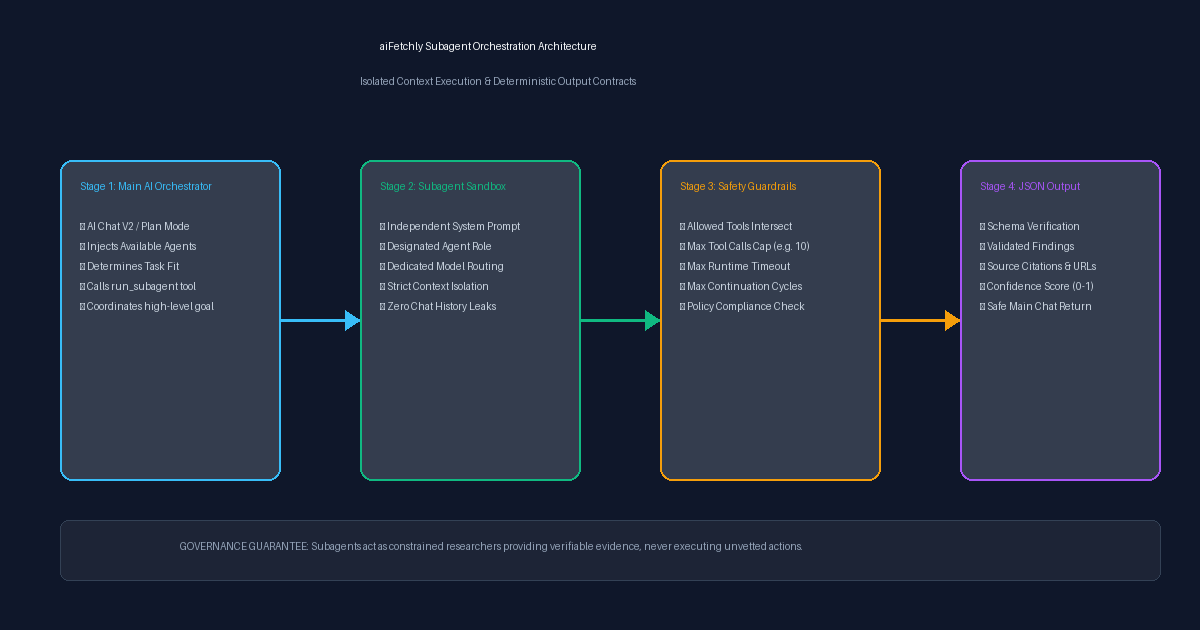
AI Fetchly solves this architectural challenge with AI Subagents. Rather than overloading the primary assistant, aiFetchly delegates targeted jobs to scoped specialists. Each subagent operates within isolated context boundaries, governed by explicit tool allowlists, strict runtime budgets, and validated JSON output schemas.
Subagent Roles and Execution Lifecycle
Subagents are not invoked directly by manual prompt commands. Instead, aiFetchly injects an inventory of registered agents into the primary AI context. When a task requires specialized execution, the main orchestrator calls the run_subagent tool with the agent’s unique ID slug.
| Subagent Mode | Operational Role | Typical Tool Access | Primary Deliverable |
|---|---|---|---|
| Specialist | Deep domain extraction and retrieval | google_search, knowledge_library_search | Verified factual profiles |
| Verifier | Independent validation of claims | Local file inspection, schema validators | Confidence scoring and anomaly alerts |
| Coordinator | Multi-phase task planning and decomposition | Workspace status tools, dependency checks | Execution roadmaps |
| Formatter | Reshaping raw outputs into business formats | Structured template transformers | Validated JSON / Markdown tables |
Step-by-Step Tutorial: Creating a Custom Specialist Subagent
Follow this walkthrough to build and deploy a dedicated market intelligence subagent in aiFetchly.
Step 1: Open the Subagent Manager
- Launch aiFetchly on your Windows desktop.
- Click System Setting in the left navigation menu.
- Select Manage Subagents to open the subagent catalog.
- Click Add Subagent in the upper toolbar.
Step 2: Configure Agent Metadata and Functional Mode
- Name: Enter
Market Intelligence Researcher. - ID Slug: aiFetchly automatically generates
agent-market-intelligence-researcher(locked upon creation). - Description: Enter
Gathers company background, business model, and recent hiring signals for prospect domains. - Mode: Select
specialistfrom the role dropdown.
Step 3: Define System Prompt and Tool Allowlists
Subagents require completely self-contained instructions. Because subagents do not inherit parent chat histories, provide explicit instructions:
You are a specialist market researcher. Analyze the target company URL.
Identify: (1) Core value proposition, (2) ICP profile, (3) Pricing model.
Cite every factual finding with a verified source URL.
Return your findings strictly formatted according to the configured JSON schema. In the Allowed Tools field, enter only the necessary primitives:
google_search, scrape_urls_from_search_engine, knowledge_library_search.
aiFetchly strictly intersects this allowlist with active security policies. Subagents cannot send emails or mutate workspace databases.
Step 4: Enforce Safety Limits and Output Schemas
Under runtime parameters, define defensive operational bounds:
- Max Tool Calls: Set to
10to stop recursive retrieval loops. - Max Runtime (Seconds): Set to
120seconds. - Max Continue Calls: Set to
3turns. - Output Schema: Define a JSON schema requiring
companyName,productsServices,sourceUrls, andconfidenceScore.
Click Save. Your subagent is immediately available to the main AI in AI Chat V2 and Plan Mode.
Scalable Desktop Intelligence with Bounded Execution
By delegating intensive extraction to isolated, schema-enforced subagents, power users eliminate context degradation while preventing accidental tool abuse. Explore the full specification in the AI Fetchly Docs.
Visual Generation Prompts
Hero Image Prompt:Modern software interface of aiFetchly Subagent Manager in dark mode, showcasing active specialist agents, tool budget cards (max tool calls, runtime limits), and clean glowing status badges, isometric 3D perspective, electric cyan and emerald green accents.Body Image Prompt:Technical system architecture diagram illustrating the four-stage subagent dispatch lifecycle: main AI orchestrator, run_subagent contract, isolated sandbox with tool allowlist guardrails, and validated JSON schema return, vector blueprint style.