Building Custom Command Hooks: Intercept AI Tool Calls
Why Prompt-Based Guardrails Fail in Production
As autonomous AI agents execute multi-step engineering tasks—generating scripts, executing shell commands, and querying local SQLite databases—developers face a critical security boundary problem. Relying on soft system prompts (e.g., “please do not touch system files” or “never expose API tokens”) frequently fails against prompt injection, model drift, and hallucinated paths.
Enterprise workstations require hard, deterministic middleware that intercepts agent actions before they execute.
AI Fetchly solves this with Command Hooks. By executing standalone executables on your local machine that communicate over standard I/O streams (stdin and stdout), developers create deterministic policy firewalls around built-in skills, Model Context Protocol (MCP) servers, and shell commands.
Step 1: Understand the JSON Stdio Contract
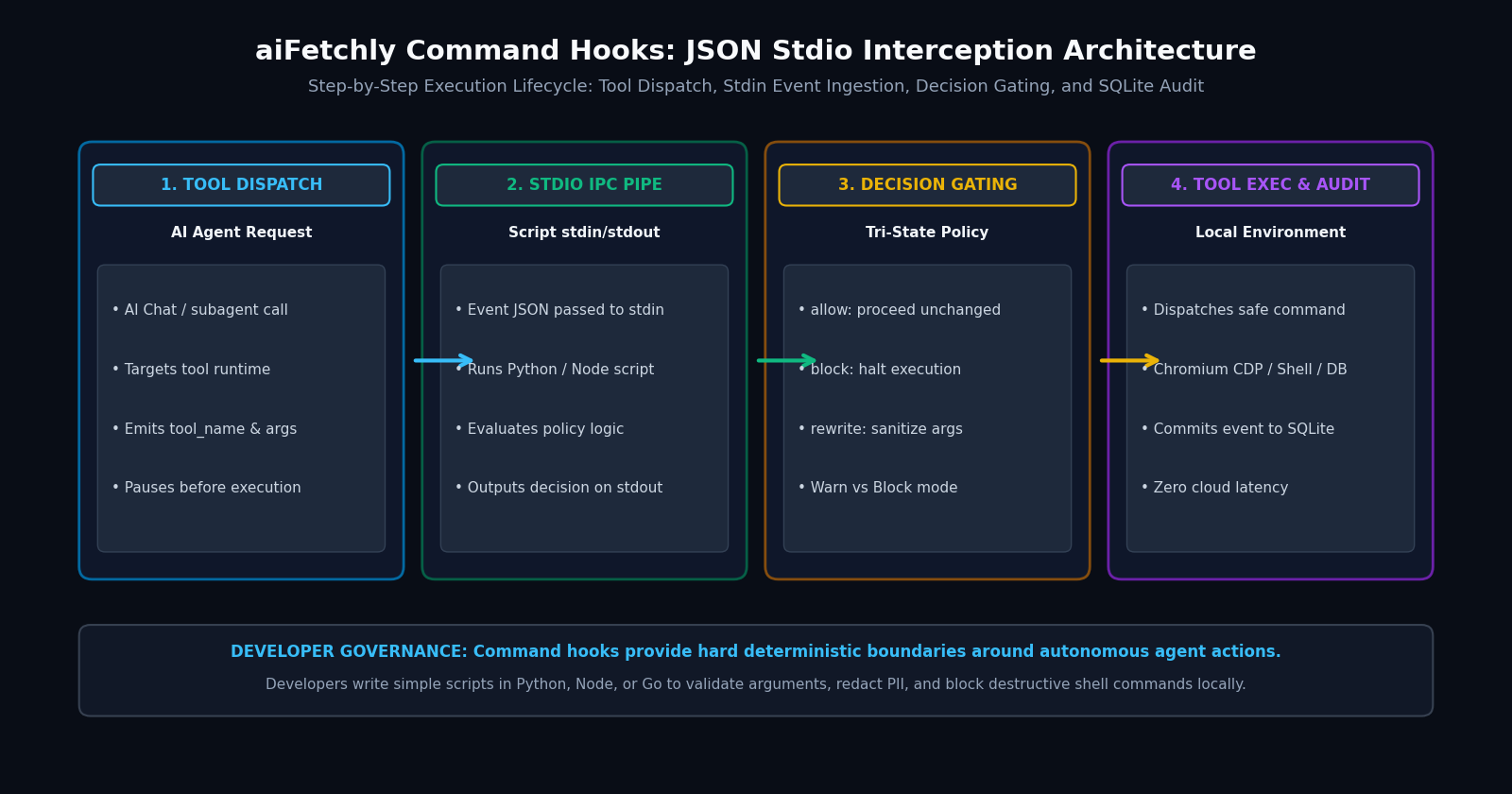
When an agent requests a tool call, aiFetchly pauses execution and triggers registered hooks:
- Input Payload (
stdin): aiFetchly transmits an event JSON object containingtool_name,args,workspace_root, andtimestamp. - Decision Object (
stdout): Your script parses the payload, applies security logic, and returns a JSON decision:{"action": "allow"}: Proceeds with pristine input arguments.{"action": "block", "reason": "Policy violation"}: Halts execution immediately and informs the model.{"action": "rewrite", "args": {...}}: Sanitizes or redacts parameters before execution.
Step 2: Write a Python PreToolUse Command Hook
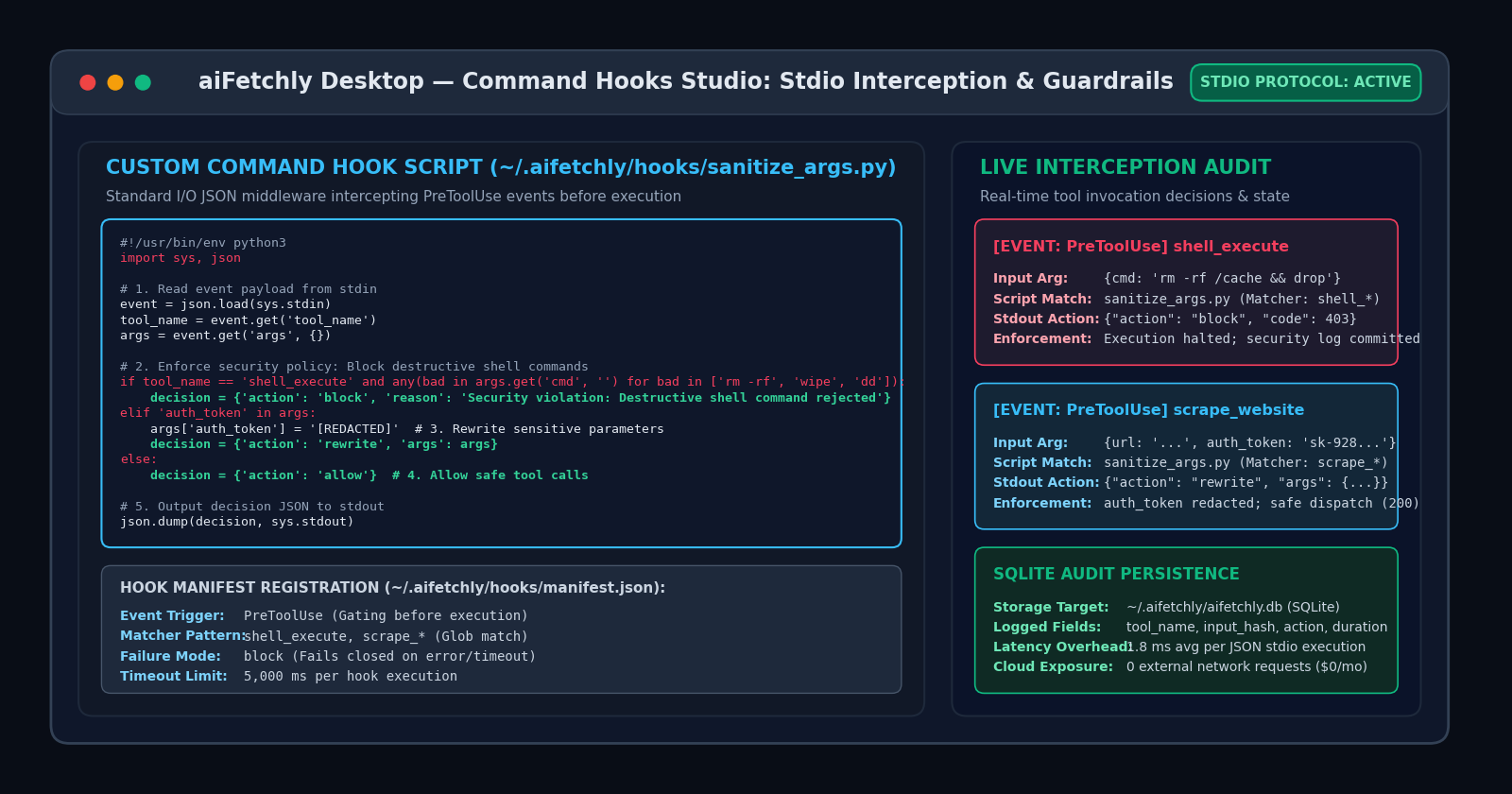
Create a script at ~/.aifetchly/hooks/sanitize_args.py:
#!/usr/bin/env python3
import sys, json

event = json.load(sys.stdin)
tool = event.get('tool_name')
args = event.get('args', {})

# Block destructive shell commands
if tool == 'shell_execute' and any(bad in args.get('cmd', '') for bad in ['rm -rf', 'wipe', 'dd']):
    decision = {'action': 'block', 'reason': 'Destructive shell command prohibited'}
# Redact sensitive credential keys
elif 'auth_token' in args:
    args['auth_token'] = '[REDACTED]'
    decision = {'action': 'rewrite', 'args': args}
else:
    decision = {'action': 'allow'}

json.dump(decision, sys.stdout) Make the script executable: chmod +x ~/.aifetchly/hooks/sanitize_args.py.
Step 3: Register the Hook Manifest
Register the hook in ~/.aifetchly/hooks/manifest.json:
{
  "name": "security-sanitizer",
  "version": "1.0.0",
  "event": "PreToolUse",
  "matcher": "shell_execute, scrape_*",
  "entry": "sanitize_args.py",
  "failure_mode": "block",
  "timeout_ms": 5000
} matcher: Supports glob patterns (*,shell_*,*_search).failure_mode: Set toblockso the hook fails closed if the script crashes or times out.
Step 4: Verify Live Execution and SQLite Auditing
In AI Chat V2, prompt the assistant to run a shell command. The hook intercepts execution in sub-2ms latency. Every blocked call, rewritten argument, and execution duration is permanently recorded in your local SQLite ledger (~/.aifetchly/aifetchly.db).
By deploying local command hooks, developers enforce complete security governance over autonomous agents without relying on fragile prompt engineering.
Explore complete hook events in the AI Fetchly Docs.
Visual Generation Prompts
Hero Image Prompt:Modern dark-mode SaaS developer dashboard showing the aiFetchly Command Hooks Studio, displaying a Python code editor window with active JSON stdio parsing logic, a live PreToolUse interception feed highlighting blocked shell commands in red and rewritten arguments in cyan, and local SQLite audit metrics, sleek isometric 3D perspective, slate-900 background with cyan and emerald accents.Body Image Prompt:High-resolution technical pipeline flowchart illustrating the aiFetchly Command Hook Architecture: AI Agent Tool Dispatch, Stdio IPC Pipe (event JSON over stdin), Tri-State Decision Gating (allow, block, rewrite with failure modes), and Local Tool Execution with SQLite Audit Logging, clean dark vector blueprint styling.