Building Custom AI Skills in aiFetchly: Developer Guide
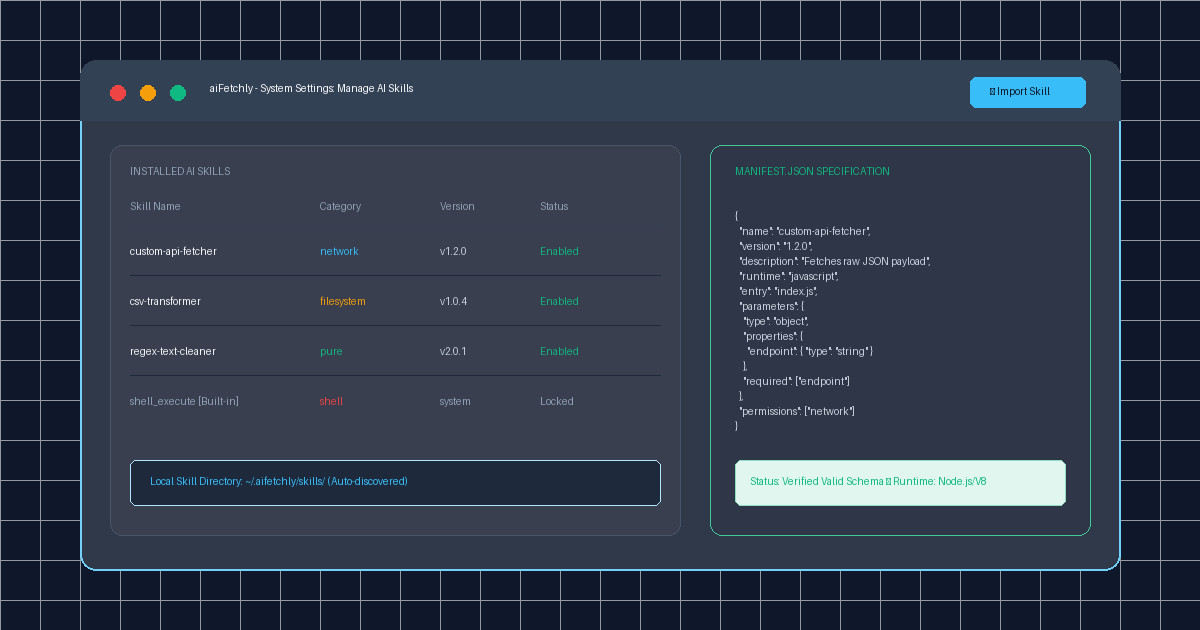
Expanding Desktop AI with Modular Tooling
While frontier large language models exhibit powerful reasoning, their operational utility in production software workflows depends entirely on external tooling. Standard chat interfaces restrict developers to vendor-bundled tools or require maintaining brittle, cloud-hosted webhook endpoints.
AI Fetchly introduces a native desktop extension architecture called AI Skills. Skills are self-contained, versioned tool packages written in JavaScript or Python that give AI Chat deterministic capabilities—such as querying internal databases, transforming niche data formats, or scraping authenticated endpoints.
By defining an explicit manifest.json schema and permission boundaries, developers can deploy custom tools locally without running remote servers or leaking proprietary business logic.
Permission Categories and Approval Gates
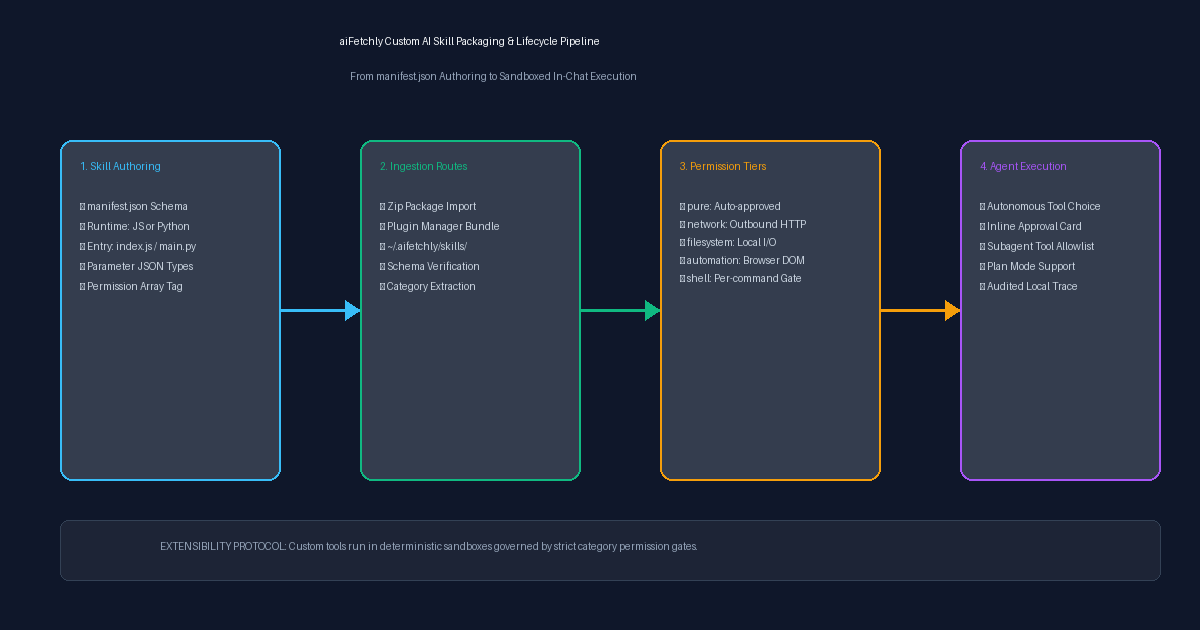
To maintain workstation security, aiFetchly categorizes every installed skill based on its declared permissions:
| Permission Category | Operational Capabilities | Approval Behavior in AI Chat |
|---|---|---|
pure | Text formatting, regex transformations, calculations | Always auto-approved without user prompts |
network | Outbound HTTP requests, external API queries | Prompts by default; auto-approves in Full Access mode |
filesystem | Local workspace read and write operations | Prompts with file path preview before execution |
automation | Browser automation, DOM interaction, scraping | Prompts with target URL and script scope |
shell | Arbitrary OS shell execution (built-in only) | Prompts on every single command; never permanently bypassed |
Step-by-Step Tutorial: Creating and Deploying a Custom Skill
Follow this walkthrough to author, validate, and install a custom API data fetcher skill.
Step 1: Define the manifest.json Specification
In your project directory, create a manifest.json file. The manifest informs the AI model about what the skill accomplishes and provides the JSON Schema for input validation:
{
  "name": "custom-api-fetcher",
  "version": "1.0.0",
  "description": "Fetches and sanitizes JSON records from external analytics endpoints.",
  "runtime": "javascript",
  "entry": "index.js",
  "parameters": {
    "type": "object",
    "properties": {
      "endpointUrl": { "type": "string" },
      "timeoutMs": { "type": "number" }
    },
    "required": ["endpointUrl"]
  },
  "permissions": ["network"]
} Note: Permissions strictly accept network, filesystem, or automation. If omitted, the skill defaults to pure.
Step 2: Implement the Entry Logic
Create index.js adjacent to your manifest:
module.exports = async function run(params) {
  const { endpointUrl, timeoutMs = 5000 } = params;
  const controller = new AbortController();
  const id = setTimeout(() => controller.abort(), timeoutMs);

  try {
    const response = await fetch(endpointUrl, { signal: controller.signal });
    clearTimeout(id);
    const data = await response.json();
    return { success: true, count: data.length, data };
  } catch (err) {
    return { success: false, error: err.message };
  }
}; Step 3: Package and Import into aiFetchly
- Compress the contents of your folder (not the outer directory) into
custom-api-fetcher.zip. - Open aiFetchly, navigate to System Setting > Manage Skills.
- Click the Import button in the upper toolbar and select your
.ziparchive. - Alternatively, copy the uncompressed folder directly to
~/.aifetchly/skills/custom-api-fetcher/for automatic hot-reloading during development.
Once installed, the skill appears immediately in AI Chat V2 and Plan Mode, where the AI autonomously invokes it whenever your prompts demand external analytics data.
Safe, Sovereign Agentic Extensibility
By coupling strict JSON Schema parameter validation with transparent permission prompts, aiFetchly lets developers safely bridge autonomous reasoning with local and remote developer tools.
To explore pre-built skills and plugin management, visit the AI Fetchly Docs.
Visual Generation Prompts
Hero Image Prompt:Modern dark-mode developer UI showing the aiFetchly Manage Skills table in System Settings, displaying installed extensions with permission category chips (‘network’, ‘pure’, ‘filesystem’), an active manifest.json preview drawer, and an ‘Import Skill’ modal, sleek 3D isometric perspective, electric cyan and emerald accents.Body Image Prompt:High-resolution technical pipeline flowchart illustrating the four-stage AI Skill execution lifecycle: manifest.json authoring, zip ingestion with permission validation, multi-tier approval gate routing (pure vs network vs filesystem), and sandboxed in-chat execution, clean slate vector styling.