BAML Guide: Type-Safe Structured AI Output Architecture
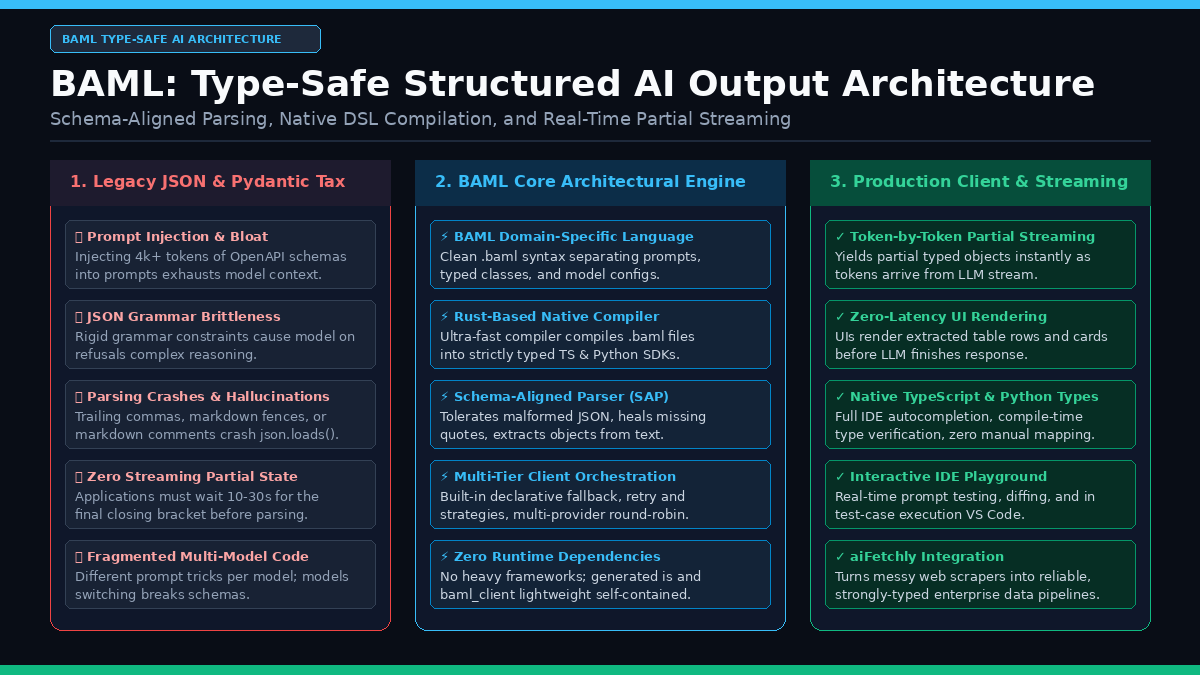
The Problem: The Fragility of Structured LLM Outputs in Production
In modern enterprise AI systems, autonomous research copilots, and real-time data collection engines like AiFetchly, foundation models rarely operate in conversational isolation. Instead, language models function as reasoning compute engines embedded inside complex software graphs: querying internal databases, calling external APIs, extracting tabular metrics from raw HTML, and orchestrating multi-agent state machines.
For downstream software systems to consume model outputs reliably, the unstructured natural language generated by an LLM must be transformed into strictly typed, machine-readable data structures—typically JSON objects complying with a deterministic schema.
However, extracting structured outputs from foundation models has historically proven to be one of the most brittle, frustrating engineering challenges in production AI. Software engineering teams have cycled through multiple paradigms, each introducing severe operational compromises:
The Evolution of Structured Output Fragility:
┌─────────────────────────────────────────────────────────────────┐
│ Approach 1: Naive Prompting ("Return valid JSON only!")         │
│ • Raw string interpolation in Python or TypeScript              │
│ ❌ Fails on markdown code fences (`json` code blocks)          │
│ ❌ Fails on conversational pleasantries ("Here is the JSON:")   │
│ ❌ Trailing commas, single quotes, unescaped newlines crash      │
│    json.loads() / JSON.parse() at runtime                       │
├─────────────────────────────────────────────────────────────────┤
│ Approach 2: Schema Injection Wrappers (Pydantic / Instructor)   │
│ • Serializes OpenAPI/JSON Schema dictionaries into system prompt│
│ ❌ 2,000–8,000 prompt tokens consumed purely by schema syntax   │
│ ❌ Quadratic token bloat accelerates context window exhaustion  │
│ ❌ Schema drift between Python type annotations and prompt text │
│ ❌ Retry loops repeat full prompts, spiking cost and latency    │
├─────────────────────────────────────────────────────────────────┤
│ Approach 3: Constrained Grammar Decoding (OpenAI JSON Mode)     │
│ • Forces LLM logits into valid JSON token transitions           │
│ ❌ Model refusal rates spike when reasoning contradicts grammar │
│ ❌ Complex nested schemas cause catastrophic token generation loops│
│ ❌ Zero support for streaming partially populated objects       │
│ ❌ Tight proprietary vendor lock-in; breaks on local open models│
└─────────────────────────────────────────────────────────────────┘
Result: Production pipelines spend 40% of their compute budget on
retrying malformed JSON payloads! 1. The Context Window Tax of Inlined JSON Schemas
Frameworks like Pydantic and Instructor attempt to enforce structure by programmatically converting Python classes into OpenAPI JSON Schema specifications and appending them to the model’s system prompt.
In realistic enterprise applications—such as extracting company profiles, financial balance sheets, or multi-field ecommerce catalogs—the target schema frequently consists of 15 to 40 nested fields with custom enum definitions, field descriptions, and validation constraints:
- Serializing these schemas into standard JSON Schema format consumes between 2,000 and 6,000 input tokens per invocation.
- In agent loops where tools are called repeatedly across multiple turns, this schema tax is paid on every single step, accelerating context exhaustion and driving up cloud API expenses.
- Furthermore, small open-weights models (such as 3B to 8B parameter instruction models) suffer from attention dilution when overwhelmed by verbose JSON Schema definitions, frequently forgetting the primary user instructions.
2. The Grammar Constraint Paradox
To prevent syntax errors, frontier model providers introduced constrained decoding (often branded as “Structured Outputs” with json_schema response formats). Under this mechanism, the inference engine applies a context-free grammar mask over the output logits, physically disallowing any token that would produce invalid JSON.
While this guarantees syntactically valid JSON, it introduces a dangerous architectural trade-off known as the grammar constraint paradox:
- Reasoning Suppression: Forcing a model to emit strict JSON from token zero prevents the model from thinking in natural language first. Without a scratchpad or chain-of-thought buffer, the model must commit to a structured key-value assignment before reasoning through the solution, causing severe accuracy regressions on mathematical, logical, and nuanced extraction tasks.
- Catastrophic Refusal Loops: If a question requires nuance or partial refusal, the grammar constraint forces the model to either hallucinate a field value that conforms to the type or enter an infinite loop trying to reconcile its internal safety alignment with the token mask.
- Provider Lock-In: Grammar-constrained decoding relies on custom sampler modifications inside the inference server. It works seamlessly on closed APIs like OpenAI, but fails or behaves unpredictably when porting the pipeline to Anthropic Claude, Google Gemini, or local models served via Ollama and vLLM.
3. The Real-Time Streaming Black Hole
Modern end-user applications demand responsive, low-latency interfaces. Users expect to see extracted data populate tables, cards, and dashboards in real time as tokens stream across the wire.
Under traditional JSON parsing:
The Streaming Latency Barrier:
LLM Stream:  {"company": "Acme Corp", "metrics": [{"year": 2024, "rev": 12.5}, ...]}
Timeline:    |────────────────────── 15 Seconds ──────────────────────|
UI State: [Spinner / Skeleton Screen (Zero user feedback)] [Render All] Because standard JSON parsers (json.loads in Python or JSON.parse in JavaScript) require a complete, syntactically closed string, the frontend or backend cannot inspect a single field until the final closing brace } arrives. If a model generates a 1,000-token financial extraction over 15 seconds, the user is left staring at a blank loading skeleton.
Furthermore, if a network timeout or token limit cuts off the stream at second 14, standard parsers fail completely, discarding all previously generated data.
BAML Architecture: A Domain-Specific Language for Structured AI
To eliminate the fragility of prompt strings, schema injection bloat, and rigid grammar constraints, Boundary ML developed BAML (Basically A Made-up Language).
BAML is not a Python wrapper or a JavaScript library; it is a purpose-built, open-source programming language and compiler designed specifically for orchestrating foundation models and extracting structured data.
BAML End-to-End System Architecture:
┌─────────────────────────────────────────────────────────────────┐
│ 1. Developer Layer (.baml Source Files)                         │
│ • Declarative Class & Enum Definitions (Type-Safe Contracts)   │
│ • LLM Client Configurations (API Keys, Retries, Fallbacks)      │
│ • Typed Functions with Jinja-Style Semantic Prompt Templates    │
└─────────────────────────────────┬───────────────────────────────┘
                                  │ baml-cli generate
                                  ▼
┌─────────────────────────────────────────────────────────────────┐
│ 2. Native Rust Compiler & Code Generator                        │
│ • Validates schema integrity, cycles, and client definitions    │
│ • Generates native baml_client SDK for Python, TypeScript, Ruby │
│ • Compiles zero-dependency runtime bindings via PyO3 / WebAssembly
└─────────────────────────────────┬───────────────────────────────┘
                                  │ Runtime Execution
                                  ▼
┌─────────────────────────────────────────────────────────────────┐
│ 3. The Schema-Aligned Parser (SAP Engine)                       │
│ • Ingests raw token streams from any model (OpenAI, Claude, vLLM)│
│ • Tolerates conversational preamble, markdown blocks, typos     │
│ • Heals unclosed brackets, missing quotes, and single quotes   │
│ • Streams partial typed instances (baml_client.partial_types)   │
└─────────────────────────────────────────────────────────────────┘ 1. Separation of Concerns: The .baml Source File
In traditional Python or TypeScript codebases, prompts, JSON schemas, client instantiations, and parsing logic are tangled together inside application functions. Modifying a prompt requires navigating application code, updating test files, and hoping the regex or Pydantic validator does not break.
BAML enforces a strict separation of concerns by moving all AI interactions into dedicated .baml files. A BAML project defines three core primitives:
- Classes and Enums: Strict data contracts representing inputs and desired outputs.
- Clients (
client<llm>): Reusable definitions of model providers, model checkpoints, temperature, retry policies, and fallback cascades. - Functions (
function): Executable units that accept typed inputs, bind them to a specific client and semantic prompt template, and guarantee a typed return value.
Here is a concrete example of a .baml file defining a real-world web data extraction task:
// 1. Data Contracts
enum ExtractionStatus {
  VERIFIED
  ESTIMATED
  UNAVAILABLE
}

class FinancialMetric {
  metric_name string @description("e.g. ARR, Gross Margin, Net Income")
  value float
  currency string @description("ISO 4217 code, e.g. USD, EUR")
  fiscal_year int
  status ExtractionStatus
}

class CompanyReport {
  company_name string
  headquarters string?
  key_metrics FinancialMetric[]
  summary string @description("Executive synthesis under 250 words")
}

// 2. Resilient Multi-Provider Client Configuration
client<llm> FastModel {
  provider "anthropic"
  options {
    model "claude-3-5-sonnet-20241022"
    api_key env.ANTHROPIC_API_KEY
    max_tokens 4096
  }
}

client<llm> FallbackModel {
  provider "openai"
  options {
    model "gpt-4o"
    api_key env.OPENAI_API_KEY
  }
}

client<llm> ResilientExtractor {
  provider fallback
  options {
    strategy [FastModel, FallbackModel]
  }
}

// 3. Typed Function with Prompt Template
function ExtractCompanyReport(raw_html: string) -> CompanyReport {
  client ResilientExtractor
  prompt #"
    You are an expert financial analyst. Extract structured company metrics from the provided web content.

    {# BAML automatically injects the schema representation here #}
    {{ ctx.output_format }}

    Input Document:
    ---
    {{ raw_html }}
    ---

    Ensure all currency values are standardized and omit speculation.
  "#
} 2. The Native Rust Compiler and Zero-Dependency Code Generation
Unlike interpreted wrappers that inspect Python type hints at runtime using reflection, BAML features a native compiler written in Rust.
When developers run baml-cli generate, the compiler:
- Parses the Abstract Syntax Tree (AST): Validates all class hierarchies, enum variants, and prompt references at compile time.
- Type-Checks Prompt Variables: Ensures that every variable referenced in the prompt template (e.g.,
{{ raw_html }}) matches an argument in the function signature. - Generates Native Client SDKs: Synthesizes a completely self-contained
baml_clientdirectory in the target language (Python or TypeScript).
In Python, the generated code provides clean, idiomatic async and sync methods with native Pydantic models:
from baml_client import b
from baml_client.types import CompanyReport

# Fully typed, autocomplete-enabled call
report: CompanyReport = await b.ExtractCompanyReport(
    raw_html="<div>Acme reported $45.2M ARR in FY2024...</div>"
)

print(report.company_name)
print(report.key_metrics[0].value) In TypeScript, BAML generates pure TypeScript types and a lightweight execution client without requiring heavy runtime dependencies or Node.js native compilation:
import { b } from './baml_client';
import type { CompanyReport } from './baml_client/types';

const report: CompanyReport = await b.ExtractCompanyReport({
  raw_html: '<div>Acme reported $45.2M ARR in FY2024...</div>',
});

console.log(report.company_name); 3. Schema-Aligned Parsing (SAP): Robustness Without Constraints
The breakthrough innovation behind BAML is its Schema-Aligned Parsing (SAP) engine.
Rather than forcing the LLM into a rigid grammar mask or relying on brittle standard JSON deserializers, BAML’s parser is designed with the explicit understanding that LLMs produce probabilistic, semi-structured natural language:
How Schema-Aligned Parsing Rescues LLM Outputs:
Raw LLM Output Stream:
"Sure! Here is the data you requested:
[Markdown Block: json]
{
  company_name: 'Stripe, Inc.', // single quotes & unquoted keys
  headquarters: "San Francisco, CA",
  key_metrics: [
    {
      metric_name: "Annual Processing Volume",
      value: 1000000000000.0,
      currency: "USD",
      fiscal_year: 2024,
      status: "VERIFIED", // trailing comma!
    }
  ],
  summary: "Stripe processed over $1T in 2024."
  // missing closing brace!
"
          │
          ▼ [BAML Schema-Aligned Parser]
• Automatically strips conversational preambles and postscripts
• Strips markdown code fences (`json` fences)
• Accepts single quotes, unquoted keys, and trailing commas
• Automatically closes open brackets and unclosed string literals
• Coerces string numerals ("2024" -> 2024) and matches enum aliases
          │
          ▼
Clean, Strictly Typed CompanyReport Instance in Memory! Because BAML knows the expected target schema ahead of time, it uses the schema as an anchor during parsing:
- Key Matching: If the model outputs
"companyName"or"Company Name", BAML maps it directly to the targetcompany_nameattribute defined in the.bamlschema. - Preamble Stripping: If the model outputs natural language explanations before or after the JSON body, the parser locates the JSON boundaries automatically without failing.
- Syntax Healing: If the model omits quotes around keys, includes trailing commas before closing brackets, or gets truncated mid-token, BAML repairs the AST in memory.
4. Real-Time Partial Streaming
Because the Schema-Aligned Parser operates iteratively on token deltas, BAML can construct and yield partially populated typed objects as tokens arrive from the foundation model.
When streaming with BAML, the compiler generates a parallel set of types under baml_client.partial_types. In these partial types, every field is optional, and lists can yield individual elements before the closing array bracket is generated:
import asyncio
from baml_client import b
from baml_client.partial_types import CompanyReport

async def stream_extraction(html_payload: str):
    stream = b.stream.ExtractCompanyReport(raw_html=html_payload)

    async for partial_report in stream:
        # partial_report is an instance of partial_types.CompanyReport
        if partial_report.company_name:
            print(f"Company Identified: {partial_report.company_name}")

        if partial_report.key_metrics:
            for metric in partial_report.key_metrics:
                if metric.metric_name and metric.value:
                    print(f"  -> Extracted Metric: {metric.metric_name} = {metric.value}")

    # Await the final, fully-validated instance
    final_report = await stream.get_final_response()
return final_report In modern web applications, this unlocks true sub-second rendering. When scraping long corporate pages with AiFetchly Data Fetching, user dashboards can render company names and table rows incrementally within 300 milliseconds of model generation, completely bypassing the 15-second waiting wall.
Hands-On Implementation: Building a Production BAML Extraction Pipeline
To demonstrate the power and simplicity of BAML, let us build a production-grade web intelligence extraction pipeline that ingests unstructured web documentation, extracts structured entity profiles, handles automatic provider fallbacks, and streams results in Python.
Step 1: Install BAML and Initialize Project
Install the official BAML Python SDK and CLI tool:
pip install baml-py Initialize BAML inside your project workspace:
baml-cli init This command creates a baml_src directory containing sample .baml files and sets up the project configuration.
Step 2: Define Clients, Schemas, and Functions in BAML
Create a new file at baml_src/extractor.baml:
// Configure local and cloud models
client<llm> PrimaryClaude {
  provider "anthropic"
  options {
    model "claude-3-5-sonnet-20241022"
    api_key env.ANTHROPIC_API_KEY
  }
}

client<llm> FallbackOpenAI {
  provider "openai"
  options {
    model "gpt-4o-mini"
    api_key env.OPENAI_API_KEY
  }
}

client<llm> SmartRoutingClient {
  provider fallback
  options {
    strategy [PrimaryClaude, FallbackOpenAI]
  }
}

// Define extraction data schema
enum TechStackCategory {
  BACKEND
  FRONTEND
  DATABASE
  INFRASTRUCTURE
  AI_FRAMEWORK
}

class TechDependency {
  name string
  category TechStackCategory
  version_constraint string?
  confidence_score float @description("Score between 0.0 and 1.0")
}

class SoftwareArchitectureProfile {
  product_name string
  description string
  primary_language string
  dependencies TechDependency[]
  api_endpoints string[]
  supports_streaming boolean
}

// Define the extraction function
function ExtractSoftwareProfile(raw_document: string) -> SoftwareArchitectureProfile {
  client SmartRoutingClient
  prompt #"
    Analyze the following technical documentation or repository readme.
    Identify the architecture profile, software dependencies, and runtime capabilities.

    {{ ctx.output_format }}

    Technical Document:
    ---
    {{ raw_document }}
    ---

    Extract all verified dependencies and categorize them strictly.
  "#
} Step 3: Compile BAML into Native Python SDK
Run the BAML compiler to generate your strongly typed client:
baml-cli generate The compiler inspects baml_src/extractor.baml, validates the syntax, and creates the baml_client directory.
Step 4: Execute and Stream in Python
Now, create a Python script run_extractor.py that utilizes the generated client:
import asyncio
import os
from baml_client import b
from baml_client.types import SoftwareArchitectureProfile

async def main():
    sample_text = (
        "aiFetchly is an enterprise desktop and cloud platform for AI-powered web data collection. "
        "Built on top of Astro 6.1, TypeScript 5.9, and Tailwind CSS 4.0 for the frontend interface. "
        "The backend pipeline leverages FastMCP, PyTorch 2.4, and LanceDB for high-throughput "
        "vector storage and sub-5ms retrieval. Exposes REST endpoints at /api/v1/extract and "
        "supports real-time server-sent events token streaming."
    )

    print("--- Initiating Real-Time BAML Streaming ---")

    # 1. Stream partial results
    stream = b.stream.ExtractSoftwareProfile(raw_document=sample_text)

    displayed_deps = set()
    async for partial in stream:
        if partial.product_name:
            print(f"\rDetected Product: {partial.product_name}", end="")

        if partial.dependencies:
            for dep in partial.dependencies:
                if dep.name and dep.name not in displayed_deps:
                    displayed_deps.add(dep.name)
                    cat = dep.category if dep.category else "DETECTING..."
                    print(f"\n  [STREAMED] Found Dependency: {dep.name} ({cat})")

    # 2. Retrieve final fully validated response
    final_profile: SoftwareArchitectureProfile = await stream.get_final_response()

    print("\n\n--- Extraction Complete ---")
    print(f"Product: {final_profile.product_name}")
    print(f"Primary Language: {final_profile.primary_language}")
    print(f"Supports Streaming: {final_profile.supports_streaming}")
    print(f"Total Dependencies Identified: {len(final_profile.dependencies)}")
    for dep in final_profile.dependencies:
        print(f" • {dep.name} [{dep.category.name}]: confidence={dep.confidence_score}")

if __name__ == "__main__":
asyncio.run(main()) When executed, BAML establishes a streaming session with Anthropic. As tokens arrive, the Schema-Aligned Parser parses the incomplete JSON stream, identifies dependencies as soon as their text tokens complete, and prints them to the terminal seconds before the model generates the final closing bracket.
Architectural Comparison: BAML vs. Traditional Paradigms
To understand why leading AI teams are migrating from pure Pydantic wrappers and JSON mode to BAML, examine the architectural capabilities side by side:
| Architectural Capability | Standard Prompting (json.loads) | OpenAI Structured Outputs (Constrained Grammar) | Instructor / Pydantic (Schema Injection) | BAML (Boundary ML) (Schema-Aligned DSL) |
|---|---|---|---|---|
| Parsing Engine | Brittle standard parser | Grammar-constrained token sampler | Inlined schema + Pydantic validation retry | Fault-tolerant Schema-Aligned Parser (SAP) |
| Token Efficiency | High (manual prompts) | Moderate (backend JSON Schema) | Poor (2k–8k tokens of injected OpenAPI schema) | High (compact declarative format, 0 bloat) |
| Fault Tolerance | Zero (crashes on quotes, comments, trailing commas) | High for syntax, poor for model refusal/loops | Low (requires re-calling model with error log) | State-of-the-Art (heals syntax, quotes, and fences) |
| Token-by-Token Partial Streaming | Impossible | Impossible (requires complete valid JSON) | Severely limited (requires complex custom chunking) | Native (baml_client.partial_types on token deltas) |
| Multi-Provider Portability | Universal (manual strings) | Locked to OpenAI / constrained providers | Supported via OpenAI API compatibility layers | Universal (Anthropic, OpenAI, Gemini, Ollama, vLLM) |
| Prompt & Code Separation | Poor (strings inside Python/TS) | Poor (embedded inside API calls) | Moderate (Pydantic classes mixed with app code) | Complete (clean .baml files + generated SDK) |
| Developer Tooling | None | Web playground | Python IDE linters | Native VS Code Extension with live interactive testing |
Production Integration with aiFetchly
In enterprise data pipelines, extracting structured intelligence from messy, heterogeneous web documents requires tight synergy between the web collection layer and the schema validation layer.
By coupling AiFetchly with BAML, engineering teams establish an end-to-end, resilient data harvesting pipeline:
aiFetchly + BAML Enterprise Architecture:
┌───────────────────────────┐      ┌───────────────────────────┐
│     Live Public Web       │ ───► │  aiFetchly Extraction     │
│ SPAs, PDFs, Tables, Blogs │      │  • Headless Chrome CDP    │
└───────────────────────────┘      │  • Anti-bot mitigation    │
                                   │  • DOM pruning & markdown │
                                   └─────────────┬─────────────┘
                                                 │ Cleaned Markdown
                                                 ▼
┌───────────────────────────┐      ┌───────────────────────────┐
│ Enterprise Applications   │ ◄─── │  BAML Type-Safe Engine    │
│ • PostgreSQL / BigQuery   │      │  • Schema-aligned parser  │
│ • Real-time React / Astro │      │  • Sub-second partial     │
│ • Knowledge Graph RAG     │      │    object streaming       │
└───────────────────────────┘      │  • Multi-model fallbacks  │
└───────────────────────────┘ - High-Fidelity Web Acquisition: AiFetchly Web Scraping navigates complex JavaScript single-page applications, bypasses CAPTCHAs, prunes non-essential DOM noise, and generates clean Markdown representations of target pages.
- Schema-Aligned Extraction: BAML ingests the cleaned document, applies domain-specific extraction prompts defined in
.bamlsource files, and routes execution through cost-optimized model cascades (e.g. streaming locally via Ollama and falling back to Claude 3.5 Sonnet on ambiguous inputs). - Sub-Second Downstream Delivery: Extracted products, financial indicators, and technical dependencies stream directly into user dashboards and database queues with full compile-time type verification.
To learn more about connecting autonomous agents to web intelligence, explore the AiFetchly Documentation or review our AiFetchly Pricing.