B2B Lead Enrichment: AI Cold Outreach with aiFetchly
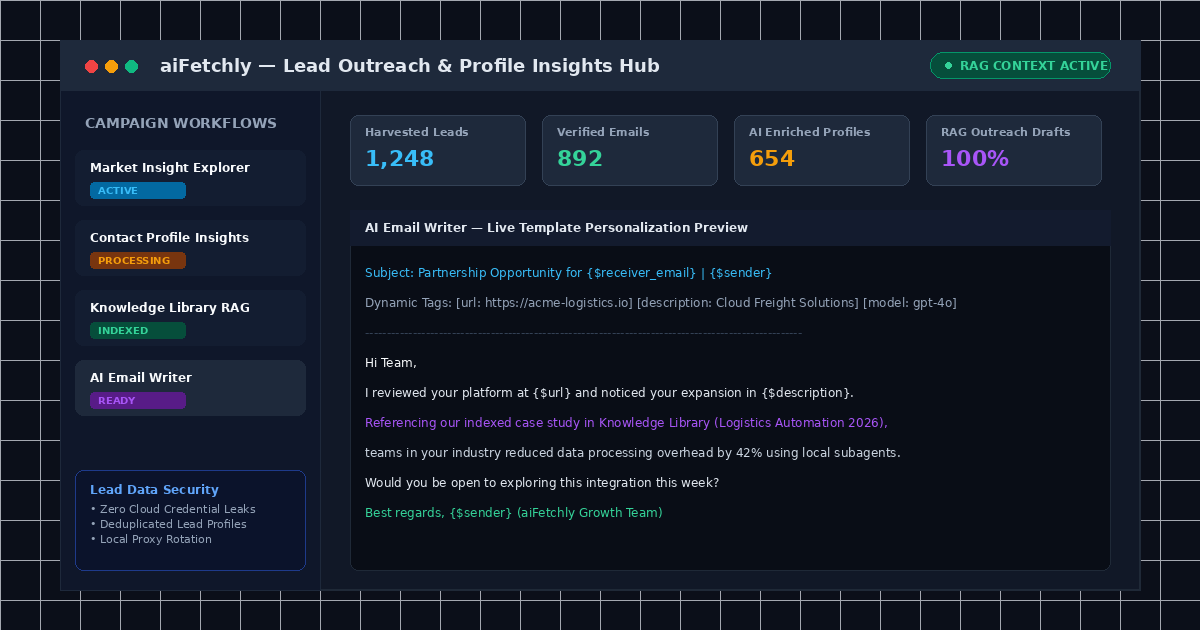
The Outbound Challenge: Moving Beyond Generic Email Blasts
Digital marketing and growth teams face persistent friction when running outbound acquisition campaigns: manual prospect prospecting is painfully slow, generic email templates generate dismal reply rates, and fragmented SaaS tools inflate acquisition costs.
Traditional outreach funnels require jumping between disparate services—one tool to scrape search queries, another to guess email formats, and a third to fire impersonal email cadences. Because these tools lack contextual awareness of your actual product collateral, marketing teams resort to generic templates that land directly in spam folders.
The Solution: AI-Powered Contact Discovery and RAG Outreach
AI Fetchly resolves this bottleneck by unifying web search discovery, deep contact profile insights, and retrieval-augmented generation (RAG) into a single, desktop-native workflow.
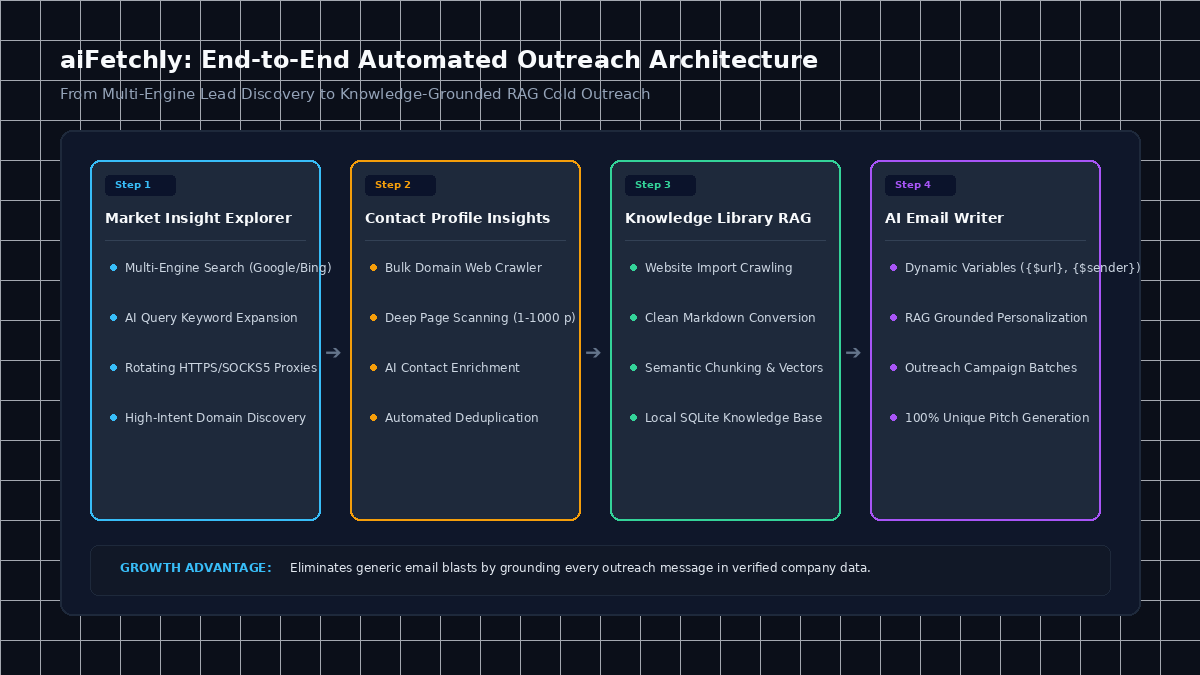
Step-by-Step Tutorial: Building an Automated Outreach Campaign
Follow this end-to-end tutorial to set up an automated, context-driven lead generation and email outreach pipeline in aiFetchly.
Step 1: Discover High-Intent Prospects via Market Insight Explorer
Begin by collecting qualified company domains using multi-engine search:
- Open Insights from the left navigation and select the Market Insight card.
- Click Create Search Task and enter your industry target keywords (e.g.,
"independent cloud consultancy","b2b logistics software"). - Click the purple AI Query Keywords button. aiFetchly automatically expands your seed terms into semantically related keywords while deduplicating entries.
- Select your search engine (Google or Bing), configure your proxy pool under Proxy Setup to prevent rate limiting, and launch the search. aiFetchly stores all harvested URLs locally.
Step 2: Extract and Enrich Contact Profiles at Scale
Transform your harvested URLs into comprehensive, actionable lead profiles using Contact Profile Insights:
- Navigate to Insights > Contact Profile and select Create New Task.
- Under URL Input, choose From Search Results and link your completed search task.
- Configure your crawling scope: set Page Length to 10–20 pages per domain and enable headless execution for background speed.
- Toggle Enable AI Enrichment. In addition to scanning standard mailto links, aiFetchly’s multimodal parser reviews “About” and “Team” pages to capture verified phone numbers, corporate addresses, and social profile links.
Step 3: Index Product Collateral with Website Import
Ground your outbound messaging in verified business facts by indexing your collateral into the Knowledge Library:
- Navigate to Knowledge and select Import Website.
- Select Site Crawl mode, enter your documentation or product URL, and set Max Depth to 2 hops.
- aiFetchly converts crawled pages into clean markdown, chunks the text, and stores vector embeddings in your local SQLite knowledge base. Consult the AI Fetchly Docs for advanced chunking options.
Step 4: Generate Personalized Outreach with AI Email Writer
Finally, draft tailored outreach using dynamic variables and RAG context:
-
Open Insights > Outreach Campaign > Email Templates and click Create New Template.
-
Draft your template framework using dynamic variables:
Subject: Partnership Opportunity regarding \{$description\} | \{$sender\} Hi, I reviewed your platform at \{$url\} and noticed your work in \{$description\}. Referencing our case study on automated workflow pipelines, we helped teams in your sector reduce processing overhead by up to 40%. Would you be open to a brief discussion this week? -
Toggle Use AI Generation and enable RAG Context. The AI retrieves specific value propositions from your Knowledge Library, outputting tailored, high-converting messages for every prospect.
Visual Generation Prompts
Hero Image Prompt:Modern SaaS application interface in sleek dark mode, displaying an AI marketing outreach dashboard, lead discovery analytics counters, real-time contact enrichment status tags, dynamic template preview editor, isometric 3D perspective, cyan and violet neon glowing accents.Body Image Prompt:Clean technical flowchart illustrating an automated B2B outreach architecture, showing four connected stages from search engine discovery to domain crawling, RAG knowledge indexing, and personalized cold email delivery, dark slate vector styling.