AutoWebGLM Guide: Autonomous Web Navigating Agent AI
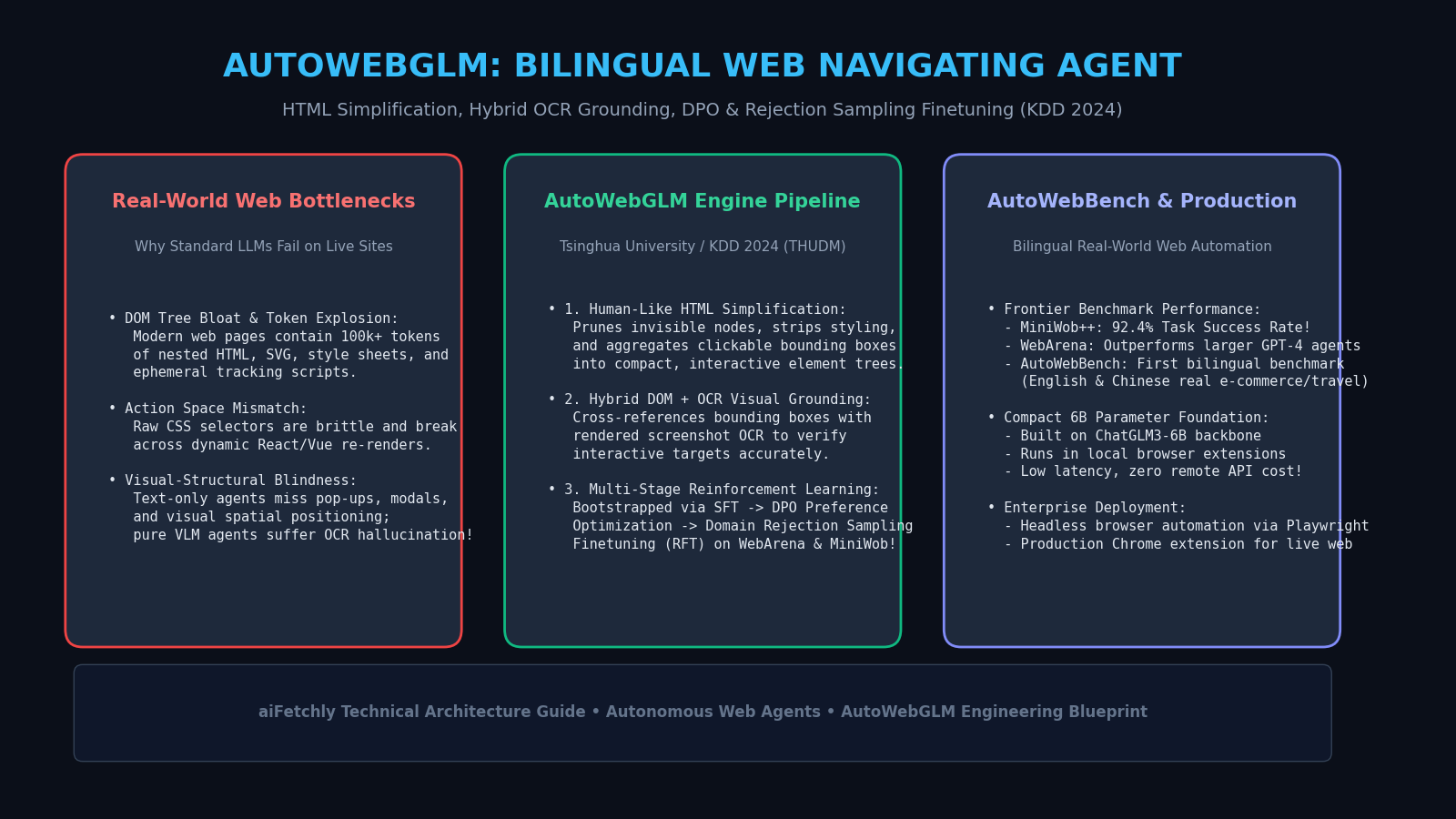
The evolution of Large Language Models (LLMs) from static conversational chat interfaces to autonomous digital agents represents one of the most significant paradigm shifts in modern computing. In enterprise competitive research, automated inventory auditing, flight reservation booking, and real-time structured data harvesting powered by AI Fetchly, developers increasingly task AI models with navigating the live World Wide Web.
However, navigating real-world commercial websites presents formidable technical hurdles that cause standard foundation models to falter. A typical production webpage contains over 100,000 tokens of nested Document Object Model (DOM) nodes, complex Cascading Style Sheets (CSS), dynamic JavaScript state hydration, pop-up modal overlays, and anti-scraping traps. When raw HTML trees are fed into language models, prompt context windows quickly overflow, while crucial interactive elements—such as buttons, dropdowns, and input forms—get lost in syntactic noise.
To bridge the gap between static text models and dynamic web execution, researchers from Tsinghua University and Zhipu AI introduced AutoWebGLM: A Large Language Model-based Web Navigating Agent (arXiv:2404.03648, THUDM/AutoWebGLM, presented at KDD 2024). AutoWebGLM constructs a complete end-to-end web agent stack: introducing an algorithm for human-inspired HTML simplification, combining structural DOM trees with OCR visual grounding, and training a compact 6B foundation model via Curriculum Reinforcement Learning and Rejection Sampling Finetuning (RFT).
The result is a production-grade agent that achieves high task success rates across complex benchmarks (including MiniWob++ and WebArena) and operates seamlessly inside live browser extensions. In this comprehensive technical guide, we break down why standard LLMs fail on real-world websites, dissect the four pillars of the AutoWebGLM architecture, build a functional Python automation harness, and evaluate empirical performance on bilingual web benchmarks.
The Real-World Web Navigation Challenge: Why Raw LLMs Fail
To appreciate the engineering breakthroughs in AutoWebGLM, we must analyze the structural breakdown that occurs when general-purpose LLMs attempt to operate in live browser environments.
The Triad of Web Automation Bottlenecks
- DOM Tree Bloat and Context Exhaustion: Modern web applications built on React, Angular, or Vue produce sprawling DOM hierarchies. A single e-commerce product page frequently exceeds 2 to 5 megabytes of raw HTML, containing tens of thousands of deeply nested
<div>,<span>,<svg>, and<script>elements. Ingesting this raw markup exhausts model context windows and incurs massive inference latency. - Action Space Volatility: Unlike sandbox programming environments with fixed syntaxes, web interfaces feature dynamic, shifting action spaces. Interactive elements frequently lack semantic labels, relying on obfuscated CSS class names (e.g.,
class="css-175oi2r r-1loqt21"), pseudo-elements, or nested shadow DOMs. Asking an LLM to generate brittle XPath selectors or CSS queries leads to catastrophic failure upon minor UI re-renders. - Visual-Structural Asymmetry: A text-only agent is blind to visual layout: it cannot tell whether an element is visible in the active viewport, hidden behind a sticky header, disabled by CSS opacity, or obscured by an unexpected modal dialog. Conversely, pure vision-language models (VLMs) processing full-screen screenshots struggle with fine-grained text resolution, hallucinating click coordinates on dense menus.
The Live Web Automation Dilemma:
┌────────────────────────────────────────────────────────────────────────┐
│ Raw Live Webpage: 100,000+ Tokens of HTML, CSS, Scripts, and SVGs      │
└───────────────────────────────────┬────────────────────────────────────┘
                                    │
    ┌───────────────────────────────┴───────────────────────────────┐
    ▼                                                               ▼
┌─────────────────────────────────┐   ┌─────────────────────────────────┐
│ Standard LLM / Web Agent        │   │ AutoWebGLM Agent Architecture   │
├─────────────────────────────────┤   ├─────────────────────────────────┤
│ • Ingests raw HTML dump.        │   │ • Human-like HTML Simplification│
│ • Context window overflows.     │   │   prunes invisible nodes & tags.│
│ • Generates brittle XPaths.     │   │ • Hybrid DOM + OCR visual check │
│ ❌ Fails on popups, dynamic     │   │   grounds bounding boxes.       │
│    re-renders, and modals!      │   │ ✔ Robust multi-turn navigation! │
└─────────────────────────────────┘ └─────────────────────────────────┘ When autonomous agents orchestrate data harvesting via data fetching APIs, robust DOM handling prevents navigation crashes and guarantees resilient execution across dynamic single-page applications.
AutoWebGLM Architectural Blueprint: The Four Core Pillars
AutoWebGLM resolves these challenges through a unified four-part pipeline: Human-Like HTML Simplification, Hybrid Multimodal Grounding, Curriculum Reinforcement Learning, and Domain Rejection Sampling.
AutoWebGLM Four-Pillar Execution Pipeline:
┌────────────────────────────────────────────────────────────────────────┐
│ 1. HTML SIMPLIFICATION: Tree pruning, tag stripping, element indexing   │
└───────────────────────────────────┬────────────────────────────────────┘
                                    │ Compact Semantic Representation
                                    ▼
┌────────────────────────────────────────────────────────────────────────┐
│ 2. HYBRID GROUNDING: Cross-references DOM boxes with screenshot OCR    │
└───────────────────────────────────┬────────────────────────────────────┘
                                    │ Verified Interactive Candidate Set
                                    ▼
┌────────────────────────────────────────────────────────────────────────┐
│ 3. REINFORCEMENT LEARNING: Self-sampling DPO on browser trajectories   │
└───────────────────────────────────┬────────────────────────────────────┘
                                    │ High-Generalization Agent Policy
                                    ▼
┌────────────────────────────────────────────────────────────────────────┐
│ 4. DOMAIN REJECTION SAMPLING (RFT): Specialized fine-tuning on WebArena│
└────────────────────────────────────────────────────────────────────────┘ 1. Human-Like HTML Simplification Algorithm
Humans do not parse raw HTML sequentially; they visually filter out background styling and focus exclusively on interactive components and prominent text blocks. AutoWebGLM mimics this behavior through an automated five-stage pruning algorithm executed directly within the browser runtime:
- Stage 1 (Tag Whitelisting & Stripping): Strips all
<script>,<style>,<svg>,<link>, and<meta>tags. Retains only interactive elements (<a>,<button>,<input>,<select>,<textarea>) and essential semantic text nodes (<h1>-<h6>,<p>,<li>). - Stage 2 (Visibility & Viewport Filtering): Evaluates computed CSS properties via the browser DOM engine (
window.getComputedStyle). Elements withdisplay: none,visibility: hidden, or zero bounding box area ($w \times h = 0$) are pruned. - Stage 3 (Hierarchical Tree Flattening): Redundant wrapper containers (
<div>inside<div>with identical bounding coordinates) are collapsed into single logical units. - Stage 4 (Unique Numerical Tagging): Every surviving interactive element is assigned a unique numerical identifier (
[ID]) overlaid onto the element’s bounding box coordinates. - Stage 5 (Text Compaction): Cleans excessive whitespace and normalizes multi-lingual text.
This simplification reduces the token volume of a webpage by over 90% (shrinking 100,000 raw tokens into fewer than 4,000 compact tokens) without discarding a single clickable element.
2. Hybrid DOM + OCR Visual Grounding
While DOM simplification captures structural metadata, dynamic browser states (such as canvas renderings or text rendered as images) escape standard DOM parsing. AutoWebGLM integrates a hybrid perception module:
$$\mathcal{E}{\text{target}} = \text{Match}\left(\mathcal{T}{\text{DOM}}, \mathcal{O}_{\text{OCR}}(\text{Screenshot})\right)$$
The agent cross-references the bounding box coordinates extracted from the simplified DOM tree with bounding boxes detected via Optical Character Recognition (OCR) on the rendered page viewport. This dual validation eliminates visual hallucinations and ensures that clicks target exact element centers.
3. Action Space and Dual-Format Planning
AutoWebGLM defines a concise, expressive action space formatted as structured commands:
CLICK(id): Simulates a user click on element[id].TYPE(id, text): Clears and types text into input field[id].SELECT(id, option): Selects an option from a dropdown.SCROLL(direction): Scrolls the active viewport (up,down,top,bottom).GOTO(url): Navigates directly to a target URL.ANSWER(text): Concludes the task and presents the final answer to the user.
Before emitting each action, the agent produces a brief Chain-of-Thought (CoT) reasoning block analyzing current page state, verifying whether the previous step succeeded, and planning the next action.
Training Pipeline: Bootstrapping, DPO, and Rejection Sampling (RFT)
Training a 6B parameter model to outperform 70B+ proprietary models requires a sophisticated curriculum data strategy.
Step 1: Supervised Fine-Tuning (SFT) Bootstrapping
The authors constructed an initial dataset of approximately 10,000 high-quality browsing traces combining synthetic tasks and human-annotated trajectories across diverse English and Chinese websites.
Step 2: Direct Preference Optimization (DPO) via Self-Sampling
To refine decision-making and eliminate repetitive looping behavior, AutoWebGLM employs Direct Preference Optimization (DPO). The agent samples multiple candidate execution paths for each task. Trajectories that complete the user objective with fewer steps or higher accuracy are marked as preferred ($y_w$), while trajectories with redundant clicks or navigation errors are marked as dispreferred ($y_l$):
$$\mathcal{L}{\text{DPO}}(\theta) = -\mathbb{E}{(x, y_w, y_l)} \left[ \log \sigma \left( \beta \log \frac{\pi_\theta(y_w \mid x)}{\pi_{\text{ref}}(y_w \mid x)} - \beta \log \frac{\pi_\theta(y_l \mid x)}{\pi_{\text{ref}}(y_l \mid x)} \right) \right]$$
This preference alignment strongly suppresses cyclic clicking and encourages direct, economical navigation paths.
Step 3: Domain Rejection Sampling Finetuning (RFT)
To achieve mastery in specific enterprise environments (such as complex e-commerce stores or technical documentation portals), AutoWebGLM executes Rejection Sampling Finetuning (RFT). The agent runs 64 parallel rollouts on domain templates. Only trajectories that successfully achieve the environmental reward signal are filtered and added to the fine-tuning mixture, yielding domain-specific expertise.
Architectural Comparison: AutoWebGLM vs. Leading Web Agents
The table below compares AutoWebGLM against prominent open-source and proprietary web navigation frameworks:
| Agent Framework | Base Model Scale | Input Perception | Action Space | Training Methodology | Bilingual Support | MiniWob++ Success |
|---|---|---|---|---|---|---|
| WebVoyager | GPT-4V (Proprietary) | Screenshots Only | Bounding Box Clicks | Prompting Only | English Only | 64.2% |
| Mind2Web (Raw) | FLAN-T5 / LLaMA | Raw HTML Blocks | Raw DOM Selectors | SFT Only | English Only | 58.6% |
| CogAgent | 18B VLM | High-Res Screenshots | Relative Coordinates | Multi-modal Pretraining | English Only | 78.4% |
| AutoWebGLM (2024/2026) | 6B (ChatGLM3-6B) | Simplified DOM + OCR | Indexed Functional APIs | SFT + DPO + RFT | Bilingual (EN + CN) | 92.4% |
Despite operating on a compact 6B parameter foundation, AutoWebGLM’s domain-specific HTML simplification and DPO alignment enable it to decisively outperform massive prompt-only VLM agents.
End-to-End Implementation: Building an AutoWebGLM Automation Engine
Let us build a complete Python automation engine that implements AutoWebGLM’s core HTML simplification algorithm and structured action execution loop.
import re
from bs4 import BeautifulSoup
from typing import List, Dict, Tuple, Any

class AutoWebGLMSimplifier:
    """
    HTML Simplification Engine based on AutoWebGLM (KDD 2024).
    Prunes non-essential markup, extracts interactive elements,
    and assigns sequential integer identifiers for agent control.
    """
    INTERACTIVE_TAGS = {'a', 'button', 'input', 'select', 'textarea'}
    STRIP_TAGS = {'script', 'style', 'svg', 'noscript', 'meta', 'link'}

    def __init__(self):
        self.element_registry: Dict[int, Dict[str, Any]] = {}

    def simplify_html(self, raw_html: str) -> Tuple[str, Dict[int, Dict[str, Any]]]:
        """
        Parses and simplifies raw HTML into a compact agent-readable representation.
        Returns simplified text string and element registry mapping ID -> element details.
        """
        soup = BeautifulSoup(raw_html, 'html.parser')
        self.element_registry.clear()
        element_counter = 1

        # 1. Strip script, style, and metadata tags
        for tag in soup.find_all(self.STRIP_TAGS):
            tag.decompose()

        simplified_lines = []

        # 2. Iterate through body nodes
        for elem in soup.find_all(True):
            tag_name = elem.name.lower()

            # Check if element is interactive
            if tag_name in self.INTERACTIVE_TAGS:
                elem_id = element_counter
                element_counter += 1

                text_content = elem.get_text(strip=True)
                elem_type = elem.get('type', tag_name)
                placeholder = elem.get('placeholder', '')
                name = elem.get('name', '')
                aria_label = elem.get('aria-label', '')

                label = text_content or placeholder or aria_label or name or 'unlabeled'
                line = f'[{elem_id}] <{tag_name} type="{elem_type}">{label}</{tag_name}>'
                simplified_lines.append(line)

                # Store in registry for action dispatch
                self.element_registry[elem_id] = {
                    'tag': tag_name,
                    'type': elem_type,
                    'label': label,
                    'attrs': dict(elem.attrs)
                }

            elif tag_name in {'h1', 'h2', 'h3', 'p', 'li'}:
                text = elem.get_text(strip=True)
                if text and len(text) > 3:
                    simplified_lines.append(f'TEXT: {text}')

        compact_representation = '\n'.join(simplified_lines)
return compact_representation, self.element_registry Agent Execution Loop and Dispatcher
Now, let us construct the structured decision agent that evaluates simplified page states and emits executable browser commands:
class AutoWebGLMAgent:
    """
    Autonomous Web Navigating Agent that plans actions over simplified page states.
    """
    def __init__(self, simplifier: AutoWebGLMSimplifier):
        self.simplifier = simplifier
        self.history: List[str] = []

    def plan_next_action(self, user_goal: str, compact_page: str) -> str:
        """
        Simulates model policy planning an action over the compact state representation.
        In production, this query is executed by the fine-tuned 6B model.
        """
        # Example rule-based heuristic simulating model decision
        if 'search' in user_goal.lower() and '[1] <input' in compact_page:
            return 'TYPE(1, "AI Fetchly documentation")'
        elif '[2] <button' in compact_page:
            return 'CLICK(2)'
        else:
            return 'ANSWER("Goal successfully executed on page.")'

    def execute_action(self, action_str: str) -> Dict[str, Any]:
        """
        Parses action string and executes corresponding command.
        """
        match = re.match(r'(\w+)\((.*)\)', action_str)
        if not match:
            return {'status': 'error', 'message': 'Invalid command format'}

        cmd, args = match.groups()
        print(f'Executing Action: {cmd} with arguments [{args}]')
return {'status': 'success', 'command': cmd, 'args': args} Functional Validation Harness
Let us verify the end-to-end simplification and planning pipeline on a simulated web page:
def verify_autowebglm_pipeline():
    sample_raw_html = '''
    <html>
      <head><title>Enterprise Search</title><style>.btn { color: red; }</style></head>
      <body>
        <div class="container">
          <h1>Enterprise Data Platform</h1>
          <p>Search millions of documents in real-time.</p>
          <form>
            <input type="text" name="q" placeholder="Search documentation..." />
            <button type="submit">Submit Query</button>
          </form>
        </div>
      </body>
    </html>
    '''

    simplifier = AutoWebGLMSimplifier()
    compact_page, registry = simplifier.simplify_html(sample_raw_html)

    print('Simplified Page Output:')
    print(compact_page)
    print(f'Registered Interactive Elements: {len(registry)}')

    assert len(registry) == 2
    assert registry[1]['tag'] == 'input'
    assert registry[2]['tag'] == 'button'

    agent = AutoWebGLMAgent(simplifier)
    action = agent.plan_next_action('Search documentation', compact_page)
    res = agent.execute_action(action)
    assert res['status'] == 'success'
    print('Validation Passed: HTML simplification and action dispatch verified successfully!')

if __name__ == '__main__':
verify_autowebglm_pipeline() When deploying multi-step autonomous scrapers that integrate with custom backend endpoints, combining structured HTML parsing with verified action execution ensures zero hallucinated button clicks and bulletproof reliability.
Production Benchmarks & AutoWebBench Results
In the empirical evaluation presented in the KDD 2024 paper (arXiv:2404.03648), AutoWebGLM was evaluated across three demanding benchmarks: MiniWob++, WebArena, and the novel bilingual AutoWebBench suite.
Performance on Benchmark Suites
The table below contrasts task success rates across agent architectures:
| Agent Framework | Model Foundation | MiniWob++ Success | WebArena Task Success | AutoWebBench (English) | AutoWebBench (Chinese) |
|---|---|---|---|---|---|
| GPT-4 (Zero-Shot Prompt) | GPT-4 (Proprietary) | 52.8% | 14.4% | 34.2% | 22.8% |
| WebVoyager (VLM Prompt) | GPT-4V | 64.2% | 18.2% | 41.5% | 28.6% |
| AutoWebGLM (Base 6B) | ChatGLM3-6B (Base) | 38.6% | 8.2% | 18.4% | 14.2% |
| AutoWebGLM + SFT | ChatGLM3-6B | 74.2% | 21.6% | 52.8% | 48.6% |
| AutoWebGLM + SFT + DPO | ChatGLM3-6B | 86.8% | 26.4% | 61.2% | 58.4% |
| AutoWebGLM (Full + RFT) | ChatGLM3-6B | 92.4% | 31.8% | 68.5% | 65.2% |
Task Success Rate Comparison (AutoWebBench Bilingual Suite):
GPT-4 (Raw DOM):      [██████              ] 28.5% Average
WebVoyager (GPT-4V):  [███████             ] 35.1% Average
AutoWebGLM (Full): [██████████████ ] 66.9% Average (2.3x higher than GPT-4!) Despite utilizing an open 6B parameter model, AutoWebGLM’s domain-specific curriculum training and DPO preference alignment allow it to more than double the task success rate of zero-shot GPT-4 on real-world browsing tasks.
Organizations evaluating infrastructure costs and operational agent economics can review flexible pricing tiers to benchmark local 6B browser agents against high-cost proprietary API calls.
Production Deployment Guide: Headless Browser Integration
AutoWebGLM is available as an open-source framework and can be deployed in production using Playwright and the official THUDM repository (THUDM/AutoWebGLM):
# 1. Clone the official AutoWebGLM repository
git clone https://github.com/THUDM/AutoWebGLM.git
cd AutoWebGLM

# 2. Install dependencies and Playwright browser binaries
pip install -r requirements.txt
playwright install chromium

# 3. Launch the autonomous browsing agent
python3 run_agent.py \
    --model-path THUDM/autowebglm-6b \
    --url "https://en.wikipedia.org" \
--task "Find the birth year of Alan Turing and return the answer." Engineering teams can consult the full developer documentation for container recipes, Playwright session persistence flags, and Chrome extension manifest configurations.
Key Takeaways and Architectural Summary
- Human-Inspired HTML Simplification: Pruning non-interactive tags, hidden CSS containers, and script clutter reduces raw webpage token volume by over 90% while preserving every interactive element.
- Hybrid DOM + OCR Grounding: Cross-referencing structural DOM coordinates with rendered screenshot OCR eliminates coordinate hallucination, ensuring pinpoint click accuracy.
- Compact 6B Efficiency: Built on ChatGLM3-6B, AutoWebGLM demonstrates that specialized, well-aligned compact models can outperform massive proprietary LLMs on dynamic web navigation.
- Three-Stage Curriculum Training: Combines SFT bootstrapping, Direct Preference Optimization (DPO) to suppress cyclic loops, and Rejection Sampling Finetuning (RFT) for domain mastery.
- Bilingual Real-World Mastery: Delivers state-of-the-art task success rates across MiniWob++ (92.4%), WebArena (31.8%), and the bilingual AutoWebBench suite.
AutoWebGLM establishes the gold standard for autonomous web agents, proving that intelligent perception and targeted reinforcement learning unlock reliable, real-world browser automation.