Automating ICP Lead Qualification: aiFetchly Analysis Guide
The Sifting Bottleneck in B2B Demand Generation
Modern lead generation scrapers can easily harvest thousands of company domains from search engines and business directories in minutes. However, volume alone does not translate to sales pipeline. Growth teams quickly discover that 70% to 80% of raw scraped URLs represent poor fits: regional retail shops, dropshipping portals, unfunded hobby projects, or service consultancies outside their target revenue band.
Traditionally, qualifying these leads requires extensive manual vetting. Sales development representatives (SDRs) spend days opening websites in browser tabs, reading homepage copy, checking pricing models, and subjectively scoring account fit.
When teams turn to generic cloud AI tools to automate qualification, they face another hurdle: generic prompts lack deep understanding of your business model, producing superficial summaries rather than actionable qualification decisions.
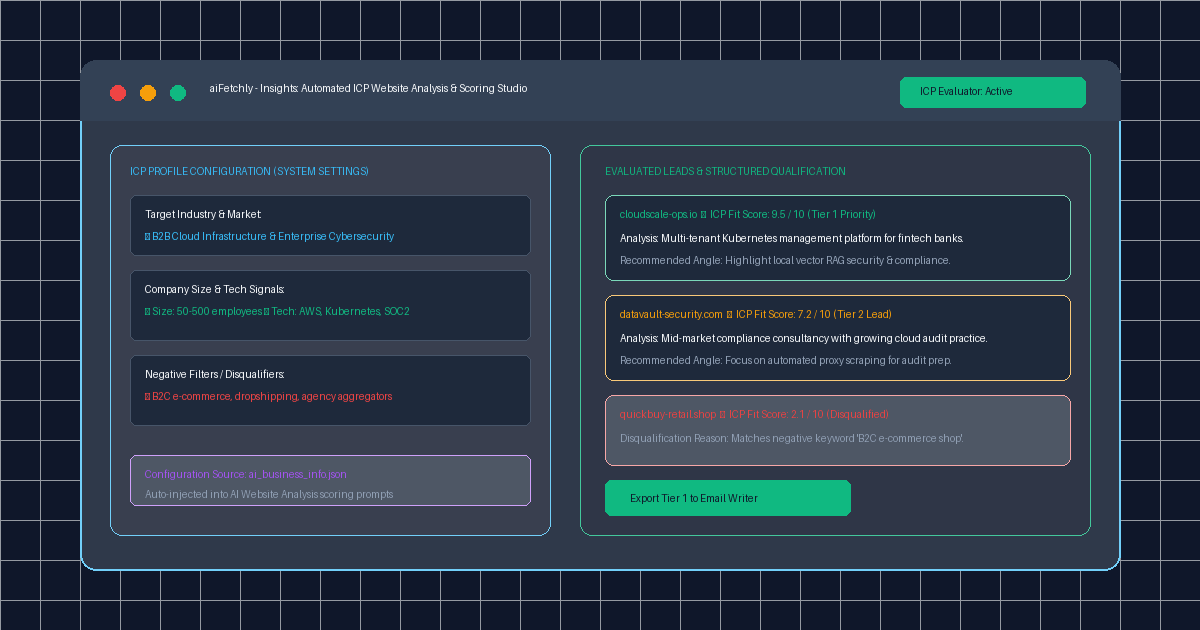
AI Fetchly resolves this bottleneck through AI Website Analysis. By injecting your company’s Ideal Customer Profile (ICP) parameters directly into the evaluation pipeline, aiFetchly automatically scores and tiers prospect domains on your local desktop.
The ai_business_info.json Context Engine
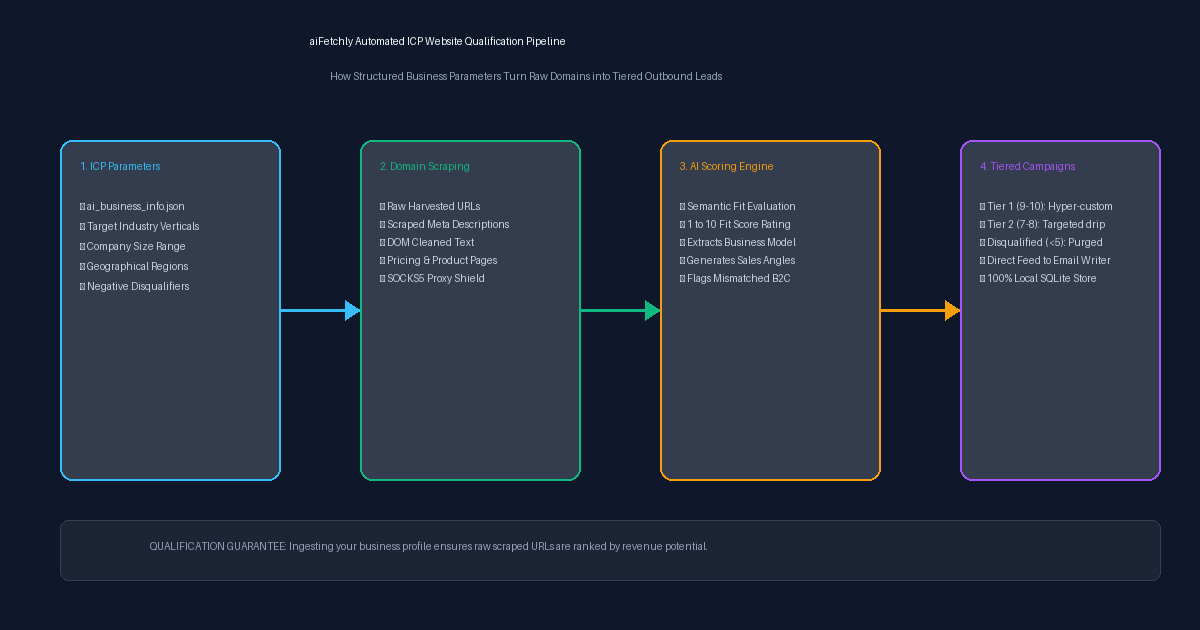
Rather than re-explaining your product positioning in every prompt, aiFetchly anchors evaluation to your Business Info Configuration in System Settings:
| Configuration Parameter | Function & Data Input | Qualification Impact |
|---|---|---|
target_industries | Specific verticals (e.g., DevSecOps, Fintech Infrastructure) | Instantly filters out retail, e-commerce, and agencies |
company_size_icp | Employee count or revenue tiers (e.g., 50–500 FTEs) | Disqualifies solo freelancers and unmanageable enterprises |
target_markets | Target geographic regions (e.g., North America, DACH) | Aligns prospects with localized outbound sales teams |
core_value_props | Value propositions from your Knowledge Library | Generates tailored outreach angles for qualified leads |
negative_keywords | Blacklisted terms (e.g., dropshipping, crypto exchange) | Triggers immediate automated disqualification |
Step-by-Step Tutorial: Qualifying Raw Domains
Follow this walkthrough to configure automated website qualification in aiFetchly.
Step 1: Define Your ICP Parameters in Settings
- Launch aiFetchly on your workstation.
- Navigate to System Setting > User Preferences.
- Under AI Website Analysis Business Info, input your company’s core profile, target ICP parameters, and disqualifying negative keywords.
- Click Save Preferences. The configuration writes to your local SQLite settings table.
Step 2: Launch Website Analysis on Harvested Domains
- Go to Insights > Market Insight (or import an external domain CSV).
- Select your harvested lead batch and click Run AI Website Analysis.
- The engine deploys local scraper workers through your active SOCKS5 proxy pool, capturing homepages, about pages, and meta descriptions.
Step 3: Review Structured Scoring and Export Tiered Lists
As domains are analyzed, aiFetchly’s AI evaluator scores each company from 1 to 10:
- Tier 1 (Scores 9–10): Perfect ICP alignment with matching technology signals.
- Tier 2 (Scores 7–8): High-potential accounts requiring targeted angle testing.
- Disqualified (Scores <5): Automatically flagged with explicit rejection reasons (e.g., “Matched negative keyword: agency aggregator”).
Click Export Tier 1 to feed validated accounts directly into the AI Email Writer with pre-populated sales hooks.
Precision Lead Qualification on Your Desktop
By uniting structured ICP parameters with local web analysis, aiFetchly allows digital marketers to transform raw domain lists into qualified, revenue-ready pipelines in seconds.
Explore website analysis configuration in the AI Fetchly Docs.
Visual Generation Prompts
Hero Image Prompt:Modern dark-mode marketing analytics UI of aiFetchly AI Website Analysis studio, showing an ICP parameter configuration drawer on the left (target industries, negative disqualifiers) and an active qualification table on the right displaying 1-10 fit scores, green Tier 1 badges, and generated sales angles, sleek isometric 3D perspective, cyan and emerald glow.Body Image Prompt:High-resolution technical pipeline flowchart illustrating the aiFetchly automated ICP qualification architecture: business info JSON parameter ingestion, proxy-protected domain scraping, AI scoring engine evaluating ICP fit (1-10 rating and rejection flags), and tiered routing directly into local SQLite storage and AI Email Writer, dark slate vector blueprint style.