aiFetchly Task Chaining: Automate Multi-Step B2B Pipelines
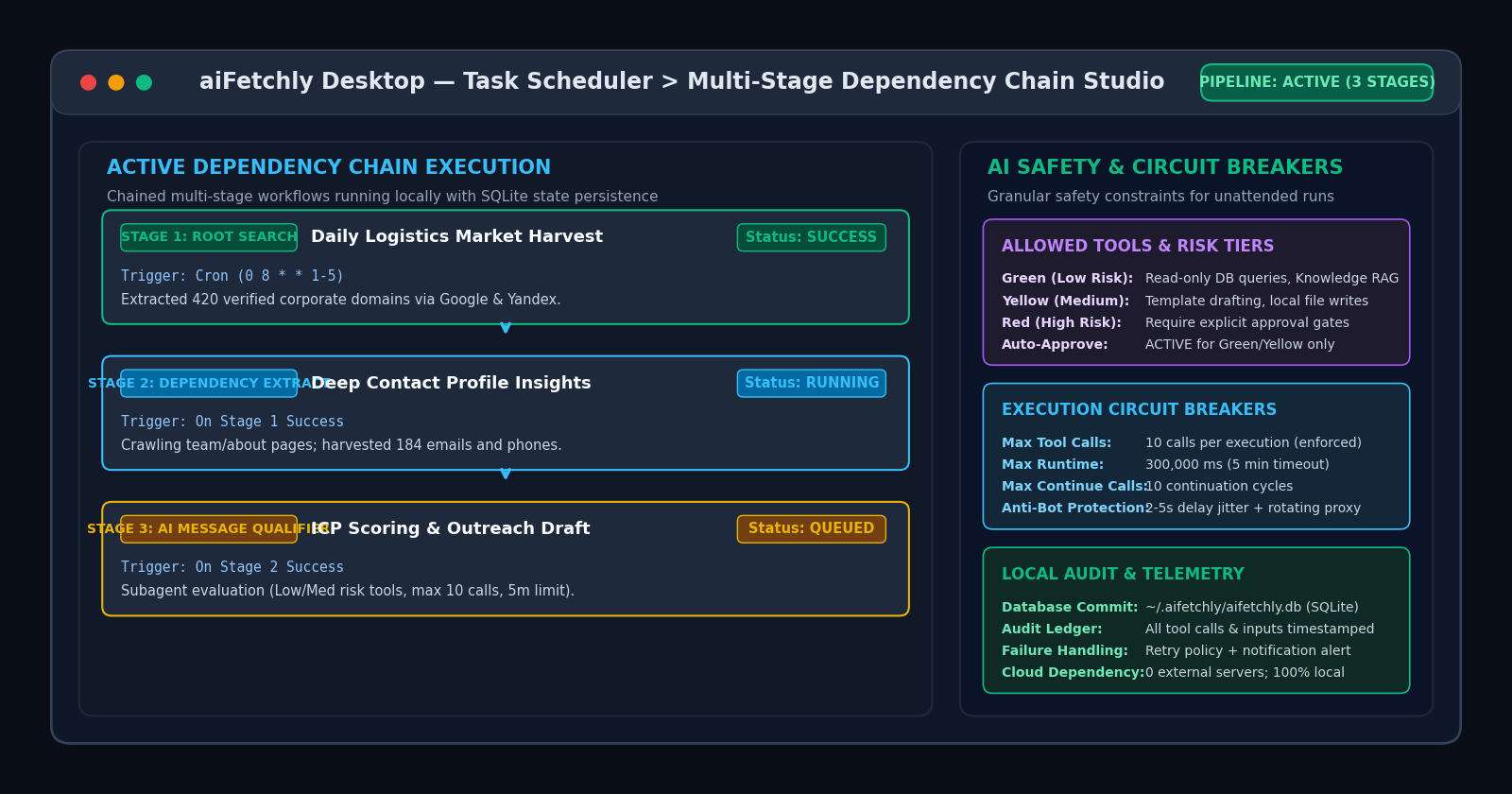
Beyond Isolated Cron Jobs: The Need for Event-Driven Task Chains
Power users orchestrating data collection and outbound marketing know that high-value business workflows are rarely single-step tasks. In a complete prospect intelligence pipeline, discovering target company domains is merely the first phase. Those domains must subsequently undergo deep contact discovery, followed by firmographic filtering and personalized outreach drafting.
Traditionally, automating multi-stage workflows required brittle engineering:
- Disconnected Cloud Schedulers: Managing isolated cron jobs on external cloud servers creates race conditions when upstream search jobs run longer than expected.
- Complex Glue Code: Developers spend hours writing custom webhook scripts, queue consumers, and database monitors to pass IDs between separate scrapers.
- Ungoverned Agent Execution: Headless AI workers left unattended can enter infinite loops or execute unsanctioned data modifications without human circuit breakers.
AI Fetchly resolves these hurdles with Task Dependency Chaining in the native desktop Task Scheduler. By chaining event-driven child tasks directly to root jobs, power users run sovereign, multi-step pipelines on local desktop hardware.
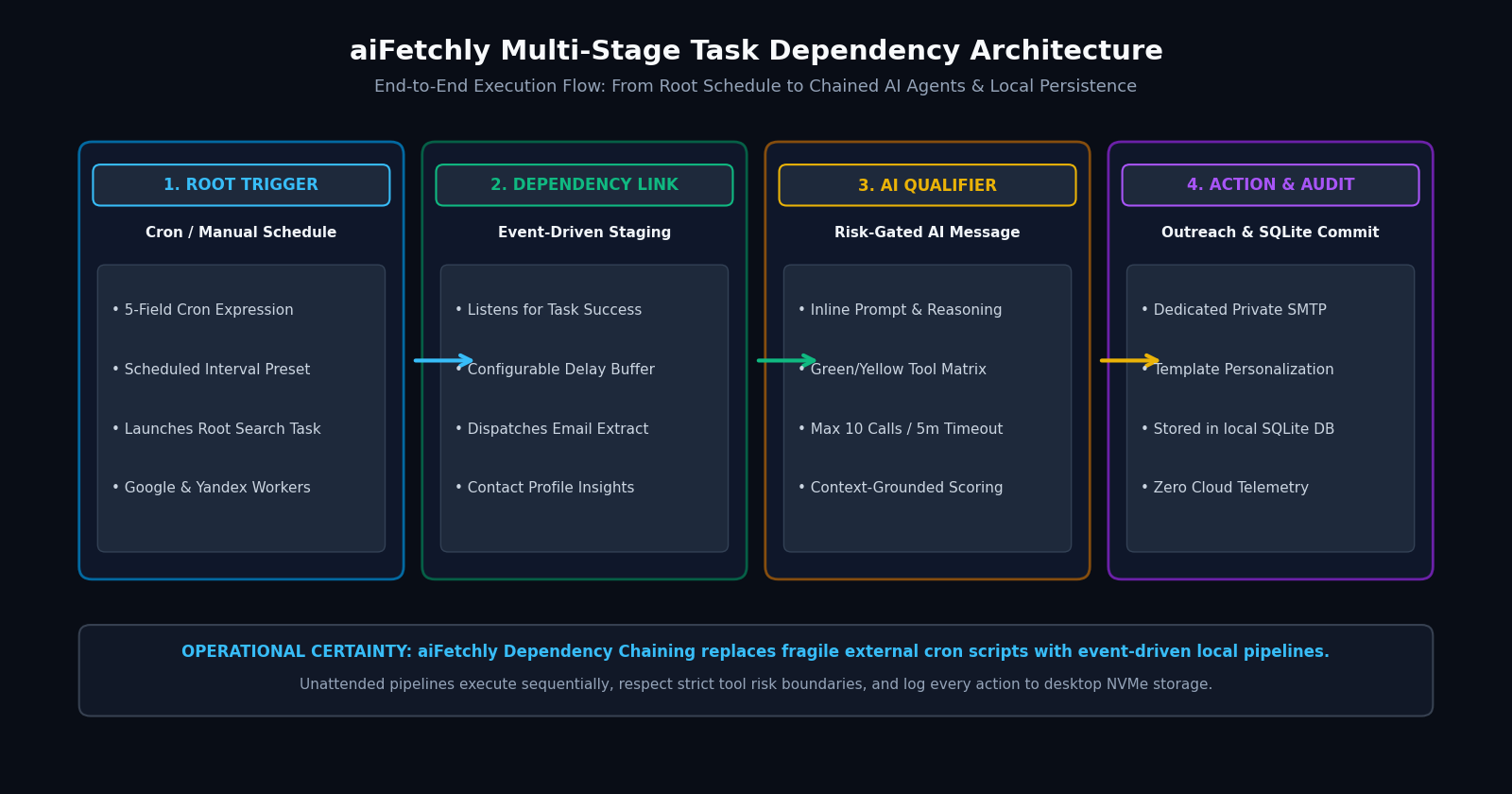
Step 1: Configure the Root Market Discovery Task
Every automated pipeline begins with an initial data harvest:
- Open Schedule from the left navigation and click New Schedule.
- Set your Schedule Name (e.g., “Morning Logistics Market Sweep”).
- Select Task Type as Search (Market Insight Explorer) or Google Maps.
- Set the Trigger Type to Cron and input your cadence (e.g.,
0 8 * * 1-5for weekdays at 8:00 AM). - Bind your target search parameters and proxy pool, then save the root task.
Step 2: Bind Downstream Tasks via Dependency Triggers
Once your root search task is registered, chain your contact enrichment stage:
- Create a second schedule named “Extract Contact Profile Insights”.
- Select Email Extract as the Task Type.
- Set the Trigger Type to Dependency.
- In the Parent Task selector, pick your root search task from Step 1.
- Choose the Trigger Condition: set to On Parent Success so extraction triggers automatically when the search job finishes without errors.
Step 3: Embed an Autonomous AI Message Qualifier with Safety Limits
The real power of aiFetchly task chaining lies in automated intelligence. Chain an AI Message task to analyze and qualify extracted prospects:
- Inline Prompting: Provide multi-line evaluation instructions (e.g., “Inspect newly extracted domains from Stage 2. Filter companies with fewer than 50 employees, calculate an ICP fit score from 1-10, and draft custom value propositions using the Knowledge Library.”)
- Tool Risk Allowlists: Assign granular tool access using color-coded risk tiers:
- Green (Low Risk): Read-only database queries and RAG vector searches.
- Yellow (Medium Risk): Draft generation and local file staging.
- Auto-Approve Tools: Enable autonomous execution strictly for vetted Green and Yellow tools.
Step 4: Enforce Circuit Breakers and Local SQLite Auditing
To ensure unattended pipelines never run wild, aiFetchly enforces hard runtime circuit breakers on all AI Message tasks:
- Max Tool Calls: Hard-capped at 10 calls per execution to halt recursive tool loops.
- Max Runtime: Circuit-breaker threshold defaulting to 300,000 ms (5 minutes).
- Local SQLite Logging: Every execution milestone, extracted record, and agent decision commits immediately to
~/.aifetchly/aifetchly.db.
By chaining modular jobs with event-driven triggers, aiFetchly provides power users with resilient, sovereign automation without cloud subscription taxes.
Explore advanced scheduler configurations in the AI Fetchly Docs.
Visual Generation Prompts
Hero Image Prompt:Modern dark-mode SaaS developer dashboard showing the aiFetchly Task Scheduler console, displaying an active 3-stage dependency chain connecting Market Insight Explorer, Contact Profile Insights, and an AI Message Qualifier, with glowing status pills, cron timer badges, green proxy indicators, and local SQLite commit metrics, sleek isometric 3D perspective, slate-900 background with cyan and amber neon accents.Body Image Prompt:High-resolution technical pipeline flowchart illustrating the aiFetchly Multi-Stage Task Dependency Architecture: Root Cron Trigger, Event-Driven Child Dispatch, Risk-Gated AI Message Agent (Green/Yellow tool allowlists, circuit breakers), and Downstream SQLite persistence, clean vector blueprint styling with dark slate and emerald accents.