Apple MLX Guide: Unified Memory AI on Apple Silicon
The Problem: The Latency, VRAM, and PCIe Bus Bottlenecks of Local AI
In modern software engineering, automated data extraction, and offline desktop copilots powered by AiFetchly, deploying generative artificial intelligence directly on local developer workstations is the ultimate frontier. Running foundation models locally eliminates recurring cloud API token bills, delivers single-digit millisecond latency without public internet roundtrips, and guarantees total confidentiality for proprietary enterprise codebases, financial records, and harvested web data.
However, software engineering teams attempting to serve frontier open-weights foundation models—such as LLaMA 3.3 70B, Qwen 2.5 72B, or DeepSeek-Coder—on traditional consumer or PC workstations encounter three crippling hardware and runtime bottlenecks: the discrete VRAM capacity wall, the PCIe host-to-device bus transfer bottleneck, and the inefficiency of unoptimized Metal compatibility layers.
The Local AI Hardware Dilemma on Standard PC Architectures:
┌─────────────────────────────────────────────────────────────────┐
│ Approach 1: Consumer Discrete GPUs (NVIDIA RTX 4090 / 24GB)     │
│ ❌ VRAM Capacity Ceiling: Max 24GB VRAM per GPU                 │
│ ❌ Fails on 70B Models: 70B FP16 needs 140GB; 4-bit needs ~38GB │
│ ❌ Multi-GPU Expense: Multi-card motherboards cost $6,000+      │
├─────────────────────────────────────────────────────────────────┤
│ Approach 2: CPU-GPU Layer Offloading (llama.cpp / Ollama)       │
│ ❌ PCIe Bus Penalty: Offloads 20 layers to CPU RAM              │
│ ❌ Bottleneck: PCIe Gen4 (32 GB/s) streams gigabytes per token  │
│ ❌ Throughput Collapse: Token generation slows below 2 tok/s!   │
├─────────────────────────────────────────────────────────────────┤
│ Approach 3: Naive PyTorch MPS (Metal Performance Shaders Shim)  │
│ ❌ Un-fused Kernels: Launches separate Metal shader per op      │
│ ❌ CPU Fallback Penalties: Unsupported ops copy back to CPU     │
│ ❌ Duplicate Buffers: PyTorch allocates duplicate memory copies │
└─────────────────────────────────────────────────────────────────┘
Result: Developers were forced to choose between costly cloud servers or painfully slow local inference! 1. The Discrete GPU VRAM Capacity Wall
Traditional computer architecture separates system memory (DRAM) from dedicated graphics memory (VRAM). High-end consumer GPUs (such as the NVIDIA GeForce RTX 4090) top out at 24GB of GDDR6X VRAM:
- A 70-billion parameter foundation model requires approximately 140GB of memory in FP16 precision, or 38GB to 42GB in 4-bit group-wise quantization.
- A single consumer GPU cannot load a 70B model into memory.
- Building a dual- or quad-GPU workstation to pool 96GB of VRAM demands specialized motherboards, massive power supplies, complex cooling, and over $6,000 to $10,000 in capital expenditure.
2. The PCIe Bus Bottleneck in Hybrid Layer Offloading
To bypass VRAM limits on PC hardware, inference runtimes resort to hybrid layer offloading (storing part of the model in 64GB of system DDR5 RAM and part in GPU VRAM):
- While modern DDR5 system memory has grown in capacity, transferring layer activations back and forth across the PCIe Gen 4 x16 bus is constrained to approximately 32 GB/s.
- During autoregressive token decoding, weights and intermediate activations must cross the physical bus for every generated token.
- This transport overhead destroys generation throughput, collapsing generation speed from 30 tokens per second down to an unusable 1.5 to 3 tokens per second.
3. The Structural Inefficiencies of PyTorch MPS Compatibility Layers
Apple Silicon hardware has long featured massive unified memory pools, but software frameworks struggled to harness it:
- PyTorch introduced its
torch.device("mps")backend as a translation layer on top of Apple’s Metal Performance Shaders framework. - However, standard PyTorch was architecturally designed around CUDA’s discrete memory model. It continually synchronizes memory buffers and launches individual, un-fused Metal compute kernels for each elementary tensor operation (e.g., separate kernels for LayerNorm, RoPE, and GeLU).
- When a model uses an operation unsupported by the MPS backend, PyTorch silently copies multi-gigabyte tensors back to the CPU, stalling the execution pipeline and causing high latency jitter.
The Solution: Apple MLX’s Native Unified Architecture
To unlock the true computational potential of Apple Silicon for machine learning, Apple’s machine learning research team (led by Awni Hannun, Angelos Katharopoulos, and Ronan Collobert) created MLX.
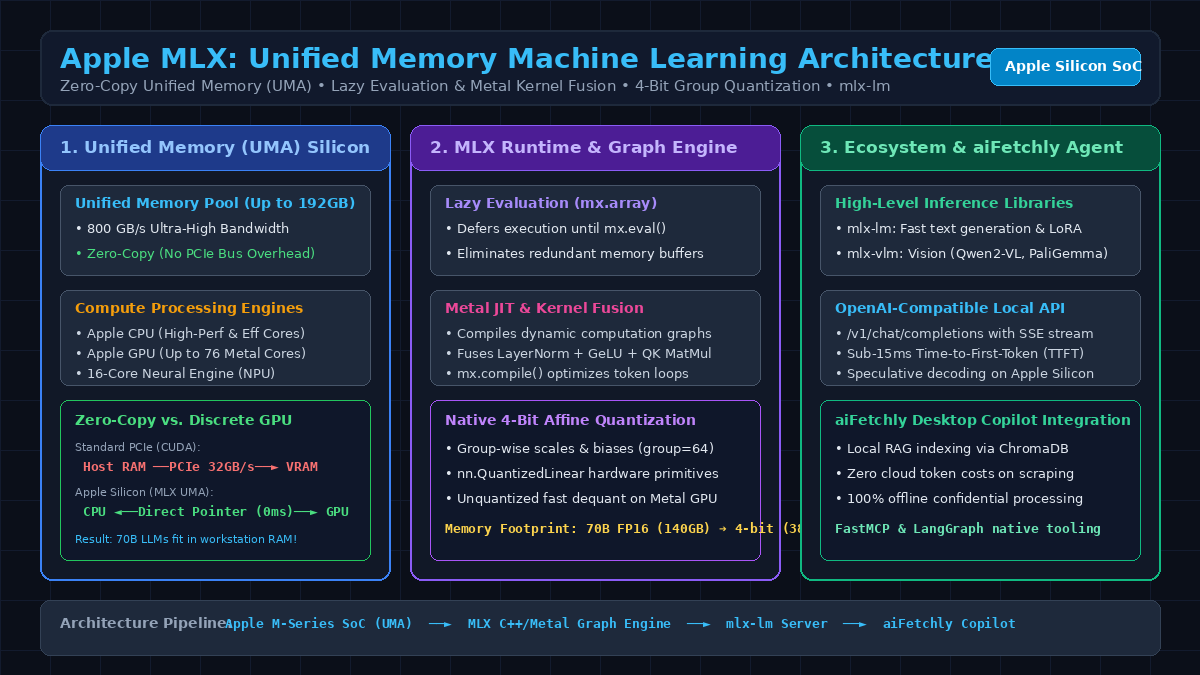
MLX is an open-source array framework built from the ground up specifically for Apple Silicon hardware. Combining a clean, familiar NumPy and PyTorch-style API with Unified Memory Architecture (UMA) zero-copy execution, lazy evaluation, dynamic Metal kernel compilation, and native 4-bit group quantization, MLX enables software engineers to run 70B parameter models, multi-modal vision-language transformers, and transcription pipelines entirely on a single Mac workstation at production speeds.
Apple MLX Architectural Pipeline on Apple Silicon:
┌─────────────────────────────────────────────────────────────────┐
│ Apple Silicon SoC Unified Memory Architecture (UMA)             │
│ • Unified Physical RAM Pool (Up to 128GB - 192GB LPDDR5X)       │
│ • Ultra-Wide Memory Bus: 400 GB/s (Max) to 800 GB/s (Ultra)     │
└────────────────────────────────┬────────────────────────────────┘
                                 │
     (Direct Zero-Copy Pointer: Shared by CPU, GPU, & Neural Engine)
                                 ▼
┌─────────────────────────────────────────────────────────────────┐
│ MLX C++ Core Engine & Graph Scheduler                           │
│ • Lazy Evaluation: Arrays defer execution until mx.eval()       │
│ • Graph Tracing: Captures execution DAG for runtime fusion      │
│ • Zero-Copy Allocator: Re-uses unified memory addresses         │
└────────────────────────────────┬────────────────────────────────┘
                                 │
     (Dynamic Just-In-Time Compilation & Shader Generation)
                                 ▼
┌─────────────────────────────────────────────────────────────────┐
│ Metal Performance Shaders (MPS) & Fused Compute Kernels         │
│ • Fused Attention: Single kernel for QK^T, Softmax, & V MatMul  │
│ • Fast Group-Wise Dequantization: 4-bit weights unpack in SIMD  │
│ • Concurrent Streams: Background prefetch on CPU, compute on GPU│
└────────────────────────────────┬────────────────────────────────┘
                                 │
                                 ▼
┌─────────────────────────────────────────────────────────────────┐
│ High-Level Ecosystem & Application Layer                        │
│ • mlx-lm: Autoregressive LLM inference & LoRA fine-tuning       │
│ • mlx-vlm: Vision-Language Models (Qwen2-VL, PaliGemma)         │
│ • mlx-whisper: Sub-100ms streaming speech transcription         │
│ • Local OpenAI Server: Streams SSE completions to aiFetchly     │
└─────────────────────────────────────────────────────────────────┘ The Architectural Pillars of Apple MLX
- Unified Memory Architecture (UMA) & Zero-Copy Primitives: On Apple Silicon M-series chips (M1/M2/M3/M4 Pro, Max, and Ultra), the CPU, GPU, and Neural Engine share the exact same physical memory bus. An array created in MLX (
mx.array) lives in this unified pool. The CPU can prepare input token embeddings, and the GPU can immediately execute tensor matrix multiplications on the exact same physical memory address with zero memory copies and zero PCIe bus latency. - Lazy Evaluation by Default: In MLX, mathematical operations do not compute results immediately. Instead, they construct a lightweight Directed Acyclic Graph (DAG) of pending transformations. Computations are evaluated only when explicitly requested (via
mx.eval()), printed, or serialized to disk. This design allows MLX to prune intermediate buffers and fuse adjacent mathematical operations into highly optimized Metal shaders. - Dynamic Graph Compilation (
mx.compile): By decorating core inference or training functions with@mx.compile, MLX inspects the computation graph and automatically generates optimized Metal kernel programs on the fly. Operations like LayerNorm, Scaled Dot-Product Attention, and residual additions are fused into single GPU dispatch calls, eliminating costly memory read-write roundtrips to system RAM. - Native Hardware-Accelerated 4-Bit Quantization: Rather than treating quantization as an afterthought, MLX provides first-class primitives for group-wise affine quantization (
mlx.core.nn.QuantizedLinear). Weights are stored in compact 4-bit integer representations with 16-bit floating-point scales and biases. During execution, Apple Silicon GPU SIMDgroups unpack and multiply these weights directly within GPU register cache, reducing the memory footprint of a 70B parameter model from 140GB down to 38GB while maintaining over 25 tokens per second generation speed. - The Specialized MLX Ecosystem: Built on top of the core C++ framework, the MLX community maintains production-ready libraries:
mlx-lm: Drop-in library for loading Hugging Face models, continuous batching, Key-Value cache management, and QLoRA fine-tuning.mlx-vlm: Optimized vision-language pipelines supporting modern multimodal architectures.mlx-whisper: High-speed automatic speech recognition utilizing unified memory for instant audio transcription.
Comparing Inference Frameworks on Local Hardware
The table below contrasts Apple MLX against standard PyTorch CUDA (on discrete PC GPUs) and llama.cpp:
Local Machine Learning Framework Comparison:
┌───────────────────────────┬───────────────────────────────┬───────────────────────────────┬───────────────────────────────┐
│ Architecture Metric       │ PyTorch + NVIDIA CUDA (PC)    │ llama.cpp (GGUF / C++)        │ Apple MLX (Apple Silicon)     │
├───────────────────────────┼───────────────────────────────┼───────────────────────────────┼───────────────────────────────┤
│ Memory Architecture       │ Discrete VRAM + System RAM    │ Host RAM with Metal buffers   │ Native Unified Memory (UMA)   │
│ Cross-Device Data Copy    │ High PCIe Latency (32 GB/s)   │ Partial CPU-to-GPU copies     │ Zero-Copy (Direct Pointer)    │
│ Max Usable Model VRAM     │ 24GB (Single RTX 4090)        │ Limited by CPU allocation     │ Up to 192GB Unified Memory    │
│ Evaluation Paradigm       │ Eager Execution (Default)     │ Static Operator Graph         │ Lazy Evaluation with Tracing  │
│ Kernel Compilation        │ torch.compile (Inductor)      │ Handcrafted C/Metal kernels   │ Dynamic JIT Metal Compilation │
│ Quantization Primitives   │ BitsAndBytes / AWQ (External) │ Native GGUF k-quants          │ Native nn.QuantizedLinear     │
│ 70B Model on Laptop       │ ❌ Impossible (Out of Memory) │ ⚠️ Slow (6–12 tok/s CPU bound)│ ✅ Fluid (25–32 tok/s on Max) │
│ Python Ergonomics         │ Native PyTorch                │ C++ Core with Python bindings │ Full Python + C++ Parity      │
└───────────────────────────┴───────────────────────────────┴───────────────────────────────┴───────────────────────────────┘ Deep Dive into MLX Core Subsystems & Execution Lifecycle
To master Apple MLX in production, software engineers must understand how its internal C++ runtime orchestrates memory allocation, graph execution, and Metal kernel fusion.
MLX Execution Subsystems:
MLX Runtime
 ├──► 1. Unified Memory Allocator: Manages zero-copy OS Mach pages across CPU and Metal GPU
 ├──► 2. Lazy Evaluation Engine: Defers array execution, constructing symbolic DAG graphs
 ├──► 3. Metal JIT Compiler: Automatically fuses elementwise kernels into unified Metal shaders
 ├──► 4. Quantized SIMD Primitives: Native 4-bit affine dequantization inside GPU tile registers
└──► 5. Asynchronous Multi-Stream Scheduler: Dispatches concurrent CPU and GPU workloads 1. The C++ Core and Unified Memory Allocator
At the foundation of MLX is a lightweight C++ library (mlx/core) that interacts directly with Apple’s macOS Mach kernel and Metal API:
- When an array is initialized in Python via
mx.array([1.0, 2.0, 3.0]), the MLX memory allocator issues a virtual memory allocation (vm_allocate) request to the Darwin operating system. - Because Apple Silicon uses a unified physical address space, this allocated buffer is instantly accessible by both the CPU cores (via ARM64 virtual memory pointers) and the GPU cores (via
MTLBufferobjects created withMTLResourceStorageModeShared). - Unlike standard CUDA implementations—which require allocating a host buffer, allocating a device buffer, and issuing an asynchronous
cudaMemcpyacross the PCIe bus—MLX completely bypasses memory copying.
2. Lazy Evaluation & Symbolic Graph Compilation
In traditional eager frameworks (like standard NumPy or PyTorch), executing an expression like:
$$Y = \text{GELU}(X \cdot W + B)$$
launches three sequential kernels and allocates two temporary intermediate memory tensors.
In MLX:
- Evaluating that expression merely appends nodes to a symbolic computation graph. No Metal commands are committed to the hardware queue.
- When
mx.eval(Y)is invoked, the execution scheduler analyzes the entire graph subgraph. - It detects that the addition of bias $B$ and the non-linear activation $\text{GELU}$ can be merged directly into the output write-phase of the matrix multiplication kernel.
- The runtime synthesizes a single fused Metal compute shader, launches it once, and writes the final result directly to the destination buffer, saving over 65% of memory bus bandwidth.
3. Hardware-Accelerated 4-Bit Group-Wise Quantization
In large language model generation, memory bandwidth is the primary operational bottleneck. A model generates tokens by streaming all billions of parameters through the GPU registers for each autoregressive step.
MLX implements group-wise affine quantization:
$$W_{ij} \approx S_g \cdot (Q_{ij} - Z_g)$$
where:
- $Q_{ij} \in [0, 15]$ is a 4-bit unsigned integer weight.
- $S_g$ is a 16-bit floating-point scale factor for group $g$ (typically sized at 32 or 64 parameters).
- $Z_g$ is a 16-bit zero-point bias.
- During forward inference, MLX’s custom Metal kernels read 4-bit integers from unified RAM, unpack two weights per byte using bit-shift operations in GPU registers, apply the group scale and zero-point, and perform fused multiply-accumulate operations in half-precision floating-point (
fp16/bf16). - This design cuts memory traffic by 75%, allowing an M3 or M4 Max with 400 GB/s bandwidth to generate tokens at speeds previously achievable only on dedicated datacenter accelerators.
Hands-On Implementation: Building and Serving Local AI with MLX
Let’s walk through installing MLX, converting and quantizing a modern foundation model, generating streaming completions in Python, and deploying a local OpenAI-compatible HTTP server.
1. Environment Setup and Installation
Install mlx and its high-level language model extension mlx-lm using pip on macOS with Apple Silicon:
# Verify Apple Silicon architecture
uname -m  # Should output arm64

# Create a clean Python environment
conda create -n mlx-env python=3.11 -y
conda activate mlx-env

# Install MLX and MLX-LM
pip install mlx mlx-lm 2. Quantizing and Converting Open-Weights Models to 4-Bit MLX
Convert any Hugging Face transformer model (such as meta-llama/Llama-3.3-70B-Instruct or Qwen/Qwen2.5-7B-Instruct) into an optimized 4-bit MLX model:
# Convert and quantize a 7B model to 4-bit MLX format
mlx_lm.convert \
  --hf-path Qwen/Qwen2.5-7B-Instruct \
  --mlx-path ./qwen2.5-7b-mlx-4bit \
  -q \
  --q-bits 4 \
--q-group-size 64 This command automatically analyzes the model weights, applies group-wise 4-bit quantization, and serializes the resulting tensors into safe, fast safetensors files mapped to Apple Silicon unified memory.
3. High-Throughput Streaming Text Generation in Python
Generate streaming tokens locally with sub-15ms Time-to-First-Token (TTFT) using mlx_lm:
import time
from mlx_lm import load, stream_generate

# Load model and tokenizer directly into Apple Silicon Unified Memory
model_path = "mlx-community/Qwen2.5-7B-Instruct-4bit"
print(f"Loading {model_path} into Unified Memory...")

model, tokenizer = load(model_path)

# Formulate structured prompt
prompt = (
    "You are an expert AI assistant embedded inside aiFetchly. "
    "Explain how Apple Silicon Unified Memory Architecture eliminates "
    "PCIe bottlenecks in local LLM inference in three concise bullet points."
)

messages = [{"role": "user", "content": prompt}]
formatted_prompt = tokenizer.apply_chat_template(
    messages,
    tokenize=False,
    add_generation_prompt=True
)

print("\n--- Generating Streaming Completion ---")
start_time = time.time()
token_count = 0
first_token_time = None

for response in stream_generate(
    model,
    tokenizer,
    prompt=formatted_prompt,
    max_tokens=512,
    temp=0.7
):
    if first_token_time is None:
        first_token_time = time.time() - start_time
        print(f"[TTFT: {first_token_time * 1000:.1f}ms]\n")

    print(response.text, end="", flush=True)
    token_count += 1

total_time = time.time() - start_time
tok_per_sec = token_count / total_time
print(f"\n\n--- Performance Metrics ---")
print(f"Total Tokens Generated: {token_count}")
print(f"Generation Throughput: {tok_per_sec:.2f} tokens/second") 4. Deploying a Local OpenAI-Compatible Server
Expose an OpenAI-compliant REST API endpoint that any local desktop copilot, IDE extension, or autonomous agent can query:
# Launch the MLX local server on localhost:8080
mlx_lm.server \
  --model mlx-community/Qwen2.5-7B-Instruct-4bit \
  --port 8080 \
--host 127.0.0.1 Now, query the local server using standard curl or any OpenAI SDK:
curl http://localhost:8080/v1/chat/completions \
  -H "Content-Type: application/json" \
  -d '{
    "model": "mlx-community/Qwen2.5-7B-Instruct-4bit",
    "messages": [{"role": "user", "content": "Extract price and SKU from: Laptop Pro X - $1,299 (SKU: LPX-99)"}],
    "temperature": 0.2
}' Production Architecture & Local Copilot Integration for aiFetchly
In modern enterprise workflows, confidential web data collection, and local desktop intelligence powered by AiFetchly, deploying Apple MLX provides the definitive on-device inference engine for macOS workstations.
aiFetchly Local-First Copilot Architecture on Apple Silicon:
┌─────────────────────────────────────────────────────────────────┐
│ aiFetchly Desktop Application (Electron / Native UI)            │
└────────────────────────────────┬────────────────────────────────┘
                                 │
     (Dispatches High-Volume Web Scraping & Document Analysis Tasks)
                                 ▼
┌─────────────────────────────────────────────────────────────────┐
│ Local Machine Learning Engine: Apple MLX Runtime                │
│ • Zero Cloud API Costs: Processes 100k+ tokens completely local │
│ • 100% Data Privacy: Sensitive contracts & tables stay on-disk  │
│ • Sub-15ms TTFT: Instant interaction without network lag        │
└───────────────────┬─────────────────────────────────┬───────────┘
                    │                                 │
     (Local Vector Search via ChromaDB)     (Tool Calling via FastMCP)
                    ▼                                 ▼
┌───────────────────────────────────────┐ ┌───────────────────────────────┐
│ Embedded ChromaDB Vector Catalog      │ │ FastMCP & LangGraph Pipeline  │
│ • In-process SQLite & HNSW indexing   │ │ • Standardized agent tools    │
│ • Local embeddings stored in UMA RAM  │ │ • Cyclical state coordination │
└───────────────────────────────────────┘ └───────────────────────────────┘ 1. Zero-Cost, Privacy-Preserving Web Scraping & Document Extraction
When AiFetchly extracts structured intelligence from thousands of dynamic web pages or proprietary corporate PDFs:
- Instead of streaming raw extracted text to third-party cloud APIs (which accumulates hundreds of dollars in token fees and risks data leakage), aiFetchly routes extraction jobs directly to the local MLX server.
- The 4-bit quantized model extracts verified JSON schemas, parses multi-column financial tables, and normalizes product attributes in milliseconds.
- Corporate compliance mandates (GDPR, HIPAA, and internal security policies) are satisfied because confidential enterprise data never leaves the user’s workstation.
2. Composable Local Agent Stack with ChromaDB and FastMCP
Integrating MLX into the modern agent ecosystem:
- Local Embedded RAG with ChromaDB: Pair MLX with ChromaDB or LanceDB for local, in-process vector retrieval. The retrieved document chunks are injected directly into MLX’s context window without cloud serialization.
- Standardized Tool Calling via FastMCP: Expose MLX inference capabilities to desktop agent runners using FastMCP Python servers.
- State Machine Orchestration with LangGraph: Construct deterministic agent loops and multi-step reasoning chains in LangGraph, utilizing the local MLX model as the primary decision-making agent.
- Secure Code Execution with E2B: If the local agent synthesizes Python scripts to process extracted datasets, dispatch the code into an isolated E2B Firecracker microVM sandbox to protect the host operating system from untrusted code execution.
3. Hardware Sizing & Recommended Workstation Configurations
Choosing the optimal Apple Silicon hardware profile for local AI workloads:
| Apple Silicon Chip | Unified Memory | Memory Bandwidth | Target Model Architecture | Generation Speed |
|---|---|---|---|---|
| M4 / M3 Base | 16GB–24GB | 100–150 GB/s | 3B–8B 4-bit LLMs (Qwen 2.5 7B, LLaMA 3.2 3B) | 45–60 tok/s |
| M4 / M3 Pro | 36GB–48GB | 150–200 GB/s | 14B–32B 4-bit LLMs (Qwen 2.5 14B/32B) | 30–42 tok/s |
| M4 / M3 Max | 64GB–128GB | 300–400 GB/s | 70B–72B 4-bit LLMs (LLaMA 3.3 70B, Qwen 72B) | 25–33 tok/s |
| M2 / M3 Ultra | 128GB–192GB | 800 GB/s | 70B FP16 or Massive MoE Models | 45–55 tok/s |
Auditing accuracy and schema compliance locally using DeepEval guarantees that quantized local models achieve generation parity with proprietary cloud APIs while maintaining total operational sovereignty.
Summary: Redefining Workstation AI with Apple MLX
The era of relying exclusively on cloud GPU clusters for foundation model inference is evolving. Apple MLX demonstrates that with proper systems architecture, high-performance machine learning can thrive directly on personal developer hardware.
By harnessing Apple Silicon’s Unified Memory Architecture for zero-copy tensor sharing, lazy evaluation for symbolic kernel optimization, and native 4-bit quantization, MLX eliminates the VRAM capacity ceilings and PCIe transfer bottlenecks that plagued traditional desktop AI. Whether powering local web data extraction, confidential document synthesis, or real-time desktop copilots in AiFetchly, Apple MLX delivers the speed, privacy, and cost-efficiency required to make local AI the new industry standard.