aiFetchly AI Skills: Permission Sandboxing & Tool Governance
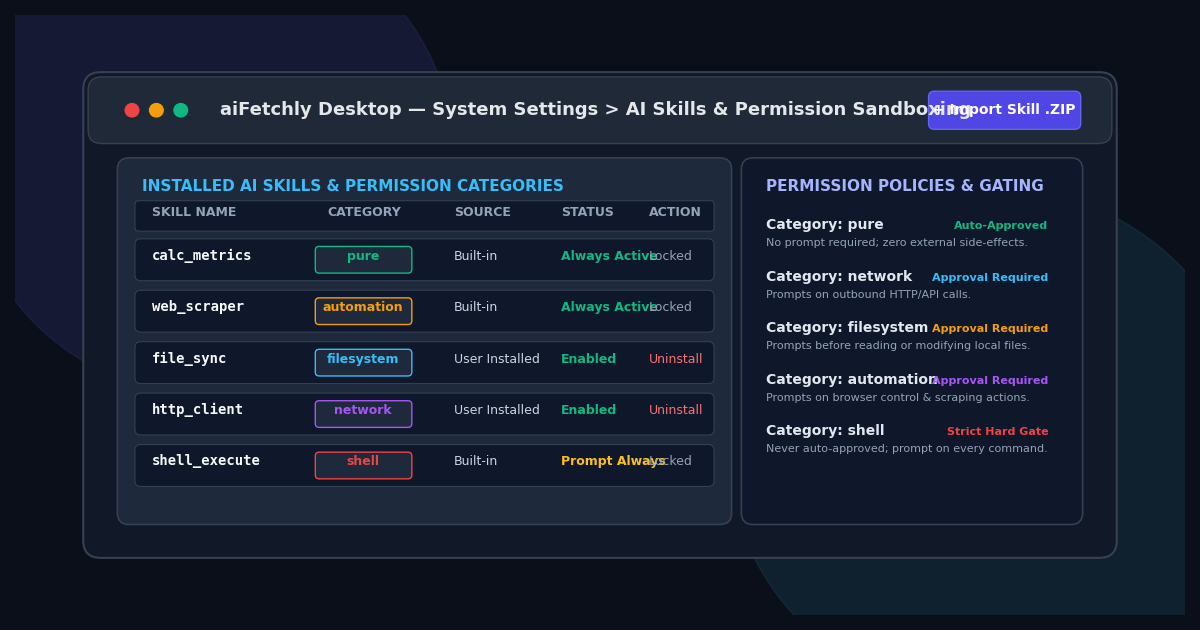
Beyond Unchecked Agent Execution: The Need for Granular Permissions
As autonomous AI agents progress from generating conversational responses to executing operational tasks—extracting web data, writing local files, and orchestrating API pipelines—developers face a fundamental security dilemma. Granting language models blanket access to system APIs invites catastrophic side effects: accidental file overwrites, unvetted external network calls, and unauthorized command execution.
Conversely, sandboxing agents inside rigid web containers disables local workflows entirely. When tools cannot interact with local directories or developer utilities, agent productivity collapses.
AI Fetchly resolves this architectural tension through its native AI Skills framework. Operating within the desktop runtime, AI Skills provide modular tool extensions governed by a deterministic, five-tier permission model. Developers can equip models with specialized capabilities while enforcing interactive confirmation prompts and granular security gates.
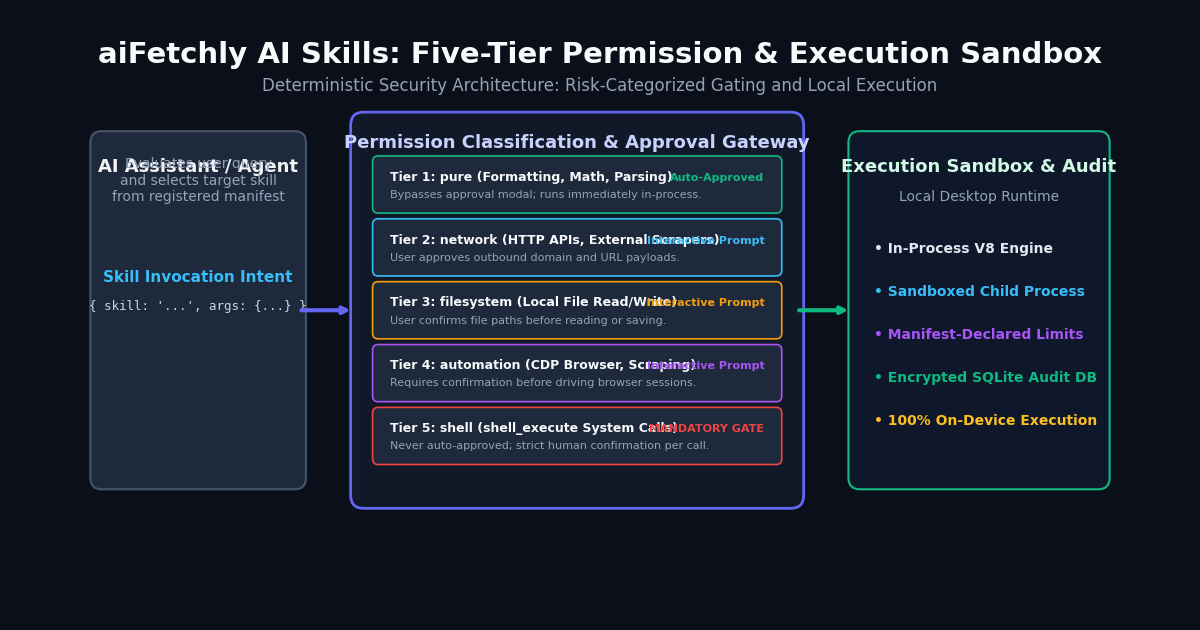
The Five Permission Categories
Every AI Skill declares its capabilities in its manifest. aiFetchly categorizes these declarations into five distinct operational tiers:
pure(General Utilities): In-memory text transformations, mathematical calculations, and schema formatting. Because pure skills produce zero external side effects, they execute immediately without interactive approval prompts.network(HTTP & API Access): External network requests, REST endpoints, and outbound data fetching. The runtime prompts users before dispatching requests to external domains.filesystem(Local File I/O): Reading project source files or writing output reports to local storage. Prompts display target paths before disk mutation occurs.automation(Browser & DOM Scrapers): Headless browser automation via Chrome DevTools Protocol (CDP), site crawling, and dynamic page interaction.shell(System Command Execution): The built-inshell_executecapability. Shell commands are permanently locked behind mandatory human confirmations and can never be auto-approved.
Packaging and Importing Custom Skills
Custom skills are distributed as lightweight .zip archives containing an entry script and a declarative manifest.json:
{
  "name": "csv_data_cleaner",
  "version": "1.0.0",
  "description": "Validates and normalizes lead extraction CSV files.",
  "permissions": ["filesystem"],
  "entry": "dist/index.js"
} Developers import packages via System Settings > Manage Skills by clicking Import Skill. aiFetchly inspects the package manifest, validates declared permissions against entry code, and installs the skill into ~/.aifetchly/skills/.
Runtime Approval Modes and SQLite Auditing
In AI Chat V2, developers calibrate approval behavior based on their operational environment:
- Ask for Approval (Default): Generates interactive approval cards for any
network,filesystem, orautomationtool call, displaying input parameters for inspection. - Approve Always: Automatically authorizes routine network and filesystem calls during trusted batch operations, while maintaining strict hard gates for
shellcommands.
Every invocation, parameter payload, execution duration, and approval decision is committed to a local SQLite database, providing complete visibility into agent activities.
Explore the AI Fetchly Docs to learn how to bundle AI Skills with Subagents and Lifecycle Hooks using the Plugin Manager.
Image Generation Prompts
- Hero Image Prompt: Modern SaaS dark mode interface showing aiFetchly System Settings Manage Skills dashboard, displaying the AI Skills table with permission category badges (pure, network, filesystem, automation, shell), status switches, and Import Skill ZIP button, violet and indigo accents, 8k resolution.
- Body Image Prompt: Detailed technical architecture diagram illustrating the aiFetchly five-tier permission gate, showing AI intent routing through automated approvals, interactive modal prompts, and local workstation execution sandboxes with encrypted SQLite auditing.