AgentOps Guide: AI Agent Observability & Session Replay
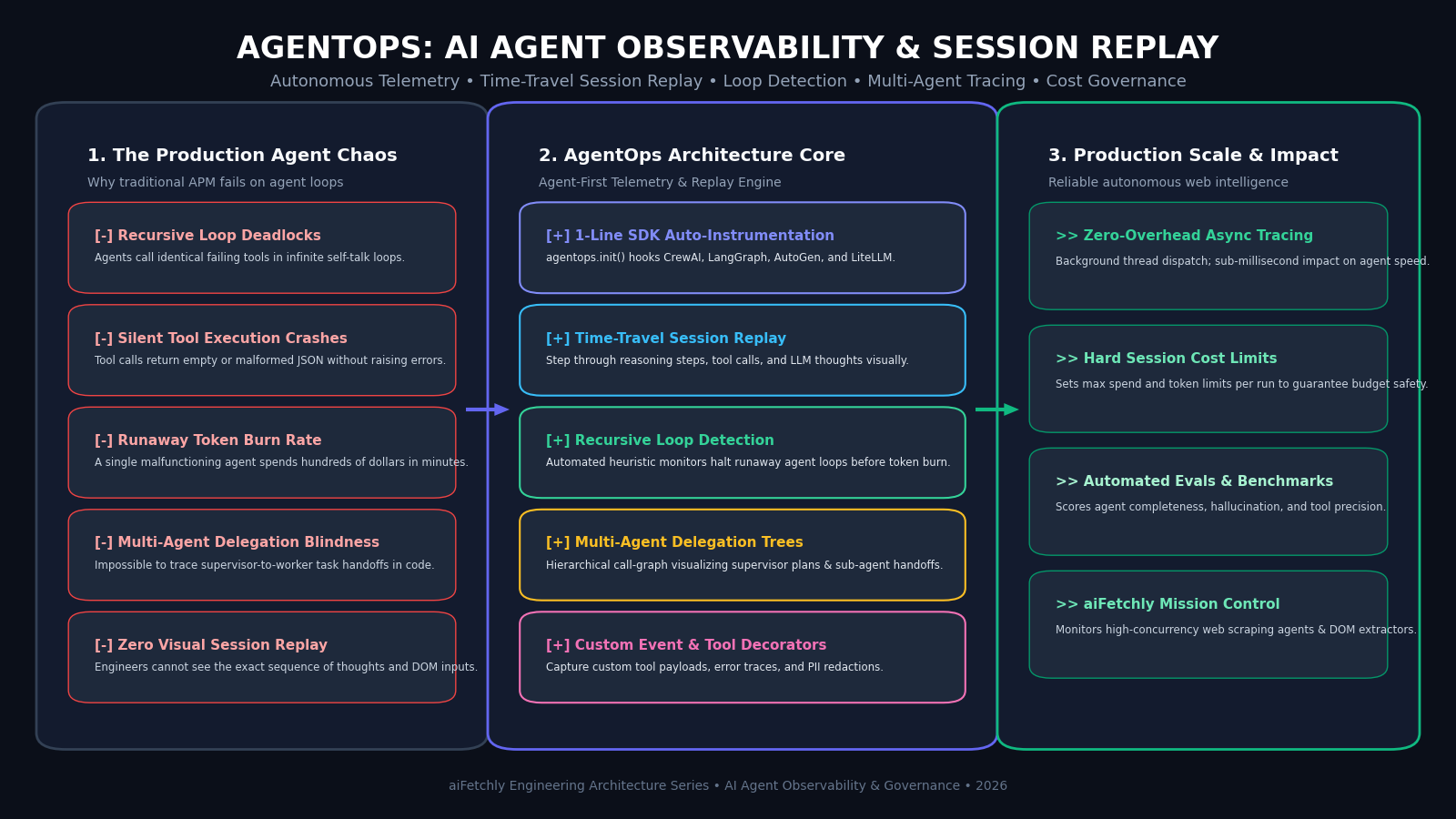
The Problem: The Unobservable Chaos of Autonomous Agents in Production
In modern enterprise automation, automated web scraping swarms, and intelligent research copilots powered by AiFetchly, foundation models have evolved from simple conversational endpoints into autonomous, multi-step agent systems. Instead of answering a single user prompt, agents independently plan tasks, invoke external web crawlers, execute database queries, inspect tool outputs, and delegate sub-goals across specialized agent teams.
However, moving from a deterministic prototype to an enterprise production deployment introduces a staggering engineering hurdle: the total lack of observability into agentic decision loops.
The Autonomous Agent Production Breakdown:
┌─────────────────────────────────────────────────────────────────┐
│ User Objective: "Scrape pricing from target SaaS and audit DB"  │
└────────────────────────────────┬────────────────────────────────┘
                                 │
                                 ▼
┌─────────────────────────────────────────────────────────────────┐
│ Autonomous Agent Execution Loop (The "Black Box")              │
│ Step 1: LLM plans task ──► Tool Call: web_scraper(url)         │
│ Step 2: Tool fails (Cloudflare 403) ──► Observation: "Error"    │
│ Step 3: LLM retries identical tool ──► Observation: "Error"     │
│ Step 4: LLM hallucinate selector ──► Tool Call: db_insert(...) │
│ Step 5: Enters infinite reasoning loop: "I should try again"   │
│ ... (Repeats for 140 iterations over 45 minutes)               │
└────────────────────────────────┬────────────────────────────────┘
                                 │
                                 ▼
┌─────────────────────────────────────────────────────────────────┐
│ The Production Reality:                                         │
│ ❌ Runaway Cloud Bill: $180 spent on a single looped session    │
│ ❌ Silent Tool Failure: Empty data written to production tables │
│ ❌ Deadlocked Workers: Exhausted API rate limits for all users │
│ ❌ Zero Post-Mortem Trace: No record of why the agent failed   │
└─────────────────────────────────────────────────────────────────┘ 1. The Recursive Loop Deadlock and Runaway Token Burn
Unlike traditional software that throws an unhandled exception or terminates on error, Large Language Models (LLMs) operate stochastically:
- When an external API or web scraping tool fails, an agent often attempts to self-correct by re-invoking the same tool with cosmetic prompt variations.
- Without external intervention, agents can enter an infinite self-talk cycle, repeatedly consuming thousands of tokens per step.
- In production environments, a single deadlocked agent can burn through hundreds of dollars in API credits within an hour while exhausting organization-wide model rate limits.
2. Silent Tool Execution Failures and Schema Crashes
Tool calling is the primary mechanism through which agents manipulate the real world:
- Agents emit JSON arguments to call external functions (e.g., executing SQL queries, clicking DOM elements via headless browsers, or sending emails).
- Often, these tools fail silently: returning HTTP error codes, malformed schemas, or empty payloads that the host runtime does not treat as system crashes.
- The model misinterprets the silent failure as a successful execution, confidently hallucinating downstream answers or corrupting production databases with partial records.
3. The Multi-Agent Delegation Black Box
Modern agentic architectures (such as CrewAI or LangGraph) deploy hierarchical networks of agents:
- A “Manager Agent” breaks down a business goal and assigns tasks to specialized workers (e.g., a “Researcher Agent”, “Data Normalizer”, and “Compliance Auditor”).
- When a workflow delivers flawed output, developers face a multi-agent attribution puzzle: Which agent hallucinated? Did the manager provide ambiguous instructions, did the researcher fetch irrelevant data, or did the normalizer strip critical fields?
- Without structured delegation tracking, debugging multi-agent handoffs requires wading through gigabytes of raw, unstructured terminal stdout logs.
4. Why Traditional APM and Request Tracing Fall Short
Traditional Application Performance Monitoring (APM) tools (Datadog, New Relic) and generic OpenTelemetry collectors monitor stateless HTTP transactions:
- They track HTTP status codes, CPU spikes, and database query durations.
- They are blind to agentic cognitive states: they cannot measure prompt-to-reasoning token efficiency, detect circular reasoning patterns, visualize tool delegation trees, or replay what the agent “saw” at step 4.
To bridge this operational gap, the AI community created AgentOps: an observability, session replay, and evaluation platform purpose-built for autonomous AI agents.
The Solution: AgentOps Architecture, Time-Travel Replay & Agent Telemetry
AgentOps treats autonomous agents not as isolated microservices, but as stateful cognitive workflows. By providing single-line auto-instrumentation, visual session replay, and active guardrails, AgentOps gives engineering teams comprehensive visibility into agent performance, reliability, and cost.
AgentOps Unified Observability & Telemetry Architecture:
┌─────────────────────────────────────────────────────────────────┐
│ Autonomous Agent Framework (CrewAI / LangGraph / AutoGen / SDK) │
│ • Instrumented via single-line: agentops.init()                 │
│ • Captures Prompts, Reasoning Thoughts, Tool Calls, and Errors  │
└──────────────────────────────┬──────────────────────────────────┘
                               │ (Non-Blocking Async Event Stream)
                               ▼
┌─────────────────────────────────────────────────────────────────┐
│ AgentOps Ingestion Engine & Circuit Breakers                    │
│ • Recursive Loop & Stagnation Detection Engine                  │
│ • Hard Cost & Token Budget Threshold Enforcement                │
│ • Client-Side PII Masking and Data Redaction Filter             │
└──────────────────────────────┬──────────────────────────────────┘
                               │
        ┌──────────────────────┼──────────────────────┐
        ▼                      ▼                      ▼
┌───────────────┐      ┌───────────────┐      ┌───────────────┐
│ Time-Travel   │      │ Multi-Agent   │      │ Automated     │
│ Session Replay│      │ Delegation    │      │ Evals & Audit │
│ • Step-by-step│      │ Graph         │      │ • Hallucination│
│   execution   │      │ • Supervisor  │      │ • Tool success│
│ • DOM inputs  │      │   hierarchy   │      │ • Benchmarking│
└───────────────┘ └───────────────┘ └───────────────┘ 1. Zero-Friction One-Line SDK Auto-Instrumentation
AgentOps eliminates manual spans and decorator boilerplate. By adding a single initialization call at the entrypoint of your script:
import agentops
agentops.init(api_key="AO_API_KEY", default_tags=["web-scraper", "production"]) AgentOps automatically monkey-patches underlying LLM libraries (OpenAI, Anthropic, LiteLLM, Ollama) and agent frameworks (CrewAI, LangGraph, AutoGen, LlamaIndex). Every prompt, completion, tool call, error, and latency metric is automatically intercepted and shipped asynchronously in background threads with sub-millisecond impact on execution speed.
2. Visual Time-Travel Session Replay
The defining feature of AgentOps is its Time-Travel Session Replay interface:
- Developers can scrub through an agent’s entire operational lifecycle like a video playback.
- At each discrete step, the replay inspector exposes:
- The exact system prompt and accumulated conversation history.
- The model’s hidden chain-of-thought reasoning tokens.
- The exact tool call arguments emitted.
- The raw tool response or error stack trace returned by the environment.
- This allows developers to isolate precisely when and why an agent deviated from its intended plan.
3. Automated Recursive Loop & Stagnation Detection
To prevent runaway billing and frozen workers, AgentOps includes real-time Recursive Loop Detection:
- N-Gram Thought Hashing: The engine continuously calculates semantic similarity hashes across consecutive model reasoning blocks.
- Circuit Breakers: If an agent executes three identical tool calls with identical parameters or produces circular reasoning loops, AgentOps flags a
LOOP_DETECTEDwarning or triggers an automatic circuit breaker that gracefully halts the execution thread.
4. Multi-Agent Delegation Call Graphs (CrewAI & LangGraph)
AgentOps maps complex multi-agent architectures into visual directed acyclic graphs:
- Hierarchical Visualization: Displays the parent-child relationship between Orchestrator / Manager agents and specialized worker agents.
- Context Handoff Tracing: Highlights the exact payloads transferred across agent boundaries, revealing whether downstream errors were caused by corrupted upstream instructions.
5. Real-Time Cost Capping and Enterprise PII Redaction
Production enterprise deployments require strict financial and security guardrails:
- Session Cost Caps: Developers configure hard financial limits (e.g.,
max_cost_per_session=0.50). Once an agent crosses this threshold, further LLM calls are rejected, preventing budget surprises. - Automated PII Scrubbing: Before telemetry leaves the local host, AgentOps’s client-side sanitizer regexes mask sensitive entities—such as social security numbers, credit cards, emails, and API secrets.
Architectural Comparison: AgentOps vs. LangSmith vs. Arize Phoenix vs. Langfuse
The table below contrasts AgentOps with competing AI observability platforms:
| Metric / Capability | Arize Phoenix | Langfuse | LangSmith | AgentOps |
|---|---|---|---|---|
| Core Design Focus | OpenTelemetry RAG Evals | General LLM Tracing | LangChain Ecosystem | Autonomous Agents & Multi-Agent |
| Session Replay GUI | Spans / Trace Waterfall | Trace Tree View | Run Tree View | Time-Travel Step Playback |
| Loop / Deadlock Alerts | Manual Metric Alarms | None | Basic Retry Warnings | Automated Heuristic Loop Detection |
| Multi-Agent Trees | Basic Span Hierarchy | Basic Nesting | Native LangGraph Only | Native CrewAI, AutoGen & LangGraph |
| Instrumentation | Manual Tracers / OpenInference | Decorators / SDK | Environment Variables | 1-Line Auto-Patch (agentops.init()) |
| Cost Capping Guard | Post-Facto Alerts | Budget Dashboards | Token Rate Limits | Hard Runtime Circuit Breakers |
| Deployment Model | Self-Hosted Docker | Self-Hosted & Cloud | Managed SaaS & Cloud | Managed Cloud & Self-Hosted |
Hands-On Implementation: Instrumenting Multi-Agent Workflows with AgentOps
Below is a complete, production-grade guide demonstrating how to install AgentOps, instrument a multi-agent web intelligence workflow with CrewAI, record custom tool executions, and configure safety budget guardrails.
Step 1: Install and Initialize AgentOps
Install AgentOps and CrewAI using pip:
pip install agentops crewai langchain-openai Initialize AgentOps at the top of your application entrypoint:
import os
import agentops

# Initialize AgentOps before importing agent frameworks
agentops.init(
    api_key=os.getenv("AGENTOPS_API_KEY", "your-agentops-api-key"),
    default_tags=["market-research", "v2-production"],
    auto_start_session=False # Allows manual session management
) Step 2: Instrument a Multi-Agent Crew with Custom Tool Tracking
Define specialized agents and custom tool tracking using the @agentops.record_tool decorator:
from crewai import Agent, Task, Crew, Process
from crewai.tools import tool

# Custom tool decorated for granular AgentOps telemetry
@tool("fetch_competitor_pricing")
def fetch_competitor_pricing(target_domain: str) -> str:
    """Scrapes and extracts enterprise subscription pricing from a competitor website."""
    # Simulated scraping logic
    if "error" in target_domain:
        raise ValueError(f"Target {target_domain} blocked crawler via Cloudflare 403.")

    return f"Pricing for {target_domain}: Starter $49/mo, Enterprise $499/mo (Billed Annually)."

# 1. Senior Market Researcher Agent
researcher = Agent(
    role="Principal Competitive Intelligence Analyst",
    goal="Extract and verify live competitor pricing models from the web.",
    backstory="You are an expert market intelligence specialist skilled at automated data extraction.",
    tools=[fetch_competitor_pricing],
    verbose=True
)

# 2. Executive Synthesis Agent
synthesizer = Agent(
    role="Executive Strategy Editor",
    goal="Synthesize extracted pricing data into a structured market summary table.",
    backstory="You transform raw unstructured web intelligence into clean, board-ready executive summaries.",
    verbose=True
)

# Define tasks with clear dependencies
task_research = Task(
    description="Harvest live pricing data for 'acme-corp.com' and 'datadrive-ai.com'.",
    expected_output="Raw pricing tiers and billing terms for both companies.",
    agent=researcher
)

task_report = Task(
    description="Format the extracted pricing tiers into a structured comparison summary.",
    expected_output="A Markdown table comparing tiers, feature limits, and annual discounts.",
    agent=synthesizer
) Step 3: Configure Guardrails, Cost Limits, and Session Replay
Run the agent crew within an explicit AgentOps session, tracking token spend and recording terminal success or failure states:
# Start a monitored session
session = agentops.start_session(tags=["web-extraction-run", "q3-benchmark"])

try:
    print(f"AgentOps Session Initialized: {session.session_id}")

    # Build and execute the Crew
    market_crew = Crew(
        agents=[researcher, synthesizer],
        tasks=[task_research, task_report],
        process=Process.sequential,
        verbose=True
    )

    # Execute workflow
    result = market_crew.kickoff()
    print("\n--- FINAL CREW DELIVERABLE ---")
    print(result)

    # Record successful completion in AgentOps
    agentops.end_session(
        end_state="Success",
        end_state_reason="Extracted competitor pricing and generated summary report successfully."
    )

except Exception as e:
    print(f"Workflow encountered fatal error: {e}")
    # Record failure with error stack trace in AgentOps dashboard
    agentops.end_session(
        end_state="Fail",
        end_state_reason=str(e)
) When this script executes, AgentOps captures the entire session lifecycle:
- Navigating to the AgentOps dashboard displays the Time-Travel Session Replay.
- Developers can inspect each tool execution of
fetch_competitor_pricing, measuring execution latency and argument payloads. - If an agent begins looping or failing selectors, AgentOps flags the anomalous run in real-time.
Production Deployment with aiFetchly
In automated data extraction, distributed web crawlers, and high-frequency market intelligence pipelines powered by AiFetchly, multi-agent systems are deployed to parse complex web pages, validate schemas, and normalize heterogeneous datasets.
aiFetchly Enterprise Intelligence Integration with AgentOps:
┌─────────────────────────────────────────────────────────────────┐
│ 1. Autonomous Web Extraction Swarms                             │
│ • aiFetchly orchestrates multi-agent crews for deep site crawls │
│ • Dispatches headless browsers, parses DOM, extracts JSON       │
├─────────────────────────────────────────────────────────────────┤
│ 2. Real-Time AgentOps Telemetry Stream                          │
│ • Monitored via background async AgentOps instrumentation       │
│ • Tracks token burn, scraping tool errors, and selector drift   │
├─────────────────────────────────────────────────────────────────┤
│ 3. Automated Circuit Breakers & Quality Gateways                │
│ • Halts looping agents instantly if anti-bot defenses trigger   │
│ • Prevents runaway billing across thousands of concurrent jobs  │
├─────────────────────────────────────────────────────────────────┤
│ 4. Verified Enterprise Knowledge Delivery                       │
│ • Only schema-validated, audited agent outputs enter production │
│ • 100% auditable time-travel replays for regulatory compliance  │
└─────────────────────────────────────────────────────────────────┘ - Elimination of Runaway Web Scraping Costs: High-concurrency data collection workflows running on aiFetchly enforce strict AgentOps session cost limits, ensuring that stubborn target websites never trigger infinite retry loops or unexpected cloud API invoices.
- Instant Debugging of Anti-Bot Obstacles: When a target website updates its DOM structure or introduces dynamic bot challenges, operators open the AgentOps Time-Travel Replay to inspect the exact HTML snippet the agent encountered, diagnosing extraction failures in seconds.
- Auditable Enterprise Governance: For organizations conducting financial diligence or market benchmarking, AgentOps maintains an immutable, timestamped record of every model decision, tool input, and raw web observation.
To discover how aiFetchly combines autonomous web extraction agents with production-grade AI observability architectures, explore our AiFetchly Documentation or review our AiFetchly Pricing.