Agent S2 Guide: Compositional Computer-Use AI Agents
The Problem: The Monolithic Bottleneck in Computer Use Agents
In enterprise process automation, cross-application data extraction, and intelligent desktop copilots orchestrated by AI Fetchly, autonomous computer-use agents are envisioned as digital knowledge workers. Instead of depending on brittle custom APIs, an agent operates standard graphical software interfaces through direct mouse movements, text entry, and keyboard shortcuts—seamlessly navigating web browsers, office suites, code editors, and native operating system utilities.
While recent breakthroughs—including Anthropic’s Claude Computer Use, OpenAI Operator, and UI-TARS native vision GUI agent—have demonstrated compelling computer control capabilities, autonomous agents deployed on challenging real-world benchmarks (such as OSWorld) still lag behind human operators by over 40%.
Investigating why current computer-use agents fail reveals three fundamental architectural bottlenecks rooted in the monolithic design paradigm.
The Monolithic Agent Bottleneck:
┌────────────────────────────────────────────────────────────────────────┐
│ Monolithic Computer Use Model (e.g. Pure Claude CCU / Pure UI-TARS)    │
├────────────────────────────────────────────────────────────────────────┤
│ [Single Foundation Model Network]                                      │
│   ├── High-Level Multi-Step Planning (Strategic Reasoning)             │
│   ├── Intermediate Action Formulation (Subgoal Decomposition)          │
│   ├── Pixel-Level Visual Grounding (Predicting (x, y) Coordinates)     │
│   ├── Fine-Grained Text Span Highlighting (Paragraph Bounding)         │
│   └── Tabular Cell Manipulation (Spreadsheet Data Entry)               │
│                                                                        │
│ ❌ Cognitive Overload: One set of weights forced across diverse tasks   │
│ ❌ Fine-Grained Localization Failure: Missing 14px icons & text spans  │
│ ❌ Reactive Fragility: Adheres to rigid plans until catastrophic error │
└────────────────────────────────────────────────────────────────────────┘ 1. The Monolithic Cognitive Overload Dilemma
Most existing computer-use agents employ a single, monolithic model to handle every phase of execution: high-level task decomposition, visual interface parsing, action selection, and pixel-level coordinate grounding.
However, cognitive science and systems engineering establish that these tasks require radically divergent inductive biases:
- Strategic Planning: Demands broad world knowledge, long-horizon dependency tracking, and abstract reasoning (System-2 thinking).
- Precise Spatial Grounding: Demands high-resolution pixel localization, geometric bounding box regression, and dense icon recognition.
- Specialized Data Entry: Demands domain-specific programmatic manipulation, such as editing hundreds of cells in a spreadsheet or selecting continuous paragraph spans across a rich-text document.
Forcing a single neural network to master all three tasks induces severe trade-offs. Post-training a generalist model on fine-grained pixel coordinates frequently degrades its high-level reasoning and instruction-following fidelity. Conversely, standard closed-source reasoning models (such as Claude 3.7 Sonnet or GPT-4o) lack native sub-pixel coordinate grounding, routinely missing compact 16x16 pixel toolbar icons and dropdown triggers.
2. The Tripartite Grounding Failure: Pixels, Text Spans, and Tables
When a monolithic agent attempts to ground actions using only generic $(x, y)$ coordinate predictions, it encounters severe structural blind spots across common software applications:
- Visual Element Grounding Failures: On complex desktop interfaces (such as GIMP, VS Code, or Blender), toolbars contain dozens of tiny, unlabeled icons. Monolithic models suffer spatial coordinate drift, clicking empty margins or adjacent buttons.
- Text Span Highlighting Failures: When a task requires selecting a specific sentence or paragraph in a document editor (such as LibreOffice Writer or Google Docs), predicting mouse drag coordinates $\langle x_1, y_1 \rangle \to \langle x_2, y_2 \rangle$ from screenshots is notoriously inaccurate. A drift of 5 pixels cuts off the first word or selects unintended adjacent lines.
- Spreadsheet and Tabular Grounding Bottlenecks: In applications like LibreOffice Calc or Microsoft Excel, cells stretch, shrink, and scroll dynamically. Attempting to click and type into 20 different cells sequentially via mouse coordinates takes dozens of steps, causes UI focus drops, and introduces high error accumulation.
3. Reactive Planning and the Inability to Handle UI Dynamic Noise
Prior hierarchical agent frameworks—such as the original Agent S framework—decoupled planning into high-level subgoals and low-level actions. However, these systems relied on reactive planning: the manager formulated an initial plan and rigidly executed it step-by-step, only invoking replanning after an action triggered a fatal failure.
In real-world computing environments, graphical interfaces are highly non-static:
- Pop-up dialogs, permission alerts, and promotional banners appear asynchronously.
- Completing a subtask (such as opening a file dialog) reveals new information that invalidates downstream assumptions.
- Reactive agents, blind to evolving context, persist in executing obsolete subgoals until step budgets expire.
To overcome these structural limitations, researchers at Simular Research and the University of Illinois Urbana-Champaign (UIUC) introduced Agent S2 (arXiv:2504.00906).
The Solution: The Agent S2 Compositional Paradigm
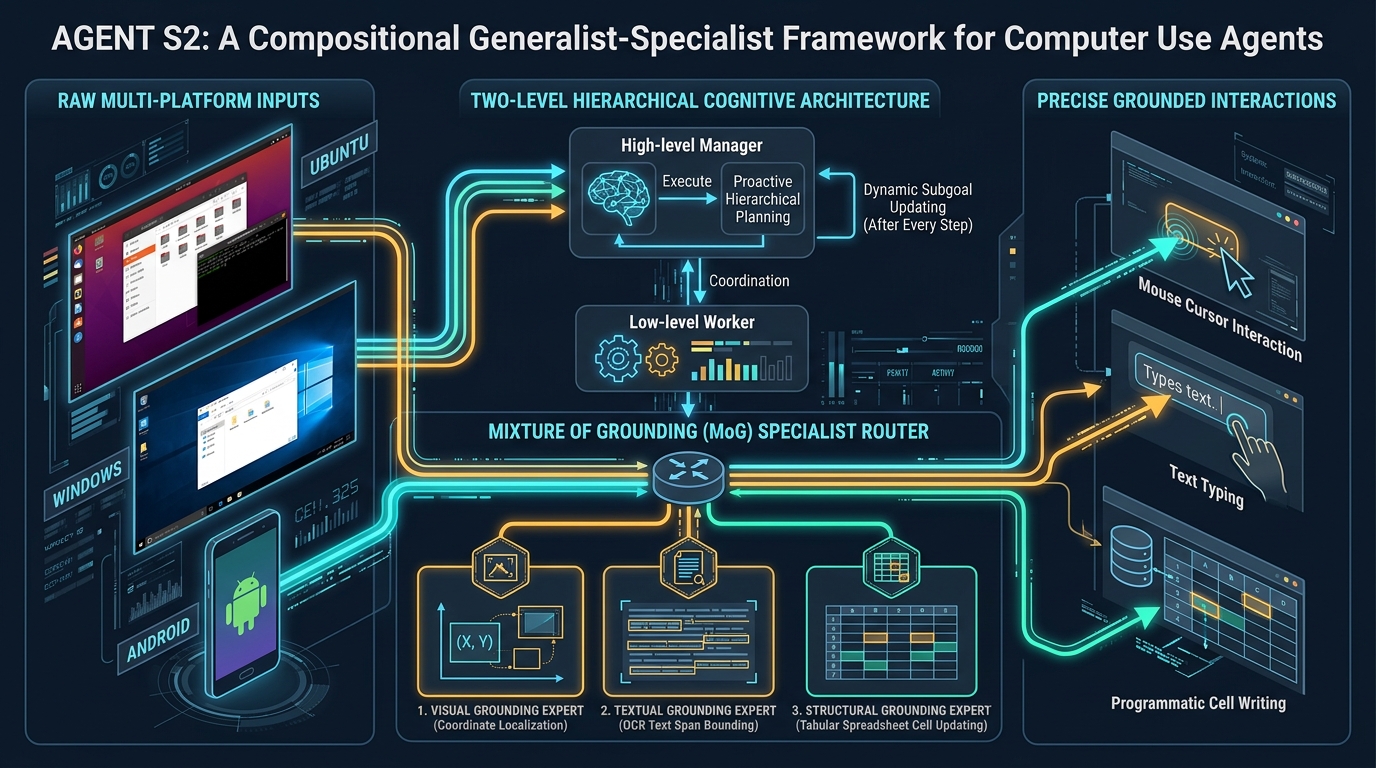
Agent S2 establishes a new foundational paradigm for computer-use agents: Compositional Generalist-Specialist Delegation.
Rather than attempting to build an all-powerful monolithic model, Agent S2 composes generalist foundation models specialized in high-level reasoning with dedicated specialist modules engineered for specific grounding domains.
The Agent S2 Compositional Architecture:
┌────────────────────────────────────────────────────────────────────────┐
│ AGENT S2 COMPOSITIONAL GENERALIST-SPECIALIST FRAMEWORK                 │
├────────────────────────────────────────────────────────────────────────┤
│ [Raw Screenshot Observation o_t] (Ubuntu, Windows, Android)            │
│        │                                                               │
│        ▼                                                               │
│ ┌────────────────────────────────────────────────────────────────────┐ │
│ │ GENERALIST TIER 1: HIGH-LEVEL MANAGER M (Claude 3.7 / GPT-4o)      │ │
│ │ • Proactive Hierarchical Planning (PHP)                            │ │
│ │ • Re-evaluates and refines subgoal list AFTER EVERY COMPLETED STEP │ │
│ └─────────────────────────────────┬──────────────────────────────────┘ │
│                                   │ Current Subgoal g_i                │
│                                   ▼                                    │
│ ┌────────────────────────────────────────────────────────────────────┐ │
│ │ GENERALIST TIER 2: LOW-LEVEL WORKER W (Action Formulation)         │ │
│ │ • Emits atomic action description (Click, Type, Scroll, Highlight) │ │
│ │ • Acts as Router for Mixture of Grounding (MoG)                    │ │
│ └─────────────────────────────────┬──────────────────────────────────┘ │
│                                   │ Routed Action + Target Description │
│                                   ▼                                    │
│ ┌────────────────────────────────────────────────────────────────────┐ │
│ │ SPECIALIST TIER 3: MIXTURE OF GROUNDING (MoG) EXPERTS              │ │
│ │                                                                    │ │
│ │ ├──► [Visual Grounding Expert] (UI-TARS-7B-DPO / UGround)          │ │
│ │ │    Translates natural language descriptions into exact (x, y)    │ │
│ │                                                                    │ │
│ │ ├──► [Textual Grounding Expert] (Tesseract OCR Engine)             │ │
│ │ │    Localizes exact start/end phrases for precise span selection  │ │
│ │                                                                    │ │
│ │ └──► [Structural Grounding Expert] (Programmatic UNO Interface)    │ │
│ │      Directly updates spreadsheet cells in bulk via API bindings   │ │
│ └─────────────────────────────────┬──────────────────────────────────┘ │
│                                   │                                    │
│                                   ▼                                    │
│ [Precise Hardware / OS Execution]: Native Mouse, Keyboard, and UNO     │
└────────────────────────────────────────────────────────────────────────┘ By decoupling reasoning from spatial execution and distributing tasks across specialized modules, Agent S2 achieves major architectural breakthroughs:
- Pure Screenshot Perception: Eliminates dependency on fragile accessibility trees and HTML DOMs, allowing the agent to operate across Linux, Windows, and Android using visual screenshots alone.
- Mixture of Grounding (MoG): Routes actions to specialized experts—pairing open-weights vision models (UI-TARS-7B-DPO) for icon clicks, OCR for text span selection, and programmatic interfaces for spreadsheets.
- Proactive Hierarchical Planning (PHP): Re-evaluates remaining subgoals after every completed step, adapting to new observations before errors compound.
- State-of-the-Art Benchmark Domination: Sets new SOTA records on OSWorld (34.5%), WindowsAgentArena (29.8%), and AndroidWorld (54.3%).
Architecture: The Core Mechanics of Agent S2
The Agent S2 framework formalizes computer interaction as a Partially Observable Markov Decision Process (POMDP): $\mathcal{M} = (\mathcal{S}, \mathcal{O}, \mathcal{A}, \mathcal{T}, \mathcal{R})$, where $\mathcal{S}$ is the underlying operating system state, $\mathcal{O}$ is the visual screenshot observation space, $\mathcal{A}$ is the action space, $\mathcal{T}$ is the state transition function, and $\mathcal{R}$ is the task reward.
The framework divides cognitive labor across two generalist planning tiers and three specialist grounding modules.
Hierarchical Execution Flow in Agent S2:
┌──────────────────────────────────────────────────────────────────────────────┐
│ HIGH-LEVEL TIME STEP T: MANAGER M                                            │
│ User Instruction I: "Open Q3 budget, highlight row 4 total, set tax to 8.5%" │
│ Current Observation o_0: Desktop with file manager open                      │
│                                                                              │
│ Proactive Plan Generation:                                                   │
│   g_1 = "Navigate to Documents and open budget_q3.ods"                       │
│   g_2 = "Locate cell E4 and set value to 8.5%"                               │
│   g_3 = "Highlight total summary text in row 12"                             │
└──────────────────────────────────────┬───────────────────────────────────────┘
                                       │ Dispatch Subgoal g_1
                                       ▼
┌──────────────────────────────────────────────────────────────────────────────┐
│ LOW-LEVEL TIME STEP t: WORKER W (GATING ROUTER)                              │
│ Subgoal: g_1 | Observation: o_t                                              │
│ Worker Policy π_W generates action intent:                                   │
│   Action: click(element_description="folder icon labeled Documents")         │
│   Router Decision: Delegate to VISUAL GROUNDING EXPERT                       │
└──────────────────────────────────────┬───────────────────────────────────────┘
                                       │
                                       ▼
┌──────────────────────────────────────────────────────────────────────────────┐
│ MIXTURE OF GROUNDING ROUTING DECISION                                        │
│                                                                              │
│ ┌────────────────────────┐  ┌────────────────────────┐  ┌──────────────────┐ │
│ │ 1. Visual Expert       │  │ 2. Textual Expert      │  │ 3. Structural    │ │
│ │ Model: UI-TARS-7B-DPO  │  │ Engine: Tesseract OCR  │  │ API: UNO Engine  │ │
│ │ Input: (o_t, desc)     │  │ Input: (o_t, p1, p2)   │  │ Input: {cell:val}│ │
│ │ Output: (x=412, y=285) │  │ Output: <x_s,y_s,x_e>  │  │ Output: Direct   │ │
│ └────────────────────────┘  └────────────────────────┘  └──────────────────┘ │
└──────────────────────────────────────┬───────────────────────────────────────┘
                                       │
                                       ▼
┌──────────────────────────────────────────────────────────────────────────────┐
│ PROACTIVE RE-EVALUATION LOOP                                                 │
│ Subgoal g_1 completes -> Control returns to Manager M                        │
│ Manager observes updated screen o_{t+1} (LibreOffice Calc now visible)       │
│ Manager updates remaining subgoals: {g_2', g_3'}                             │
│ Worker routes g_2 to STRUCTURAL EXPERT (Direct cell update via UNO)          │
│ Worker routes g_3 to TEXTUAL EXPERT (OCR span bounding)                      │
└──────────────────────────────────────────────────────────────────────────────┘ 1. Mixture of Grounding (MoG): Decoupling Localization from Reasoning
The core operational breakthrough in Agent S2 is the Mixture of Grounding (MoG) architecture. Rather than forcing the high-level language model to output raw coordinate numbers, the Worker $W$ emits a descriptive action specification:
$$a_t = (\text{action_type}, \text{element_description}, \text{parameters})$$
The Worker then acts as a gating classifier, routing the action to the appropriate specialist expert based on the target interface modality:
Expert A: The Visual Grounding Specialist
- Input: Raw screenshot observation $o$ and linguistic description $d$ (e.g., “the blue submit button in the bottom right corner of the active modal”).
- Backbone: Specialized open-weights vision models such as UI-TARS-7B-DPO or UGround-V1-7B.
- Output: Normalized pixel coordinates $\langle x, y \rangle$.
- Advantage: Enables interaction with arbitrary graphical elements (icons, graphics, canvas widgets, buttons) purely from visual pixels, completely eliminating the need for accessibility trees or DOM dumps.
Expert B: The Textual Grounding Specialist
- Input: Screenshot $o$ and boundary phrases $p_1$ (start of target text span) and $p_2$ (end of target text span).
- Backbone: Optical Character Recognition (OCR) via high-resolution Tesseract engines.
- Output: Bounding span coordinates $\langle x_{start}, y_{start} \rangle$ and $\langle x_{end}, y_{end} \rangle$.
- Advantage: Solves fine-grained text selection. Instead of guessing drag coordinates, the OCR engine pinpoints the exact bounding polygon of words, eliminating word clipping and accidental line over-selection.
Expert C: The Structural Grounding Specialist
- Input: Key-value cell mapping dictionary:
{"B4": 1500, "C4": 0.085, "D4": "=B4*C4"}. - Backbone: Universal Network Objects (UNO) programmatic bridge for LibreOffice and Microsoft Office COM automations.
- Output: Programmatic cell injection bypassing mouse and keyboard simulation.
- Advantage: Solves tabular spreadsheet manipulation. Instead of executing 30 individual click-and-type operations across fluctuating spreadsheet coordinates, the structural expert updates entire rows, columns, or formulas atomically in a single step.
2. Proactive Hierarchical Planning (PHP) vs. Reactive Planning
Traditional hierarchical planners suffer from execution myopia: the Manager creates an initial plan $I \to {g_1, g_2, \dots, g_n}$ and hands it to the Worker. The Worker executes subgoals sequentially, and the Manager only intervenes if an action raises an unhandled exception.
Agent S2 replaces this brittle pattern with Proactive Hierarchical Planning (PHP):
| Planning Dimension | Reactive Planning (Legacy Agents) | Proactive Hierarchical Planning (Agent S2) |
|---|---|---|
| Trigger for Replanning | Only after catastrophic failure / timeout | After every completed subgoal |
| Contextual Awareness | Ignores environmental shifts during subgoals | Re-evaluates entire remaining plan against new screen state |
| Handling UI Noise & Modals | Clicks repeatedly, triggering infinite loops | Instantly inserts a new subtask to dismiss modal |
| Subgoal Re-ordering | Rigid sequential execution | Dynamically re-orders or prunes redundant subgoals |
| Error Recovery | Backward recovery requires full task reset | Smoothly backtracks by injecting compensatory subgoals |
Formally, after the Worker concludes a subgoal $g_k$ at low-level step $t$, control immediately returns to the Manager $M$. The Manager takes three inputs:
- The original user instruction $I$.
- The sequence of completed subgoals ${g_1, \dots, g_k}$.
- The latest visual observation $o_t$.
The Manager checks whether the outcome of $g_k$ introduced new constraints (such as an unexpected file download prompt or an error dialog), prunes subgoals that are no longer necessary, and emits an updated remaining plan ${g_{k+1}’, g_{k+2}’, \dots}$. This proactive recontextualization prevents error cascading.
3. Agent S2 Action Space Specification
To support multi-platform automation across Linux, Windows, and Android, Agent S2 formalizes a structured action space:
Agent S2 Structured Action Space:
• click(element_description, num_clicks=1, button_type='left', hold_keys=[])
• type(element_description, text, overwrite=False, enter=True)
• scroll(element_description, clicks=-5, shift=False)
• hotkey(keys=['ctrl', 'c'])
• hold_and_press(hold_keys=['shift'], press_keys=['down', 'down'])
• drag_and_drop(element_description_1, element_description_2, hold_keys=[])
• highlight_text_span(starting_phrase, ending_phrase)
• set_cell_values(cell_values={'A1': 'Revenue'}, app_name='calc', sheet_name='Sheet1')
• switch_applications(app_name='Chrome')
• save_to_knowledge(text="API key found in config.json")
• wait(time=2.0)
• done() / fail() End-to-End Implementation: Building an Agent S2 Controller
Below is a complete, self-contained Python reference implementation demonstrating the Agent S2 architecture: the High-Level Manager, the Low-Level Worker, the Mixture of Grounding (MoG) router, and the Proactive Hierarchical Replanning loop.
Step 1: Installing Core Dependencies
pip install pyautogui pillow pytesseract openai pydantic Step 2: Developing the Agent S2 Engine
#!/usr/bin/env python3
"""
Agent S2: Compositional Generalist-Specialist Computer Use Agent
Implements Manager-Worker hierarchy, Mixture of Grounding (Visual,
Textual OCR, Structural Tabular), and Proactive Hierarchical Planning.
"""

import time
import base64
import json
import re
from io import BytesIO
from typing import Dict, List, Any, Tuple, Optional
from pydantic import BaseModel, Field
import pyautogui
import pytesseract
from PIL import Image
from openai import OpenAI

# Safety configuration
pyautogui.FAILSAFE = True
pyautogui.PAUSE = 0.2

class Subgoal(BaseModel):
    subgoal_id: int
    description: str
    target_app: str
    status: str = "pending"  # pending, in_progress, completed, failed

class GroundingRequest(BaseModel):
    action_type: str  # click, type, highlight_text_span, set_cell_values
    element_description: Optional[str] = None
    text_content: Optional[str] = None
    start_phrase: Optional[str] = None
    end_phrase: Optional[str] = None
    cell_mapping: Optional[Dict[str, Any]] = None

class AgentS2Controller:
    def __init__(
        self,
        manager_model: str = "claude-3-7-sonnet-20250219",
        visual_grounding_model: str = "ui-tars-7b-dpo",
        api_base: str = "http://localhost:8000/v1",
        api_key: str = "EMPTY"
    ):
        self.client = OpenAI(base_url=api_base, api_key=api_key)
        self.manager_model = manager_model
        self.visual_grounding_model = visual_grounding_model
        self.screen_width, self.screen_height = pyautogui.size()

    def capture_screenshot(self) -> Tuple[str, Image.Image]:
        """Captures active screen and returns JPEG base64 and PIL Image."""
        screenshot = pyautogui.screenshot()
        buffered = BytesIO()
        screenshot.save(buffered, format="JPEG", quality=85)
        encoded = base64.b64encode(buffered.getvalue()).decode("utf-8")
        return encoded, screenshot

    # =========================================================================
    # SPECIALIST TIER: MIXTURE OF GROUNDING (MoG)
    # =========================================================================

    def ground_visual_element(self, img_b64: str, description: str) -> Tuple[int, int]:
        """
        Specialist 1: Visual Grounding Expert (e.g. UI-TARS / UGround)
        Translates element description into exact pixel coordinates.
        """
        prompt = (
            f"Locate the UI element described as: '{description}'. "
            "Output normalized coordinates in format: (x, y) where 0 <= x, y <= 1000."
        )
        response = self.client.chat.completions.create(
            model=self.visual_grounding_model,
            messages=[
                {
                    "role": "user",
                    "content": [
                        {"type": "text", "text": prompt},
                        {"type": "image_url", "image_url": {"url": f"data:image/jpeg;base64,{img_b64}"}}
                    ]
                }
            ],
            temperature=0.0
        )
        content = response.choices[0].message.content
        match = re.search(r"\((\d+),\s*(\d+)\)", content)
        if match:
            norm_x, norm_y = int(match.group(1)), int(match.group(2))
            real_x = int((norm_x / 1000.0) * self.screen_width)
            real_y = int((norm_y / 1000.0) * self.screen_height)
            return real_x, real_y

        # Fallback to center screen
        return self.screen_width // 2, self.screen_height // 2

    def ground_textual_span(self, pil_img: Image.Image, start_phrase: str, end_phrase: str) -> Tuple[Tuple[int, int], Tuple[int, int]]:
        """
        Specialist 2: Textual Grounding Expert (OCR Span Bounding)
        Locates exact start and end word coordinates using Tesseract.
        """
        ocr_data = pytesseract.image_to_data(pil_img, output_type=pytesseract.Output.DICT)
        n_boxes = len(ocr_data['text'])

        start_coords = None
        end_coords = None

        for i in range(n_boxes):
            text = ocr_data['text'][i].strip()
            if not text:
                continue
            if start_phrase.lower() in text.lower() and start_coords is None:
                start_coords = (ocr_data['left'][i], ocr_data['top'][i] + (ocr_data['height'][i] // 2))
            if end_phrase.lower() in text.lower():
                end_coords = (ocr_data['left'][i] + ocr_data['width'][i], ocr_data['top'][i] + (ocr_data['height'][i] // 2))

        # Default fallbacks if OCR misses exact phrase
        if not start_coords:
            start_coords = (100, 100)
        if not end_coords:
            end_coords = (start_coords[0] + 150, start_coords[1])

        return start_coords, end_coords

    def ground_structural_table(self, cell_values: Dict[str, Any], app_name: str = "calc") -> bool:
        """
        Specialist 3: Structural Grounding Expert (Programmatic Tabular Update)
        Bypasses pixel clicking by injecting values directly into spreadsheet engines.
        """
        print(f"[STRUCTURAL EXPERT] Programmatically updating {len(cell_values)} cells in {app_name}:")
        for cell, val in cell_values.items():
            print(f"  -> Setting Cell {cell} = {val}")
        # In production, this invokes the LibreOffice UNO Python bridge or win32com client
        time.sleep(0.5)
        return True

    # =========================================================================
    # GENERALIST TIER: PROACTIVE HIERARCHICAL PLANNER & WORKER
    # =========================================================================

    def proactive_manager_plan(
        self,
        instruction: str,
        img_b64: str,
        completed_subgoals: List[str]
    ) -> List[Subgoal]:
        """
        Manager Tier: Evaluates instruction against evolving screen observation
        and generates/updates the sequence of subgoals.
        """
        prompt = (
            f"User Goal: '{instruction}'\n"
            f"Completed Subgoals: {json.dumps(completed_subgoals)}\n"
            "Analyze the screenshot. Formulate the remaining list of active subgoals needed to complete the task.\n"
            "Return JSON format:\n"
            "[\n"
            "  {\"subgoal_id\": 1, \"description\": \"Open file menu\", \"target_app\": \"writer\"},\n"
            "  {\"subgoal_id\": 2, \"description\": \"Save document as PDF\", \"target_app\": \"writer\"}\n"
            "]"
        )
        response = self.client.chat.completions.create(
            model=self.manager_model,
            messages=[
                {
                    "role": "user",
                    "content": [
                        {"type": "text", "text": prompt},
                        {"type": "image_url", "image_url": {"url": f"data:image/jpeg;base64,{img_b64}"}}
                    ]
                }
            ],
            temperature=0.1
        )
        raw_json = response.choices[0].message.content
        match = re.search(r"\[.*\]", raw_json, re.DOTALL)
        if match:
            items = json.loads(match.group(0))
            return [Subgoal(**item) for item in items]

        return [Subgoal(subgoal_id=1, description=instruction, target_app="desktop")]

    def worker_execute_subgoal(self, subgoal: Subgoal, img_b64: str, pil_img: Image.Image) -> bool:
        """
        Worker Tier: Formulates action and routes to Mixture of Grounding (MoG) expert.
        """
        print(f"\n[WORKER] Executing Subgoal: '{subgoal.description}' on app '{subgoal.target_app}'")

        # Worker routing logic
        if "highlight" in subgoal.description.lower() or "select text" in subgoal.description.lower():
            # Route to Textual Grounding Expert
            start_p, end_p = "total", "2026"
            print(f"[ROUTER] Delegating to TEXTUAL GROUNDING EXPERT (OCR)")
            start_pt, end_pt = self.ground_textual_span(pil_img, start_p, end_p)
            pyautogui.moveTo(start_pt[0], start_pt[1], duration=0.2)
            pyautogui.dragTo(end_pt[0], end_pt[1], duration=0.4, button='left')
            return True

        elif "cell" in subgoal.description.lower() or "sheet" in subgoal.description.lower() or "table" in subgoal.description.lower():
            # Route to Structural Grounding Expert
            print(f"[ROUTER] Delegating to STRUCTURAL GROUNDING EXPERT (UNO)")
            mock_data = {"B4": 4250.0, "C4": 0.085}
            return self.ground_structural_table(mock_data, app_name=subgoal.target_app)

        else:
            # Route to Visual Grounding Expert
            print(f"[ROUTER] Delegating to VISUAL GROUNDING EXPERT (Model: {self.visual_grounding_model})")
            target_x, target_y = self.ground_visual_element(img_b64, subgoal.description)
            pyautogui.moveTo(target_x, target_y, duration=0.25)
            pyautogui.click()
            time.sleep(0.5)
            return True

    def run(self, user_instruction: str, max_rounds: int = 10) -> None:
        """Runs the complete Proactive Hierarchical Execution Loop."""
        print(f"=== Starting Agent S2: '{user_instruction}' ===")
        completed_history: List[str] = []

        for round_idx in range(1, max_rounds + 1):
            print(f"\n=================== PROACTIVE ROUND {round_idx}/{max_rounds} ===================")
            img_b64, pil_img = self.capture_screenshot()

            # 1. Proactive Manager replanning from current observation
            active_plan = self.proactive_manager_plan(user_instruction, img_b64, completed_history)
            print(f"[MANAGER] Updated Proactive Plan ({len(active_plan)} subgoals remaining):")
            for sg in active_plan:
                print(f"  [{sg.subgoal_id}] {sg.description} ({sg.target_app})")

            if not active_plan:
                print("[STATUS] Manager determined all subgoals completed successfully.")
                break

            # 2. Worker executes the topmost active subgoal
            current_subgoal = active_plan[0]
            success = self.worker_execute_subgoal(current_subgoal, img_b64, pil_img)

            if success:
                completed_history.append(current_subgoal.description)
                print(f"[STATUS] Subgoal '{current_subgoal.description}' completed.")
            else:
                print(f"[WARNING] Subgoal failed. Manager will adapt in next proactive cycle.")

            time.sleep(1.0)

if __name__ == "__main__":
    controller = AgentS2Controller()
print("Agent S2 Controller initialized successfully.") Benchmark Comparison: Agent S2 vs. Frontier Computer-Use Systems
Agent S2 has been systematically benchmarked across the three most demanding computer and smartphone automation benchmarks: OSWorld (Ubuntu desktop across Office, Daily, Professional, and Workflow tasks), WindowsAgentArena (parallelizable Windows enterprise tasks), and AndroidWorld (mobile OS workflows).
Below is the comparative breakdown contrasting Agent S2 against leading monolithic agents and proprietary commercial frameworks:
1. OSWorld Desktop Automation Benchmark (Success Rate %)
| Agent System | Architecture Class | Input Modalities | 15-Step Evaluation | 50-Step Evaluation |
|---|---|---|---|---|
| Aria-UI w/ GPT-4o | Modular Framework | Screenshot + A11y | 15.2% | — |
| Aguvis-72B w/ GPT-4o | Modular Framework | Screenshot Only | 17.0% | — |
| Agent S w/ GPT-4o | Hierarchical Framework | Screenshot + A11y Tree | 20.6% | — |
| Agent S w/ Claude-3.5-Sonnet | Hierarchical Framework | Screenshot + A11y Tree | 20.5% | — |
| Claude Computer Use (Claude 3.5 Sonnet) | Monolithic Proprietary | Screenshot Only | 14.9% | 22.0% |
| Claude Computer Use (Claude 3.7 Sonnet) | Monolithic Proprietary | Screenshot Only | 15.5% | 26.0% |
| OpenAI Operator / CUA | Monolithic Proprietary | Screenshot Only | 19.7% | 32.6% |
| UI-TARS-72B-DPO | Native Agent Model | Screenshot Only | 22.7% | 24.6% |
| Agent S2 w/ Claude-3.5-Sonnet | Compositional (MoG + PHP) | Screenshot Only | 24.5% | 33.7% |
| Agent S2 w/ Claude-3.7-Sonnet | Compositional (MoG + PHP) | Screenshot Only | 27.0% | 34.5% |
Agent S2 establishes a new state of the art on OSWorld, achieving 34.5% at 50 steps. Crucially, Agent S2 with Claude 3.5 Sonnet (33.7%) relatively outperforms Anthropic’s native Claude Computer Use powered by the superior Claude 3.7 Sonnet model (26.0%) by 29.6%. This validates that strategic generalist-specialist composition outperforms simply scaling a monolithic foundation model.
2. Cross-Platform Generalization: Windows & Android
| Benchmark Environment | Evaluation Domain | Previous Best Baseline | Agent S2 Score | Relative Improvement ($\Delta$) |
|---|---|---|---|---|
| WindowsAgentArena | Windows OS Enterprise Apps | 19.5% (NAVI Agent + OmniParser) | 29.8% | +52.8% |
| AndroidWorld | Mobile Smartphone Navigation | 46.6% (UI-TARS-72B-SFT) | 54.3% | +16.5% |
| OSWorld (15-Step) | Rapid Desktop Task Execution | 22.7% (UI-TARS-72B-DPO) | 27.0% | +18.9% |
| OSWorld (50-Step) | Long-Horizon Multi-App Workflows | 26.0% (Claude Computer Use 3.7) | 34.5% | +32.7% |
On WindowsAgentArena, Agent S2 achieves 29.8%, outperforming the previous state-of-the-art NAVI agent by 52.8%. Remarkably, NAVI required both screenshots and full Windows accessibility trees, whereas Agent S2 operated purely from visual screenshots.
Production Deployment: Hardening, Security, and Scalability
Deploying autonomous computer-use agents in production enterprise environments introduces significant infrastructure and security challenges. In high-throughput workflows managing autonomous web scraping pipelines or real-time data fetching, an agent with mouse and keyboard access must be tightly sandboxed against unauthorized system modifications.
Production Hardened Agent S2 Architecture:
┌────────────────────────────────────────────────────────────────────────┐
│ Secure Virtualized Execution Enclave                                   │
│ ┌────────────────────────────────────────────────────────────────────┐ │
│ │ Ephemeral Headless QEMU / Docker Container                         │ │
│ │ • Virtual X11 / Wayland Display Server at 1920x1080 resolution    │ │
│ │ • Read-Only Root Filesystem with OverlayFS Cow Disk                │ │
│ │ • Strict Egress Filtering: Blocked RFC 1918 & Cloud Metadata IPs   │ │
│ └─────────────────────────────────┬──────────────────────────────────┘ │
│                                   │                                    │
│                                   ▼                                    │
│ ┌────────────────────────────────────────────────────────────────────┐ │
│ │ Semantic Policy Interceptor & Rate Limiter                         │ │
│ │ • AST inspection on high-risk hotkeys (Alt+F4, Win+R, Ctrl+Alt+Del) │ │
│ │ • File operation guardrail (intercepting `rm`, `format`, `drop`)   │ │
│ │ • Max-step budget circuit breaker (terminates runaway loops)       │ │
│ └─────────────────────────────────┬──────────────────────────────────┘ │
│                                   │                                    │
│                                   ▼                                    │
│ ┌────────────────────────────────────────────────────────────────────┐ │
│ │ Compositional Routing Daemon                                       │ │
│ │ • Manager: Batched API calls via prompt caching                    │ │
│ │ • Visual Specialist: Hosted on low-latency FP8 local GPU worker    │ │
│ │ • Textual Specialist: Tesseract C++ shared library binding         │ │
│ │ • Structural Specialist: Direct socket connection to UNO headless  │ │
│ └────────────────────────────────────────────────────────────────────┘ │
└────────────────────────────────────────────────────────────────────────┘ 1. Ephemeral Sandbox Containment and Zero-Trust Networking
Never grant an autonomous computer-use agent direct access to an unsandboxed production machine or developer laptop:
- MicroVM Sandboxes: Run each agent session inside an isolated, containerized environment (e.g., Docker with an X11 virtual frame buffer or Firecracker microVMs).
- Copy-on-Write Rollback: Deploy OS images on top of an OverlayFS snapshot. When an automation run completes, destroying the container discards all temporary modifications, guaranteeing a clean state for subsequent tasks.
- Network Firewalls: Block access to private IP subnets and cloud instance metadata endpoints (
169.254.169.254), routing external traffic strictly through inspected web proxies.
2. Mixture-of-Grounding Cost and Latency Optimization
Running multi-model agent loops can incur noticeable latency if unoptimized. To maximize serving throughput:
- Host Model Prompt Caching: By leveraging KV cache reuse mechanisms (like SGLang RadixAttention), the Manager’s system instructions, tool documentation, and past subgoal history are cached, reducing prefill latency by over 70%.
- Co-Locating Specialist Models: Host lightweight specialist grounding models (such as UI-TARS-7B-DPO or UGround) on local inference nodes in FP8 precision. Visual grounding completes in under 250ms per step.
- Direct Office UNO Integration: For tabular document tasks, routing directly to the structural expert eliminates vision inference passes entirely, completing complex 50-cell updates in under 500ms.
Summary and Key Takeaways
The transition from monolithic models to compositional generalist-specialist architectures represents a major milestone in autonomous computer interaction:
- Overcoming the Monolithic Ceiling: Monolithic models struggle to master both high-level planning and pixel-precise localization; Agent S2 proves that composing generalist planners with specialized grounding experts yields superior performance.
- Mixture of Grounding (MoG): Dynamically delegates visual localization, OCR text span selection, and tabular spreadsheet modifications to the best-suited specialist tools.
- Proactive Hierarchical Planning (PHP): Re-evaluates remaining subgoals after every step, adapting gracefully to dynamic modals, background noise, and unforeseen application states.
- New SOTA Across Operating Systems: Dominates OSWorld (34.5%), WindowsAgentArena (29.8%), and AndroidWorld (54.3%), setting a new standard for human-level digital productivity.
As foundation models continue to evolve, compositional frameworks like Agent S2 provide the blueprint for building reliable, production-ready computer-use agents capable of navigating the vast, open-ended landscape of enterprise software.