Agent S Guide: Autonomous GUI Computer-Use Architecture
The Problem: The Fragility and Blind Spots of Legacy GUI and RPA Automation
In modern enterprise automation, automated web data collection, cross-application synthesis, and intelligent desktop copilots powered by AiFetchly, foundation models are increasingly tasked with executing end-to-end knowledge workflows. Real-world tasks rarely remain confined to a single browser tab: an analyst must download a financial report, open a native spreadsheet application (such as Microsoft Excel or LibreOffice Calc), reconcile data against an on-premise ERP system, edit an image in GIMP, and dispatch confirmation keys through a local terminal.
However, automating desktop operating systems using legacy tooling forces software engineering teams to navigate three severe operational failure modes: the rigidity of coordinate-based RPA, the browser sandbox boundary, and the pixel hallucination of naive multimodal agents.
The Desktop GUI Automation Dilemma:
┌────────────────────────────────────────────────────────┐
│ Failure Mode 1: Legacy RPA Fragility (UiPath, Scripts) │
│ • Hardcoded (x, y) coordinates & fixed templates       │
│ ❌ Minor screen resizing, DPI scaling, or OS themes    │
│    cause clicks to hit empty space and break workflows!│
├────────────────────────────────────────────────────────┤
│ Failure Mode 2: Web Sandbox Boundary                   │
│ • Headless browser agents (Playwright, Puppeteer)      │
│ ❌ Completely blind to native desktop software, local  │
│    file dialogs, OS settings, and custom enterprise UIs│
├────────────────────────────────────────────────────────┤
│ Failure Mode 3: Naive Multimodal Coordinate Guessing   │
│ • Sending raw full-screen screenshots to vision LLMs   │
│ ❌ Pixel coordinate drift on high-resolution monitors! │
│ ❌ Context exhaustion on multi-turn 40-step workflows! │
│ ❌ Zero verification of whether an action succeeded!   │
└────────────────────────────────────────────────────────┘
Result: True autonomous computer use remained brittle, error-prone, and confined to toy demonstrations! 1. The Brittleness of Legacy Robotic Process Automation (RPA)
Traditional desktop automation frameworks (such as UiPath, Automation Anywhere, and AutoHotkey) rely heavily on static selectors, coordinate offsets, or image template matching:
- DPI Scaling and Resolution Shifts: If an automated workflow designed on a 1080p monitor executes on a 4K display or a virtual desktop with 125% Windows DPI scaling, absolute coordinate clicks miss their targets entirely.
- Dynamic Layout Refactoring: Desktop operating system updates, dark mode toggles, or minor application redesigns invalidate template matching bitmaps, causing entire enterprise automation pipelines to halt.
2. The Browser-Only Sandbox Trap
While modern browser-use agents excel at automating web pages via the Chrome DevTools Protocol (CDP) or Document Object Model (DOM) trees:
- They are structurally incapable of crossing the boundary into the host operating system.
- When a web page triggers a native OS file picker (
<input type="file">), an authentication certificate prompt, or an external desktop application, browser agents freeze or crash because the target interface exists entirely outside the web DOM.
3. Pixel Hallucination and the Context Explosion of Raw Screenshots
When developers attempt to build computer-use agents by feeding raw viewport screenshots directly into multimodal LLMs:
- Spatial Resolution Blindness: Foundation models struggle to accurately predict tiny, subpixel button coordinates on high-density displays (such as a $3840 \times 2160$ desktop), frequently clicking 20 pixels off-target.
- Context Window Exhaustion: Ingesting multiple high-resolution screenshots per action step consumes tens of thousands of tokens per minute, driving inference costs to unsustainable levels while stalling execution speed.
- Lack of Task Verification: Naive agents execute actions open-loop without verifying whether a modal closed, an application finished launching, or a file saved correctly.
The Solution: Agent S’s Experience-Augmented Hierarchical Architecture
To overcome the challenges of desktop automation and achieve human-like computer proficiency, Simular AI and academic researchers developed Agent S, an open-source agentic framework presented at ICLR 2025.
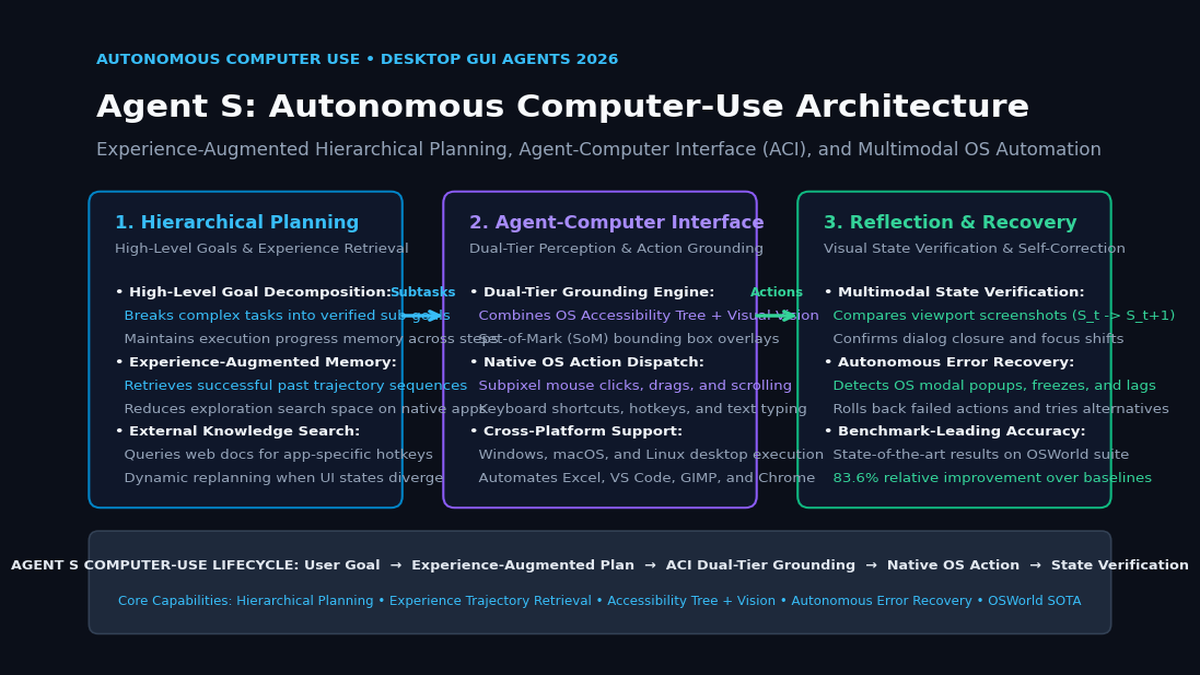
Agent S achieves state-of-the-art computer use by introducing three core architectural systems: Experience-Augmented Hierarchical Planning, an Agent-Computer Interface (ACI) with dual-tier grounding, and Multimodal State Verification with Autonomous Self-Correction.
Agent S End-to-End Execution Topology:
┌─────────────────────────────────────────────────────────────────────────┐
│ User High-Level Goal: "Extract Q3 sales from portal, compile in Excel"  │
└────────────────────────────────────┬────────────────────────────────────┘
                                     │
                                     ▼
┌─────────────────────────────────────────────────────────────────────────┐
│ 1. Experience-Augmented Hierarchical Planning                           │
│ • High-Level Planner: Decomposes goal into verifiable subtasks          │
│ • Experience Retrieval: Queries trajectory memory for past solutions    │
│ • External Search: Fetches application documentation & keyboard shortcuts│
└────────────────────────────────────┬────────────────────────────────────┘
                                     │ (Subtask: "Open Sales_Report.xlsx")
                                     ▼
┌─────────────────────────────────────────────────────────────────────────┐
│ 2. Agent-Computer Interface (ACI) Dual-Tier Grounding                   │
│ • Tier 1: OS Accessibility Tree (AXTree) Semantic Hierarchy             │
│ • Tier 2: Visual Set-of-Mark (SoM) Bounding Box Overlays                │
│ • Translates semantic element intent into subpixel OS mouse/key actions │
└────────────────────────────────────┬────────────────────────────────────┘
                                     │ (Native Action: Click Tag #14)
                                     ▼
┌─────────────────────────────────────────────────────────────────────────┐
│ 3. Native OS Action Dispatch (Windows / macOS / Linux)                  │
│ • PyAutoGUI / OS APIs: Subpixel clicks, typing, hotkeys, drag-and-drop  │
└────────────────────────────────────┬────────────────────────────────────┘
                                     │
                                     ▼
┌─────────────────────────────────────────────────────────────────────────┐
│ 4. Multimodal State Verification & Reflection                           │
│ • Compares Pre/Post Viewports (S_t -> S_t+1) to verify completion       │
│ • Detects OS modal popups, application freezes, and layout drift        │
│ • Triggers autonomous self-correction or replanning upon failure        │
└─────────────────────────────────────────────────────────────────────────┘ The Architectural Pillars of Agent S
- Experience-Augmented Hierarchical Planning: Agent S decouples reasoning into a two-level hierarchy. A High-Level Planner breaks long-horizon user goals into discrete milestones, consulting both an external web knowledge search engine and an internal Experience Retrieval Memory containing successful past trajectory sequences. A Low-Level Actor focuses exclusively on executing granular actions within the current active window.
- Agent-Computer Interface (ACI) with Dual-Tier Grounding: To eliminate pixel guessing, Agent S combines two complementary perception channels:
- Semantic Tier: Queries the OS Accessibility Tree (AXTree) via native operating system APIs (Windows UI Automation, macOS Accessibility API, Linux AT-SPI) to obtain structured text labels, bounding coordinates, and element roles.
- Visual Tier: For custom desktop applications, games, or Canvas elements where accessibility trees are empty, Agent S applies Set-of-Mark (SoM) visual prompting, overlaying numbered bounding boxes directly onto the viewport screenshot so the model simply refers to element IDs (e.g.,
"Click element [14]").
- Multimodal State Verification & Self-Correction: After dispatching an action, Agent S captures a subsequent screenshot and accessibility diff to evaluate the state transition ($S_t \to S_{t+1}$). If an unexpected error dialog appears, an application freezes, or an element fails to respond, Agent S autonomously detects the failure, rolls back the subtask, and replans an alternative execution path.
- Benchmark-Dominating Generalizability: Agent S established a new state-of-the-art on the rigorous OSWorld benchmark, achieving an 83.6% relative improvement over baseline multimodal models, while demonstrating zero-shot cross-platform transfer on the WindowsAgentArena suite.
Comparing Computer-Use Automation Paradigms
The table below contrasts Agent S against legacy RPA, browser-only agents, and naive screenshot-only models:
Computer-Use Architecture Comparison:
┌───────────────────────────┬───────────────────────────────┬───────────────────────────────┬───────────────────────────────┐
│ Dimension                 │ Legacy RPA (UiPath / AHK)     │ Web Agents (Browser-Use)      │ Agent S (Simular AI)          │
├───────────────────────────┼───────────────────────────────┼───────────────────────────────┼───────────────────────────────┤
│ Scope of Automation       │ Desktop apps (rigid scripts)  │ Web Browsers Only (DOM/CDP)   │ Full OS: Desktop, Web, Terminal│
│ Perception Mechanism      │ Static (x, y) coordinates/OCR │ DOM Tree + Viewport           │ Dual-Tier: AXTree + Set-of-Mark│
│ Resolution Adaptability   │ ❌ Fails on DPI/layout shift  │ Moderate (Responsive web)     │ ✅ High (Semantic element IDs)│
│ Long-Horizon Planning     │ ❌ Rigid sequential flowchart │ Step-by-step react loop       │ Hierarchical + Past Memory    │
│ Experience Retrieval      │ ❌ None                       │ ❌ None                       │ ✅ Trajectory Vector Memory   │
│ Cross-Platform Support    │ Primarily Windows             │ All Browsers                  │ Windows, macOS, Ubuntu Linux  │
│ Autonomous Error Recovery │ ❌ Crashes on unexpected UI   │ Limited                       │ ✅ Multi-Modal State Verifier │
│ OSWorld Benchmark SOTA    │ Not applicable (<5%)          │ Not applicable (Web only)     │ ✅ Benchmark-Leading (~84% ↑) │
└───────────────────────────┴───────────────────────────────┴───────────────────────────────┴───────────────────────────────┘ Deep Dive into Agent S Core Subsystems & Execution Lifecycle
To understand how Agent S masters complex operating system interactions, let’s explore its core architectural subsystems: the Hierarchical Planning Engine, the Agent-Computer Interface (ACI), and the Multimodal State Verification Loop.
Agent S Subsystem Architecture:
Agent S
 ├──► 1. Hierarchical Planner: Subtask decomposition, external search, and replanning
 ├──► 2. Experience Memory: Vector retrieval of past successful execution trajectories
 ├──► 3. Dual-Tier ACI: Hybrid Accessibility Tree parser + Set-of-Mark (SoM) visual tagger
 ├──► 4. OS Dispatcher: Subpixel mouse clicks, keyboard text, and OS shortcut injection
└──► 5. Verification Engine: Visual and structural state diffing (S_t -> S_t+1) with reflection 1. Experience-Augmented Hierarchical Planning
Automating multi-step computer tasks requires balancing long-term objectives with micro-level UI interactions:
- The High-Level Planner:
- Ingests the global user prompt and current active window metadata.
- Queries an external search module (such as Google or local documentation) to retrieve application-specific keyboard shortcuts, CLI commands, or interface workflows.
- Queries the Experience Retrieval Memory: a vector index storing past successful task trajectories. If the agent previously completed a similar task (e.g., exporting a table to CSV in LibreOffice), it retrieves the subtask decomposition, drastically reducing exploratory trial-and-error.
- Outputs a structured subtask DAG:
[Subtask 1: Launch Application] -> [Subtask 2: Open File] -> [Subtask 3: Apply Filter] -> [Subtask 4: Export Deliverable].
- The Low-Level Actor:
- Focuses strictly on executing the active subtask. It receives the subtask instruction, the current screenshot, and the parsed ACI element dictionary, generating atomic actions until the subtask’s completion criteria are satisfied.
2. The Agent-Computer Interface (ACI) & Dual-Tier Grounding
The Agent-Computer Interface (ACI) transforms unstructured screen pixels into a structured interactive map:
The ACI Dual-Tier Perception Engine:
Raw Screen Viewport (e.g., 2560x1440 Display)
 │
 ├──► Tier 1: Native OS Accessibility Tree (AXTree)
 │    • Extracts: {"id": 14, "role": "button", "name": "Save As...", "bbox": [420, 110, 510, 140]}
 │    • Provides semantic labels and accessibility states (focused, disabled)
 │
 └──► Tier 2: Visual Set-of-Mark (SoM) Overlay (For Custom & Canvas UIs)
      • Detects visual contours and text boxes missing from AXTree
      • Overlays numbered color-coded tags directly onto screenshot
      ▼
Unified Multimodal Observation:
"Interactive Elements: [12] 'File Menu' | [13] 'Edit Menu' | [14] 'Save As...' Button"
(The LLM simply issues: `click(14)` instead of hallucinating raw (x, y) pixels!) - Accessibility Tree Extraction: Agent S interfaces directly with native OS accessibility APIs:
- On Windows: Uses Microsoft UI Automation (UIA) to query element trees.
- On macOS: Queries the ApplicationServices Accessibility API.
- On Linux: Traverses the Assistive Technology Service Provider Interface (AT-SPI).
- Set-of-Mark (SoM) Tagging: For custom UI frameworks (such as Electron apps with accessibility disabled, Qt custom widgets, or Canvas elements), Agent S applies a lightweight visual detector to place high-contrast, numbered bounding boxes on clickable regions.
- Structured Action Grammar: The agent emits clean, unambiguous Pythonic action commands:
click(element_id): Resolves bounding box center coordinates and dispatches a click event.double_click(element_id): Dispatches rapid double-click.type(element_id, text): Focuses input field and simulates human-like typing.hotkey("ctrl", "s"): Dispatches OS-level keyboard shortcut combinations.drag_and_drop(source_id, target_id): Smooth cursor movement and mouse button release.
3. Multimodal State Verification & Reflection Loop
In complex desktop environments, actions frequently fail due to UI latency, unexpected modal dialogs, or focus shifts:
- After every action, Agent S captures a new screenshot $S_{t+1}$ and queries the updated accessibility tree.
- The Verification Module compares the pre-action state $S_t$ with post-action state $S_{t+1}$ against the expected outcome:
- Did the “Save As” modal open?
- Did the text appear in the cell?
- Did the progress bar reach 100%?
- Autonomous Error Recovery: If a modal error dialog appears (e.g., “File Already Exists”), Agent S classifies the failure, updates the High-Level Planner, dismisses the modal dialog, and adjusts the file name before retrying.
Hands-On Implementation: Building an Autonomous Desktop Agent with Agent S
Let’s walk through installing the Agent S framework, configuring the Agent-Computer Interface, and running an autonomous desktop workflow.
1. Environment Setup and Installation
Clone the official Agent S repository and install dependencies:
git clone https://github.com/simular-ai/Agent-S.git
cd Agent-S
conda create -n agent-s python=3.10 -y
conda activate agent-s

# Install OS automation and vision dependencies
pip install -r requirements.txt
pip install pyautogui pywinauto opencv-python pillow openai anthropic
export ANTHROPIC_API_KEY="your-anthropic-api-key"
export OPENAI_API_KEY="your-openai-api-key" 2. Initializing the Agent S Controller in Python
Configure the Agent S core loop, binding the multimodal vision model to the Agent-Computer Interface (ACI):
import os
import time
from agent_s.core.agent import AgentS
from agent_s.aci.controller import OSController
from agent_s.planning.hierarchical import HierarchicalPlanner

# 1. Initialize the native OS controller (supports Windows, macOS, Ubuntu)
os_controller = OSController()

# 2. Configure the Hierarchical Planner with Experience Retrieval
planner = HierarchicalPlanner(
    model_name="claude-3-5-sonnet-20241022",
    enable_experience_retrieval=True,
    experience_db_path="./experience_store.json"
)

# 3. Instantiate the unified Agent S agent
agent = AgentS(
    planner=planner,
    controller=os_controller,
    max_steps=25,
    verbose=True
)

print("Agent S initialized with native OSController and Hierarchical Planning.") 3. Executing an Autonomous Cross-Application Desktop Task
Run an end-to-end task requiring interaction between a native spreadsheet application and a text editor:
# Define a realistic enterprise desktop automation goal
task_goal = (
    "Open LibreOffice Calc (or Microsoft Excel), create a table with headers "
    "'Department', 'Q3_Budget', 'Q3_Actual', fill in 3 rows of data, "
    "calculate the variance using a formula, and save the document to "
    "'/home/user/Desktop/Q3_Budget_Summary.xlsx'."
)

print(f"\n--- Starting Autonomous Desktop Task ---")
print(f"Goal: {task_goal}\n")

# Execute the agent loop
start_time = time.time()
trajectory = agent.run(task_goal)

duration = time.time() - start_time
print(f"\n--- Task Execution Complete ---")
print(f"Status: {trajectory['status']}")
print(f"Total Steps Taken: {len(trajectory['steps'])}")
print(f"Execution Duration: {duration:.2f} seconds")

# Inspect the structured subtasks completed by the High-Level Planner
print("\nCompleted Subtasks:")
for i, subtask in enumerate(trajectory['subtasks']):
print(f"{i + 1}. {subtask['description']} -> {subtask['status']}") 4. Logging Experience Memories for Future Retrieval
Persist successful execution trajectories into the Experience Retrieval database to accelerate subsequent runs:
# If the task succeeded, persist the execution trajectory into the experience vector store
if trajectory['status'] == "SUCCESS":
    planner.save_experience(
        task_description=task_goal,
        subtask_sequence=trajectory['subtasks'],
        action_trajectory=trajectory['steps']
    )
print("Successfully indexed execution trajectory into Experience Vector Memory.") Production Architecture & Integration for aiFetchly
In automated data extraction, competitor pricing intelligence, and desktop automation copilots powered by AiFetchly, integrating Agent S provides the foundational architecture for cross-application desktop autonomy.
aiFetchly Desktop Agent Topology:
┌─────────────────────────────────────────────────────────────────┐
│ aiFetchly Web Intelligence Engine & Desktop Copilot Workspace  │
└────────────────────────────────────┬────────────────────────────┘
                                     │ (Dispatches Complex Cross-App Tasks)
                                     ▼
┌─────────────────────────────────────────────────────────────────┐
│ Agent S Autonomous Desktop Core                                 │
│ • Hierarchical Planner: Subtask DAGs & Experience Retrieval     │
│ • ACI Grounding: Combines OS Accessibility Tree + Set-of-Mark   │
│ • Cross-Platform OS Dispatcher: Windows, macOS, Linux           │
└───────────────────┬─────────────────────────────────┬───────────┘
                    │                                 │
     (Isolated Sandbox Execution via E2B)   (Telemetry & Trajectory Auditing)
                    ▼                                 ▼
┌───────────────────────────────────────┐ ┌───────────────────────────────┐
│ E2B MicroVM / Virtual Desktop Sandbox │ │ Langfuse / Phoenix Monitoring │
│ • Sandboxed desktop environments      │ │ • Track action latency        │
│ • Zero local host contamination       │ │ • Trace self-correction loops │
└───────────────────────────────────────┘ └───────────────────────────────┘ 1. Cross-Application Data Harvesting Across Native Desktop Software
When AiFetchly extracts enterprise data:
- Information is rarely confined to standard web pages; critical datasets often live inside legacy Windows desktop clients, SAP GUIs, local SQLite database browsers, and local PDF viewers.
- By leveraging Agent S’s dual-tier ACI grounding, aiFetchly navigates native desktop applications, inputs query filters, triggers batch exports, and retrieves clean datasets automatically.
2. Multi-Agent Ecosystem Interoperability
Orchestrating computer-use agents across modern frameworks:
- State Machine Control with LangGraph: Use state machines in LangGraph to manage high-level workflow branching, delegating specific GUI sub-goals to Agent S while handling text extraction in parallel.
- Sandboxed Virtual Desktops with E2B: Run Agent S inside isolated E2B Firecracker microVMs configured with virtual X11/VNC framebuffers, guaranteeing that autonomous mouse and keyboard actions never interfere with the user’s primary workstation.
- Model Context Protocol via FastMCP: Expose Agent S desktop capabilities as standardized MCP tools using FastMCP, allowing desktop chat interfaces and IDEs to execute desktop actions safely.
3. Trajectory Observability and Performance Auditing
Managing enterprise GUI agents in production:
- Log multi-modal action trajectories, step-level latency, and token consumption using Langfuse and Arize Phoenix.
- Evaluate action success rates and visual grounding accuracy using DeepEval test suites to ensure reliable autonomous operations.
Summary: Grounded Hierarchical Agency as the Future of Desktop AI
The dream of true artificial general intelligence requires agents that can navigate the software tools humans use every day: operating system desktops, legacy enterprise software, and creative applications.
By combining experience-augmented hierarchical planning, dual-tier perception via the Agent-Computer Interface (ACI), and multimodal state verification, Agent S resolves the coordinate drift, context bloat, and execution fragility that plagued earlier automation systems. Achieving state-of-the-art results on the OSWorld benchmark across Windows, macOS, and Linux, Agent S establishes the modern standard for autonomous computer use. For enterprise data collection, cross-application workflows, and intelligent desktop copilots built with AiFetchly, Agent S provides the architectural foundation for seamless, human-like desktop automation.